
TL;DR: A real estate dialer helps agents call lead lists faster, keep CRM records cleaner, and follow up after conversations without losing context. For 2026, the strongest buying criteria are CRM integration, responsible dialing controls, local presence, voicemail drop, SMS follow-up, call recording, reporting, and clear compliance workflows. Kixie fits teams that want power dialing tied to sales engagement workflows, while real estate-specific tools like Mojo, REDX, BatchDialer, CallTools, Dialpad, Follow Up Boss, and CloudTalk are also worth evaluating against your lead sources, team size, CRM, and compliance process.
Disclosure: Kixie publishes this guide. The Kixie section is a worked example for sales engagement workflows, not a paid placement or a claim that one dialer is best for every real estate team.
Real estate calling is still a speed game. A buyer submits a form, a seller responds to a valuation ad, an expired listing hits your list, or an investor lead needs a same-day call. Manual dialing can work for a small book of business, but it breaks down when an agent or inside sales team needs to work hundreds of records, keep accurate notes, and follow up without missing the next opportunity.
That is where a real estate dialer earns its place. The right tool does more than place calls. It helps you move through lists, preserve context, log activity, trigger the next step, and protect your team from sloppy outreach habits. This guide explains how to compare power dialers for real estate, what features matter most, and how Kixie can fit into a real estate calling workflow.
How We Evaluated Real Estate Dialers
Kixie publishes this guide, so the comparison is intentionally transparent. The goal is not to declare a universal winner or make pay-for-placement claims. Instead, this article uses public search results, official vendor pages where available, Kixie product pages, and official compliance resources from the FTC and FCC to build a practical buyer checklist.
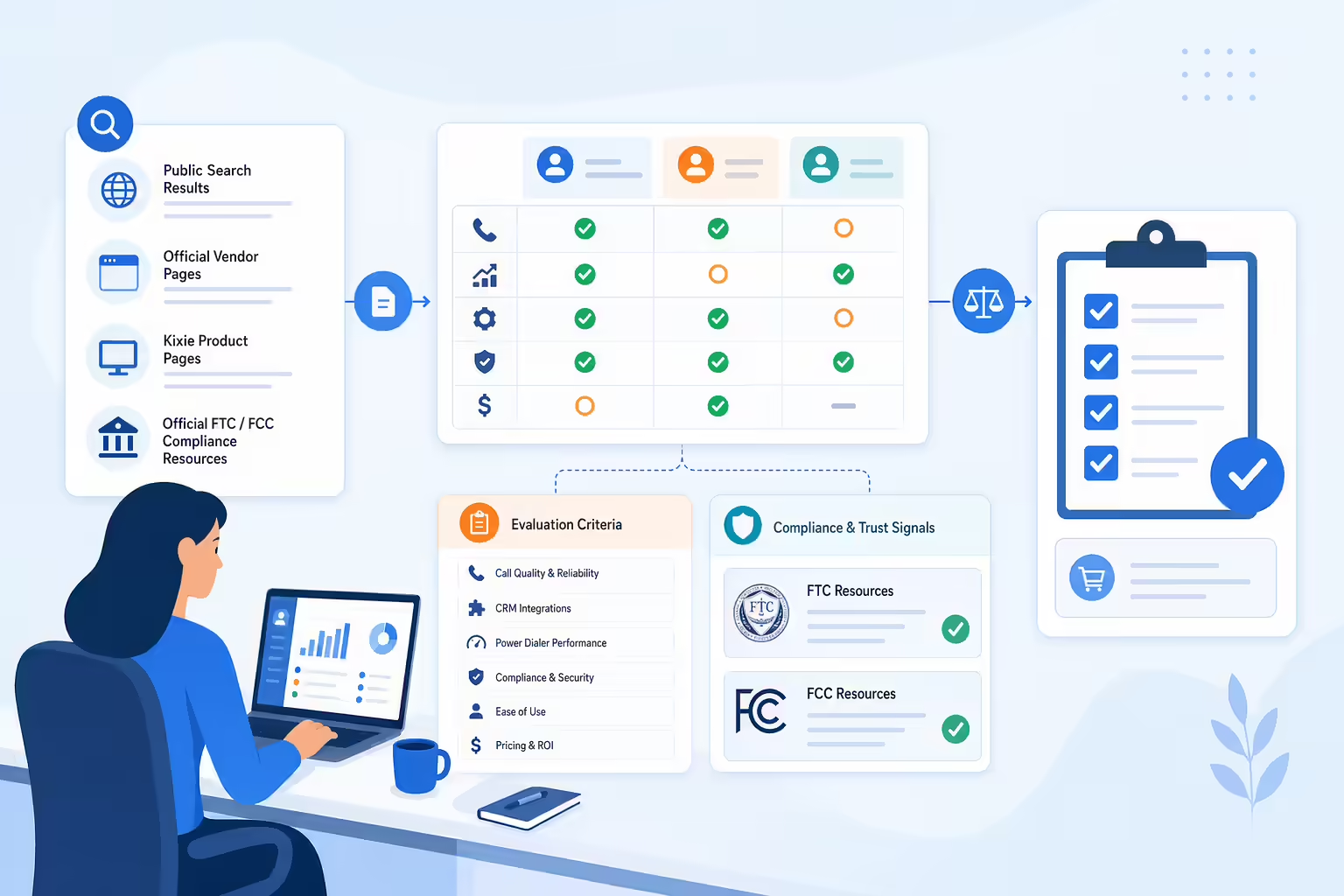
Competitor mentions are neutral and limited to what a buyer should verify. Pricing changes often, feature packaging changes often, and compliance obligations depend on your business model, lead source, location, and calling method. Treat every vendor section as a starting point for evaluation, not as legal, procurement, or compliance advice.
What Is a Real Estate Dialer
A real estate dialer is calling software that helps agents contact leads faster than they could by manually dialing each phone number. Depending on the product, it may queue records, place calls one after another, connect answered calls to an agent, log activity in a CRM, record calls, drop voicemail messages, send follow-up texts, and report on outcomes.
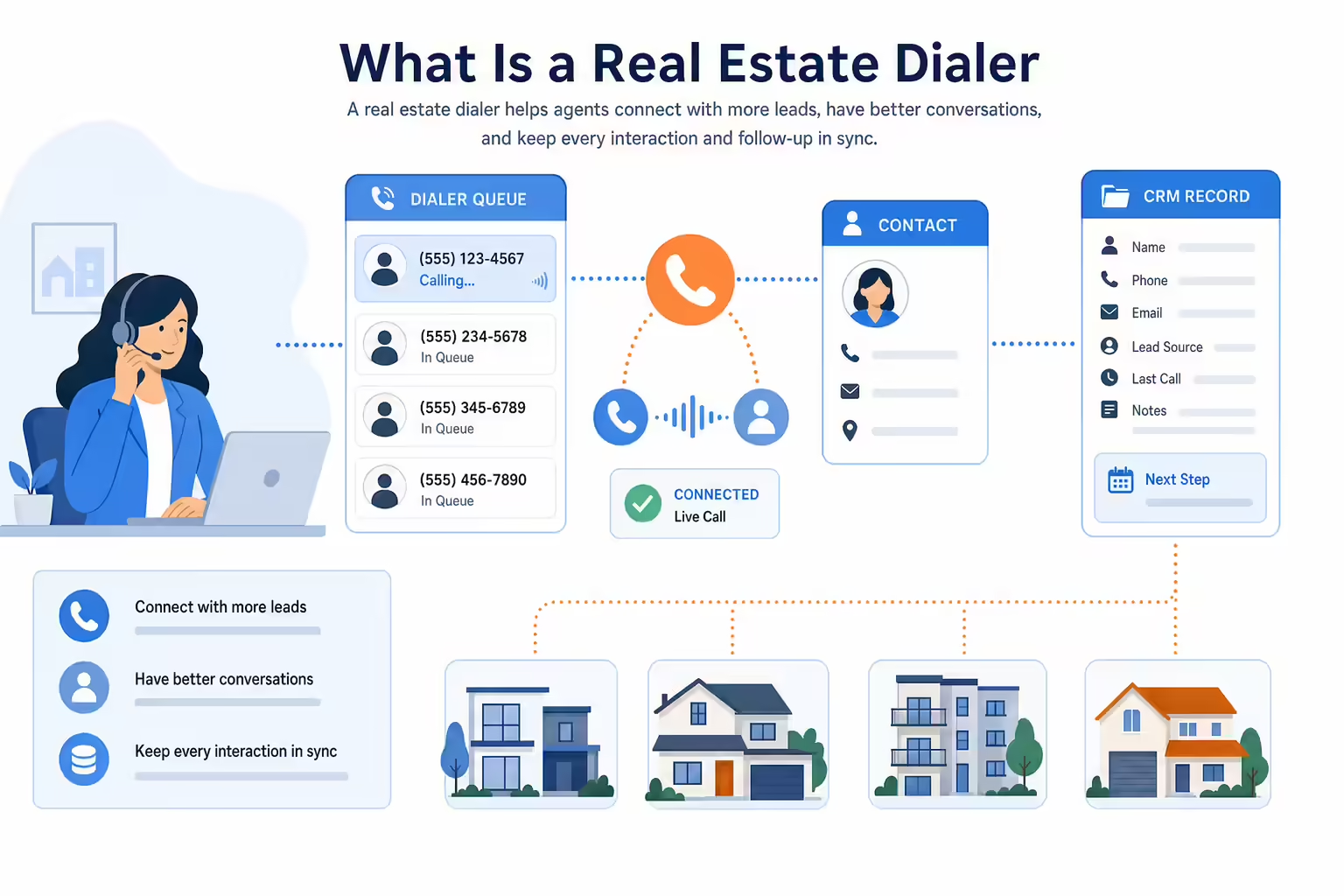
The phrase can cover several tools:
- A power dialer calls one record at a time and moves to the next lead when the current attempt is done.
- A multi-line power dialer can work more than one line at a time, depending on product settings and compliance policies.
- A predictive dialer estimates agent availability and may place multiple calls before an agent is free.
- A preview dialer lets the agent review the record before starting the call.
- A CRM dialer is built into, or tightly connected with, a real estate CRM.
For most real estate sales teams, the dialer decision is really a workflow decision. You are choosing how leads get prioritized, how quickly agents respond, how call notes are captured, and how the next follow-up happens.
Why Real Estate Agents Use Dialers
Agents and real estate teams usually adopt dialers for three practical reasons: speed, consistency, and visibility.

Speed matters because fresh inquiries can go cold quickly. A dialer helps a team call new buyer, seller, rental, investor, or referral leads without jumping between spreadsheets, phones, and CRM records. For teams with inside sales agents, this can make calling blocks more focused because reps can stay in one workflow.
Consistency matters because lead sources vary. Expired listings, FSBO lists, circle prospecting, valuation leads, open house lists, inbound web inquiries, and nurture databases all need different scripts and follow-up rules. A good dialer helps agents call the right list with the right context.
Visibility matters because real estate teams need to know what happened. If calls, recordings, notes, dispositions, and follow-up tasks are captured in the CRM, team leads can coach from actual activity instead of scattered memory. Follow Up Boss frames this around centralized calling, texting, records, and workflow integration in its own real estate dialer guidance.
Power Dialer vs Auto Dialer vs Predictive Dialer for Real Estate
The best dialer type depends on your lead source, consent posture, team size, and risk tolerance.
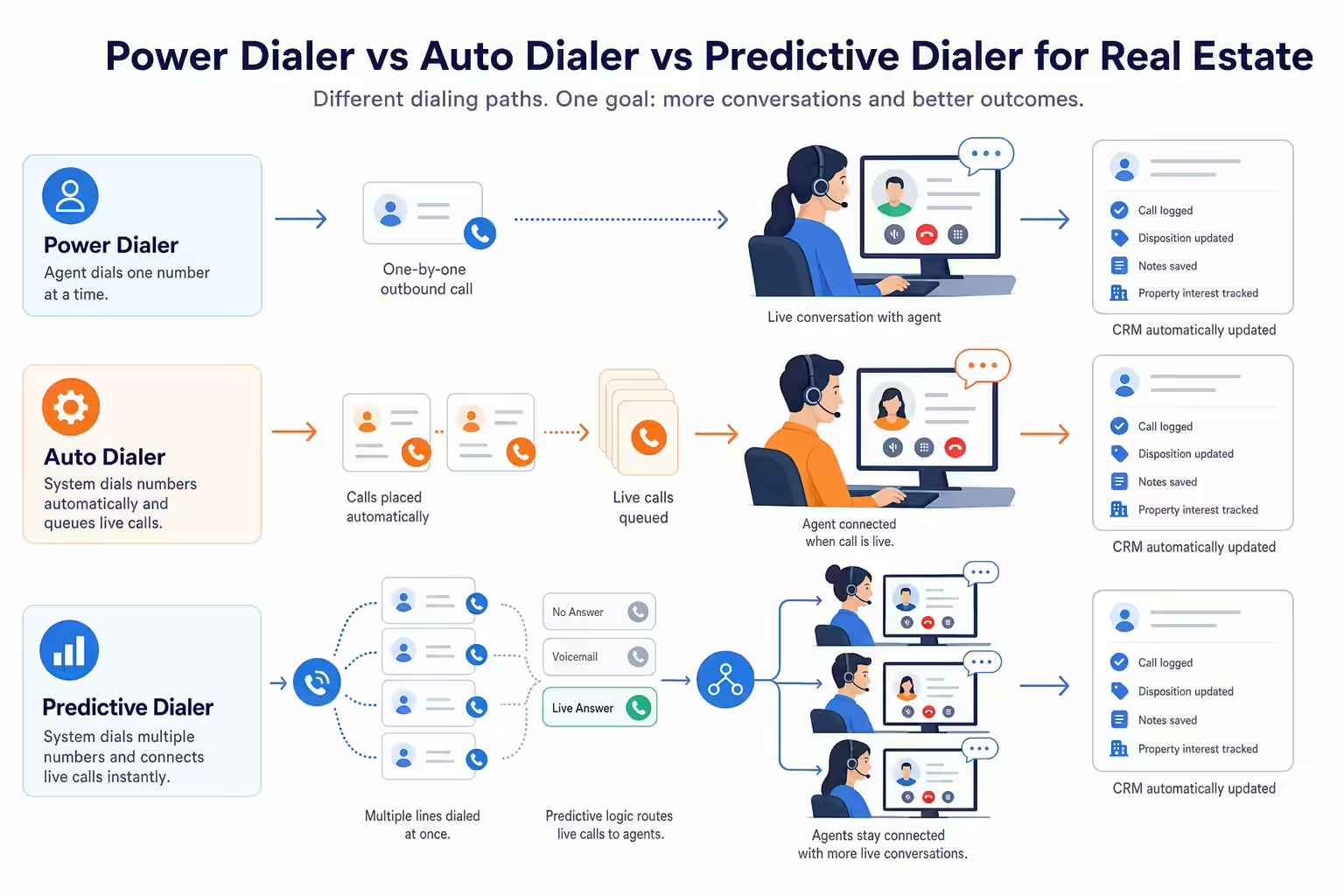
A power dialer is often the cleanest fit for real estate teams that want agent control. The agent works a prepared list, handles one live conversation at a time, and moves quickly after each attempt. This can work well for speed-to-lead, warm follow-up, referral lists, past clients, open house follow-up, and disciplined prospecting blocks.
An auto dialer is a broader term. Some people use it to mean any tool that automatically starts calls. Others use it for higher-volume systems that dial without manual number entry. Because definitions vary by vendor and regulation, buyers should ask each provider exactly how the system places calls, whether calls are manually initiated, and how consent and opt-outs are handled.
A predictive dialer can increase volume, but it can also increase compliance and customer-experience risk if it creates abandoned calls or dials people without the right consent. The FTC notes that abandoned calls often result from predictive dialers, and its Telemarketing Sales Rule guidance explains requirements around Do Not Call practices and abandoned-call controls. Real estate teams should get legal guidance before using predictive or prerecorded outreach.
What to Look For in a Real Estate Power Dialer
The feature list should start with your actual calling workflow. A solo agent calling warm database leads does not need the same setup as a brokerage running inside sales coverage across multiple lead sources.
CRM Integration and Automatic Activity Logging
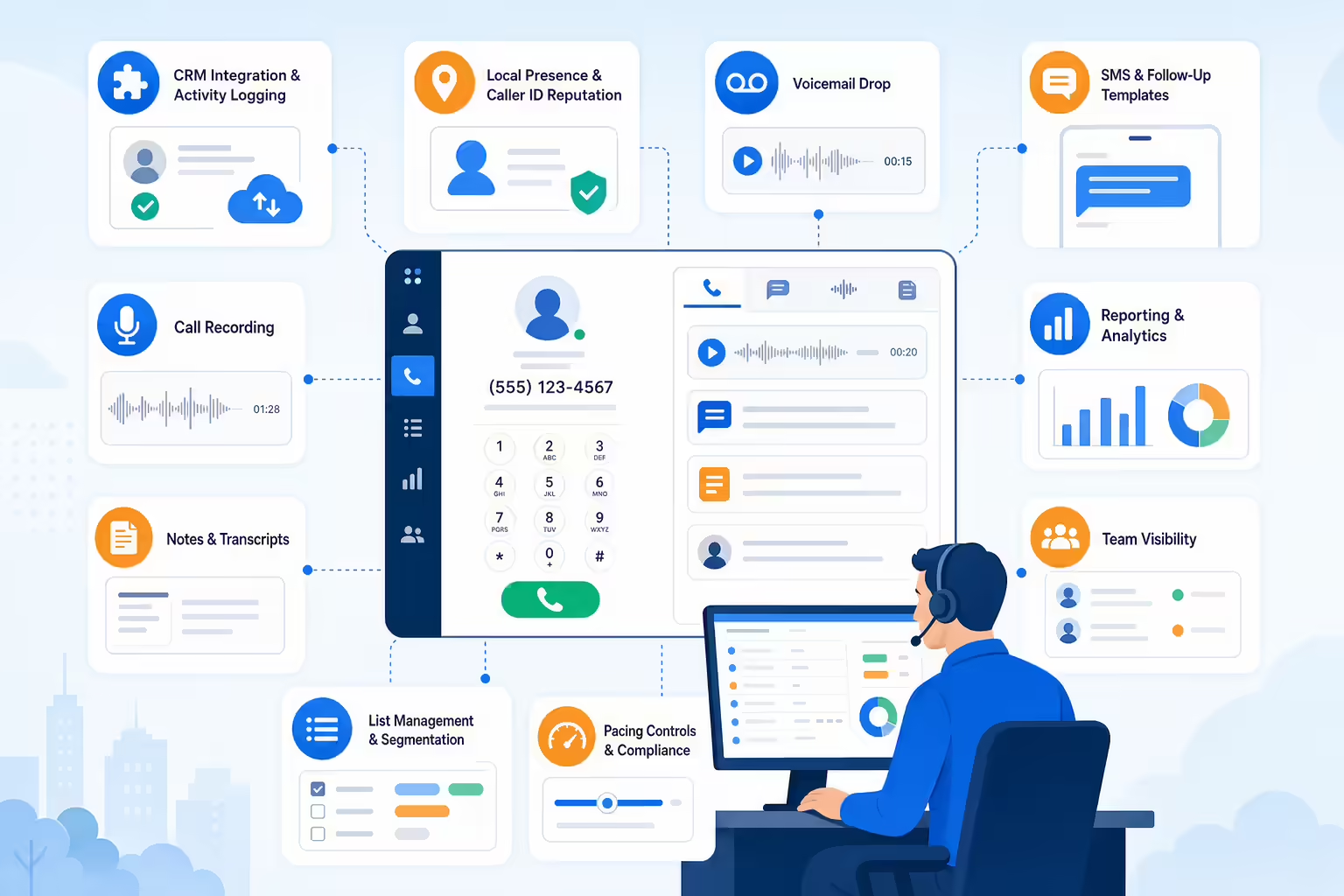
CRM integration is usually the first requirement. If your dialer does not log calls, notes, recordings, outcomes, and follow-up tasks where the team already works, agents end up doing manual admin after every calling block.
For Kixie, start with the CRM integration page and the Power Dialer feature page to understand how the calling workflow can connect to the broader sales stack. Buyers should ask every vendor how records sync, whether custom fields are supported, how duplicates are handled, and whether agents can trigger follow-up from call outcomes.
Local Presence and Caller ID Reputation
Local presence can help teams use numbers that match the market they are calling, but it should be paired with caller ID reputation monitoring and responsible calling behavior. A local number does not excuse poor consent practices, high complaint rates, or misleading caller identity.
Kixie has separate resources on local presence and local presence dialing that can help teams think through area-code strategy. For risk control, review caller ID reputation workflows and decide who owns number health, spam-label monitoring, and remediation.
Voicemail, SMS, and Follow-Up Templates
Real estate calling is rarely one touch. A good dialer should support practical next steps such as voicemail drop, SMS follow-up, email templates, or task creation after a call attempt.
Kixie’s voicemail drop feature and guide to using voicemail drop are useful starting points for teams that want a repeatable post-call process. The key is to keep follow-up relevant, consent-aware, and tied to the lead’s context.
Call Recording, Notes, Transcripts, and Reporting
Managers need visibility into what is working. Look for call recording policies, note templates, dispositions, transcripts, dashboards, and coaching workflows. Confirm whether recording is enabled by default, how notices are handled, and which jurisdictions require consent from one or all parties.
The reporting layer should answer practical questions: Which lead sources connect? Which scripts create booked appointments? Which agents need coaching? Which lists should be paused? Which follow-up step is most likely to happen late?
List Management, Pacing Controls, and Team Visibility
Real estate lists can come from portals, CRMs, spreadsheets, open houses, direct mail responses, expired listing sources, investor campaigns, and referrals. Your dialer should make it easy to segment those lists, prioritize hot leads, pause bad data, and avoid calling people who opted out.
For teams, visibility matters as much as speed. Managers should be able to see who is calling, which lists are active, how dispositions are being used, and whether the team is following the agreed process.
Real Estate Dialer Options to Compare in 2026
The SERP for “real estate dialer” includes a mix of vendor homepages, product pages, and ranked guides. Use this list as a neutral evaluation set, then verify current pricing, features, integrations, and compliance controls directly with each vendor.
BatchDialer
BatchDialer appears in real estate dialer search results with messaging around real estate calling and motivated seller workflows. Evaluate it if your team is focused on investor-style prospecting, property data workflows, and higher-volume list calling. Confirm CRM fit, dialing mode, consent controls, and current package details directly with BatchDialer.
CallTools
CallTools appears in the SERP with a real estate auto dialer page. Evaluate it if your team wants a contact-center-style platform for calling campaigns, team supervision, and outbound workflows. Ask how it handles real estate CRM integration, DNC controls, reporting, and call pacing.
CloudTalk
CloudTalk’s 2026 real estate dialer guide covers definition, methodology, dialer types, workflow integrations, must-have features, and compliance. Evaluate CloudTalk if your team wants a broader business phone and dialer platform with sales and support use cases. Confirm which real estate CRM integrations, local number options, and AI features are available in your plan.
Dialpad
Dialpad’s real estate dialer guide covers dialer types, key considerations, and a shortlist of tools to consider. Evaluate Dialpad if your team wants calling, meetings, AI notes, or coaching features inside a broader communications platform. Verify real estate CRM fit and current packaging before comparing it with dedicated real estate dialers.
Follow Up Boss
Follow Up Boss describes a real estate dialer as a tool for calling, recording, logging, and transcribing conversations with real estate leads. Evaluate it if your team already runs Follow Up Boss as the CRM and wants calling tightly connected to that database. Confirm current dialing, texting, recording, and automation capabilities with Follow Up Boss.
Mojo Dialer
Mojo appears at the top of the SERP with real estate prospecting and lead engagement positioning. Evaluate it if your team is focused on classic real estate prospecting lists, lead management, and dedicated calling blocks. Confirm current integrations, mobile access, list tools, compliance settings, and pricing directly with Mojo.
REDX Power Dialer
REDX appears in the SERP with a power dialer page aimed at real estate agents. Evaluate it if your team already uses or is considering REDX lead sources and wants dialing connected to those prospecting workflows. Confirm current lead, dialer, DNC, and package details directly with REDX.
How Kixie Fits a Real Estate Calling Workflow
Kixie is not a real estate-only CRM. It is a sales engagement platform with calling, texting, workflow, and CRM integration capabilities that can support real estate teams with structured outbound workflows.
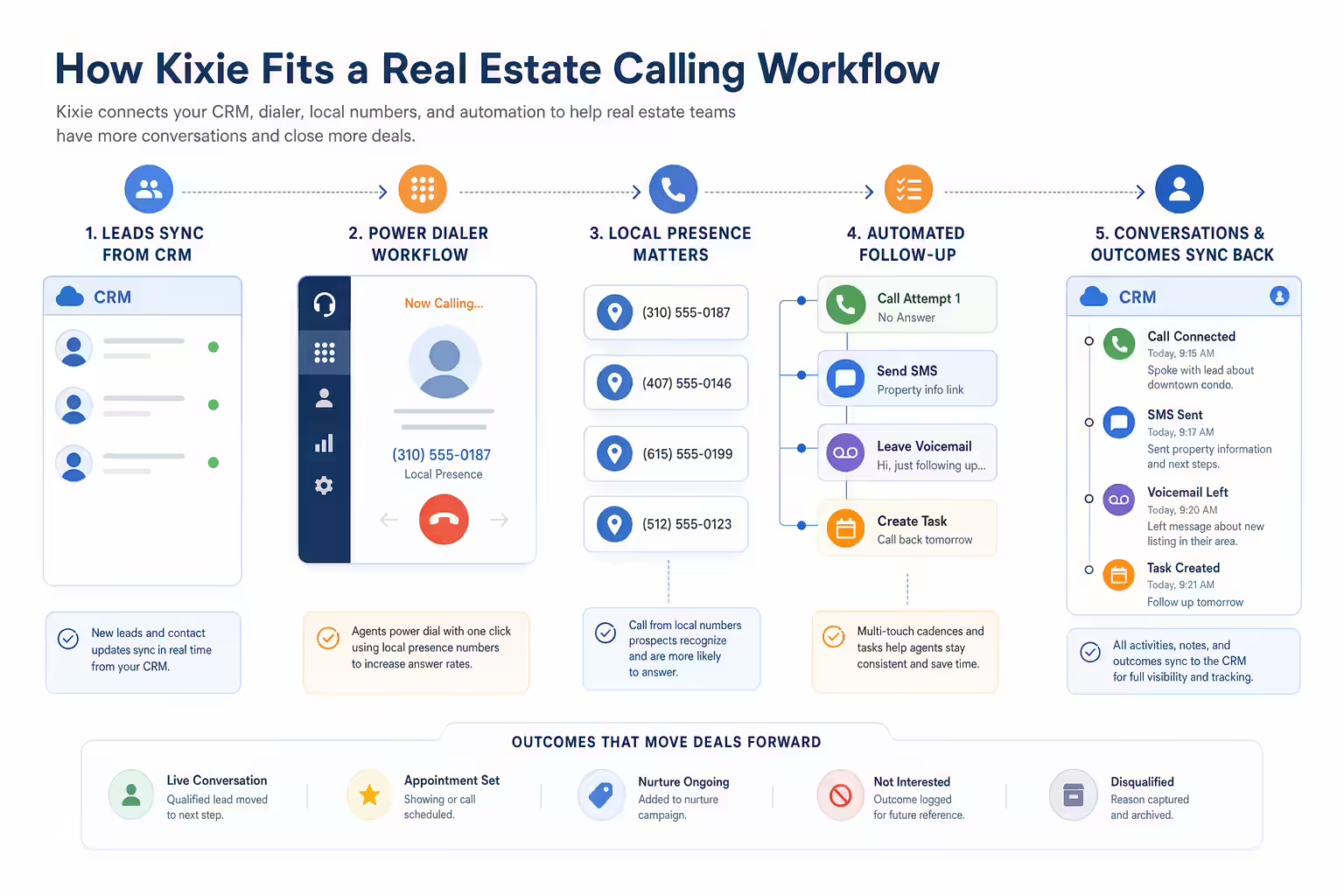
A practical Kixie real estate workflow can look like this:
- Sync or import leads from the CRM.
- Segment by source, urgency, geography, and owner.
- Prioritize speed-to-lead lists separately from long-term nurture lists.
- Use power dialing for focused calling blocks.
- Use local presence only where appropriate and with clear caller identity practices.
- Log outcomes and trigger follow-up tasks, SMS, or voicemail steps.
- Review activity and conversation outcomes before the next calling block.
This is where Kixie can be a strong fit for teams that care about outbound execution across more than one channel. Pair Power Dialer with CRM logging, caller ID reputation management, and follow-up workflows so agents can spend less time switching tools and more time having useful conversations.
Real Estate Dialer Compliance Basics
This section is general information, not legal advice. Real estate teams should consult counsel before running automated, prerecorded, AI voice, text, or high-volume telemarketing programs.

Start with Do Not Call rules. The FTC’s Telemarketing Sales Rule guide explains National Do Not Call and entity-specific Do Not Call obligations, safe harbor practices, and abandoned-call issues. Teams should maintain written procedures, train staff, record opt-outs, and use a process for checking applicable DNC lists.
Be careful with autodialers, prerecorded voice, artificial voice, and texts. FCC materials explain that TCPA consent requirements can apply to calls or texts made with autodialers or artificial or prerecorded voices. The FCC has also addressed AI-generated voice technologies under TCPA restrictions. If your workflow uses prerecorded messages, AI voice, mass texting, or predictive dialing, get legal review before launching.
Do not ignore call recording laws. Recording rules vary by jurisdiction and by call context. Your dialer may make recording easy, but your team still needs a policy for notice, consent, retention, access, and deletion.
Finally, make opt-out handling operational. A compliant policy that lives in a document is not enough if agents cannot see opt-outs in the CRM, suppress records, and prove what happened later.
How to Choose the Right Real Estate Dialer
Use a practical buying checklist before you watch demos.

- Lead source fit: Does the dialer work for inbound leads, expired listings, FSBO, investor lists, past clients, or referral follow-up?
- CRM fit: Does it sync cleanly with your CRM and preserve the fields your team needs?
- Dialing mode: Is it power, preview, predictive, or a mix?
- Compliance workflow: Can you manage consent, opt-outs, DNC suppression, recording notices, and audit trails?
- Follow-up workflow: Can agents send the next text, voicemail, email, or task without leaving the call record?
- Coaching workflow: Can managers review recordings, outcomes, and activity without manual exports?
- Total cost: What is included, what costs extra, and what changes as the team grows?
- Agent adoption: Will agents actually use it during real calling blocks?
When in doubt, run a controlled pilot. Pick one lead source, one script, one CRM workflow, and one follow-up sequence. Compare connection quality, data cleanliness, agent adoption, and booked conversations before rolling out to the full team.
FAQs About Real Estate Dialers
What is a real estate dialer
A real estate dialer is software that helps agents call lead lists, log outcomes, and move from one contact to the next more efficiently. Some dialers are built into real estate CRMs, while others connect to a CRM as a sales engagement or phone system layer.

What is the best dialer for realtors
There is no universal best dialer for every realtor. The right choice depends on your lead source, CRM, team size, consent process, budget, and whether you need power dialing, predictive dialing, texting, voicemail, call recording, AI notes, or coaching tools.
Is an automatic dialer illegal for real estate
Not automatically, but the rules depend on how calls or texts are placed, who is being contacted, what consent exists, whether DNC rules apply, and whether artificial or prerecorded voice is used. Review FTC and FCC guidance and speak with counsel before using automated or high-volume outreach.
How much does a real estate dialer cost
Pricing varies by vendor, plan, user count, phone numbers, usage, integrations, and add-ons. Because pricing pages change, verify current costs directly with each provider and compare total cost instead of only the advertised monthly seat price.
Can real estate agents use a power dialer with a CRM
Yes, many teams use power dialers with a CRM so call activity, notes, recordings, dispositions, and follow-up tasks are captured in one place. Before choosing a vendor, verify the exact CRM integration, sync direction, field mapping, and reporting limits.
What features matter most in a real estate dialer
The most important features are CRM integration, reliable calling, list management, local presence or caller ID controls, voicemail drop, SMS follow-up, call recording, reporting, opt-out handling, and a workflow agents will actually use every day.
Final Takeaway
The best power dialer for a real estate agent is the one that fits the team’s lead sources, CRM, compliance requirements, and follow-up process. A solo agent may need a simple CRM-connected dialer. A brokerage or ISA team may need deeper controls, reporting, coaching, local presence, and automated follow-up.

Kixie is worth evaluating when your real estate calling workflow needs more than a click-to-call button. If your team wants power dialing, CRM-connected follow-up, caller ID reputation workflows, voicemail drop, and sales engagement automation in one process, book a Kixie demo and compare it against the real estate-specific tools on your shortlist.
Ready to close more deals with Kixie?
See how Kixie's AI-powered tools can transform your sales and support operations.
Start Free Trial