
TL;DR: An AI dialer for Salesforce should help sales teams call faster, keep activity data clean, trigger timely follow-up, and turn calls into usable coaching and reporting data. The safest buying process is to evaluate the full workflow, including click-to-call, power dialing, CRM task logging, SMS follow-up, call recordings, analytics, admin setup, and compliance controls. Kixie fits this workflow through its Salesforce integration, PowerCall dialer, Business SMS, Conversation Intelligence, ConnectionBoost, caller ID reputation tools, and CRM automation features, but teams should validate every required capability against their Salesforce edition, data model, call volume, and compliance policy before rollout.
Salesforce is often the system of record for pipeline work, but it is not always the right place for every calling workflow to begin and end. Sales teams still need to move quickly through lead lists, handle missed connections, document outcomes, follow up by SMS or email, and give managers enough call data to coach reps without making admins clean up the CRM later.
That is why searches for an AI dialer for Salesforce usually have mixed intent. Some buyers want a native Salesforce calling option. Others want an AppExchange or third-party dialer that works inside Salesforce. Many want a practical answer to a harder question: what should AI actually improve in the daily calling workflow?
This guide uses the current page-one SERP pattern as the brief. The ranking pages emphasize Salesforce dialer comparisons, native versus third-party options, CRM logging depth, power and auto dialing, SMS, implementation checks, analytics, and AI-assisted workflows. The goal here is not to rank tools or make unsupported vendor claims. It is to give sales and RevOps teams a clean evaluation framework and show where Kixie can support a Salesforce-connected sales workflow.
What an AI Dialer for Salesforce Should Do
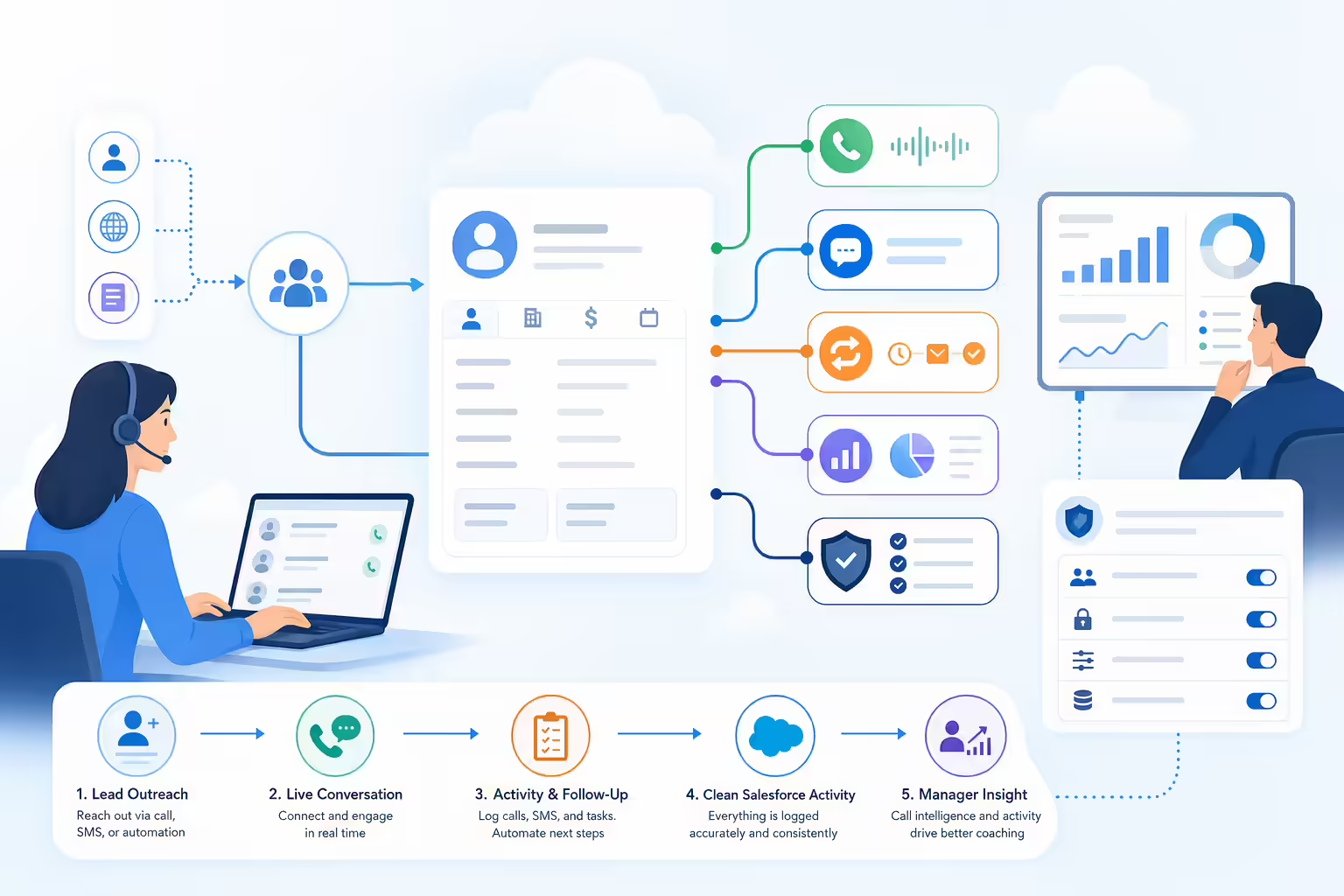
An AI dialer for Salesforce is not just a dial pad with a Salesforce logo next to it. At minimum, it should connect calling activity to the CRM record where sales work already happens. In stronger implementations, it should also reduce manual dialing, automate routine follow-up, preserve call context, and make conversation data easier to search, coach, and report on.
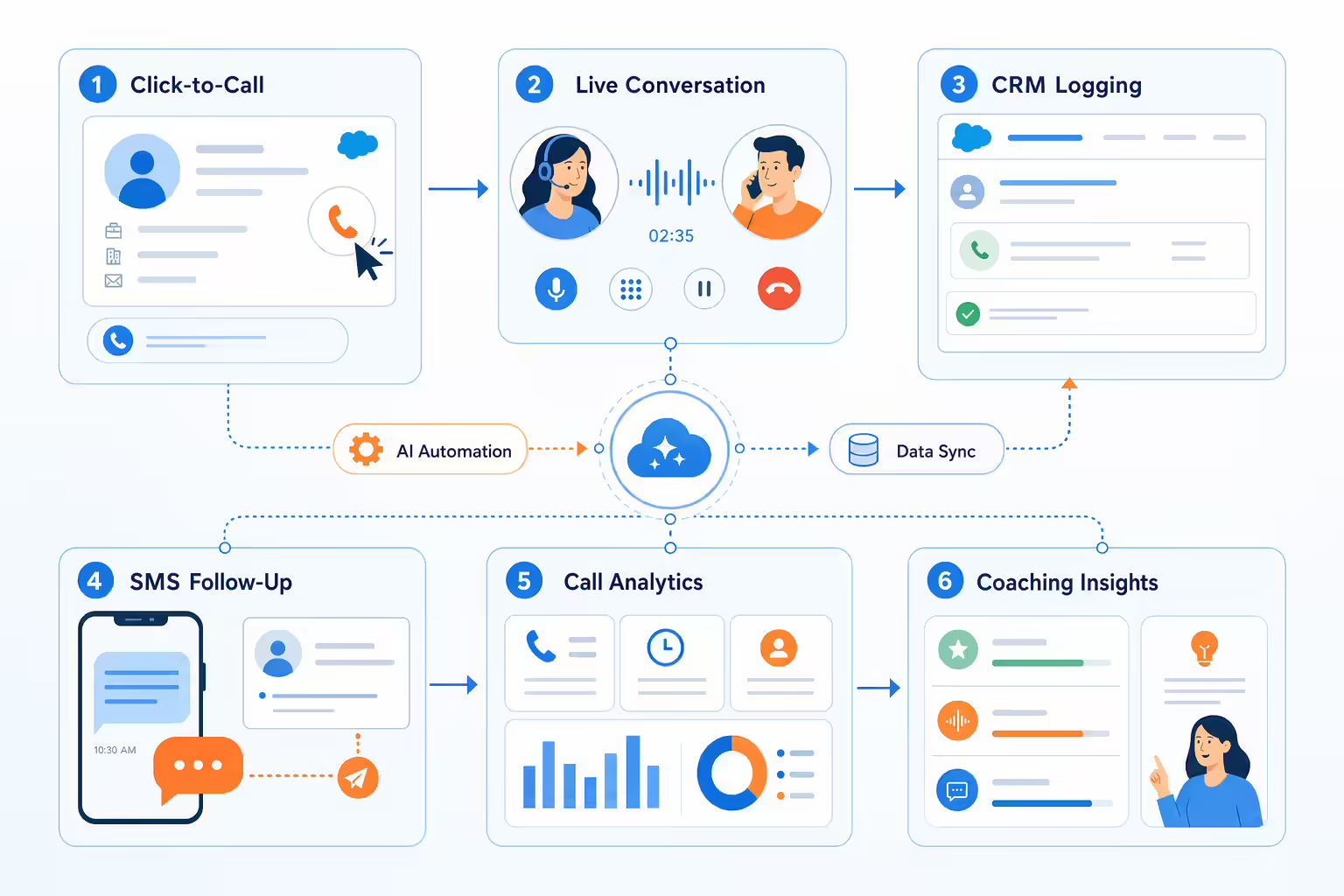
For practical evaluation, break the category into six jobs:
- Start calls from Salesforce records or lead lists without manual number entry.
- Increase live conversations through power dialing, answer detection, caller ID strategy, or workflow automation.
- Log calls, texts, recordings, dispositions, notes, and follow-up tasks back to Salesforce.
- Help reps act after the call with SMS templates, voicemail drop, tasks, or workflow triggers.
- Give managers call analytics, recordings, conversation intelligence, and coaching workflows.
- Protect the CRM data model by handling duplicates, ownership, object mapping, permissions, and failed syncs clearly.
Kixie’s current Salesforce integration page presents this as a calling and texting workflow inside Salesforce: calls, call recordings, outcomes, follow-up tasks, and text messages can be logged to Salesforce, while Kixie can display Salesforce contact information in the dialer and trigger workflows from outcomes, activities, SMS, or calls. That makes the integration depth more important than the label “AI.”
Salesforce Native Dialer or Third-Party AI Dialer
The current SERP includes Salesforce help content, AppExchange listings, vendor integration pages, and ranked comparison posts. That mix suggests buyers are not looking for a definition alone. They are comparing approaches.
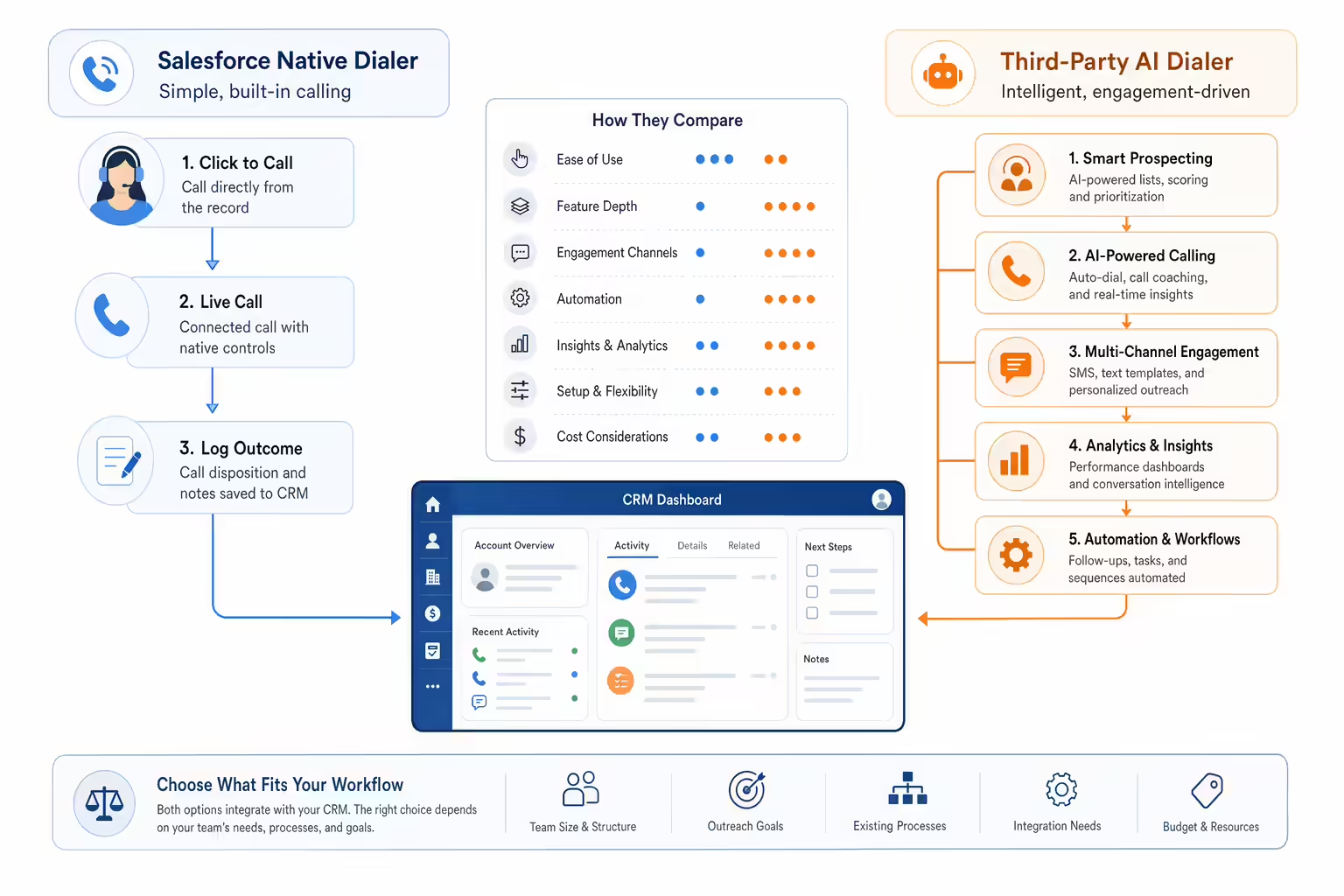
A native Salesforce calling option can be attractive when a team wants to keep configuration and support inside Salesforce. The tradeoff is that native options may still require Salesforce-specific setup, licensing, permissions, and workflow design. A third-party dialer can be attractive when the sales team needs a heavier calling motion, SMS, call coaching, local presence, workflow automation, or analytics that go beyond basic click-to-call.
Use a criteria-based comparison instead of a vendor scorecard:
| Evaluation area | What to verify |
|---|---|
| Calling workflow | Can reps click to call, power dial, leave voicemail, and record outcomes without switching tools? |
| Salesforce data sync | Are calls, texts, recordings, notes, dispositions, and follow-up tasks logged to the right Salesforce objects? |
| Admin setup | Does the implementation require custom fields, Flow work, managed packages, permissions, or sandbox testing? |
| AI assistance | Are AI features limited to summaries and analytics, or do they also support routing, coaching, prioritization, or follow-up? |
| SMS and follow-up | Can reps send and log SMS from the same workflow, and can outcomes trigger follow-up actions? |
| Reporting | Can managers review connection rates, call outcomes, recordings, dispositions, and rep activity in one place? |
| Compliance controls | Does the workflow support internal DNC policy, consent rules, caller ID practices, and call recording requirements? |
This framework avoids an easy mistake: comparing dialers by feature names alone. The better question is whether the tool keeps Salesforce useful after hundreds or thousands of calls have been placed.
The Salesforce Dialer Workflow to Evaluate
Start with the rep’s day. A useful Salesforce dialer should shorten the path from “this lead needs a call” to “the call happened and Salesforce reflects the result.”

The workflow usually includes click-to-call, power dialing, voicemail drop, SMS follow-up, activity logging, disposition logging, call recordings, and reporting. Kixie’s Salesforce integration page says Kixie logs calls to Salesforce leads or contacts, logs recordings as part of logged calls, records call outcomes and notes as closed tasks, lets users schedule Salesforce tasks from inside the dialer, and logs inbound and outbound text messages as completed SMS tasks.
Kixie’s PowerCall page also describes multi-line dialing, AI local presence, automatic CRM logging, and customizable voicemail drops. The broader Kixie features page lists call center dialer tools such as local presence, ConnectionBoost, voicemail drop, PowerCall, multi-line PowerDialer, Sales Dialer, click-to-call, click-to-text, outbound call and text cadences, and Team SMS.
For a Salesforce team, that means the evaluation should cover the full motion:
- Can reps work from Salesforce records or lists and call without copy-pasting numbers?
- Can call outcomes create clean Salesforce task history?
- Can recordings and notes stay accessible for review?
- Can SMS follow-up happen from the same business number and be logged?
- Can managers inspect activity quality rather than just activity volume?
- Can admins see what happens when a number is unknown, duplicated, or owned by another rep?
The last question matters. Dialers are productivity tools only when they leave the CRM cleaner than they found it.
AI Features Worth Evaluating Without the Hype
“AI dialer” is not a precise product category. Some vendors use it for machine detection, some for local presence, some for transcription, some for call summaries, and some for live coaching or lead prioritization. Treat AI as a set of specific capabilities, not a blanket promise.

In a Salesforce dialer evaluation, ask what the AI actually does:
- Does it detect voicemails or IVRs so reps spend more time on live calls?
- Does it support caller ID strategy or connection-rate workflows?
- Does it transcribe calls or generate call summaries?
- Does it identify keywords, sentiment, objections, or next steps?
- Does it help managers coach reps with searchable call data?
- Does it trigger or suggest follow-up actions after a call?
- Does it improve routing or speed-to-lead workflows?
Kixie’s current Salesforce integration page names AI-Powered Machine Detection for multi-line dialing, ConnectionBoost for AI-powered local presence, and Conversation Intelligence for keywords, phrases, sentiment analysis, and AI-generated call summaries synced to the CRM. Kixie’s features page also describes Conversation Intelligence as a platform for tracking sales calls, coaching teams, and maintaining CRM records.
Those are useful examples, but buyers should still verify scope. Ask whether the feature is available on the plan you are evaluating, whether it works with your Salesforce objects, and whether the output is searchable, reportable, and governed by your data policies.
Salesforce Integration Depth Checklist
The highest-risk part of a Salesforce dialer rollout is usually not the dialer. It is the data model. A tool can make thousands of calls easier, but if those calls log to the wrong object or bury managers in inconsistent outcomes, the team inherits a reporting problem.

Use this checklist before choosing or rolling out an AI dialer for Salesforce:
- Objects: Confirm whether calls and texts log to leads, contacts, accounts, opportunities, cases, or custom objects.
- Ownership: Define what happens when the caller, rep, and record owner do not match.
- Unknown numbers: Decide whether new contacts should be created automatically or routed to review.
- Duplicates: Test what happens when the same number appears on multiple records.
- Outcomes: Standardize dispositions before reps start using the tool.
- Recordings: Confirm where recordings appear, who can access them, and how long they remain available.
- SMS: Confirm whether messages log as tasks, activities, or another object.
- Tasks: Test follow-up task creation from the dialer and Salesforce.
- Automations: Decide which outcomes can trigger Salesforce workflows or external automation.
- Permissions: Confirm who can call, text, listen, coach, export, and administer settings.
- Sandbox: Test package setup, object mapping, and logging before a team-wide rollout.
Kixie’s Salesforce integration language focuses on automatic logging, closed tasks, follow-up tasks, text logging, workflow triggers, and contact display inside the dialer. Those are the exact areas a Salesforce admin should test in a controlled sandbox before enabling broader use.
Common Pitfalls When Choosing an AI Dialer for Salesforce
The most common mistakes are operational, not technical.

The first is buying for call volume alone. More dials only help when the team also improves connection quality, call notes, outcome consistency, and follow-up speed. A power dialer can accelerate a messy process just as easily as a clean one.
The second is treating “native” as the same thing as “right fit.” Native Salesforce options may work for some teams, while third-party dialers may be better for teams with heavier outbound volume, shared SMS, local presence needs, or manager coaching workflows.
The third is accepting AI language without a use case. Ask for the exact workflow. If the AI creates summaries, where do they go? If it supports local presence, how does it choose numbers? If it detects voicemail, what does the rep experience? If it analyzes sentiment, can managers act on that data?
The fourth is skipping compliance review. Calling, texting, caller ID, DNC, consent, and call recording rules vary by context. This article is not legal advice. Sales teams should work with counsel and compliance owners to define TCPA, DNC, consent, call recording, and carrier policy requirements before launching any outbound workflow.
The fifth is skipping adoption design. Reps need a simple rule for when to call, when to text, how to disposition outcomes, and what to do after each call. Without that rule, even strong technology becomes another system to manage.
Where Kixie Fits in a Salesforce Sales Workflow
Kixie is strongest in this article as a practical workflow example for teams that want Salesforce-connected calling, texting, logging, automation, and coaching without making Salesforce carry the whole communication layer alone.

The current Salesforce integration page positions Kixie as a native CRM calling and texting integration for Salesforce. It describes single-click setup, calls and recordings logged to Salesforce, call outcomes and notes as closed tasks, follow-up tasks from the dialer, inbound and outbound SMS logging, contact details displayed in the dialer, and workflow automation based on call outcomes, scheduled activities, SMS, or calls.
The PowerCall page adds the dialer layer: multi-line dialing, AI local presence, automatic CRM logging, and voicemail drops. The features page adds supporting capabilities such as Business SMS, Conversation Intelligence, ConnectionBoost, caller ID reputation, call center analytics, live call coaching, call disposition logging, outbound call and text cadences, Auto-SMS from call outcomes, and custom automations.
That does not mean every Salesforce team needs every feature. It means the Kixie conversation should be framed around workflow fit:
- Sales development teams may care most about power dialing, speed-to-lead, voicemail drop, and disposition quality.
- Account executives may care more about click-to-call, automatic activity logging, recordings, and follow-up tasks.
- RevOps teams may focus on Salesforce data quality, workflow triggers, reporting, and field governance.
- Sales managers may care about recordings, call analytics, live coaching, conversation intelligence, and rep adoption.
- Compliance owners may care about DNC workflows, caller ID reputation, SMS policy, and recording consent rules.
The next step is to map your current Salesforce calling process, then test whether Kixie improves the steps that are slow, manual, or poorly reported today.
Implementation Checklist for Sales Leaders and Salesforce Admins
Before rollout, align the team around a short implementation plan.
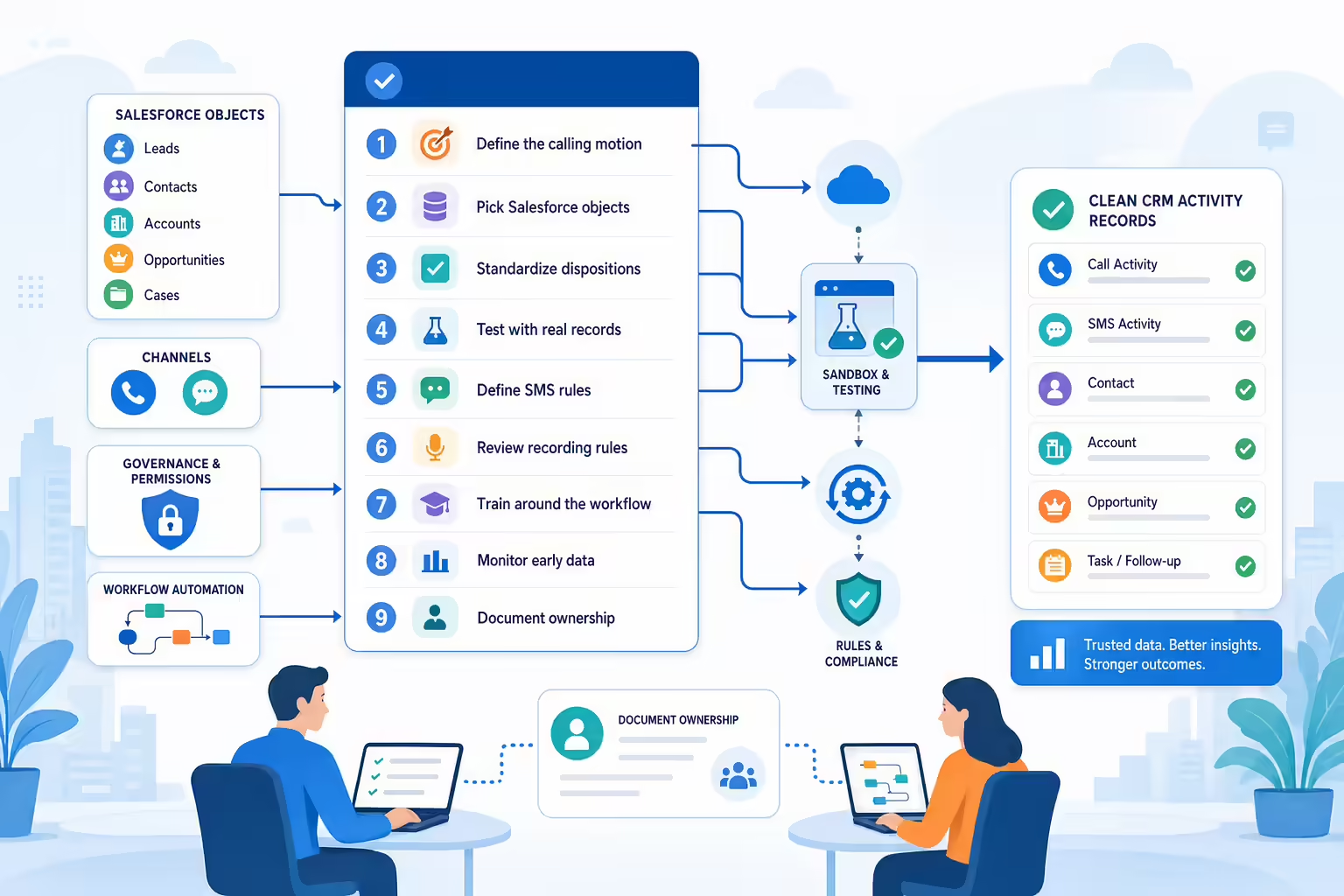
- Define the calling motion. Separate inbound support, outbound prospecting, speed-to-lead, renewal calls, and account management.
- Pick the Salesforce objects. Confirm where calls, texts, recordings, dispositions, notes, and follow-up tasks should live.
- Standardize dispositions. Keep them simple enough for reps to use and specific enough for reporting.
- Test with real records. Use a sandbox or controlled pilot to test leads, contacts, duplicates, unknown numbers, ownership, and task creation.
- Define SMS rules. Decide when reps can text, what templates are approved, and how opt-outs or consent signals are handled.
- Review recording rules. Confirm disclosure, two-party consent, retention, and access policies.
- Train around the workflow. Teach reps exactly when to call, when to use voicemail drop, when to text, and how to choose outcomes.
- Monitor quality. Review connection rate, live conversations, outcome accuracy, follow-up completion, recordings, and Salesforce data quality.
- Iterate. Adjust fields, dispositions, automations, and coaching based on what the first team actually does.
This is where AI can be valuable if it is attached to a real operating process. A summary that nobody reads is not intelligence. A call score that does not change coaching is not enablement. A dialer that logs bad data faster is not automation. The useful version ties calls, texts, outcomes, recordings, and insights to the way the revenue team manages pipeline.
FAQs About AI Dialers for Salesforce
Does Salesforce have a built-in dialer?
Salesforce has offered native calling capabilities through Salesforce dialer and sales engagement products, and Salesforce help content still ranks prominently for “Salesforce dialer” queries. Buyers should confirm the current availability, licensing, and recommended Salesforce product path directly with Salesforce because packaging and product guidance can change.
What is the difference between a power dialer and an AI dialer for Salesforce?
A power dialer helps reps call through lists faster by reducing manual dialing and waiting time. An AI dialer may add capabilities such as machine detection, transcription, summaries, local presence logic, coaching analytics, or routing support. In practice, many Salesforce teams evaluate both together because call speed and call intelligence need to work in the same CRM workflow.
What should AI actually do in a Salesforce dialer?
AI should improve a specific step in the workflow. Useful examples include detecting voicemail, summarizing calls, analyzing keywords or sentiment, improving caller ID strategy, surfacing coaching moments, or helping route follow-up. If a vendor cannot show where the AI output appears in Salesforce or manager reporting, treat the claim as incomplete.
How should teams evaluate Salesforce dialer integrations?
Start with CRM data quality. Test object mapping, call logging, SMS logging, recordings, dispositions, task creation, permissions, duplicate handling, and workflow triggers before comparing advanced features. A dialer that works cleanly with Salesforce records will usually create more operational value than one with a longer feature list but weak sync behavior.
Can a Salesforce dialer support SMS follow-up?
Yes, but implementation varies by product. Some workflows use a native Salesforce or add-on messaging path, while third-party tools can provide texting inside the sales dialer. Kixie’s Salesforce integration page says inbound and outbound text messages can be logged in Salesforce as completed SMS tasks, and Kixie’s features page describes Business SMS, Team SMS, SMS templates, and Auto-SMS from call outcomes.
Final Takeaway
An AI dialer for Salesforce should be evaluated as a workflow system, not a buzzword. The right tool helps reps reach more live conversations, keeps Salesforce activity clean, supports fast follow-up, gives managers useful call intelligence, and gives admins enough control to keep the system governed.
For Kixie buyers, the practical angle is straightforward: use Salesforce as the CRM of record, then connect calling, texting, logging, automation, and conversation insights through a sales communication platform built for daily rep activity. Before choosing any vendor, test the actual workflow your team will use, with your Salesforce objects, fields, permissions, and compliance requirements.
Ready to close more deals with Kixie?
See how Kixie's AI-powered tools can transform your sales and support operations.
Start Free Trial