TL;DR: Kixie (https://www.kixie.com/) is a sales calling and SMS platform that lets HubSpot teams keep reps on free View-Only seats while still logging calls, notes, and SMS through a Super Admin-authorized integration. This workaround addresses HubSpot’s March 2024 seat changes, avoids the INVALID_OWNER_ID error and the missing mobile “Log Call” prompt, and can cut three-year total cost of ownership by 33% to 60% by replacing $90-$100/month Core Seats with roughly $35-$65/month Kixie licenses. The setup keeps HubSpot as the system of record, uses Kixie Call Outcomes to trigger workflows, and lets admins downgrade SDRs to View-Only seats without losing call logging.
HubSpot View-Only Seat Limits

The enterprise software market has shifted from perpetual licenses to seat-based SaaS models. In March 2024, HubSpot overhauled its pricing, creating a strict separation between “Core Seats” (paid) and “View-Only Seats” (free). This change created a significant cost barrier for high-volume roles like Sales Development Representatives (SDRs) by treating them as “observers” rather than “contributors”.
This report analyzes the technical and financial impact of these limitations. It explains the specific constraints placed on free seats, such as the inability to log calls, and presents a validated architectural alternative utilizing the “Smarter Stack” methodology, specifically integrating Kixie. By integrating Kixie, a third-party sales engagement platform, organizations can separate the telephony and logging layer from the core CRM permissions. This allows “View-Only” users to perform full sales functions without requiring expensive Core Sales Seats, maintaining data integrity while bypassing prohibitive licensing costs.
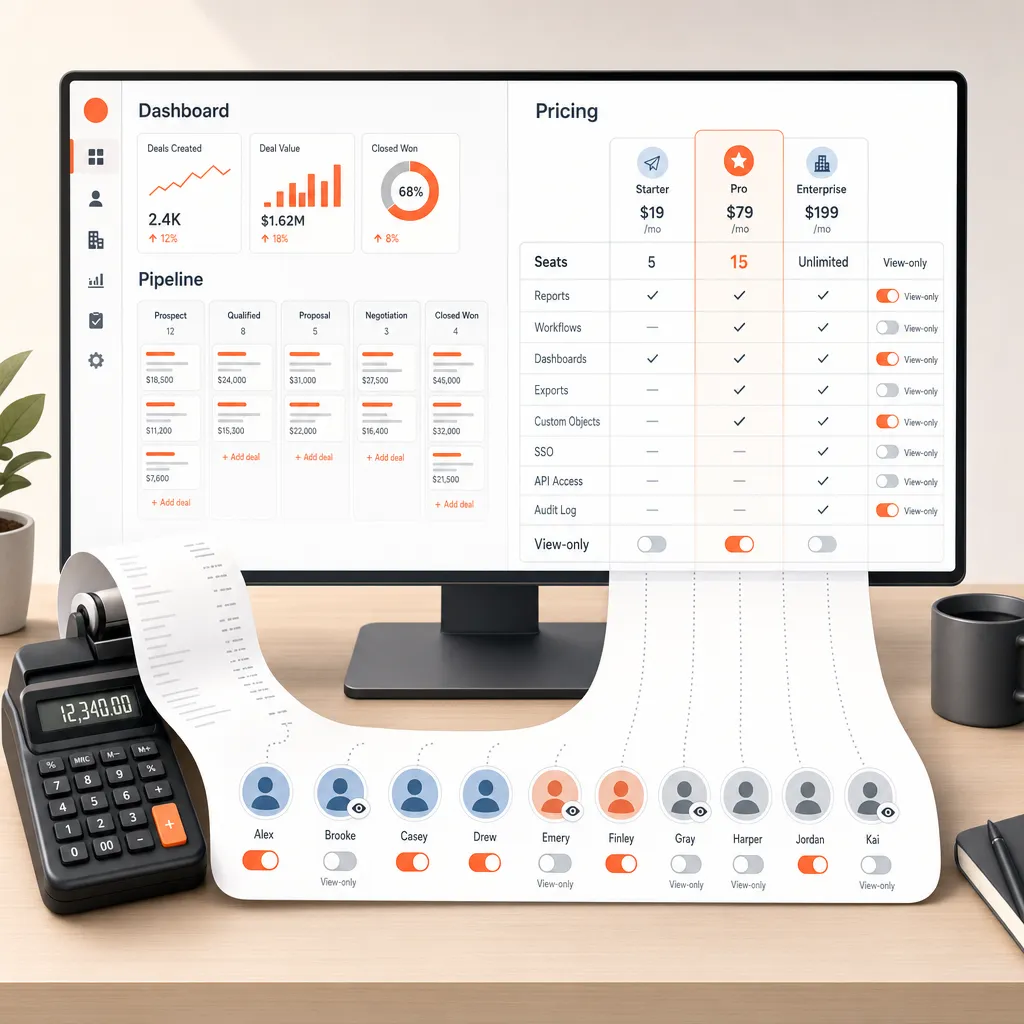
HubSpot Seat Pricing Costs
The Shift to “Revenue Retention”
To understand the necessity of a workaround for HubSpot’s pricing, one must examine the economic forces behind the 2024 update. Historically, CRM models allowed for “shadow IT” flexibility, where companies could mix paid users with free users for basic data entry. However, as the SaaS market matured, vendors shifted focus from user acquisition to “Revenue Retention” and increasing the average revenue per user.
HubSpot’s 2024 update enforced a rigid “Seats-Based Pricing” model across all tiers. While marketed as a way to “start for free and scale,” the reality for established teams was a hard ceiling on the productivity of unpaid users. The update introduced a strict dichotomy between the “Core Seat” (paid) and the “View-Only Seat” (free), effectively removing the ability for free users to contribute data.
The “Silent Tax” on Sales Growth
The financial impact of this seat-based model is particularly acute for sales organizations because sales teams scale linearly. Unlike marketing, where one user manages thousands of contacts, every new SDR requires a phone, email, and CRM seat. Under the post-2024 HubSpot model, a View-Only SDR is effectively silenced because the system monetizes the ability to write data.
This creates a linear cost correlation that punishes efficiency. If a company hires 10 new SDRs, they must immediately add 10 Core/Sales Seats. For a HubSpot Professional deployment, this requirement forces companies to pay an additional $12,000 to $15,000 annually merely for the privilege of logging text strings, such as call notes, into the database. This expense acts as a “Silent Tax” on scaling operations.
How HubSpot Seat Pricing Works

What a HubSpot Core Seat Does
In the current HubSpot ecosystem, the Core Seat is the fundamental unit of utility. It grants edit access to purchased Hubs and connects users to the “Smart CRM”. A Core Seat is strictly required for any user who needs to manipulate data, log activities, or use the mobile application for anything beyond passive reading. Without a Core Seat, a user is essentially a “ghost” in the machine, able to see the records but unable to touch or modify them.
What a View-Only Seat Blocks
The View-Only Seat was introduced as a free, unlimited resource for paid portals, but its utility is strictly limited to visibility. While these users can view CRM records and dashboards, they are architecturally prohibited from performing basic tasks. Specifically, View-Only users cannot:
- Create Information: They cannot generate new contacts, companies, or deals.
- Edit Information: They cannot update properties or change deal stages.
- Log Activity: Most critically for sales, they cannot log calls, create notes, or task themselves for follow-ups.
The documentation explicitly states: “Users with a view only-seat can’t make any changes to the account”. This restriction renders the View-Only seat useless for any employee whose job requires active interaction with customers.
HubSpot View-Only Seat Limits

The “Communicate” Permission Gap
The inability of View-Only users to function in a sales role is due to a specific permission gap. To log notes, calls, or tasks, a user effectively needs “Communicate” permissions. While users with “View permissions” on a paid seat can still create notes, users with a View-Only license cannot make any changes to the account. In HubSpot’s backend, logging a call creates an “Engagement” object. Because View-Only seats lack the license to generate Engagement objects, the database rejects the action.
Mobile App and Email Restrictions
The limitations extend aggressively to mobile and email usage.
- Mobile Blockade: On the HubSpot mobile app, users strictly need “Communicate” permissions to log notes or tasks. For View-Only users, the “Log Call” overlay is suppressed. They can use the app as a digital rolodex to find numbers, but if they place a call, the app will not prompt them to log the outcome.
- Email Disconnection: View-Only users cannot connect personal emails to HubSpot. This renders standard “Log Email” extensions useless, as the system refuses to accept incoming mail streams associated with a user ID that lacks a paid seat.
How the HubSpot API Makes This Workaround Work

Decoupling the User from the Writer
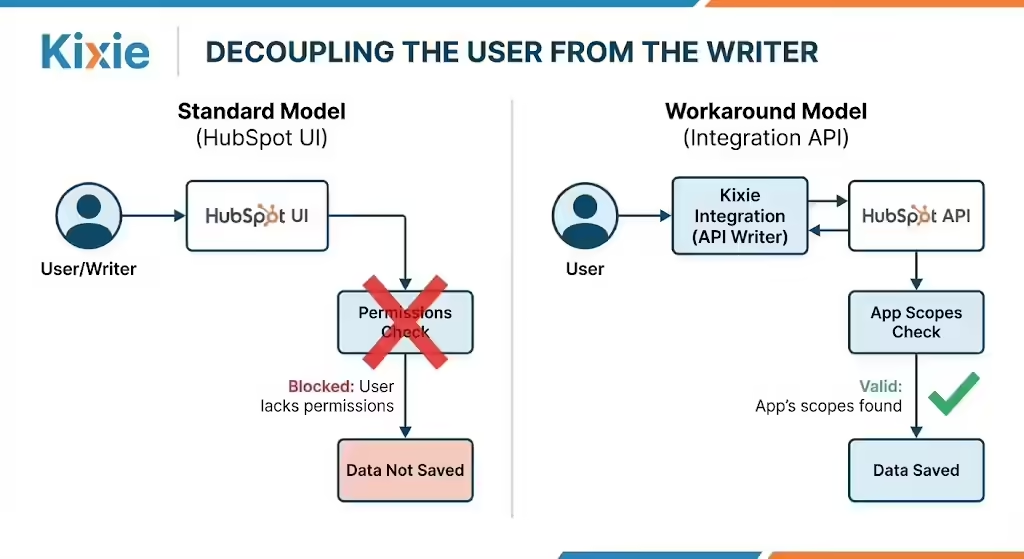
The solution to the View-Only limitation lies in the technical distinction between User Permissions and Integration Scopes.
- The Standard Model (HubSpot UI): The User is the Writer. If the User clicks “Save” but lacks permissions (e.g., a View-Only user), the action is blocked.
- The Workaround Model (Integration API): The Integration is the Writer. A third-party app (like Kixie) sends an API request. The system checks the App’s scopes, finds them valid, and saves the data.
The HubSpot API does not block the creation of an engagement simply because it is associated with a View-Only user; it only blocks it if the requestor lacks permission. If the requestor is an authorized integration, the request is valid.
How Super Admin Access Powers the Integration
To enable this workaround, an integration must be connected by a Super Admin. When a Super Admin connects Kixie to HubSpot, an OAuth handshake occurs, granting the integration an access token that inherits the Super Admin’s scopes (e.g., crm.objects.contacts.write).
When a View-Only user makes a call via Kixie, Kixie uses this authorized token to push the call log. The integration effectively tells HubSpot: “I, the authorized App, am logging a call related to User X”. HubSpot accepts this transaction because the writer (Kixie) is authorized, treating the View-Only user’s association merely as a metadata tag (hubspot_owner_id).
HubSpot View-Only Workaround Setup
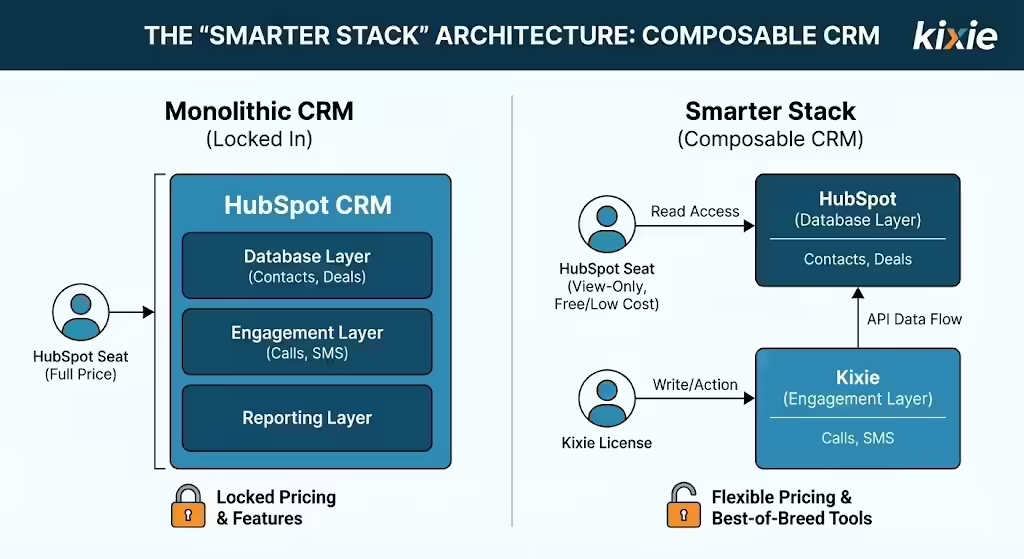
The Concept of Composable CRM
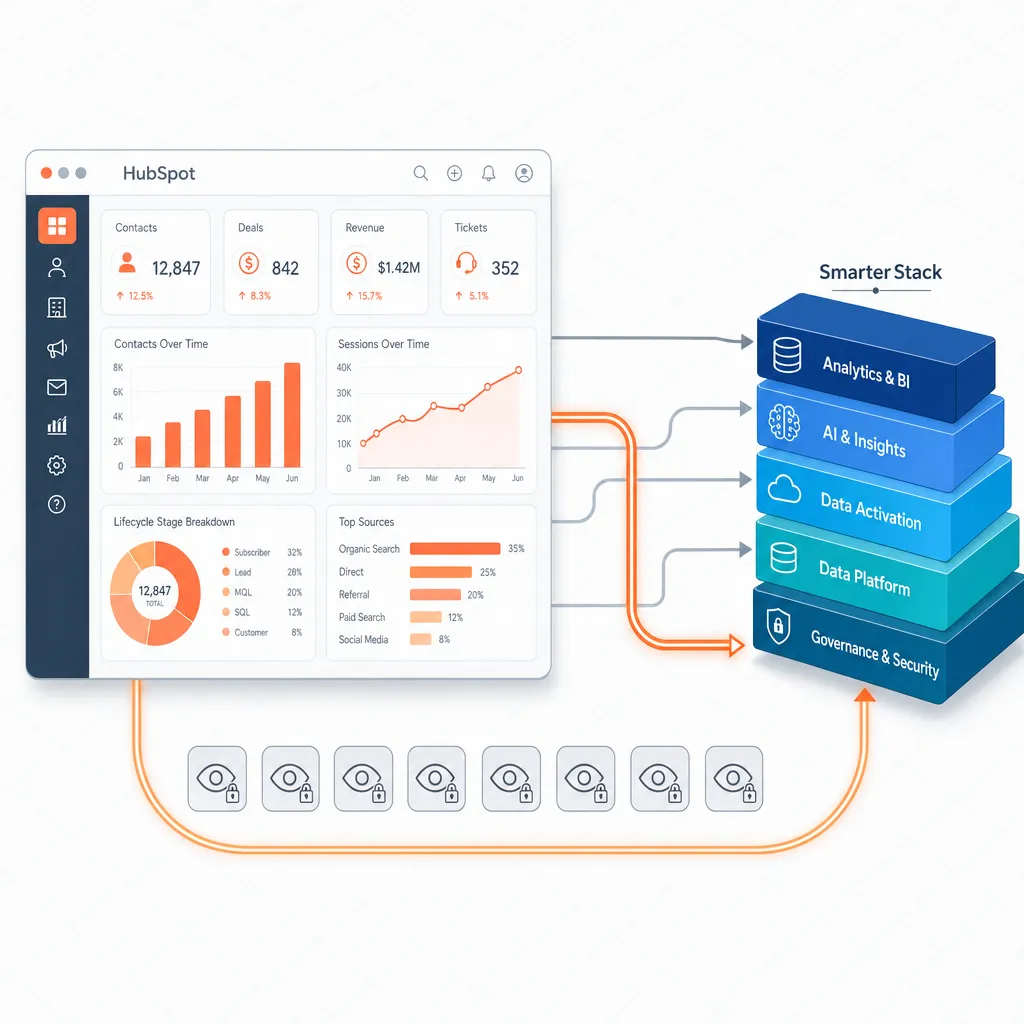
The “Smarter Stack” represents a shift from “Monolithic” CRM deployments to a “Composable” model. In a monolithic model, the CRM vendor provides the database, phone, and reporting, locking the customer into their pricing for every module.
- Database Layer: HubSpot acts as the central source of truth (contacts, deals, history).
- Engagement Layer: Specialized tools like Kixie handle specific actions (calls, SMS).
By keeping the Engagement Layer separate, organizations are not beholden to HubSpot’s pricing for engagement features. The View-Only seat is ideal for this model: it provides read access to the Database Layer, while the external tool handles the write actions.
Workflow Execution
The architecture functions through a specific sequence of events that bypasses native restrictions:
- Trigger: The View-Only User selects a contact in HubSpot (Read Access).
- Action: The User initiates a call via the Kixie Chrome Extension (External App).
- Synchronization: When the call ends, the Kixie server authenticates with HubSpot using the Super Admin Token and POSTs the call object via the API.
- Result: The call appears on the Contact Timeline in HubSpot, attributed to the View-Only User.
This process completely circumvents the “Communicate” permission check that would occur if the user attempted to log the call directly in the HubSpot UI.
Why Kixie Fits the HubSpot Workaround

Why Kixie Enables the View-Only Strategy
While many VoIP solutions exist, Kixie provides the specific “Native” behavior required to make the View-Only workaround viable. Unlike basic integrations that rely on middleware, Kixie uses a direct OAuth connection to sync data.
- Automatic Logging: Kixie creates a formal “Call Object” rather than just a note. This is crucial because if it only left a note, standard “Calls Made” reports in HubSpot would show zero; the Call Object ensures reports populate correctly.
- Bi-Directional SMS: Since View-Only users cannot connect personal emails, Kixie logs all text messages as native HubSpot SMS objects, allowing these users to maintain archived conversations within the CRM.
- Mobile Logging: Calls made via the Kixie Mobile App are routed through Kixie’s servers, which then push the log to HubSpot via API. This solves the issue where View-Only users are blocked from logging calls via the native HubSpot mobile app.
Feature Superiority over Core Seats
Implementing this workaround does not just restore lost functionality; it often enhances it. A View-Only seat equipped with Kixie has more capabilities than a standalone HubSpot Core Seat using the native dialer.
- Dialing: Kixie offers multi-line Power Dialing, whereas HubSpot’s native dialer is single-line even at Enterprise levels.
- Storage: Kixie provides unlimited cloud storage for recordings, compared to HubSpot’s tiered limits.
- Local Presence: Kixie includes AI-powered local presence dialing, a feature not available natively.
Other Dialers for This HubSpot Workaround
Kixie vs. JustCall
When engineering a workaround for View-Only seats, the choice of dialer is critical. JustCall is a competitor with a robust feature set, but Kixie is often preferred for this specific architectural setup.

- Integration Depth: Kixie’s integration is deeper and more rigid, offering a direct sync without relying on middleware like Zapier for complex workflows. This ensures reliability when mapping “View-Only” owners to call records.
- Focus: Kixie’s core value is “Speed to Lead” (PowerDialing), which aligns with the high-volume SDR roles typically assigned to View-Only seats. JustCall heavily promotes AI coaching features that may add unnecessary cost for teams specifically trying to reduce spend.
Kixie vs. HubSpot Native Dialer
The most direct comparison is against the HubSpot Native Dialer.
- Cost: Accessing a Power Dialer natively requires Sales Hub Professional ($450/mo minimum) or Enterprise ($150/seat). Kixie provides this technology for ~$35-$65/seat.
- Capability: Even at the Enterprise level, HubSpot’s dialer is single-line. Kixie offers multi-line dialing, allowing reps to call up to 10 numbers simultaneously to find a connection.
The “Zapier Tax”
Many cheaper VoIP solutions (e.g., Google Voice) rely on Zapier to log calls to HubSpot. This introduces a “Zapier Tax,” as users need a paid Zapier plan to update records. Furthermore, Zapier tasks can fail, creating data gaps. Kixie uses the HubSpot Engagement API directly, eliminating this failure point and ensuring data integrity.
HubSpot Workaround Cost Comparison
The Cost of the “Core” Path
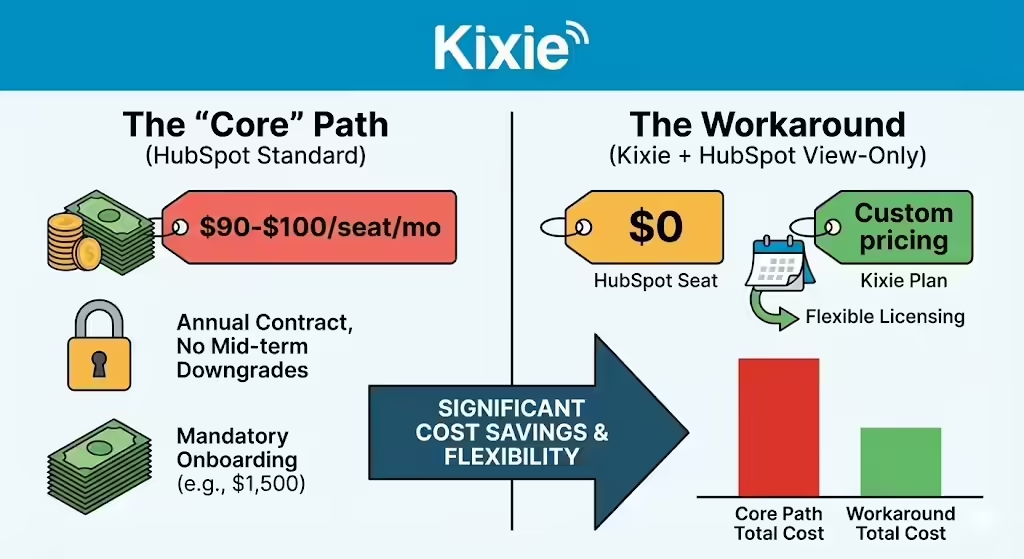
The primary driver for adopting the View-Only workaround is the high cost of HubSpot’s standard scaling path. Moving from Starter to Sales Hub Professional is the standard for growing teams.
- License Cost: Approximately $90 – $100 per seat/month.
- Onboarding: Mandatory fees often apply (~$1,500 one-time).
- Commitment: Contracts are typically annual, with no ability to downgrade seats mid-term.
The Cost of the Kixie Workaround
In contrast, the workaround utilizes HubSpot’s free View-Only seats and Kixie’s flexible licensing.
- HubSpot Cost: 10 View-Only Seats = $0.
- Kixie Cost: Custom pricing.
Three-Year TCO Comparison
Consider a growing sales team scaling from 5 to 20 users over 3 years.
- Scenario A (Pure HubSpot Stack): Buying Sales Hub Professional seats for all users results in a total 3-year spend of $43,500.
- Scenario B (Smarter Stack): Using HubSpot Starter + View-Only seats + Kixie Pro results in a total 3-year spend of $29,100.
Net Savings: $14,400 (33% Reduction). Crucially, if compared against HubSpot Enterprise (required to match Kixie’s features), the savings exceed 60%. Additionally, Kixie offers monthly billing, avoiding the “sunk cost” of annual HubSpot contracts if an employee leaves.
How to Set Up the HubSpot Workaround
Audit and Downgrade the Seats
To implement the View-Only workaround, administrators must first prepare the HubSpot environment.

- User Audit: Identify users who strictly perform outbound sales tasks (SDRs/BDRs).
- Asset Transfer: Before downgrading, ensure these users do not “Own” active workflows or templates, as downgrading them may deactivate these assets. Transfer ownership to a generic system admin.
- Downgrade: Change the user’s seat type to “View-Only,” verifying they retain view access to necessary contacts.
Set Up the Kixie Integration
A HubSpot Super Admin must authorize the integration to establish the necessary API pipe.
- Authorize: Click “Connect” in the Kixie dashboard to grant write permissions via the Super Admin’s scope.
- Configure Sync: Enable “Log Calls,” “Log SMS,” and “Sync Call Outcomes” to ensure data flows correctly.
- Recordings: Ensure “Log Recordings” is checked to maintain an audit trail, as View-Only users cannot rely on HubSpot’s native recording features.
Automate Call Outcome Updates
Since View-Only users cannot manually edit properties like “Lead Status,” organizations must use Kixie to trigger updates via API.
- The Logic: Even though the user cannot change the Lead Status manually, their Kixie call (logged via API) can trigger a Workflow.
- Implementation: Create a HubSpot Workflow where the trigger is “Activity Property (Call Outcome) is equal to ‘Left Voicemail’” and the action is “Set Property value (Lead Status) to ‘Attempted to Contact’”. This automation bypasses the permission block.
Train the View-Only Reps
The user experience changes slightly for the agent. They must be trained to stop looking for the “Log Call” button in HubSpot, which is disabled.
- New Workflow: Open the contact, click the Kixie Chrome Extension icon to dial, and select the disposition in the Kixie pop-up immediately after the call.
- Critical Warning: Agents must understand they cannot edit the note after clicking “Done” in Kixie, as they lack edit permissions in HubSpot. They must get the note right the first time.
Teams Using This HubSpot Workaround
Canopy Reduced Time to First Call
Canopy, a growing SaaS company, faced a “glass ceiling” where manual data entry and high seat costs hindered their ability to increase outbound call volume. Their “time to first call” was 35 minutes due to manual processes. By implementing the Kixie workaround with HubSpot, they dropped this time to 9 minutes and increased conversion rates by 3%. This allowed them to scale their SDR team without requiring expensive HubSpot upgrades for every rep.
Kennected Centralized Call Data
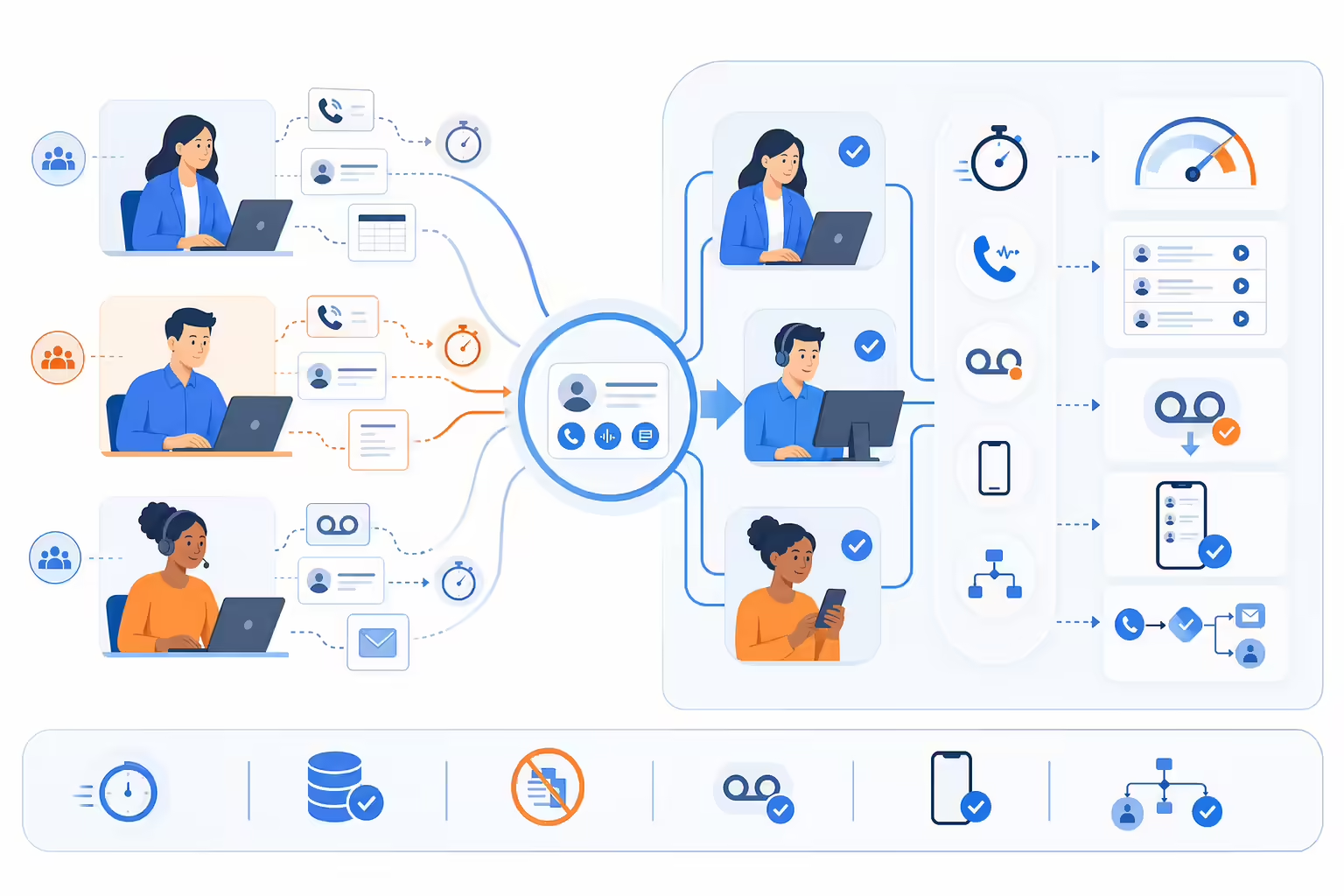
Kennected, with 120 employees, struggled with decentralized calling where reps used personal phones, leading to fragmented data and no central tracking. By adopting Kixie, they centralized their phone system. The integration saved approximately 1 hour per agent per day through voicemail drop automation. Furthermore, Kixie’s mobile app solved the “View-Only” limitations of mobile logging, allowing field reps to log activity seamlessly.
Octopi Automated Follow-Up
Octopi utilized the Kixie HubSpot integration to drive a founder-led sales strategy. They improved conversion rates by 45% by utilizing automated workflows triggered by Kixie call outcomes. This validated the architectural approach of using API-logged outcomes to trigger system actions (like follow-up emails), effectively giving a lean team the capabilities of a much larger enterprise sales force.
Risks in This HubSpot Workaround
Compliance and Data Sovereignty
While the Kixie workaround offers significant savings, it introduces a sub-processor for customer data. Organizations must ensure Kixie’s data handling aligns with GDPR/CCPA requirements and have a Data Processing Agreement (DPA) in place. Additionally, features like “ConnectionBoost” (Local Presence) must be used in compliance with local telemarketing laws (e.g., TCPA), and the liability rests with the user.

The Future of “Service-as-a-Software”
The CRM market is evolving. HubSpot executives have suggested a shift toward “service-as-a-software,” where AI agents are paid for on a “cost-per-outcome” basis rather than a seat basis. This suggests the concept of a “Seat” may eventually become obsolete. The Kixie workaround is future-proof in the medium term because it is API-centric. As long as HubSpot maintains an open API, this “Headless” engagement model will remain viable.
Dependence on Super Admin Token
A critical architectural risk is the dependence on the Super Admin account. The entire workaround hinges on the Kixie connection remaining active. If the Super Admin who authorized Kixie leaves the company and their user is deactivated, the integration (and the workaround) breaks immediately. To mitigate this, organizations should use a dedicated “System Admin” service account to authorize the integration rather than a specific employee’s personal account.
HubSpot Workaround Bottom Line
HubSpot’s pricing model reflects a broader trend of monetizing user access. However, the value of a CRM lies in the activity data, not the number of users who can click “Save”. The “View-Only” limitations effectively tax growth by requiring expensive licenses for junior employees.
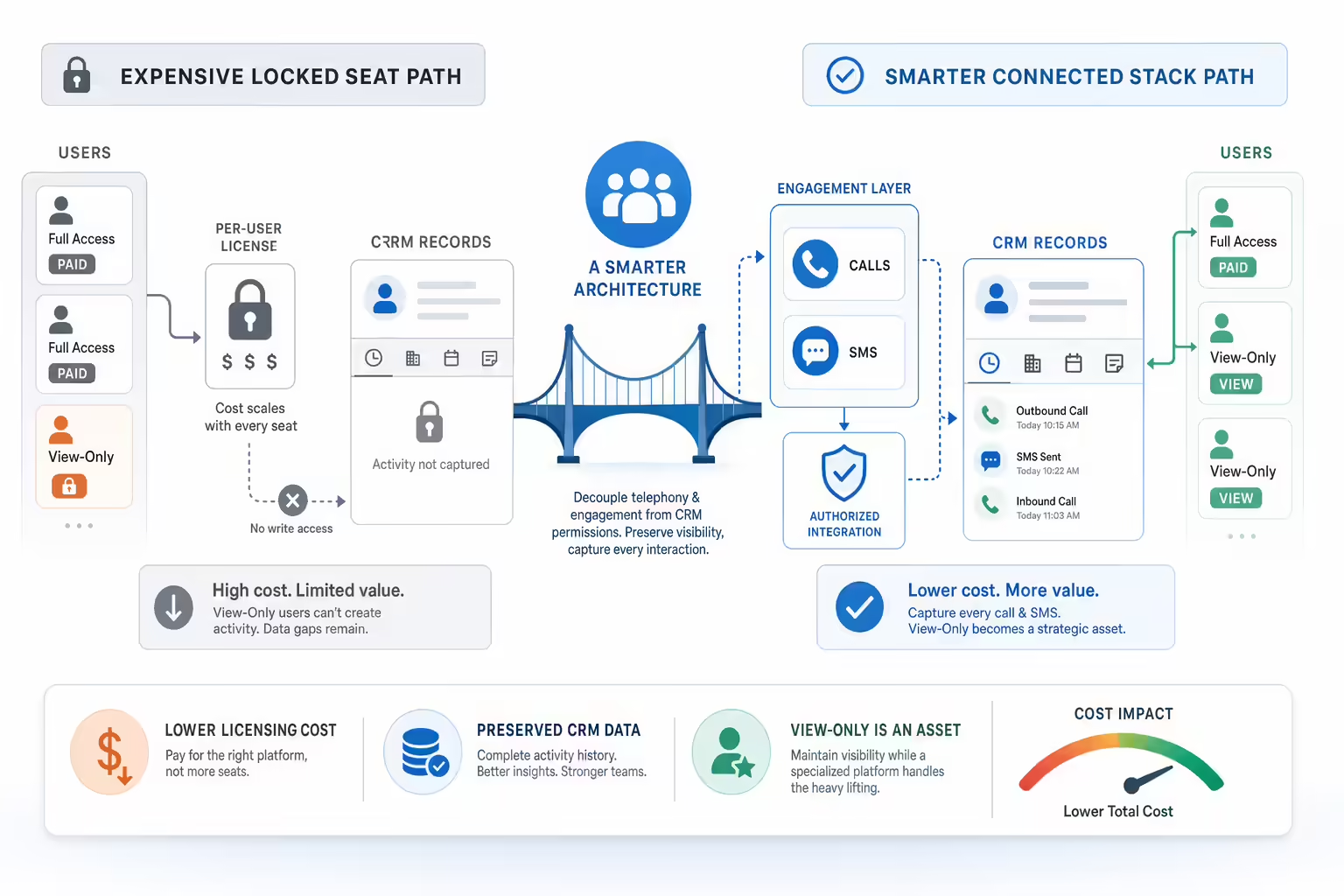
This analysis demonstrates that Kixie provides a superior architectural alternative. By decoupling telephony from permissions, the “Smarter Stack” allows organizations to use View-Only seats for visibility while offloading the action to a specialized platform. Validated by API mechanics and financial modeling showing potential savings of 30-60%, this approach transforms the View-Only seat from a trap into a strategic asset.
Ready to close more deals with Kixie?
See how Kixie's AI-powered tools can transform your sales and support operations.
Start Free Trial