
TL;DR: Kixie is positioned as a sales calling platform to evaluate alongside HubSpot for teams that want faster outbound workflows, cleaner CRM-connected call activity, and better manager visibility without replacing HubSpot as the CRM, with the article recommending buyers first document pain points such as slow dialing, inconsistent logging, missing coaching visibility, manual workflows, duplicate or incomplete data, and poor rep adoption, then compare HubSpot calling alternatives on CRM workflow fit, call record association to contacts, companies, deals, and tasks, captured fields such as notes, dispositions, outcomes, post-call follow-up speed, reporting for connection rates, talk time, outcomes, rep activity, pipeline impact, onboarding effort, admin controls, support reliability, compliance and consent fit, usage limits, add-ons, and total cost beyond seat price. Kixie should be evaluated through a demo based on the team’s real prospecting, follow-up, call notes, outcomes, reporting, and manager review process, while buyers should verify current HubSpot integration details, pricing, features, usage rules, setup requirements, and support directly with vendors because the article provides no plan names, fees, quantitative benchmarks, or confirmed integration claims.
If your sales team runs on HubSpot, calling workflows can make or break rep productivity. The right setup should help reps place calls efficiently, keep activity records accurate, and give managers enough visibility to coach, forecast, and improve outbound performance.
That is why many teams search for HubSpot calling alternatives. They may not be looking to replace HubSpot as their CRM. Instead, they are often looking for a dedicated sales calling platform that fits better with their outbound process, reporting needs, or team structure.
This guide walks through how to evaluate calling software for HubSpot-based teams, what questions to ask before switching, and where a platform like Kixie may fit into your sales workflow evaluation.
Why sales teams compare HubSpot calling alternatives
Native CRM calling can be convenient, especially for teams that want to keep activity close to contact and deal records. But as sales teams grow, calling requirements often become more specific.
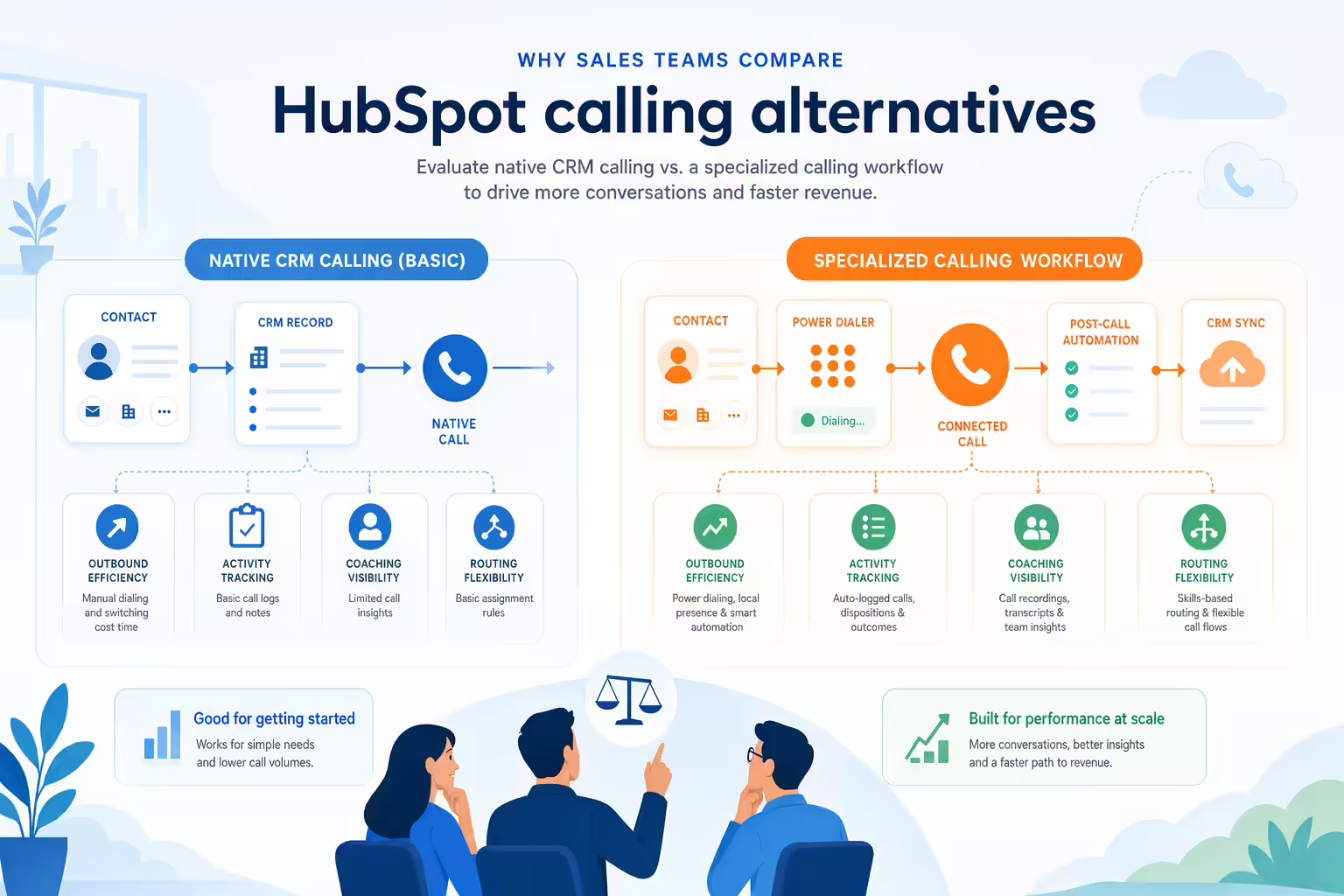
Common reasons teams evaluate alternatives include:
- Outbound efficiency: Reps may need workflows designed for higher-volume prospecting or follow-up.
- CRM-connected activity tracking: Teams want calls, notes, outcomes, and follow-up activity to be easy to keep aligned with CRM records.
- Sales coaching visibility: Managers may need clearer ways to review call activity and identify coaching opportunities.
- Workflow flexibility: RevOps teams may need calling workflows that match their team’s sales motion, routing rules, or reporting structure.
- Adoption and onboarding: A calling platform should be simple enough for reps to use consistently.
Before assuming your current setup is the problem, document what is not working. Are reps spending too much time dialing? Are calls not being logged consistently? Are managers missing visibility? Are workflows too manual? The answer should guide your evaluation.
What to look for in HubSpot calling alternatives
A strong alternative should support the way your team sells, not just add another phone tool to the stack. Use the criteria below to compare options.
HubSpot CRM workflow fit
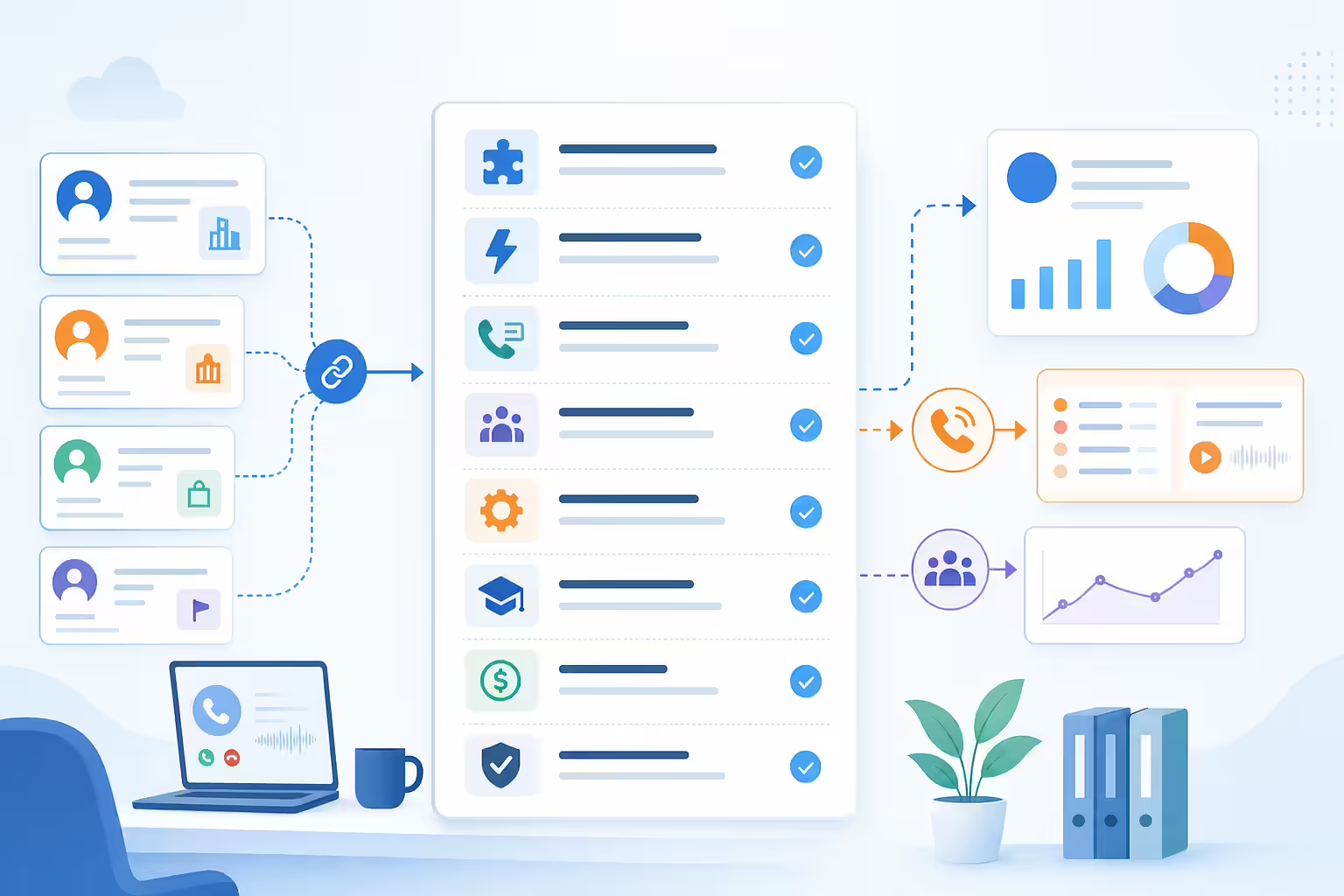
For HubSpot users, CRM fit is one of the most important evaluation areas. Ask how the calling platform connects call activity to the right contact, company, deal, or task workflow.
Questions to ask:
- How does the tool associate call records with CRM data?
- Can reps keep their workflow inside the systems they already use?
- What fields, notes, dispositions, or outcomes can be captured?
- How does the platform handle duplicate records or incomplete data?
- What setup is required from RevOps or sales operations?
Review note: Before publishing specific integration claims, confirm the exact wording and capabilities for Kixie’s HubSpot integration.
Calling features that boost sales rep productivity
Sales calling tools vary widely in how they support outbound activity. Some are built for simple one-to-one calling, while others are designed for structured prospecting workflows.
Look for features and workflows that help reps reduce manual steps, prioritize the right people to call, and move quickly from one conversation to the next. The right choice depends on your sales motion, call volume, and compliance requirements.
Call logging and HubSpot data quality
Call data is only useful if it is captured consistently. When comparing HubSpot calling alternatives, evaluate how each platform supports call logging, call outcomes, notes, and follow-up activity.
Ask vendors to show exactly what happens after a call ends. A short demo of the post-call workflow can reveal whether reps will actually use the process in real life.
Sales call reporting and coaching
Managers need visibility into more than total call count. Depending on your team, you may want to review connection rates, talk time, outcomes, rep activity, pipeline impact, or coaching opportunities.
Before choosing a platform, define which reports matter most. Then confirm whether the tool can support those views directly, through HubSpot, or through another reporting process.
Calling onboarding and ease of use
A powerful tool can still fail if reps do not adopt it. Evaluate how quickly a new rep can learn the calling workflow, where they will spend most of their day, and how much context switching the tool creates.
During the evaluation, include at least one rep, one manager, and one operations stakeholder. Each group will notice different friction points.
Calling support reliability and admin controls
Calling is a frontline sales workflow, so reliability and support matter. Ask about onboarding resources, admin settings, user management, and support options. For distributed or fast-growing teams, also ask how changes are managed as your process evolves.
HubSpot calling pricing and total cost
Do not evaluate pricing on seat cost alone. Consider the full cost of implementation, onboarding, administration, rep time saved, reporting needs, and any related calling or CRM requirements.
Important: Pricing changes frequently across software vendors. Verify current pricing directly with each provider before making a decision.
HubSpot calling alternatives checklist
Use this checklist to compare potential solutions during demos and trials:
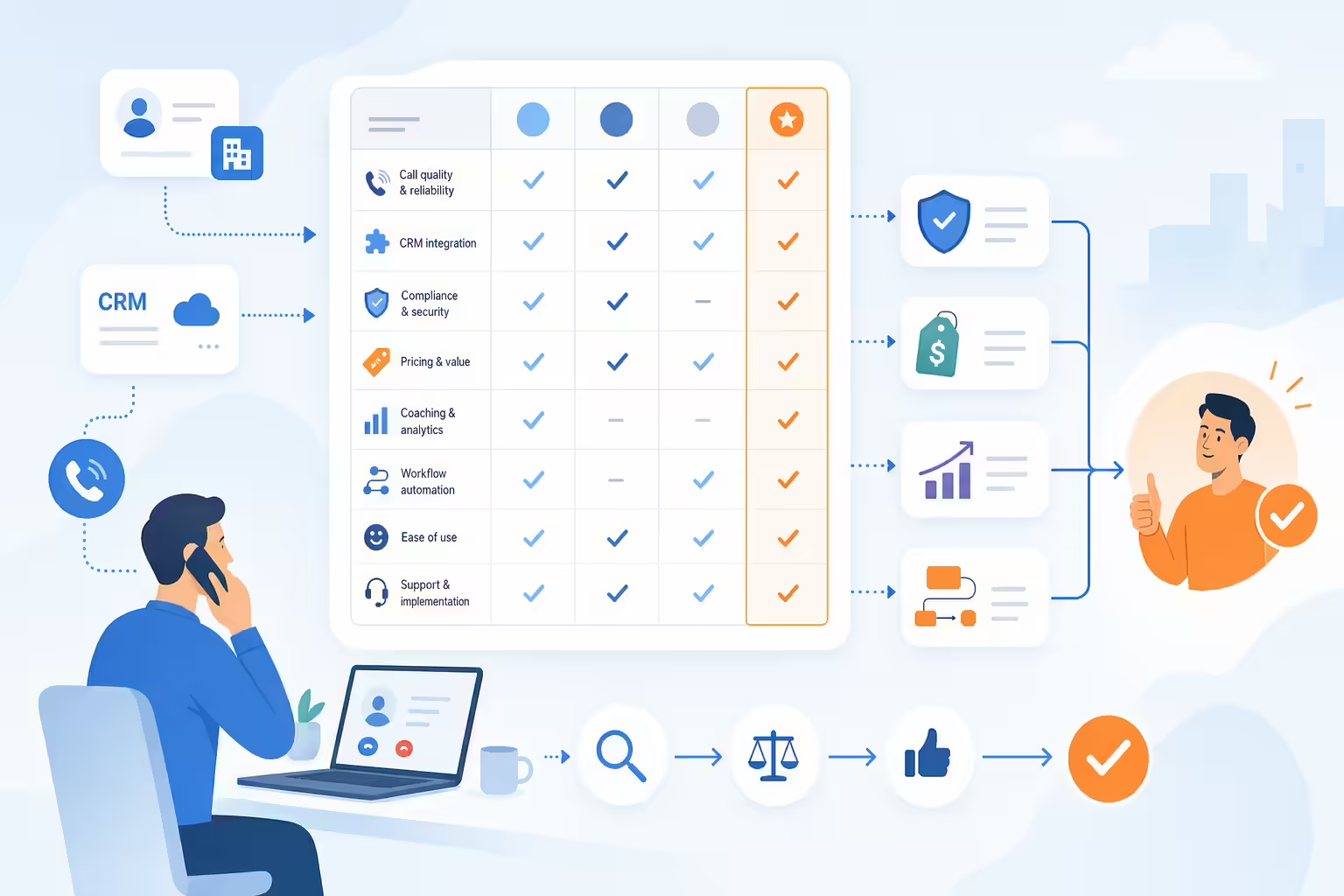
- Does the platform support the calling workflow your reps use every day?
- Can call activity be connected to the right CRM records?
- Is the post-call workflow fast enough for high-adoption usage?
- Can managers access the visibility they need for coaching?
- Can RevOps configure the workflow without unnecessary complexity?
- Does the vendor clearly explain onboarding, support, and setup requirements?
- Are pricing, usage limits, and any add-on costs clear?
- Does the platform meet your team’s compliance and consent requirements for the markets where you call?
- Can the vendor show a workflow that matches your actual sales process?
Where Kixie fits in your HubSpot calling review
If your team is looking for a sales calling platform to use alongside HubSpot, Kixie may be worth including in your evaluation. The best next step is to review your current calling workflow, identify where reps are losing time, and confirm which HubSpot-connected activities are most important to your team.

When speaking with Kixie, ask for a walkthrough of the specific workflow your reps use today, including prospecting, follow-up, call notes, call outcomes, reporting, and manager visibility. This helps ensure you are evaluating the platform against your actual sales process rather than a generic demo.
You can also book a demo to discuss whether Kixie is a fit for your team’s sales calling workflow.
Questions to ask before choosing sales calling software
Before you commit to any HubSpot calling alternative, bring these questions to your vendor conversations:

- What HubSpot workflows does the platform support?
- What data is created or updated after each call?
- How much manual work is required from reps?
- How are call outcomes, notes, and follow-up tasks handled?
- What reporting is available for managers and RevOps?
- How long does onboarding typically take?
- What support is available during and after implementation?
- What usage limits, add-ons, or extra costs should we know about?
- How does the platform help us maintain appropriate calling practices for our market?
- What should we verify in HubSpot before launch?
Common HubSpot calling mistakes to avoid
Comparing calling feature lists only
A long feature list does not guarantee a better workflow. Focus on how the tool performs in the daily rep experience and how well it supports your sales process.
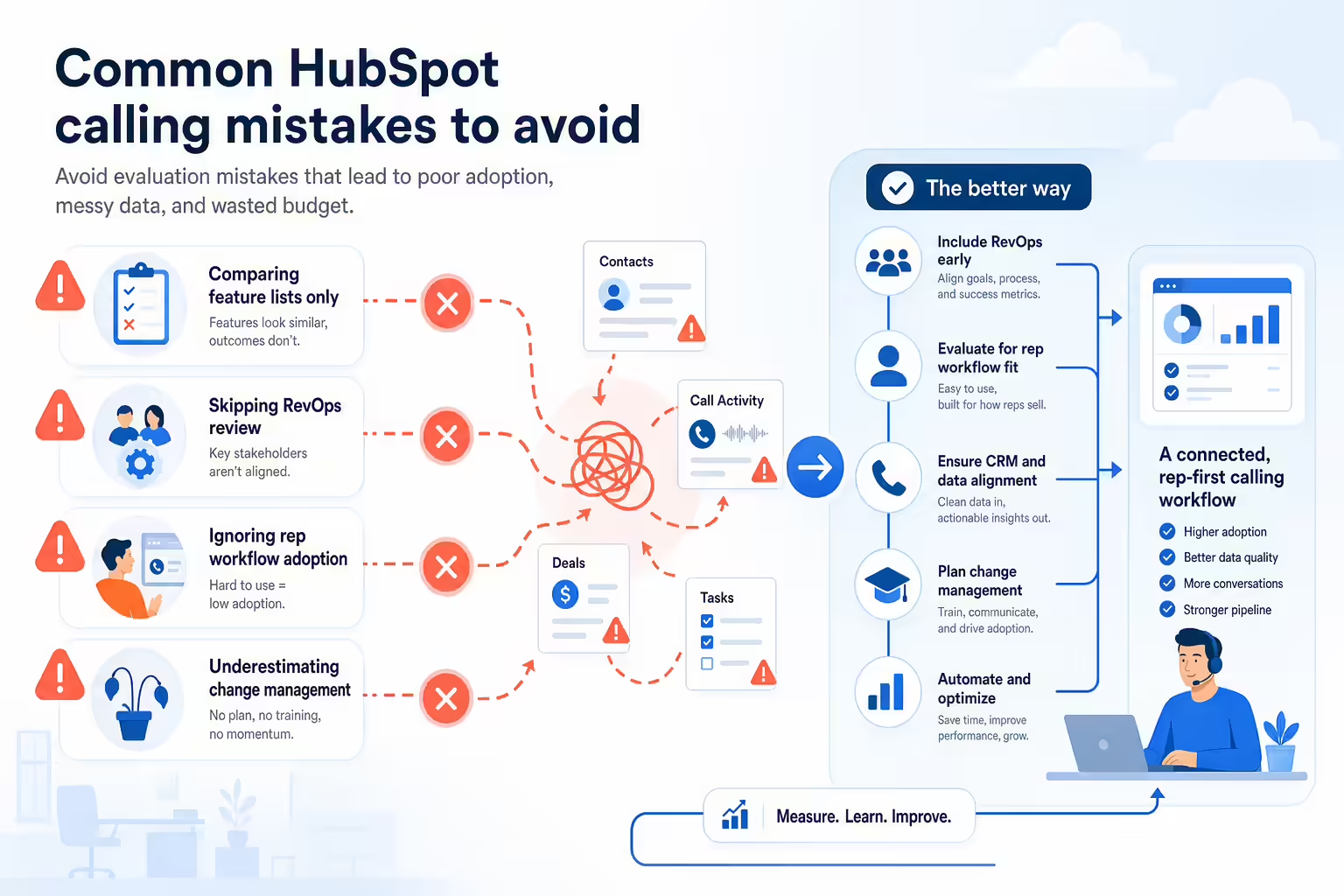
Skipping a HubSpot RevOps review
Sales calling affects CRM data, reporting, routing, follow-up, and coaching. Include operations early so the implementation does not create downstream reporting problems.
Ignoring sales rep adoption
If the workflow is too slow or confusing, reps may work around it. Watch how many clicks it takes to place a call, log activity, and move to the next step.
Not checking current calling product details
CRM and calling tools change over time. Always confirm current features, pricing, usage rules, and integration details with the vendor before making a decision.
HubSpot calling alternatives FAQ
What is a HubSpot calling alternative?
A HubSpot calling alternative is a calling or sales dialer platform that a team may evaluate instead of, or alongside, native HubSpot calling features. The goal is usually to support sales conversations, call tracking, rep productivity, and CRM-connected workflows.
Do I need to replace HubSpot to use another calling tool?
Not necessarily. Many teams evaluating this category are still committed to HubSpot as their CRM. They are looking for a calling workflow that better supports their sales process. Confirm integration details with each vendor before choosing a tool.
What should sales teams compare first?
Start with workflow fit. Confirm how reps place calls, how activity is logged, how managers review performance, and how the platform works with your CRM process. Feature comparisons are more useful after you define those requirements.
Is calling price the most important factor?
Pricing matters, but it should be considered alongside adoption, implementation effort, data quality, rep productivity, and reporting needs. Verify current pricing directly with vendors because plans and packaging can change.
How should a HubSpot sales team evaluate Kixie?
Ask for a demo based on your actual sales workflow. Review how reps would call prospects, record outcomes, manage follow-up, and keep CRM activity organized. Also confirm current HubSpot-related capabilities with Kixie before publishing or purchasing based on specific requirements.
Final takeaway on HubSpot calling alternatives
The best HubSpot calling alternative is not simply the tool with the most features. It is the platform that helps your team call more effectively, keep CRM activity accurate, and give managers the visibility they need without adding unnecessary complexity.
If your team is reviewing sales calling workflows, start by documenting your current pain points, then compare platforms against those requirements. When you are ready, book a demo to see whether Kixie fits your sales process.
Ready to close more deals with Kixie?
See how Kixie's AI-powered tools can transform your sales and support operations.
Start Free Trial