
When a new lead comes in, every minute of uncertainty can create friction. Who owns the lead? Which rep should follow up? Is the lead in the right territory? Has anyone already contacted the account?
Lead routing software helps sales and revenue teams answer those questions automatically. Instead of relying on manual assignment, spreadsheets, or ad hoc Slack messages, teams can use routing rules to send each lead to the right rep, team, queue, or workflow.
This guide explains what lead routing software does, the most common routing methods, what features to evaluate, and how to set up lead routing rules that support faster and more consistent follow-up.
What Is Lead Routing Software?
Lead routing software is a tool or workflow that automatically assigns inbound leads to the appropriate sales rep, account owner, team, or queue based on predefined rules.
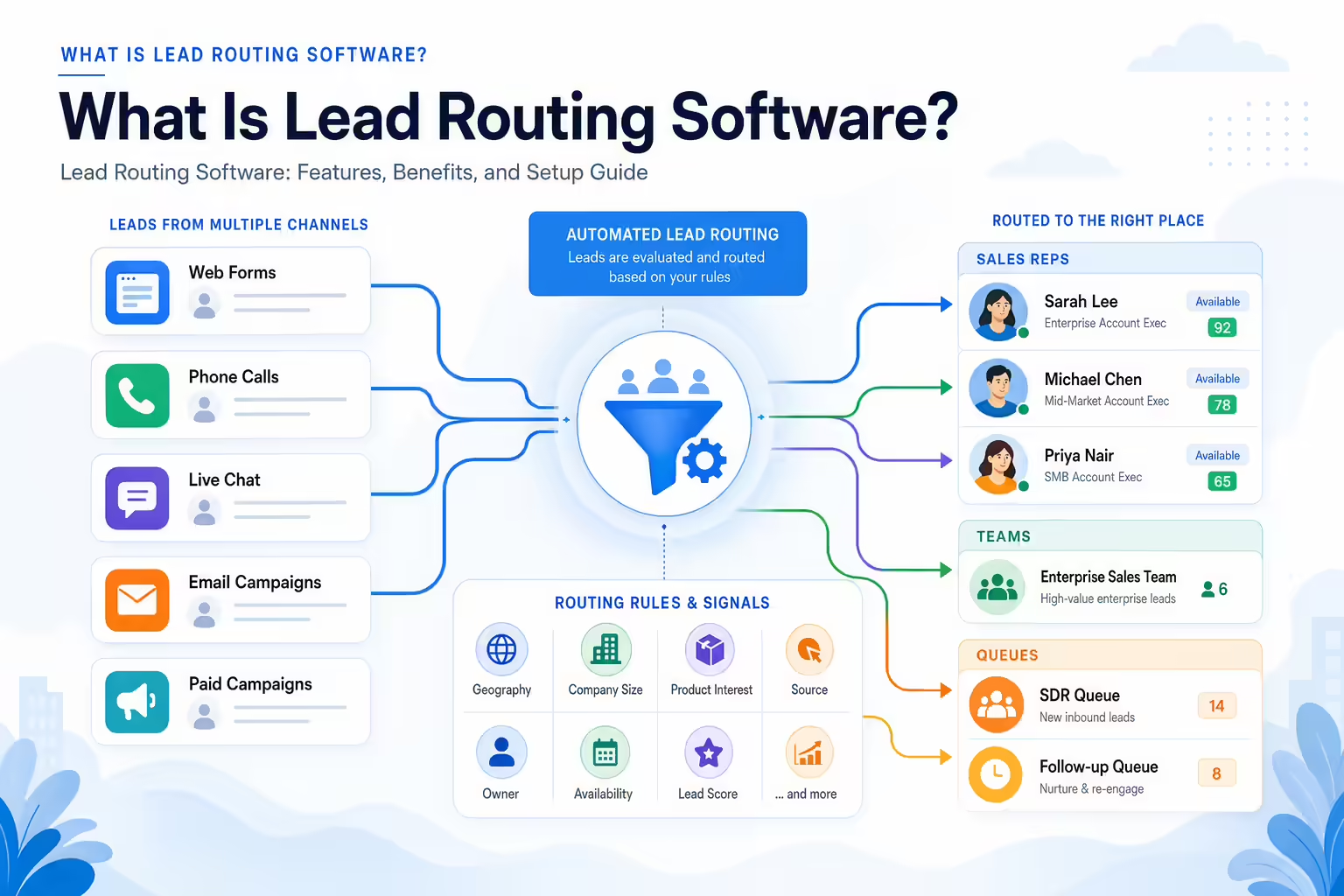
Those rules may be based on factors such as geography, company size, product interest, lead source, account ownership, rep availability, or lead score. The goal is to reduce manual work and make sure qualified leads are followed up by the right person as quickly and consistently as possible.
Lead routing is commonly used by:
- Inbound sales teams that need to respond quickly to demo requests, contact forms, calls, chats, or event leads.
- Sales operations and revenue operations teams that manage territories, assignment rules, and CRM data quality.
- Demand generation teams that want campaign-sourced leads to reach the right sales motion.
- Sales managers who need clear ownership, accountability, and visibility into follow-up.
How Lead Routing Software Works
Most automated lead routing workflows follow a similar process:
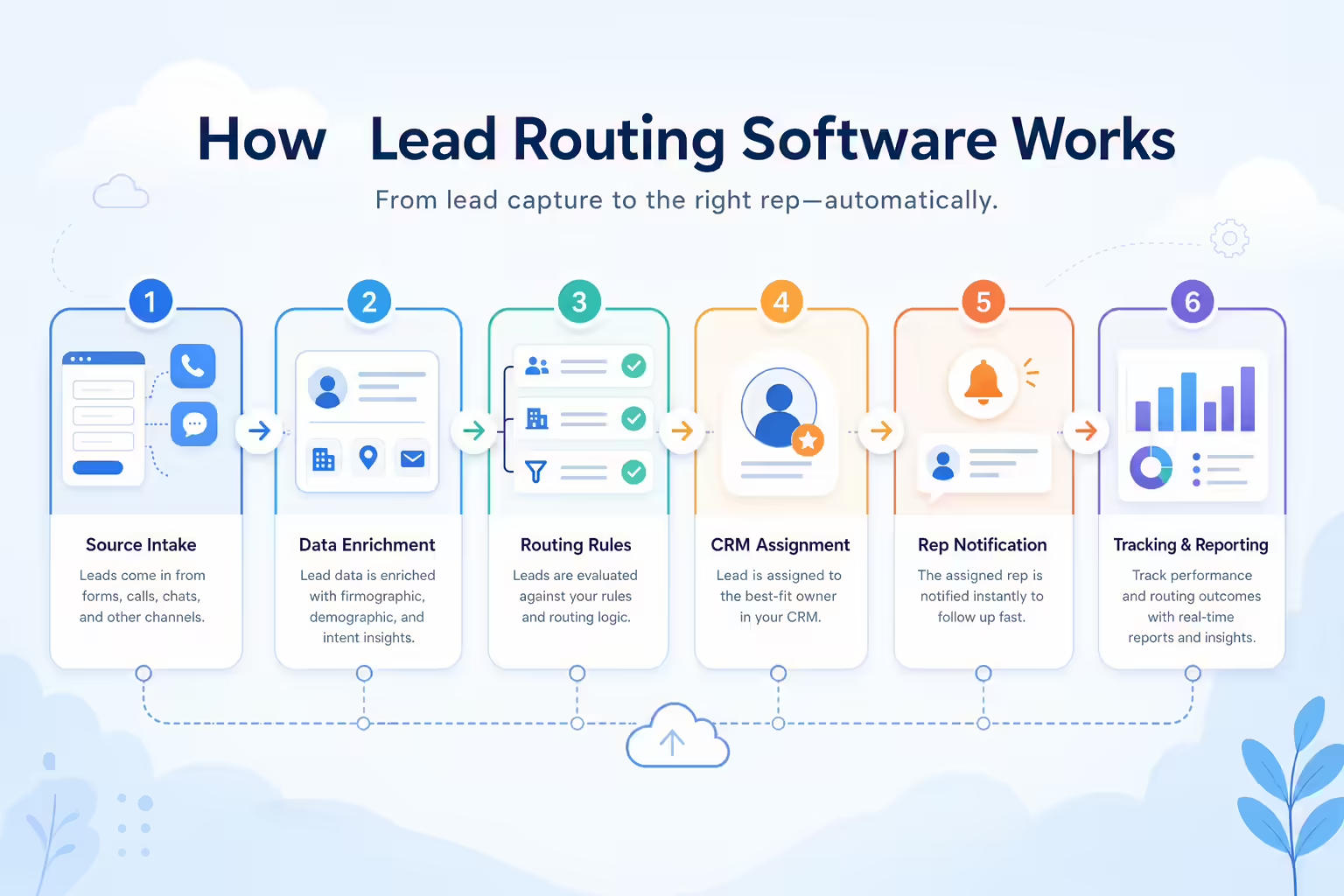
- Lead capture: A lead enters your system through a form, call, chat, webinar, ad campaign, import, or another source.
- Data enrichment or qualification: The system reviews available fields such as location, company size, industry, source, email domain, product interest, or score.
- Rule matching: The lead is compared against your routing logic to determine the correct owner, team, or queue.
- Assignment: The lead is assigned in your CRM, sales engagement platform, or another system of record.
- Notification: The assigned rep or team receives an alert, task, email, or other notification to follow up.
- Tracking and reporting: Managers can monitor assignment outcomes, follow-up activity, response times, and unresolved routing issues.
In a simple setup, this may be handled entirely inside a CRM. In more complex environments, lead routing may involve multiple systems, including marketing automation, data enrichment tools, scheduling tools, sales engagement platforms, and customer support or contact center workflows.
Common Lead Routing Methods
The best routing logic depends on your sales model, territory design, service-level expectations, and data quality. Many teams combine several of the methods below.
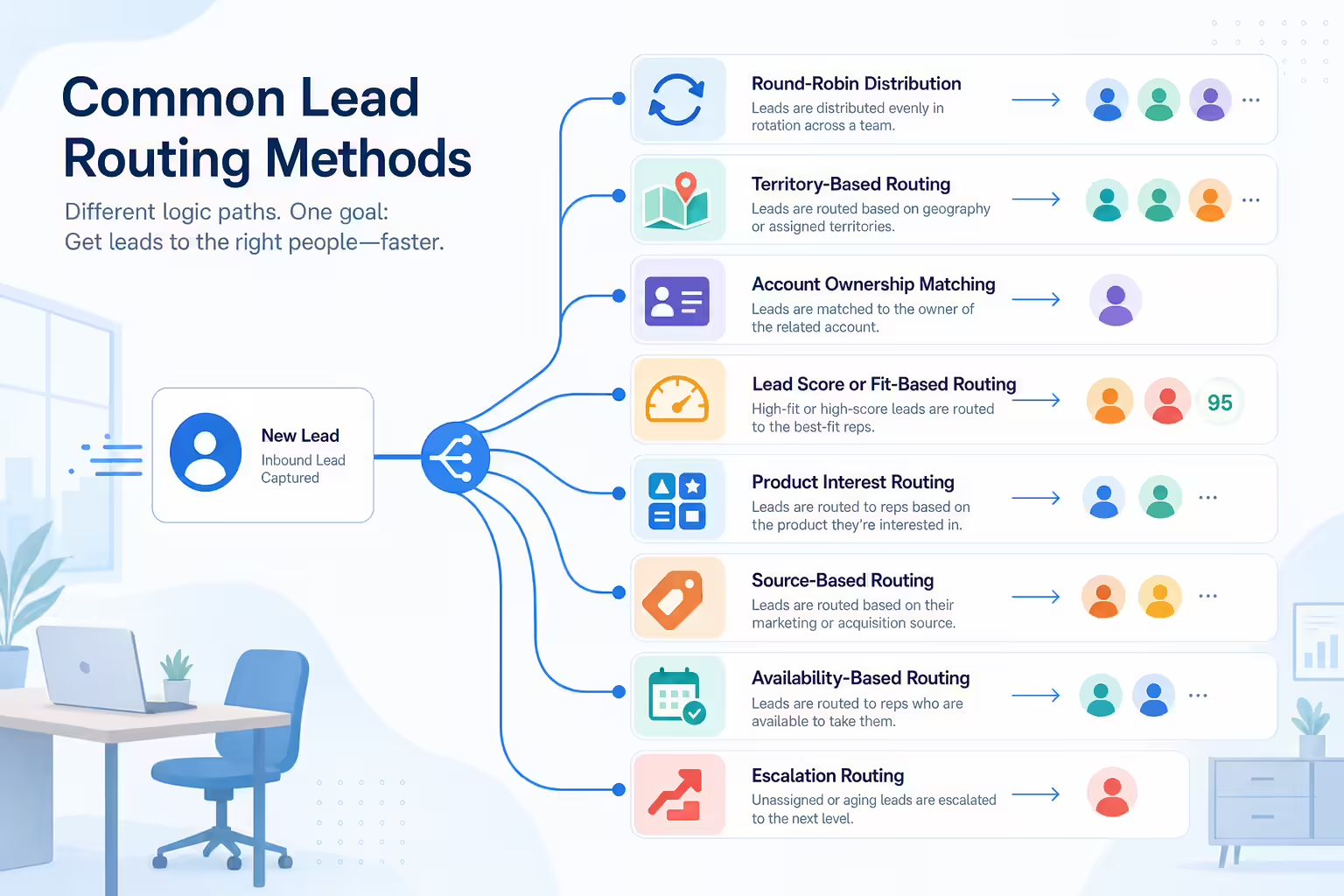
Round-Robin Lead Assignment
Round-robin routing distributes leads evenly across a group of reps. For example, if five reps are assigned to inbound demo requests, each new lead can be assigned to the next rep in sequence.
This method is useful when leads are relatively similar and your main goal is fair distribution. However, round-robin routing may need additional rules for rep availability, account ownership, seniority, or territory constraints.
Territory-Based Routing
Territory routing assigns leads based on geography, region, state, country, or market segment. For example, leads from the Northeast may go to one team, while leads from the West Coast go to another.
This is common for field sales, regional account executives, franchise models, and teams with localized expertise. It requires clean location data and clear territory definitions.
Account Ownership Routing
Account-owner routing checks whether the lead belongs to an existing account and then assigns the lead to the current account owner. This is especially important for companies that sell into named accounts, manage renewals, or want to avoid multiple reps contacting the same organization.
Account ownership routing often depends on accurate CRM matching, deduplication, and clear rules for parent-child accounts or multiple business units.
Lead Score or Fit-Based Routing
Some teams assign leads based on lead score, company fit, intent signals, or qualification criteria. For example, high-fit enterprise leads may be routed to senior account executives, while smaller accounts may go to a different sales motion.
This type of routing can help align rep expertise with opportunity potential, but it requires reliable scoring inputs and agreement on what qualifies a lead for each path.
Product Interest Routing
If your business sells multiple products, services, or packages, you may route leads based on what they requested. For example, a lead interested in one product line may go to a specialized team, while another product inquiry goes to a different team.
This is helpful when reps need product-specific knowledge or when different products have different sales processes.
Source-Based Routing
Source-based routing assigns leads according to where they came from, such as paid search, partner referrals, webinars, events, outbound campaigns, or organic website forms.
This can be useful when certain sources require special handling. For example, partner leads may need to be routed to a channel team, while event leads may need a dedicated post-event follow-up workflow.
Availability-Based Routing
Availability-based routing considers whether a rep is available to respond. This may include working hours, calendar availability, time zone, queue status, or out-of-office settings.
This approach can help reduce delays when speed matters, but it typically requires reliable availability data and clear fallback rules.
Escalation-Based Routing
Escalation rules determine what happens when a lead is not accepted, contacted, or updated within a defined time period. For example, if a rep does not follow up within your internal service-level agreement, the lead may be reassigned, escalated to a manager, or moved to a shared queue.
Escalation logic helps prevent leads from getting stuck and gives managers better visibility into follow-up gaps.
Key Features to Look For in Lead Routing Software
Not every team needs a dedicated lead routing platform. Some teams can manage routing inside their CRM, while others need more advanced workflow automation. As you compare options, consider the following capabilities.

CRM Integration
Your lead routing process should connect cleanly with your CRM or system of record. Look for workflows that can create or update lead ownership, assign tasks, preserve activity history, and avoid conflicting records.
Before choosing a tool, confirm which CRM objects, fields, and assignment actions are supported for your specific setup.
Real-Time Assignment
For inbound sales teams, routing delays can create missed opportunities. Real-time or near-real-time assignment helps ensure new leads are routed while buyer intent is still fresh.
Ask how quickly leads are processed, what happens during sync delays, and whether routing depends on batch updates or manual review.
Customizable Routing Rules
Every sales team has different assignment logic. Strong lead routing workflows allow teams to create rules based on fields such as region, company size, source, product interest, score, account owner, rep capacity, and team structure.
Also consider how easy it is to update rules as territories, teams, and campaigns change.
Deduplication and Account Matching
Duplicate leads can create ownership confusion and inconsistent follow-up. Lead routing software should help identify whether a new lead is connected to an existing contact, account, opportunity, or open sales motion.
At minimum, your routing process should include a clear strategy for duplicate detection and account matching.
Notifications and Task Creation
Assignment alone is not enough. The assigned rep needs to know what happened and what to do next. Look for notifications, tasks, reminders, or workflow triggers that make follow-up clear and timely.
Common notification channels include CRM tasks, email alerts, sales engagement tasks, chat notifications, or call queues, depending on your stack.
Service-Level Agreement Tracking
If your team has response-time expectations, routing software should help track whether reps are following up within the required timeframe. SLA tracking can support coaching, accountability, and process improvement.
Useful SLA metrics may include time to assignment, time to first activity, time to first call, time to first email, or time to qualification.
Fallback and Escalation Logic
Routing rules should account for exceptions. What happens if a territory is missing? What if a rep is out of office? What if the lead does not match any rule? What if the assigned owner does not follow up?
Fallback queues and escalation rules help keep leads from disappearing into operational gaps.
Reporting and Auditability
Sales and revenue leaders need visibility into how leads are distributed and what happens after assignment. Reporting should make it easier to answer questions such as:
- How many leads were routed to each rep or team?
- Which leads were not assigned correctly?
- How quickly did reps follow up?
- Which sources or segments create the most routing exceptions?
- Are certain reps or regions over capacity?
Benefits of Automated Lead Routing
Automated lead routing is not just an administrative convenience. When designed well, it can improve the consistency and reliability of your sales process.
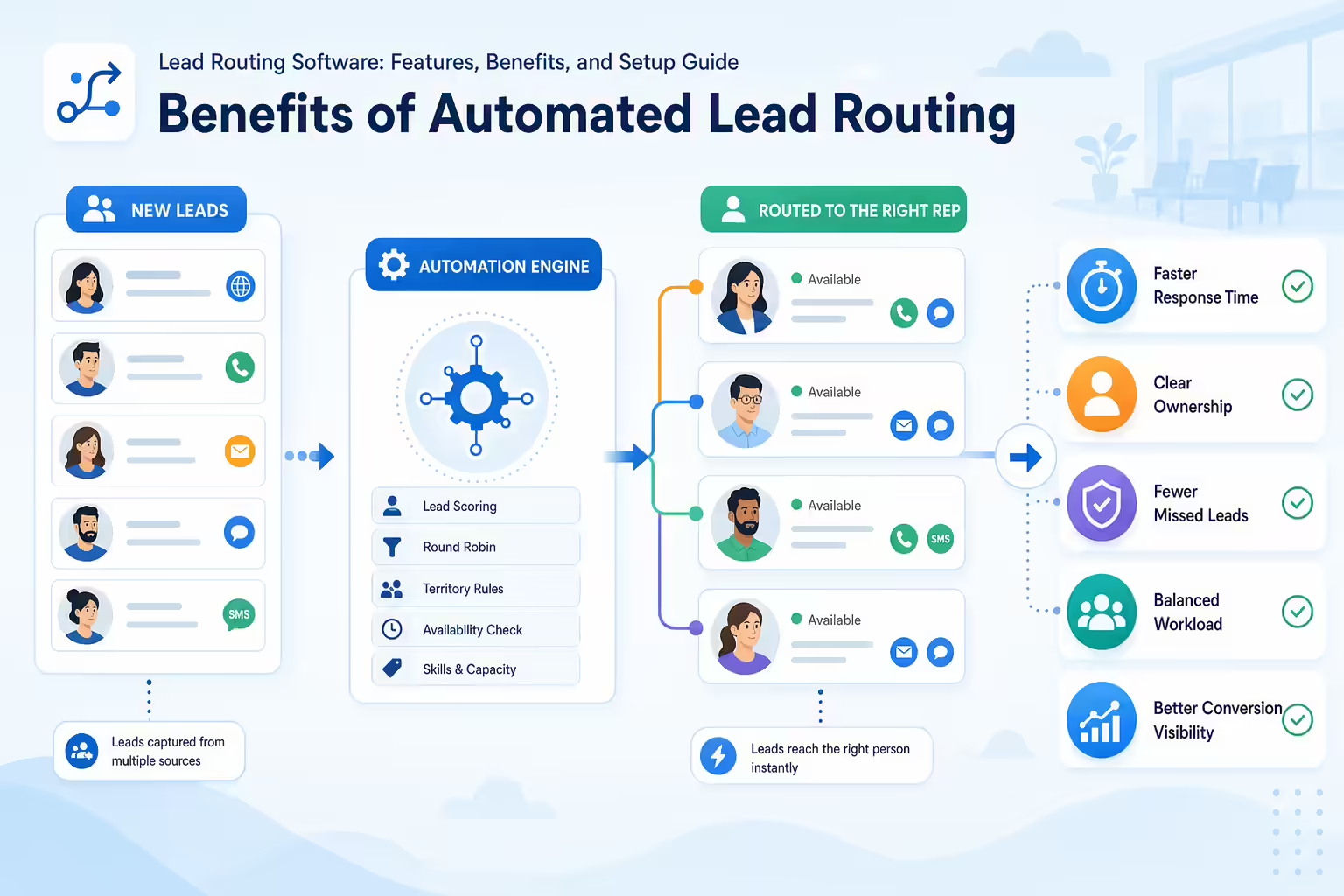
Faster Lead Follow-Up
Manual assignment adds delay. Automated routing helps reduce the time between lead capture and rep ownership, which is especially important for high-intent inbound leads.
Clearer Ownership
When assignment rules are documented and automated, reps and managers have less ambiguity about who owns each lead. This can reduce duplicate outreach, missed follow-up, and internal disputes.
Better Rep Accountability
Routing workflows can make it easier to track whether assigned reps are taking action. When ownership, alerts, and activity history are visible, managers can coach from a clearer operational picture.
More Consistent Buyer Experiences
Leads should not receive dramatically different experiences depending on who notices a form submission first. Automated routing supports a more standardized process for assignment, notification, and follow-up.
Less Manual Work for Sales Ops
Without automation, sales operations teams often spend time reviewing leads, correcting assignments, and resolving ownership questions. Routing rules can reduce repetitive work and free up time for higher-value process improvements.
Lead Routing Software vs. CRM Lead Assignment
Many CRMs include lead assignment features, and for some teams, those native tools are enough. Other teams need dedicated routing software or additional workflow automation because their assignment logic is more complex.

When CRM-Native Routing May Be Enough
CRM-native lead assignment may work well if:
- Your routing rules are simple and stable.
- You use a small number of assignment queues or territories.
- You do not need advanced availability, capacity, or escalation logic.
- Your CRM is the main place where leads are captured and managed.
- Your reporting needs are covered by existing CRM dashboards.
When Additional Routing Automation May Be Needed
You may need more advanced routing workflows if:
- Leads come from multiple sources and systems.
- You use complex territories, named accounts, or multi-product sales motions.
- You need real-time alerts across sales tools.
- You want fallback rules for unavailable reps or missed SLAs.
- You need better deduplication, account matching, or audit history.
- Your current process creates frequent ownership disputes or manual cleanup.
The right approach depends on your existing CRM, sales process, data quality, and follow-up requirements.
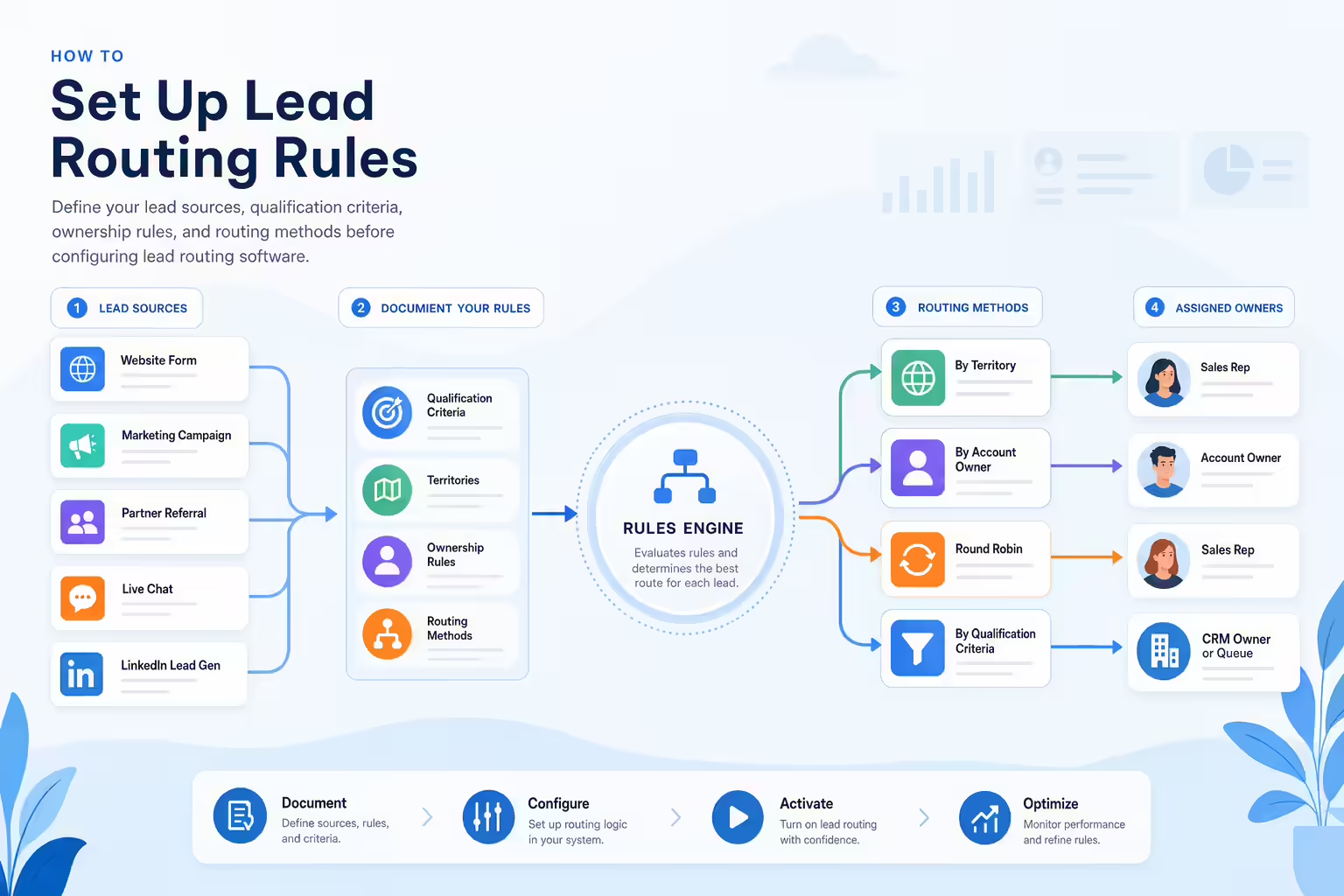
How to Set Up Lead Routing Rules
Before buying or configuring lead routing software, document the process you want to enforce. A clear routing design will make implementation easier and reduce confusion later.
1. Map Your Lead Sources
List every place new leads enter your business. This may include website forms, inbound calls, paid ads, chat, webinars, events, partner referrals, imports, and outbound replies.
For each source, identify which system captures the lead first and which fields are available at the time of routing.
2. Define Your Qualification Criteria
Decide which leads should go to sales immediately and which should enter a nurture, qualification, or disqualification path. Common criteria include company size, region, email type, job title, product interest, budget, timeline, or engagement level.
3. Document Ownership Rules
Write down who should own each type of lead. Include rules for existing accounts, open opportunities, territories, named accounts, channel partners, customer expansion, and duplicate records.
4. Choose Routing Methods
Determine whether each lead type should be routed by round-robin, territory, account owner, lead score, product interest, source, availability, or another rule. If multiple rules apply, define the order of priority.
5. Create Fallback Rules
Every routing workflow needs a backup plan. Define what happens when data is missing, a rep is unavailable, no rule matches, or a system fails to sync.
Fallback options may include a sales manager queue, a shared inbound queue, reassignment to another rep, or manual review by sales operations.
6. Set Follow-Up Expectations
Decide what counts as timely follow-up. Then define how reps will be notified, how tasks will be created, and when leads should be escalated if there is no activity.
7. Test Before Launch
Use sample leads to test each routing scenario before turning on automation. Check assignments, notifications, CRM updates, duplicate handling, and reporting.
8. Monitor and Improve
After launch, review routing performance regularly. Look for missed assignments, uneven distribution, delayed follow-up, duplicate records, and rule conflicts. Lead routing should evolve as your sales team, territories, and go-to-market strategy change.
Questions to Ask Before Choosing Lead Routing Software
Use these questions to evaluate whether a lead routing tool or workflow fits your sales process:

- Which lead sources can the tool route from?
- Which CRM objects and fields can it read and update?
- Can it route leads in real time or near real time?
- Can it assign by territory, round-robin, account owner, score, source, product interest, or availability?
- How does it handle duplicates and existing accounts?
- Can it create tasks, alerts, or follow-up actions for reps?
- Can it track SLAs and escalate leads that are not contacted?
- How easy is it for sales operations to update routing rules?
- What happens if a lead is missing required data?
- What reporting is available for assignment, response time, and follow-up?
- How does it fit with your current sales engagement, calling, marketing automation, and CRM workflows?
How Lead Routing Connects to Follow-Up Workflows
Routing is only the first step. Once a lead is assigned, the next challenge is making sure the right follow-up happens quickly and consistently.

For many sales teams, that follow-up may include calls, emails, SMS, CRM tasks, reminders, or manager visibility. As you evaluate lead routing software, also review the tools your reps use immediately after assignment. The best routing process will not deliver its full value if assigned leads sit untouched or if follow-up activity is difficult to track.
If your team is evaluating Kixie as part of your sales follow-up workflow, review Kixie’s current product documentation and speak with the Kixie team to confirm which capabilities fit your specific routing, CRM, calling, and sales engagement requirements.
Final Thoughts
Lead routing software helps sales teams move from manual assignment to a more consistent, rules-based process. The right setup can improve lead ownership, reduce operational confusion, and support faster follow-up.
Start by documenting your lead sources, ownership rules, routing logic, fallback paths, and reporting needs. From there, you can decide whether your CRM’s native assignment tools are enough or whether your team needs additional automation to manage more complex routing and follow-up workflows.
Ready to close more deals with Kixie?
See how Kixie's AI-powered tools can transform your sales and support operations.
Start Free Trial