
TL;DR
Native GoHighLevel (GHL) WebRTC dialing introduces architectural session volatility, resulting in “Wrong Number” and “One-Ring” bugs that inflict 3-5 seconds of latency per interaction. Integration with Kixie’s decoupled CTI Chrome Extension utilizes Manifest V3 Service Workers to bypass browser throttling, ensuring 100% outbound logic integrity. The deployment of four 1-Click Actions—Voicemail Drops (reducing 45-second manual processes to 5 seconds), SMS Templates (saving 30-40 minutes daily via dynamic field injection), automated Dispositions (triggering bi-directional GHL workflows for deal stage updates), and Universal Click-to-Call (DOM injection for cross-platform dialing)—cumulatively reduces administrative overhead to recover approximately one hour of productive time per sales representative per day.
Reducing Sales Workflow Friction in GoHighLevel with 1-Click Actions
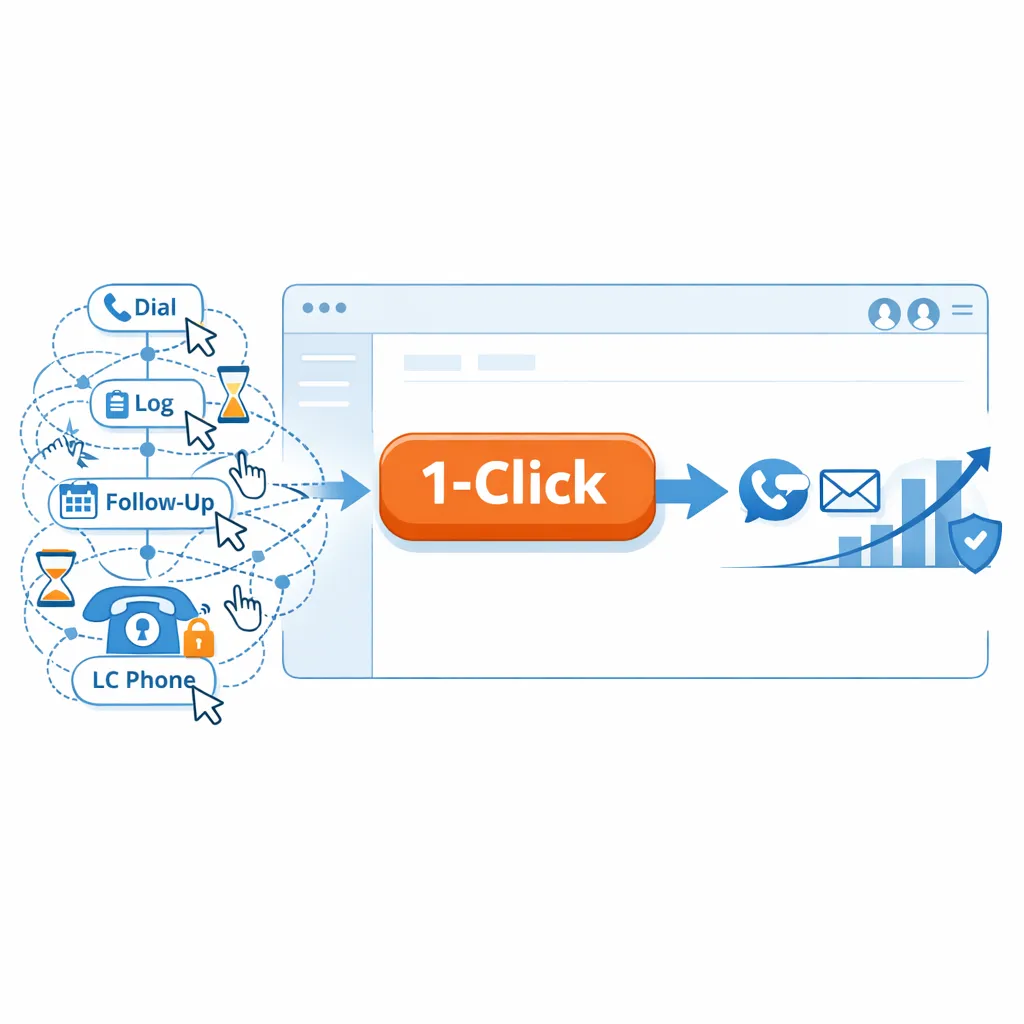
In the environment of high-velocity sales, the efficiency of the Customer Relationship Management (CRM) interface is a primary determinant of revenue throughput. For users of GoHighLevel (GHL), a platform that consolidates marketing and CRM functions, the native telephony infrastructure (“LC Phone”) presents specific architectural limitations that impede workflow velocity. Research indicates that manual tasks associated with dialing, logging, and follow-up can consume significant portions of a sales representative’s day.
Integrating Kixie, a third-party Computer Telephony Integration (CTI) platform, helps organizations resolve these inefficiencies. By replacing manual, multi-step processes with “1-Click Actions,” teams can achieve a measurable reduction in administrative overhead. The analysis focuses on four specific automation vectors: 1-Click Voicemail Drop, 1-Click Manual SMS Templates, 1-Click Dispositioning, and Universal Click-to-Call. These integrations provide a technical justification for the claim that reducing workflow friction saves approximately one hour per agent per day.
The High Cost of Native Browser Dialing When Automating Repetitive Tasks
The High Cost of Native Browser Dialing When Automating Repetitive Tasks
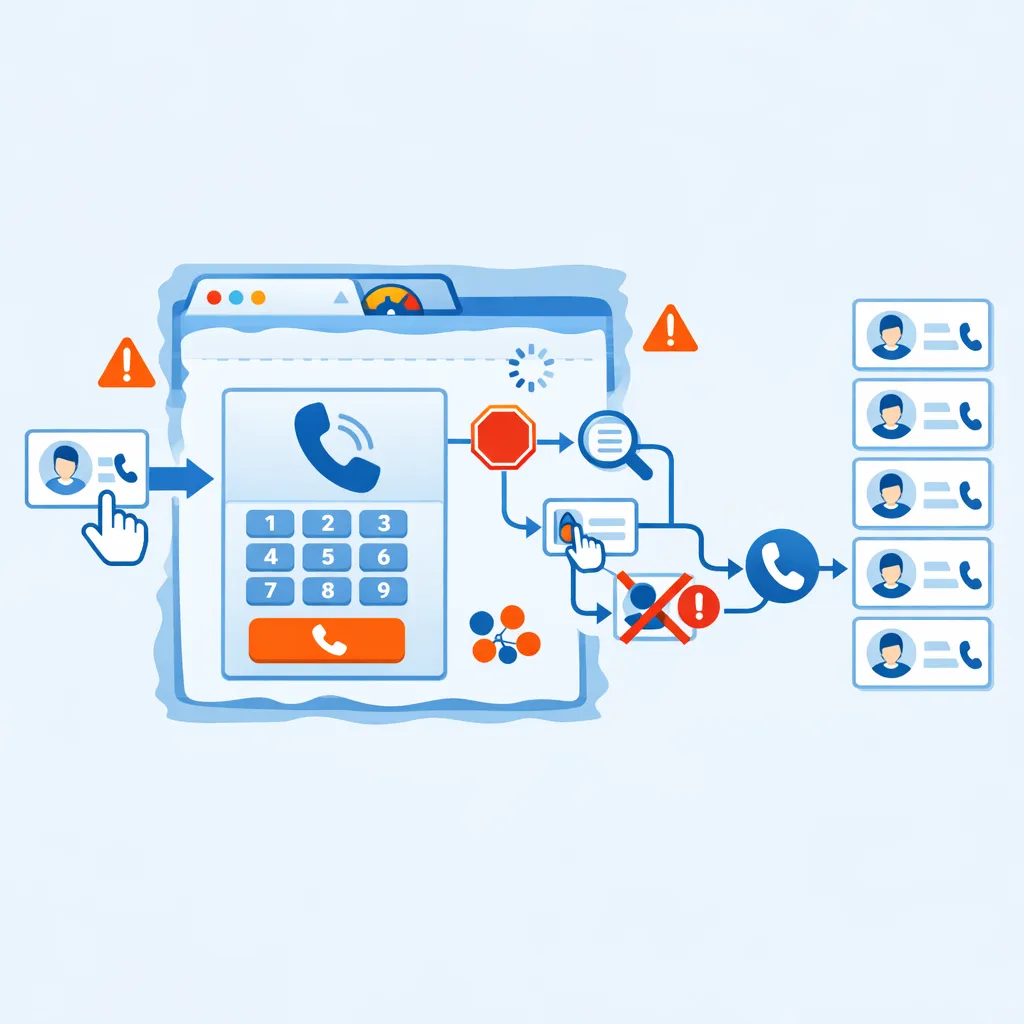
The native GoHighLevel (GHL) dialing experience operates as an embedded browser-based softphone (WebRTC). While functional for low-volume use, this architecture introduces “session volatility” and resource contention when scaled, creating specific friction points for high-volume users.
The Stop-Check-Select-Dial Workflow Impeding 1-Click Actions
The native GHL dialer often requires a “Stop-Check-Select-Dial” workflow to mitigate errors. Specifically, the “Wrong Number” bug, a symptom of session state dependencies, can cause the dialer to initiate calls from a default line rather than the intended user number if the browser session refreshes or lags. To prevent this, agents must manually verify the “From” number before every call.
Time-Motion Impact:
- Action: Pause to inspect dropdown, identify correct number, scroll, select, and dial.
- Latency: Adds approximately 3–5 seconds per call.
- Cumulative Loss: For a representative making 100 calls daily, this friction alone accounts for nearly 10 minutes of wasted time, exclusive of the cognitive load required to switch context.
Browser Throttling and the One-Ring Bug in GoHighLevel
Chrome’s “Budget-Based Background Timer Throttling” aggressively manages resources for background tabs. In a native GHL environment, if the CRM tab is inactive, the browser may delay VoIP signaling packets. This results in the “One-Ring” bug, where inbound calls ring once and disconnect before the agent can answer.
Kixie’s Decoupled Architecture:
The Kixie CTI platform resolves this by utilizing a “decoupled” architecture. Although it visually injects into the DOM (Document Object Model) for the user interface, the core voice processing occurs within a persistent Chrome Extension and independent background processes (Manifest V3 Service Workers). This ensures that voice logic is immune to CRM page freezes or browser throttling, providing the stability required for rapid 1-click execution.
Eliminating Redundant Narration with 1-Click Voicemail Drop Actions
Eliminating Redundant Narration with 1-Click Voicemail Drop Actions
Handling unanswered outbound calls is a major source of inefficiency in sales workflows. In high-volume outbound sales, connection rates can be low, necessitating frequent voicemail deposits.
Operational Mechanism for Automating Repetitive Tasks
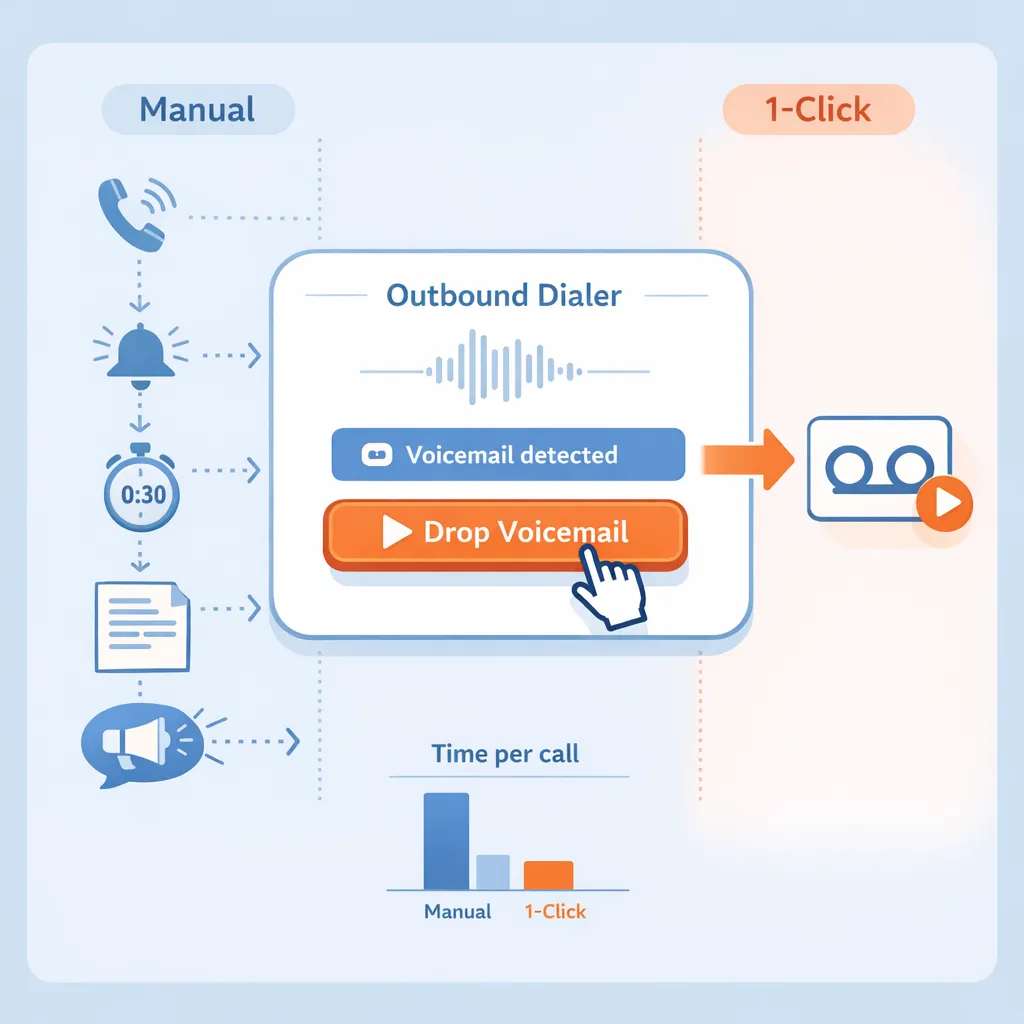
The “Voicemail Drop” feature allows a sales representative to leave a pre-recorded, perfectly scripted message with a single click once the prospect’s voicemail greeting is detected.
The agent waits for the beep, recites a 30-second script, and hangs up. This is physically and mentally repetitive, leading to fatigue and variation in message quality.
The agent hears the voicemail greeting, clicks the “Drop Voicemail” icon in the Kixie PowerCall dialer interface, and immediately disconnects. The software continues to bridge the call in the background, playing the recorded audio file to the prospect’s inbox.
Efficiency and Compliance Analysis for GoHighLevel Automation
For teams making 100+ calls per day, the cumulative time spent reciting voicemails is substantial. If 50 calls go to voicemail, and each message takes 45 seconds (including listening to the greeting), the manual process consumes over 37 minutes. 1-Click Voicemail Drop reduces the active agent involvement to approximately 5 seconds per instance (listening for the greeting and clicking).
Legal Distinction: It is critical to distinguish this from “Ringless Voicemail,” which exists in a legal gray area regarding telecommunications regulations. Kixie’s solution is a “live” drop that occurs during an active call connection, ensuring compliance while maintaining speed.
Sales management should record multiple voicemail variations (e.g., “Follow-up,” “Cold Outreach,” “Referral”) and load them into the Kixie dashboard. Agents can then select the context-appropriate message dynamically.
Standardizing Asynchronous Communication via 1-Click SMS Actions

Text messaging (SMS) has become a dominant channel for B2B and B2C engagement, with open rates frequently exceeding 90%. However, manual typing of SMS messages is prone to error and highly time-consuming.
Dynamic Field Injection to Automate Repetitive Tasks
Kixie’s 1-Click SMS Templates utilize dynamic fields (merge tags) to personalize messages instantly. When an agent selects a template from the PowerCall dropdown, the system automatically pulls data from the active GoHighLevel contact record to populate the message.
- Syntax:
Hi [fname], thanks for your time today. - Execution: The agent clicks the template; the system renders “Hi John, thanks for your time today.”
- Time Savings: Healthcare sales teams utilizing this feature have reported saving 30–40 minutes per agent per day solely from eliminating manual text entry.
Team SMS and Collaborative Inboxes in GoHighLevel
For complex sales cycles involving multiple stakeholders, Kixie offers “Team SMS.” This allows a group of agents to view and respond to SMS threads from a shared inbox within the dialer. This prevents communication silos where a prospect’s text to a specific rep goes unanswered if that rep is unavailable.
Workflow Integration:
Templates can be categorized by sales stage (e.g., “Appointment Reminder,” “Post-Demo Follow-up”). This ensures that all agents adhere to brand messaging standards without requiring management to manually review every outgoing text.
1-Click Disposition as the Trigger for Advanced Automation
1-Click Disposition as the Trigger for Advanced Automation
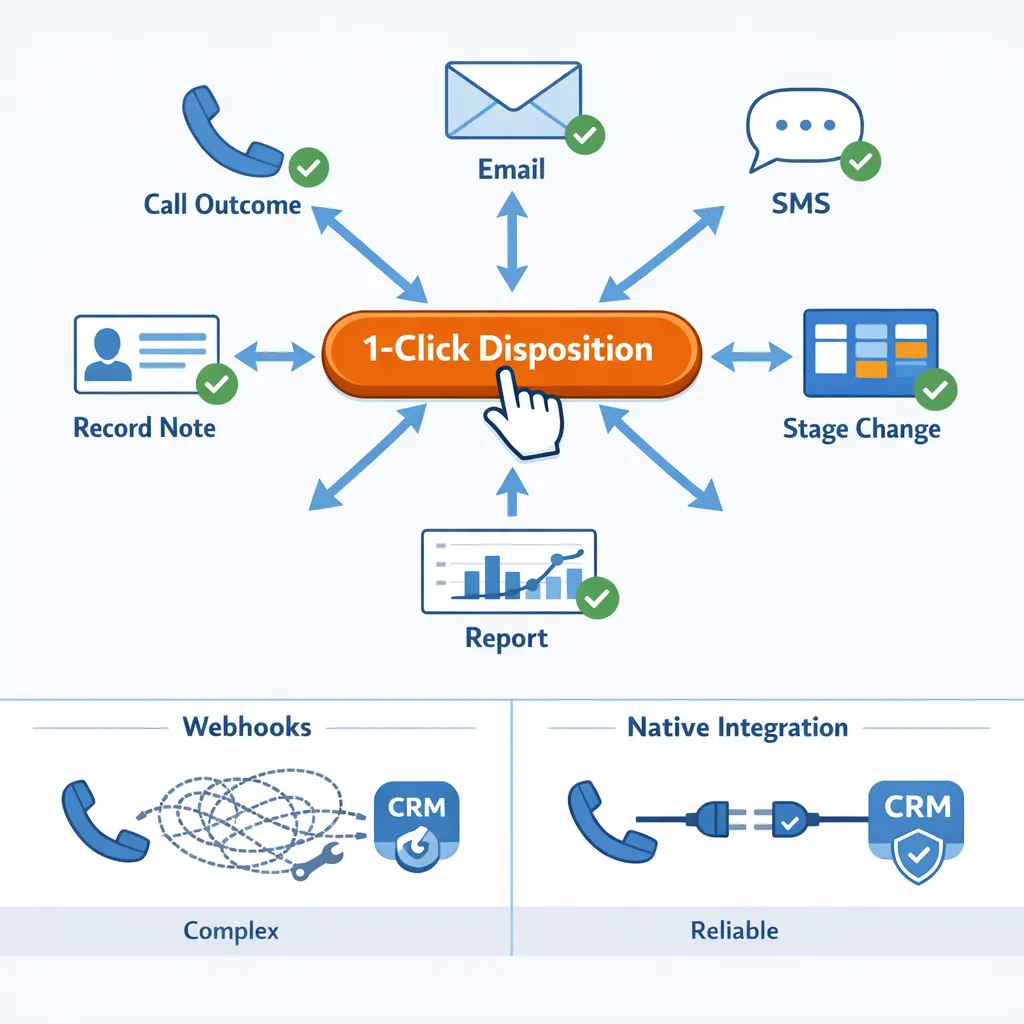
Call dispositioning acts as a powerful driver for automation. In a standard GoHighLevel (GHL) workflow, logging a call outcome involves manually opening the contact record, adding a note, and potentially manually changing a pipeline stage. Consolidating this into a single click drives bi-directional automation.
The Native Integration vs Webhooks for GoHighLevel 1-Click Actions
Historically, connecting dialer outcomes to CRM workflows required complex webhooks. Enhanced integrations now support native workflow triggers within GoHighLevel.
The Automation Cascade:
When an agent clicks a disposition button (e.g., “Demo Booked”) in the Kixie dialer, the following sequence executes instantaneously:
Log Activity: The call is logged as a completed task/activity in GHL.
Update Field: A custom field (e.g., kixie_disposition) is updated on the contact record.
Trigger Workflow: GHL detects the field change and fires a pre-built workflow.
The Appointment Set Workflow to Automate Repetitive Tasks
Consider the “Appointment Set” disposition. A single click by the agent can trigger a GHL workflow that:
- Moves the Opportunity to the “Negotiation” stage in the pipeline.
- Sends a confirmation email to the prospect.
- Sends an internal SMS notification to the sales manager.
- Tags the contact as “Hot Lead”.
Operational Impact: This automation eliminates the need for the agent to perform data entry across multiple screens. The “After Call Work” (ACW) is reduced from minutes to seconds, keeping the agent in a “flow state” for the next call.
Automated Follow-Up Using 1-Click Actions
If a call is dispositioned as “Left Voicemail,” the system can immediately trigger an automated SMS follow-up (e.g., “Sorry I missed you, feel free to text back”). This multi-touch approach significantly increases engagement rates without requiring additional agent effort.
Reducing Context Switching with Universal 1-Click Actions
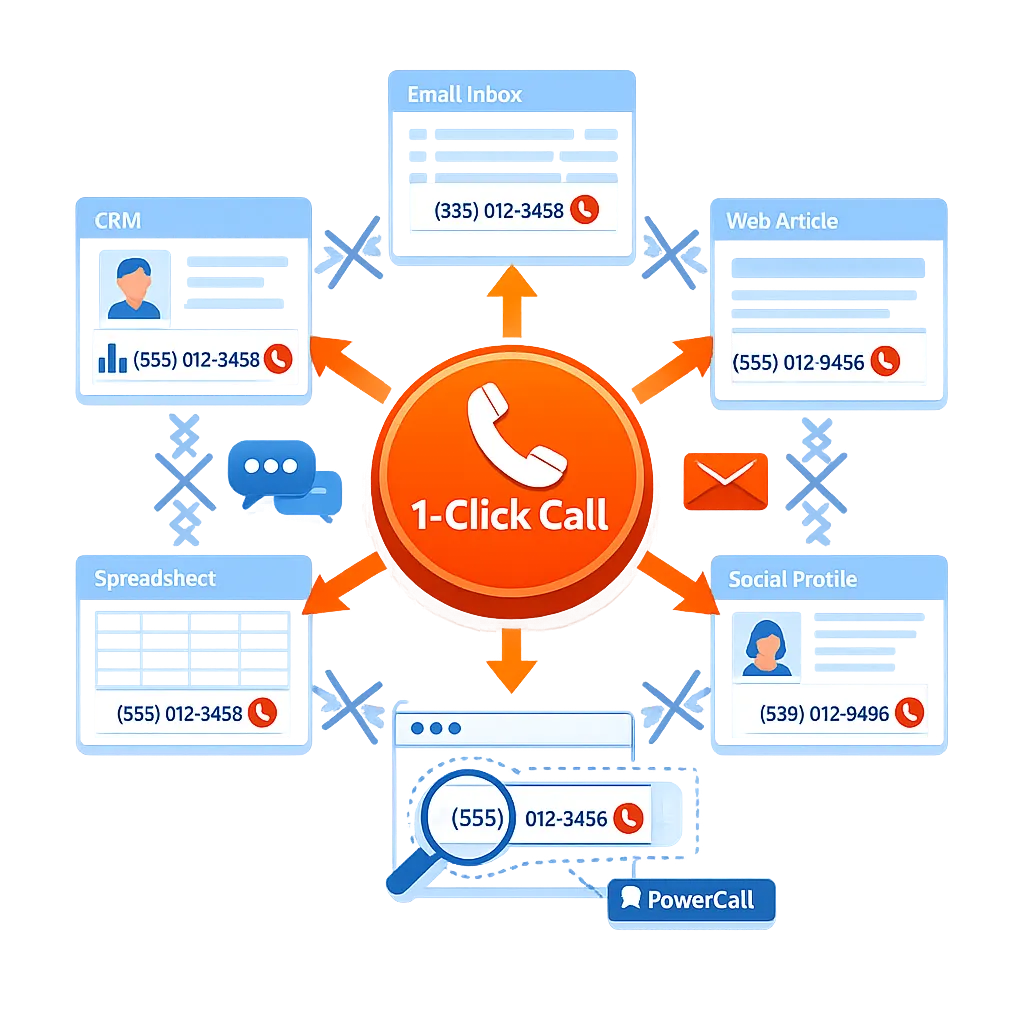
Universal Click-to-Call functionality allows sales professionals to initiate calls from any digital interface, not just the CRM. This reduces the friction involved in navigating between different data sources.
DOM Injection Technology for GoHighLevel Automation
The Kixie PowerCall extension utilizes DOM injection to scan webpages for valid phone number patterns. It appends a clickable red icon next to these numbers, transforming static text into an active communication link.
Cross-Platform Utility to Automate Repetitive Tasks
This feature extends the “1-click” capability beyond GoHighLevel:
- Google Sheets: Agents working from prospecting lists in spreadsheets can dial directly without importing data first (requires publishing sheet as webpage for icon rendering).
- Company Websites: When researching a prospect, an agent can dial the corporate line directly from the “Contact Us” page.
- Email Signatures: Dialing directly from a lead’s email signature in Gmail or Outlook.
Data Integrity: Crucially, calls initiated via Click-to-Call on external sites are still logged automatically back to the associated contact in GoHighLevel, maintaining a centralized system of record.
The Cumulative Effect of Micro-Optimizations on Repetitive Tasks in GoHighLevel
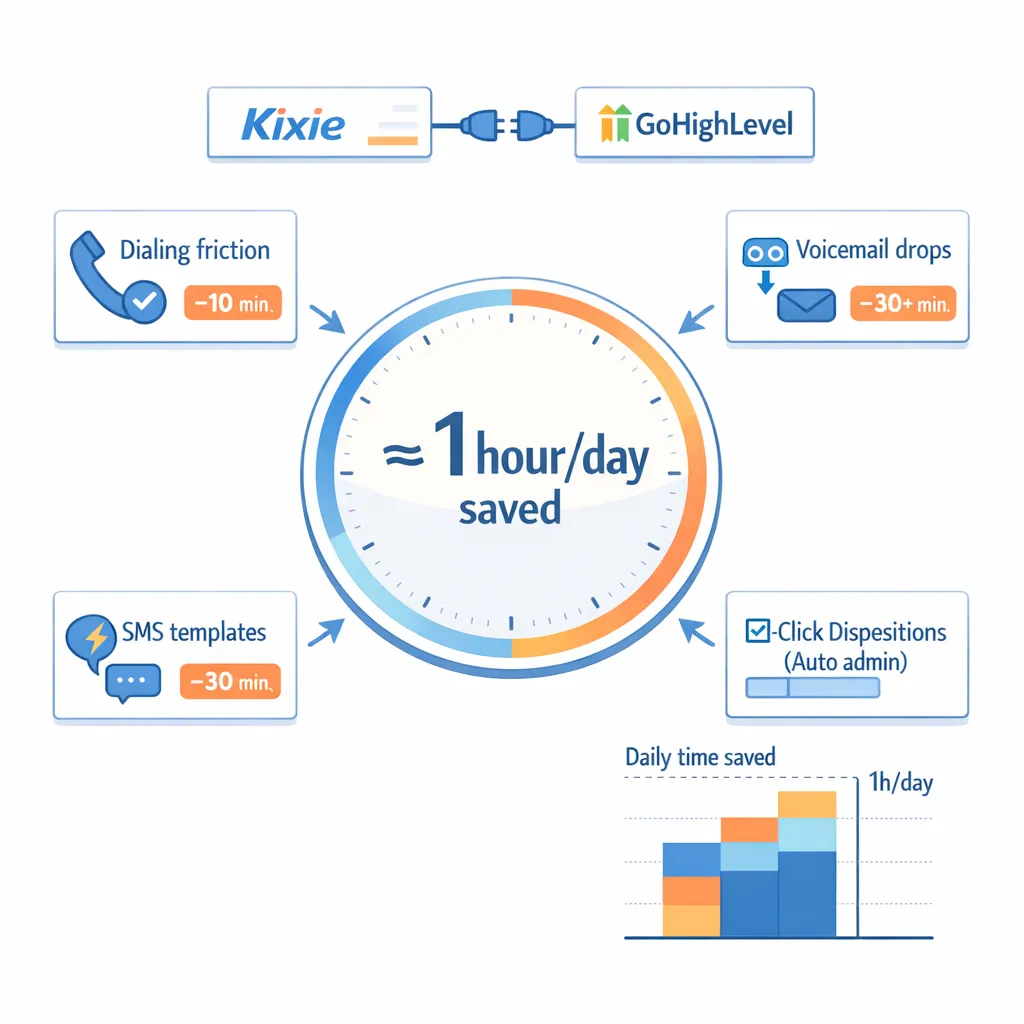
The proposition that integrating Kixie with GoHighLevel saves “an hour a day” is not based on a single feature but on the aggregation of micro-efficiencies.
- Dialing Friction: Eliminating the manual verify-and-dial routine saves ~10 minutes/day.
- Voicemail Drops: Automating message delivery saves ~30+ minutes/day for high-volume dialers.
- SMS Templates: Replacing manual typing saves ~30 minutes/day.
- Automated Admin: 1-Click Dispositions remove the need for manual CRM updates and email follow-ups, saving variable but significant time per successful connection.
For GoHighLevel users, the transition from the native, browser-dependent LC Phone to Kixie’s decoupled, automation-rich CTI represents a shift from manual administration to strategic selling. The “1-Click” philosophy does not merely speed up tasks; it fundamentally alters the sales workflow, allowing technology to handle the repetitive logic while agents focus on the human element of closing deals.
Bring 1-Click Actions to your GoHighLevel team: See how Kixie’s PowerCall dialer, Voicemail Drop, dynamic SMS Templates, and disposition-triggered workflows fit into your existing GoHighLevel pipelines — book a personalized demo or compare Kixie plans.
Ready to close more deals with Kixie?
See how Kixie's AI-powered tools can transform your sales and support operations.
Start Free Trial