Kixie Users: How to Manage Your Direct Line’s Settings

Kixie Users: How to Manage Your Direct Line’’s Settings

The video below is a quick tutorial on how to manage your direct line’s settings, or what happens when your direct number is called. This includes things like forwarding settings and ringtimes.

<

How we increased sales by 45% with one feature

Let’s face it..humans are competitive creatures.

Currently, many of you may be watching the Olympic games – the pinnacle of human competition. In sports, we love the competitive nature of athletes and how it pushes them to jump higher, run faster, and throw harder. We here at Kixie believe sales IS a sport and we are always trying to figure out how to sell more effectively.

While tinkering with Kixie one day, one of our sales reps was looking at our admin dashboard (normally reserved for sales managers and our C-level guys) and he noticed how he landed the most demos that week. He quickly made it known to the rest of the team about his accomplishment and voila… every other sales rep wanted to see their stats too.  

We gave them our Kixie leaderboard view to all our reps and next month, we increased sales by 45%. Every rep could login and see where they stood and BAM, we landed 50% more demos, which in turn led to sales. Lesson learned – let sales be a transparent and fun competition and you will see results.

Want to learn about our Kixie or to sign up for a free trial, please click here.

How to Download and Setup Kixie in Under 3 Minutes

Downloading Kixie is incredibly easy, as it’s just a Chrome extension.

The video below will guide you through a full walkthrough of the Kixie PowerCall dialer, including how to record and drop a voicemail, how to create and send an SMS template, and how to live coach your agents’ calls.

You can get Kixie up and running in under 3 minutes, starting by signing up for a free trial.

Then, navigate to the Chrome Web Store and install the Kixie PowerCall extension.

Generate 5x Better Call Data with Call Dispositions for Salesforce

Generate 5x Better Call Data with Call Dispositions for Salesforce

Watch the tutorial for call dispositions in Salesforce below, and see how Kixie’s great new call dispositions feature can boost your reps’ sales productivity and make keeping tabs on their productivity 5x easier for you.

Your reps now have a much richer way of viewing their past calls with their clients. And you can now have much better insight on their productivity, listen to all the important calls they’ve made, and pass on the best practices you find to your reps with ease. Enjoy!

Generate 5x Better Call Data with Kixie’s Call Dispositions for Zoho CRM, HubSpot CRM, ProsperWorks, Pipedrive, Insightly, Nutshell, Capsule

Generate 5x Better Call Data with Kixie’’s Call Dispositions for Zoho CRM, HubSpot CRM, ProsperWorks, Pipedrive, Insightly, Nutshell, Capsule

Watch the tutorial for call dispositions in CRMs below, and see how Kixie’s great new call dispositions feature can boost your reps’ sales productivity and make keeping tabs on their productivity 5x easier for you.

Your reps now have a much richer way of viewing their past calls with their clients. And you can now have much better insight on their productivity, listen to all the important calls they’ve made, and pass on the best practices you find to your reps with ease. Enjoy! You can sign up for a free trial (no credit card) here.

Sales Manager Phone Call Analytics and Metrics – Kixie

Want to become sales manager of the year?

What about most improved? With the Kixie Dashboard’s Call Reporting and Call History features, it is well within your grasp! Watch a quick tutorial below to see how you can take your managerial game to the next level.

The Ultimate Sales Dialer: Kixie’s Enterprise Plan Features Cont.

Kixie’s Enterprise plan really takes your sasales dialero the next level. For Enterprise plan users, the ability to leverage llocal presence dialing voivoicemail dropd PowerList dialing saves time and energy and increases pickup rates. This undoubtedly leads to more sales per unit of effort, especially for high-volume outbound callers. For managers, the ability to do all of these things plus the ability tolisten in and assist on live calls made by their reps, makes the Enterprise plan especially useful. Additional perks of the Enterprise plan include access to a mobile app, deskphone provisioning, customizable call dispositions and dedicated phone support from an account manager. Take a look at this video for a quick demo of these features:

Top 3 Traits of a Great Sales Dialer

Top 3 Traits of a Great Sales Dialer

A sales dialer can help you and your sales staff perform at peak efficiency. Staff spend less time dialing and more time on calls which means more sales. But how do you choose a great sales dialer software? Look for these three essential features.

Local Presence Dialing is a feature that enables you to call using phone numbers that have the same area code as potential customers. This is useful because prospects are up to 5 times more likely pick up local calls than long distance phone numbers. Your first impression on the prospect – your caller ID – can make a difference. More connections means more sales. Local Presence Dialing could improve sales by 40% and requires no manual or arduous work as Kixie does this automatically for you with 1 click. You can just toggle the feature on or off depending on your needs. Check out this article for more details.

Voicemail Drops are crucial in saving you time. The average sales rep makes about 100 calls per day. With it taking about 1 minute to leave a voicemail, your reps would waste an hour and a half leaving 100 voicemails. With Voicemail Drop, you can leave a perfect prerecorded voicemail message with just one click. It’s also great for building credibility and closing deals. If you go into your Kixie profile, you will see the VoVoicemail dropab. Just add a new recording, name it, and upload. Voicemail Drop saves you time and energy. Click on this link for more information.

Call Coaching is a great feature for sales managers. Managers can see how their sales staff are performing and give them advice on a call. This immediate feedback can be invaluable during training. Sales reps are more likely to remember what they need to change when they get immediate feedback. Managers can click on their staff’s name, “Listen” to their conversation, and “Whisper” advice to the agent if they need to. With the “Whisper” feature, customers do not hear the manager’s advice. Managers can also “Speak” so the customer can hear the manager, essentially creating a 3-way phone call. For more details, check out this article.

Save time and energy with a great sales dialer to help you make more sales. These three features of a great sales dialer – Local Presence Dialing, Voicemail Drop, and Call Coaching – are available on Kixie’s Enterprise Plan. Click here for a free trial of Kixie.

How Kixie’s Automated Call Logging Works with Salesforce

First, Kixie Syncs at the Lead/Contact Level:

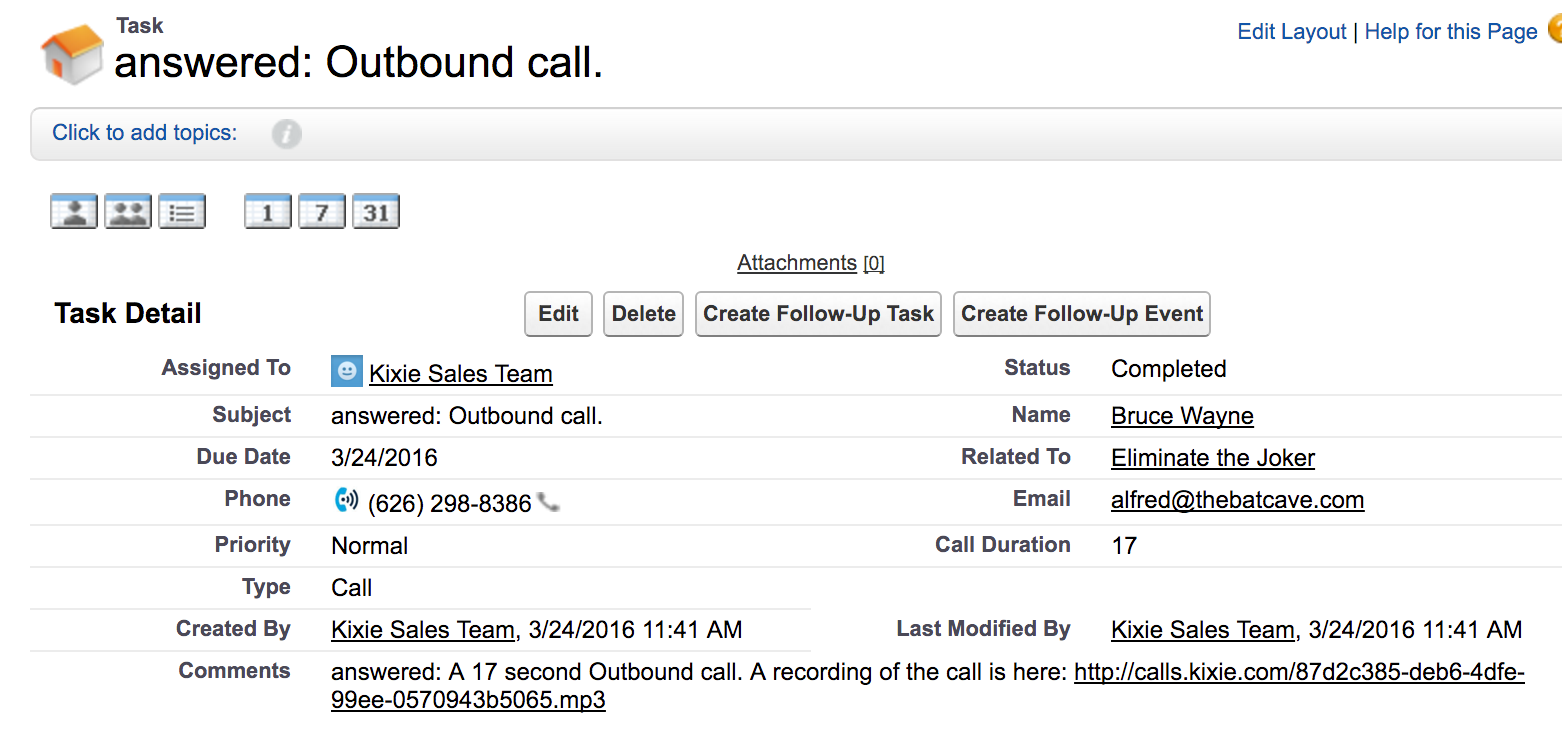
Kixie automatically syncs the call or SMS activity to the lead or contact that is associated with the phone number that is being called/calling you. The call activity we create inside the lead or contact looks like this:
InsideactivitySF

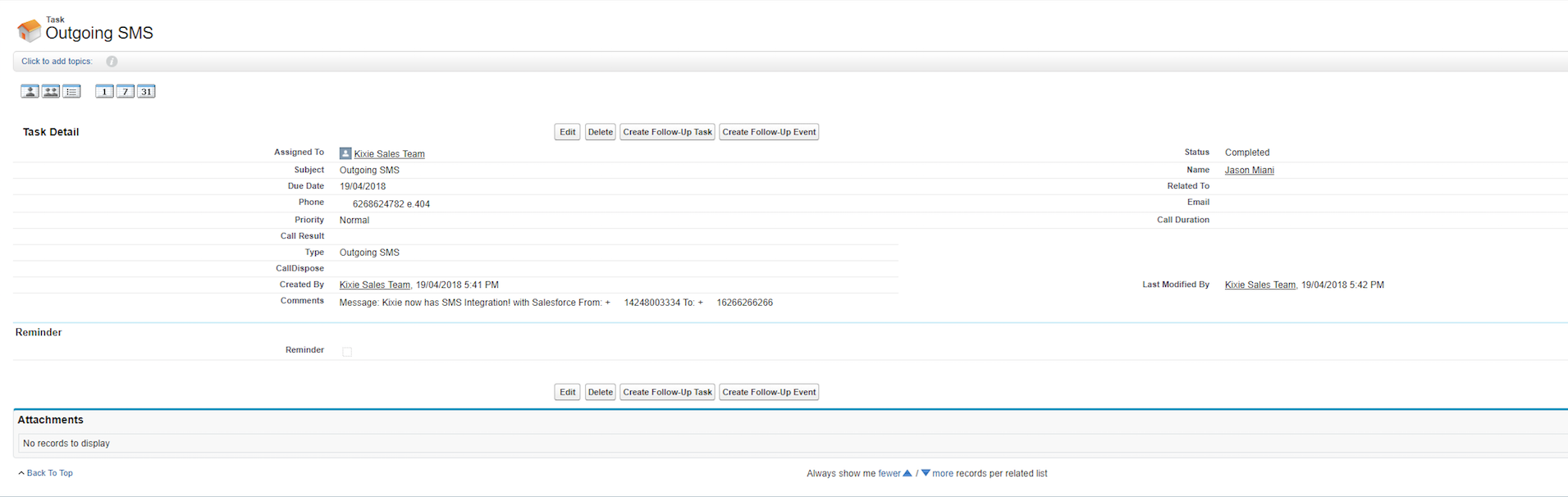
The SMS activity we create inside the lead or contact looks like this:
alt text

From there, Kixie will sync that same call or SMS activity up to the account and opportunity level, if in fact the contact is associated with any, in the following manner: _Syncing at the Account Level: _ The activity will always sync to that account if one is associated with the contact. Here is that same activity, this time as seen in the activity history of the contact Bruce Wayne’s associated account, “Wayne Enterprises”.

SFAccountAcitivity

Syncing at the Opportunity Level

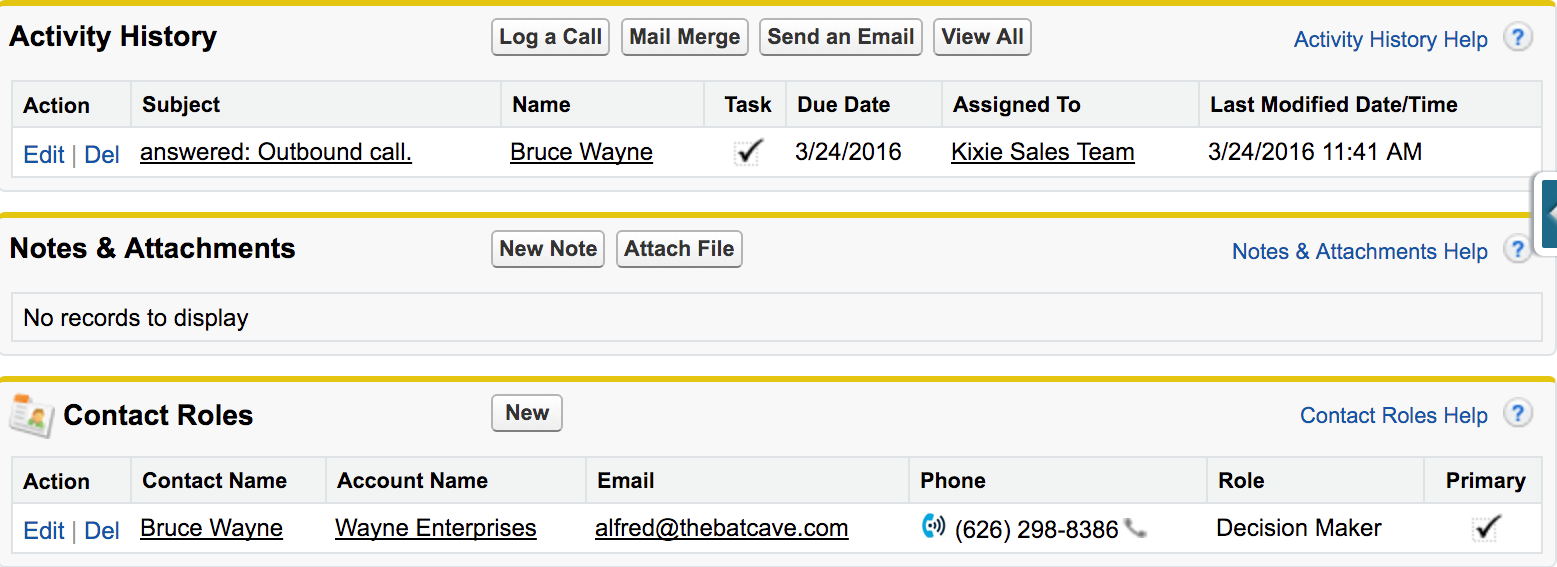
Kixie will sync to the most recent opportunity that is associated with the contact, in this case, the “Eliminate the Joker” opportunity, as shown below.
SalesforceOppActivity

What if there are multiple leads/contacts with the same number?

In the event of multiple leads/contacts with the same number, Kixie will sync to the _last referenced lead/contact, _with preference given to the contact level if there are both leads and contacts with that number. It is always best to get the direct number of any lead or contact, if you can, to avoid potential confusion.

Automatic Lead Creation

If you are calling/being called by a phone number that is not associated with a lead or contact in Salesforce yet, Kixie will automatically create a lead inside of Salesforce w/ that number, and sync all subsequent call activity to that lead, all of which will be maintained upon that lead’s conversion into a contact. *This feature may be disabled for your whole account if you so choose.

The Kixie PowerCall®

The Kixie PowerCall is a phenomenal sales tool. It functions as an enhanced, Salesforce-driven caller ID, as well as a shortcut into Salesforce. See this article for a more in-depth look at the ideal utilization of this key Kixie feature. It provides four basic opportunities for your salesperson on a given call:

  1. View the lead/contact’s basic Salesforce information as well as the most recent opportunity (with direct links to access them)
  2. Edit the Salesforce lead/contact’s basic information
  3. Compose a note that will sync to the lead/contact and contact’s associated opportunity
  4. Log a disposition (dispositions will log as an activity type: Disposition)
  5. Schedule a future activity with the Salesforce lead/contact

This functionality lends itself especially well to list-view dialing, as well as when you are receiving incoming calls. To start a ffree trialin under 3 minutes, no credit card required, please click here. Thanks!

4 tips for sales game tape review

4 tips for sales game tape review

If you are a sports fan or married to one or maybe even just friends with one, you’ve heard the phrase “We’ve got to watch the tape and make some adjustments”. This is especially popular for team sports with individual match-ups like football and basketball. Coaches and players watch game-film with the sole purpose of getting better by identifying their own strengths and weaknesses as well as their opponents. It’s a very handy tool. Fortunately sales teams can use call recordings to hone their craft. Here is a plan for sales managers to help take their team to the next level and start reviewing game tape.

1. Record your calls

The first step to reviewing game tape is, of course, having game tape. I know. I know. This sounds like common sense but there are many sales orgs that are not even getting to the call recording stage.

2. Store your recordings in your CRM

This step is important because it will help you prioritize listening. There is certainly not enough time in the day to listen to every recording by every team member. Especially not with all of the other things you need to do as a sales manager. Storing the call recording in your CRM gives you the advantage of having the recording paired with the deal size, the deal owner, and all of the many other activities that lead up to that point.

3. Each week listen to your biggest wins and your biggest losses

You have to look at both your strengths and your weaknesses to get better. Write down what worked in the wins and what went wrong in the losses and share this information objectively with the team. If possible create clips for similar situations so your team members can hear the “bad play” and followed up quickly with the “winning play”. It may be a little painful for the “bad play” team member so it is important to re-iterate that these are coaching moments.

4. Each week listen to the longest call for each of your team members

Listening to ALL of your team members will help you find hidden gold. It’s easy to focus only on your best contributor with the highest revenues every month but there are definitely some worthwhile tactics from your other team members which are better to surface earlier rather than later. This will also help you catch trends that you either want to promote or squash before you get in trouble. These are four easy steps to start reviewing call recordings and get your sales team ready to tackle their next big week, month or quarter. I’d love to hear your comments. Sign up for a free trial of Kixie and be a sales all-star today!