
TL;DR: Kixie is our best overall power dialer for outbound sales teams because it combines CRM-connected single-line or multi-line dialing, unlimited US and Canada minutes, SMS, voicemail drop, coaching, and number-health workflows in one platform. Its pricing is quote-based, so very small teams focused only on the lowest published seat price may prefer a narrower option. Myphoner suits solo users who want the lowest software price, Mojo is purpose-built for real-estate prospecting, JustCall works well for two-seat teams, Close fits teams replacing their CRM and dialer together, RingCentral RingCX is the lowest public price we found for predictive dialing at three seats, CloudTalk and Ringover emphasize international operations, PhoneBurner focuses on one-to-one deliverability, and Aircall or Dialpad make the most sense when those broader phone systems are already in place.
Prices and product requirements were checked on October 7, 2026. Pricing changes quickly. Follow the linked primary sources and confirm the final quote, taxes, usage, seat minimums, and regional terms before buying.
What changed in the October 2026 update
- Added Close, a CRM with a built-in power and predictive dialer, and RingCentral RingCX, a contact-center plan with predictive dialing at a published price.
- Dialpad now publishes Sell pricing, so it is no longer listed as quote-based.
- CloudTalk no longer offers its Lite tier; the lowest power-dialer configuration is now Starter plus the Power Dialer add-on.
- PowerDialer.ai’s entry prices apply to annual billing; the Single Line plan is not offered month to month.
- Myphoner shows US visitors prices in US dollars, and its per-minute US voice rate is now listed.
- Review counts were refreshed where the review site could be reached; figures we could not re-check are dated August 2026.
Editorial disclosure
Kixie publishes this guide and sells one of the products compared below. We apply the same evidence rules to Kixie as to every other vendor, label vendor-produced claims and videos, disclose where public pricing is unavailable, and do not use affiliate links. This is evidence-based desk research, not a claim that we logged into and tested every platform.
Quick picks: the best affordable power dialer for each use case
- Best overall for outbound sales teams: Kixie
- Best low base software price with usage-based calling: Myphoner
- Best public entry plan for testing an AI-assisted dialer: PowerDialer.ai
- Best for real-estate list prospecting: Mojo
- Best for a two-seat voice-and-SMS sales team: JustCall
- Best CRM with a built-in power dialer: Close
- Best published price for predictive dialing (three or more seats): RingCentral RingCX
- Best mix of international coverage and dialer options: CloudTalk
- Best international business-phone bundle for three or more users: Ringover
- Best for one-to-one dialing and number deliverability: PhoneBurner
- Best for teams already committed to Aircall: Aircall
- Best for Salesforce teams already on Dialpad: Dialpad
How we compared affordable power dialers
We started with the buying questions visible in current search results: Which tools are genuinely cheap? What does the dialer itself cost? Is a power dialer legal? Which products support one line versus several lines? What is excluded from “unlimited” calling? We then checked twelve vendors against the same evidence framework.
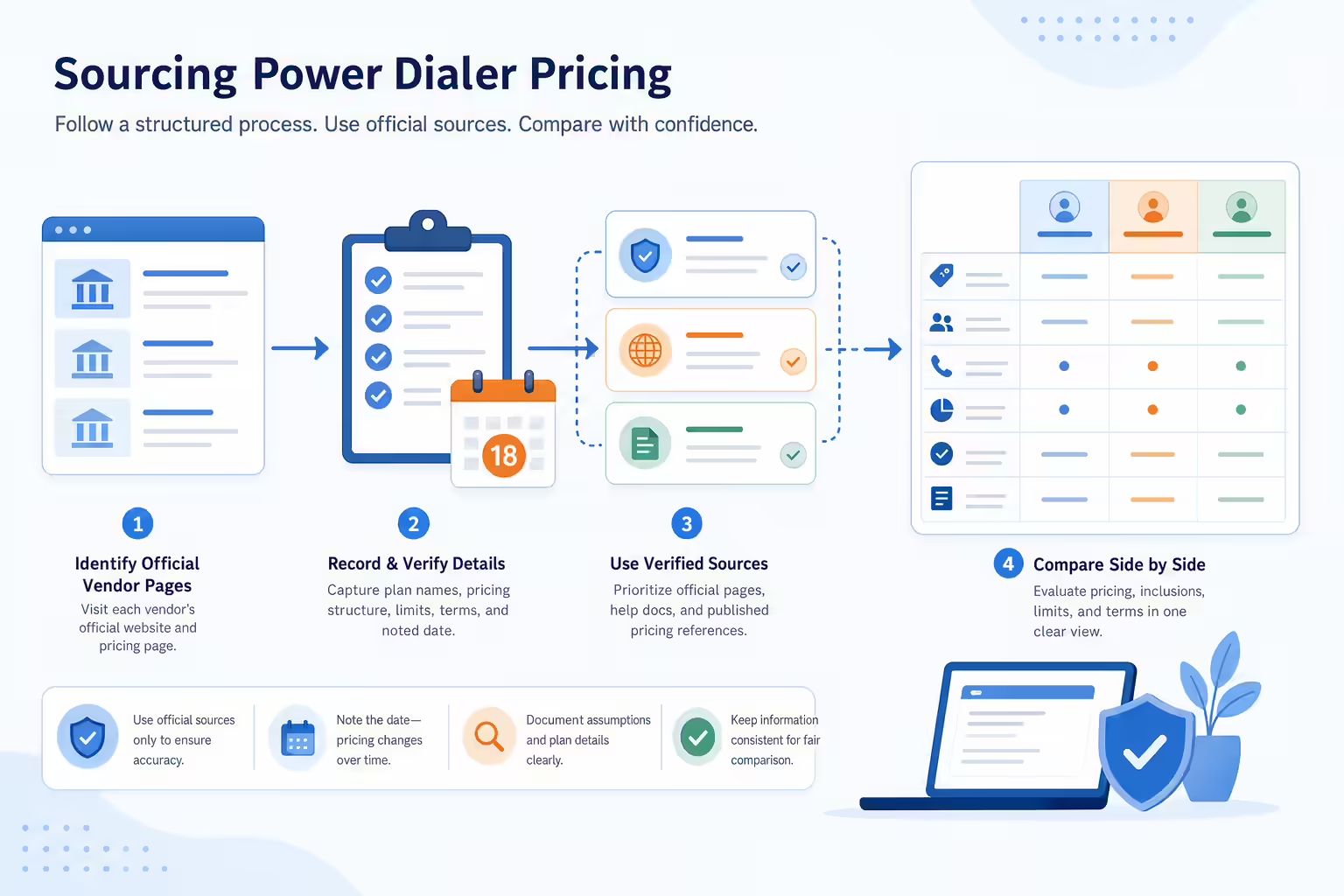
- Pricing: We used official pricing and help pages as the primary source. “Usable entry cost” means the lowest published configuration that includes the power dialer, multiplied by any stated minimum seat count, before taxes and metered usage.
- Dialing mode: We distinguished sequential or progressive dialing from multi-line, parallel, predictive, and dynamic dialing. Vendors often use these terms differently.
- Hidden-cost review: We checked voice usage, dialer-specific traffic exclusions, required base licenses, numbers, add-ons, seat minimums, and annual commitments.
- Workflow fit: We considered CRM syncing, voicemail drop, SMS, coaching, list management, international coverage, DNC controls, and caller-ID or number-health tooling.
- User sentiment: We summarized recurring themes from G2, Capterra, or TrustRadius rather than selecting a single flattering quote. Small review samples are identified.
- Videos: Every vendor section includes a public YouTube video, usually a walkthrough. Each is labeled as independent or vendor-produced, dated, and accompanied by a crawlable summary. A vendor demo shows the workflow but should not be mistaken for independent validation.
No vendor paid for placement. We did not rank products by review score alone, and we did not convert missing prices into estimates. We review this page monthly and publish a change only when the source package is complete.
Affordable power dialer comparison: real entry cost in 2026
| Tool | Best for | Dialer mode | Lowest usable published entry | Minimum seats | Main cost caveat |
|---|---|---|---|---|---|
| Kixie (best overall) | CRM-connected outbound sales teams | Single-line or up to 4 simultaneous lines | Quote-based; 7-day free trial | Not publicly stated | Seat prices and premium add-on prices (ConnectionBoost, Conversation Intelligence, AI Human Voice Detection, DNC) are not public |
| Myphoner | Low base software cost | Single-line power dialer | $27/seat/month on Basic, billed monthly (US accounts; EUR elsewhere) | None disclosed | No minutes included; Myphoner Voice is billed per minute, or bring your own Twilio |
| PowerDialer.ai | Testing AI-assisted outbound | Single Line entry plan; vendor also markets 5-line parallel dialing | $45/month billed annually, up to 250 minutes | None disclosed | No monthly Single Line option; unlimited US/Canada calling starts at $139/month annually or $199 monthly |
| Mojo | Real-estate prospecting | Single-line or 3-line | $99/month for one user: $10 access + $89 single-line dialer | 1 | Mojo Voice and recording add $30 and $25 respectively |
| JustCall | Two-seat voice/SMS sales teams | Single-line Power Dialer on Pro; predictive (up to 10 lines) and dynamic require quote-based SalesPro | $49/user/month billed yearly, or $69 monthly; $98/$138 for two seats | 2 | Fair-use policy bars telemarketing-scale use; some Sales Dialer usage is billed from credits |
| Close | Teams replacing their CRM and dialer together | Single-line Power Dialer on Growth; Predictive Dialer on Scale | $99/user/month billed yearly, or $109 monthly | None published | Calls are metered (about $0.02/minute) and numbers start around $1/month |
| RingCentral RingCX | Three-plus-seat teams that want predictive dialing | Preview, progressive, and predictive on every plan | $65/user/month billed annually; $195/month for three seats | 3 | Annual contract, sales-led purchase, and separately metered automated-dialer charges |
| CloudTalk | International teams | Sequential Power Dialer; Parallel Dialer add-on available | $40/user/month billed yearly: Starter $25 + Power Dialer add-on $15 | 1 on Starter; 3 on Expert | Expert includes the Power Dialer at $49/user/month annually; fair-use policy limits unlimited US/Canada calling |
| Ringover | Three-plus-user international teams | Power Dialer on Business; 2-line Parallel Dialer add-on in some countries | $47/user/month billed yearly; $141/month for three users | 3 | Automated calling is listed at an additional $0.08/minute |
| PhoneBurner | One-to-one deliverability | Single-line progressive | $140/user/month billed yearly or $165 monthly | 1 | ARMOR, numbers, and Connect Scores are add-ons |
| Aircall | Existing Aircall teams | Single-line Power Dialer | $50/user/month billed yearly; $150/month for three licenses | 3 | Power Dialer requires Professional; AI and some usage may cost extra |
| Dialpad | Salesforce teams on Dialpad Sell | Legacy Salesforce power dialer on Sell Advanced; new progressive Dialpad Dialer documented for Sell Premium | $95/user/month billed yearly, or $110 monthly (Sell Advanced) | None published | The new Dialer needs Sell Premium ($150/user/month annually), a Contact Center, and outbound calling credits |
Table notes: “Unlimited” always remains subject to vendor fair-use, destination, and routing rules. Myphoner sets the display currency by visitor location; US accounts are billed in US dollars. CloudTalk publishes its add-on prices for annual billing only. Seat minimums multiply the entry price, so a $65 seat with a three-seat minimum is a $195 monthly purchase. All prices were checked October 7, 2026.
Kixie: best overall power dialer for outbound sales teams
Kixie’s current plan page offers Professional, Single-Line PowerDialer, and Multi-Line PowerDialer plans. All include business phone service, bi-directional CRM integration, text messaging, coaching, voicemail drop, call recording, and unlimited US/Canada minutes. Multi-Line can power dial up to four lines simultaneously. AI Human Voice Detection, ConnectionBoost, and Conversation Intelligence are listed as premium add-ons, and DNC is a compliance add-on. Kixie offers a seven-day trial with no credit card required but does not publish seat or add-on prices.
The workflow advantage is not only more dials. Kixie can tie calls, outcomes, notes, texts, and follow-up activity to CRM records while managers monitor calls and teams manage caller-ID quality through tools such as ConnectionBoost. That can be more economical than buying a cheap dialer and then adding texting, coaching, and integration work separately.
User sentiment: G2 lists 866 reviews and a 4.8/5 score. Its summary emphasizes ease of use, CRM integration, automation, and support; recurring negatives include occasional call-quality, dialer, number, and connection issues. Review the full Kixie review record.
Myphoner: best low base software price with usage-based calling
Myphoner’s pricing page lists Basic at $27, Plus at $38, and Premium at $59 per seat/month on monthly billing. The page picks the currency from the visitor’s location, and Myphoner’s help center says US accounts are billed in US dollars while accounts elsewhere are billed in euros. There are no seat minimums, every seat costs the same, and all plans carry a 14-day free trial. The single-line Power Dialer and auto-dial retry strategies appear on every tier.
No calling minutes are included. Myphoner Voice is pay-as-you-go: its published rate for US calls is €0.015 per minute, billed in 60-second increments and converted at the exchange rate on the payment date. Teams can also dial from their own mobile phones, connect their own Twilio account (billed by Twilio, without built-in recordings, voicemail drop, or call monitoring), or use a compatible third-party VoIP softphone.
Basic lacks voicemail drop, inbound call flows, live monitoring, and HubSpot or Pipedrive support, and caps pipeline automations at five. Plus adds unlimited automations, inbound call flows, API and custom integrations, and beta HubSpot and Pipedrive integrations; voicemail drop on Plus and Premium is listed as contact us. Premium adds live monitoring and the longest recording retention.
User sentiment: Capterra lists 99 reviews and a 4.7/5 score. Reviewers commonly praise ease of use, lead management, outreach automation, and dialing speed; improvement requests include CRM integrations, reporting, and export limits. See Myphoner reviews.
PowerDialer.ai: best for testing an AI-assisted dialer with a public entry plan
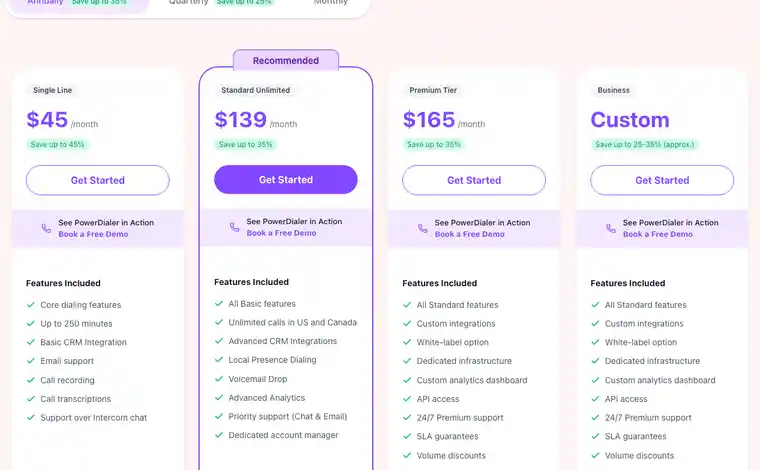
The official PowerDialer.ai pricing page defaults to annual billing, where Single Line is $45/month with up to 250 minutes, basic CRM integration, recording, and transcripts; Standard Unlimited is $139/month and adds unlimited US/Canada calls, advanced CRM integrations, local presence, voicemail drop, analytics, and an account manager; and Premium is $165/month and adds custom integrations, API access, and white-label options. A Business plan is custom priced. On quarterly billing the three published plans cost $59, $159, and $199. On monthly billing the Single Line plan is not offered, and Standard Unlimited and Premium cost $199 and $249. The screenshot above, taken in July 2026, still matches the annual view as of October 7, 2026.
PowerDialer.ai’s site markets four modes, including a parallel dialer that calls up to five numbers at once, but the pricing cards do not say which plan includes parallel dialing, and they do not state whether prices are per account or per user. Ask for both in writing before you buy.
User sentiment: When we checked G2 in August 2026, the public record had only four reviews, which is too small for a reliable consensus, and we could not reach it in October. That thin review base is itself a risk signal: run a controlled trial, test the CRM fields and audio path, and ask for current customer references before committing.
Mojo: best for real-estate prospecting and transparent month-to-month packaging
Every user needs a $10/month Agent Access license. The Single Line Dialer is $89/license/month and the Triple Line Dialer is $139/license/month, so one user’s actual dialer entry is $99 or $149. Both list unlimited minutes. Mojo Voice costs $30, call recording $25, and Mojo Caller ID $10 per month. Lead-data products are separate.
Mojo is particularly good at turning real-estate lists into structured prospecting sessions. The limitations are equally clear: the product is specialized, the interface is less modern than newer AI-native tools, and a fully equipped seat can cost much more than the dialer card alone.
User sentiment: G2 lists 28 reviews at 4.1/5. Users praise simple setup, the three-line workflow, and faster list calling; complaints include occasional dialer interruptions, caller-ID behavior, and configuration complexity. See Mojo Dialer reviews.
JustCall: best for a two-seat team that needs power dialing, voice, and SMS
JustCall’s official help center says unlimited Power Dialer campaigns are available on Pro, Pro Plus, Business, and SalesPro. Pro costs $49/user/month billed annually or $69 monthly, with a two-license minimum, making the minimum subscription $98 or $138 per month. The Pro Power Dialer is single-line: one agent, one call at a time. Predictive dialing, which the pricing page lists at up to 10 lines, and Dynamic campaigns are unlimited only on quote-based SalesPro. A 14-day trial with no credit card includes SalesPro features and a few campaigns of each type.
Pro lists unlimited outbound and inbound minutes, but JustCall’s fair usage policy bars using unlimited minutes for telemarketing or call-center-scale calling, and its help center lists Sales Dialer-specific usage, inbound calls on Sales Dialer numbers, answering machine detection, and dialer workflows and SMS as credit-billed. International, toll-free, and premium-rate calls are also excluded. Treat subscription and dialing usage as separate budget lines.
User sentiment: G2 listed 2,382 reviews and a 4.3/5 score when we checked in August 2026; G2 blocked our October check. Users frequently praise ease of use, CRM integration, automatic logging, and centralized voice/SMS; the largest negative themes are call, connection, call-quality, and loading issues. See JustCall reviews.
Close: best CRM with a built-in power dialer
Close’s pricing page lists Solo, Essentials, Growth, and Scale. The Power Dialer starts on Growth at $99 per user/month billed annually or $109 monthly; Close’s help center says Solo and Essentials do not include it. The Power Dialer is single-line: it works through a Smart View one lead at a time. The Predictive Dialer is Scale only ($139 annually, $149 monthly) and, per Close’s help center, works best with at least four reps logged in. Voicemail drop starts on Growth and live call coaching is Scale only. No seat minimum is published, and a 14-day trial requires no credit card.
Calling is not bundled. Close says most outbound calls cost around $0.02 per minute and numbers start around $1 per month, billed at cost from a prepaid usage balance. Its help center adds that calls round up to the whole minute. Call transcripts and summaries require the Call Assistant add-on.
User sentiment: G2 lists 2,092 reviews and a 4.7/5 score. Ease of use, helpfulness, and simplicity are the most common positive themes; missing or limited features and call issues are the most common negatives. See Close reviews.
- Choose it when: you are choosing a CRM and a dialer at the same time and want both in one tool.
- Watch out for: metered calling, no multi-line dialing for a single rep, and predictive dialing locked to the top plan.
RingCentral RingCX: best published price for predictive dialing
RingCentral’s RingCX pricing page lists Standard at $65 per user/month billed annually ($75 paid monthly), Professional at $95 ($110), and Elite at $145 ($165). Every plan lists a dialer with voice broadcast, preview, predictive, and progressive modes, plus call recording, AI summaries, and CRM integrations. Professional adds AI quality management and agent assist. Every plan routes to sales rather than self-serve checkout, and we found no RingCX free trial.
RingCentral’s billing documentation says seat-based RingCX packages require at least three agent licenses and that contracts are annual, even with monthly payment, so the smallest Standard purchase is $195 per month. North American accounts receive unlimited domestic minutes, but RingCentral’s transport-charge documentation lists automated outbound dialer calls as a separate metered category without published rates. DNC scrubs, recording storage, and some CRM integration licenses also appear as paid add-ons in the billing documentation. Ask for dialer usage pricing in writing.
User sentiment: TrustRadius shows a 9.1/10 score across 23 ratings, a small sample. We could not reach G2 for a current RingCX count. See RingCX reviews.
- Choose it when: a team of three or more needs predictive or progressive dialing and can handle a contact-center setup.
- Watch out for: annual commitment, metered automated-dialer charges, and compliance tools sold as add-ons.
CloudTalk: best mix of international coverage and dialer choices
CloudTalk’s pricing page now shows three tiers. On the US page they are Starter at $25, Essential at $29, and Expert at $49 per user/month billed annually ($34, $39, and $69 monthly); EU visitors see the same numbers in euros. The former Lite tier is no longer offered. The sequential Power Dialer is a $15/user/month add-on billed annually and is included in Expert, so the cheapest published configuration is Starter plus the add-on at $40/user/month annually with a one-license minimum. Expert requires three licenses. The Parallel Dialer is a $39 add-on; the pricing page says it dials up to 10 numbers at once, while CloudTalk’s help center describes up to five concurrent calls, so confirm the line count for your account. A 14-day trial is available.
Unlimited US and Canada calling sits under a fair-usage policy. CloudTalk’s help center describes a 10,000-minute monthly ceiling per seat and names sustained auto-dialing and telemarketing-scale outbound volume as patterns it monitors, with overage drawn from prepaid credit. High-volume teams should ask how dialer traffic is treated.
User sentiment: G2 lists 1,938 reviews at 4.4/5. Ease of use, CRM integration, and international workflows are common positives. Call and connection issues, app stability, reporting limitations, and add-on cost are recurring negatives. See CloudTalk reviews.
Ringover: best international phone bundle for teams of three or more
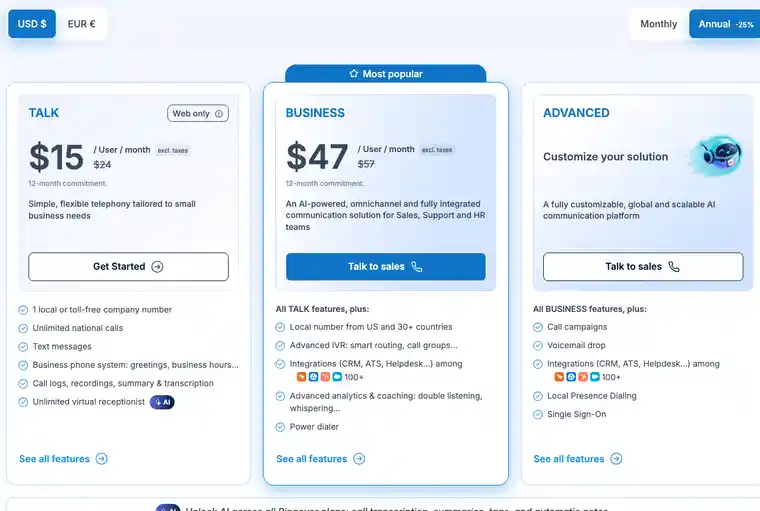
Ringover Business is $47/user/month billed annually with a three-user minimum and 12-month commitment, for a $141/month minimum before tax and usage. It includes a Power Dialer, a number per user, CRM integrations, analytics, monitoring, and coaching. Advanced is custom priced and adds call campaigns, voicemail drop, and Local Presence Dialing. Ringover also lists an additional $0.08/minute for calls made through call-automation systems. The pricing page limits a Power Dialer import to 300 contacts, and a Parallel Dialer add-on ($49/user/month) that dials two calls at once is available only in the US, UK, and Spain on plans with the Power Dialer. Monthly billing is $57/user, still with three users. A seven-day trial covers up to five users.
User sentiment: G2 lists 498 reviews and a 4.6/5 score. Reviewers commonly praise ease of use, CRM integration, call management, and support; pricing, mobile-app glitches, and missing features recur on the negative side. See Ringover reviews.
PhoneBurner: best for one-to-one dialing and caller-ID deliverability
PhoneBurner’s Standard plan is $140/user/month billed annually or $165 monthly. Professional is $165 annually/$195 monthly, and Premium is $183 annually/$215 monthly. Every plan includes unlimited power dialing, a CRM, workflow automation, analytics, and one-click voicemail. ARMOR number monitoring and remediation and Connect Scores are add-ons on every tier, and numbers are an add-on except for the one included with Premium; PhoneBurner does not publish those add-on prices. No seat minimum is published, and calls are limited to US and Canada numbers.
User sentiment: G2 lists 292 reviews and a 4.7/5 score. Users consistently praise ease of use, onboarding, support, efficiency, and deliverability workflows. Price is the clearest recurring objection, followed by dialer, integration, and occasional call issues. See PhoneBurner reviews.
Aircall: best for teams already standardized on Aircall
Aircall Professional includes Power Dialer and Voicemail Drop. Official 2026 Aircall material lists Essentials from $30/user/month and Professional from $50/user/month with annual billing. Both require three licenses, so the lowest published annual-billing configuration with the dialer is $150/month before taxes, usage, and add-ons. Aircall’s help center says a Power Dialer list can contain up to 1,000 numbers, and the dialer runs in Aircall Workspace on desktop or web, not the mobile app. Monthly billing raises Professional to $70 per license.
User sentiment: G2 listed 1,573 reviews at 4.4/5 when we checked in August 2026; G2 blocked our October check. Ease of use, fast adoption, integrations, shared history, and analytics are common positives. Peak-time call quality, connection delays, and workflow configuration are recurring criticisms. See Aircall reviews.
Dialpad: best for Salesforce teams already on Dialpad
Dialpad’s pricing page now lists Sell Essentials at $39, Advanced at $95, and Premium at $150 per user/month billed annually ($49, $110, and $170 on the monthly toggle, although Dialpad’s FAQ says Premium is sold on annual plans only). Prices exclude taxes and regulatory fees. Essentials is self-serve with a 14-day trial; Advanced and Premium are sold through sales. The pricing table includes the Salesforce power dialer on Advanced and Premium and offers it as an add-on on Essentials.
Dialpad’s new progressive Dialpad Dialer supports lists from its Lead Module, CSV, and API; configurable lines per agent; voicemail detection; local, main-line, and verified numbers; static and dynamic campaigns; DNC scrubbing; multiple passes; screen pop; and a Salesforce integration. Its overview documents it for Sell Premium users assigned to a Dialer-enabled Contact Center, and setup requires outbound calling credits. Dialpad’s articles describe access differently in places, so confirm which licenses include the Dialer before you buy.
User sentiment: TrustRadius shows an 8.7/10 score across 47 ratings. Reviewers praise recordings, transcripts, call history, analytics, and the general interface; reported negatives include occasional lag, connection behavior, mobile limitations, and manual Salesforce object linking. See Dialpad Sell reviews.
Power dialer vs auto, parallel, and predictive dialers
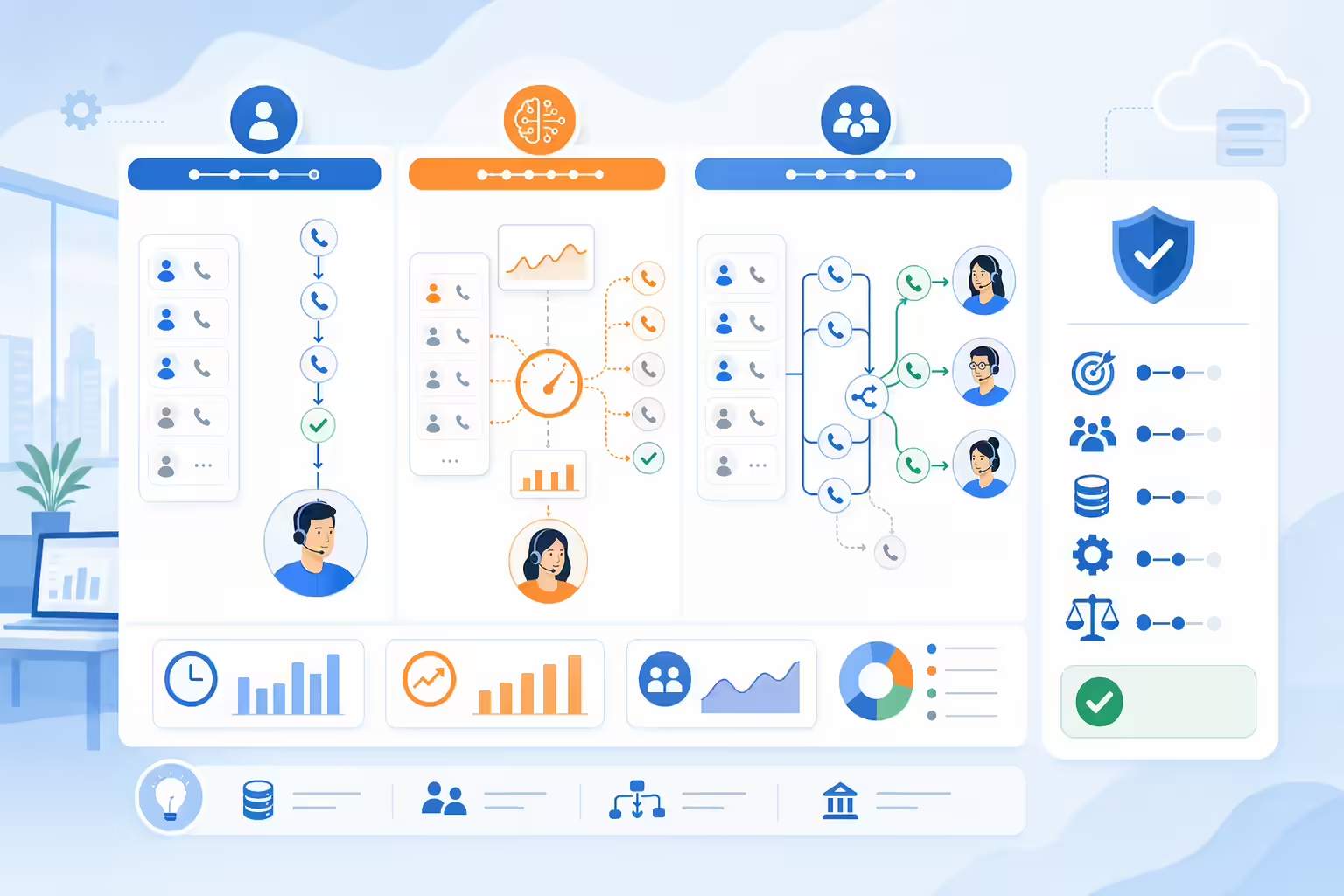
| Mode | What it does | Best use | Main risk |
|---|---|---|---|
| Preview | Shows the record before the rep chooses to call | High-value or researched accounts | Lowest call volume |
| Sequential/progressive power dialer | Calls one number after another when a rep is available | Quality-focused outbound and simpler compliance operations | Lower maximum volume than parallel dialing |
| Parallel/multi-line dialer | Calls several numbers at once and routes a live answer | High-volume SDR teams with good list and pacing controls | Abandoned calls, connection delay, number reputation, and regulatory complexity |
| Predictive dialer | Uses pacing models to call based on expected answers and agent availability | Larger contact centers | Requires close staffing, abandonment, and compliance control |
| Auto dialer | An umbrella label that vendors apply to several automated modes | Only after the buyer verifies the exact behavior | Misleading feature comparisons |
Ask every vendor what happens when two people answer, how long a prospect waits before the rep hears them, how voicemail is handled, whether calls are abandoned, and how pacing is controlled. For more detail, see our dialer-type comparison.
Are power dialers legal?
The FTC’s Telemarketing Sales Rule guidance covers disclosures, calling hours, caller-ID transmission, entity-specific opt-outs, the National Do Not Call Registry, abandoned calls, and most prerecorded telemarketing calls. The FTC notes that many business-to-business calls are exempt from parts of the TSR, but exemptions are not blanket permission: its 2024 amendments added protections against deceptive or misleading B2B telemarketing practices and expanded recordkeeping.
The FCC’s TCPA rules, state laws, sector rules, and non-US laws can impose additional consent and dialing requirements. Parallel and predictive modes can add abandonment and pacing risk because several people may answer while too few agents are available. Before launch, have counsel review your exact campaign, suppress national and internal DNC records, capture consent and opt-outs, enforce local calling windows, retain required records, and test the dialer’s abandonment and voicemail behavior.
Why answer rate and number reputation matter more than dial volume
A five-line dialer is not five times more valuable if prospects ignore the numbers or hear a delay after answering. The operating metric should be qualified conversations per rep hour and cost per qualified conversation, not dials alone.
- List quality: bad data creates retries, wrong numbers, complaints, and wasted minutes.
- Caller-ID reputation: spam labels can erase the volume advantage of a faster dialer.
- Number strategy: local presence, branded calling, number registration, rotation, and remediation are different tools; test their effect and comply with caller-ID rules.
- Connection experience: measure post-answer delay, abandoned calls, audio quality, and how often a rep receives no context.
- Workflow completion: a conversation is worth less if the result, notes, consent status, and next action never reach the CRM.
Run a controlled trial on representative lists. Compare answer rate, qualified-conversation rate, voicemail rate, complaint rate, spam-label incidence, CRM completion, and rep time, not a vendor’s maximum calls-per-hour claim.
How to calculate the real monthly cost of a power dialer
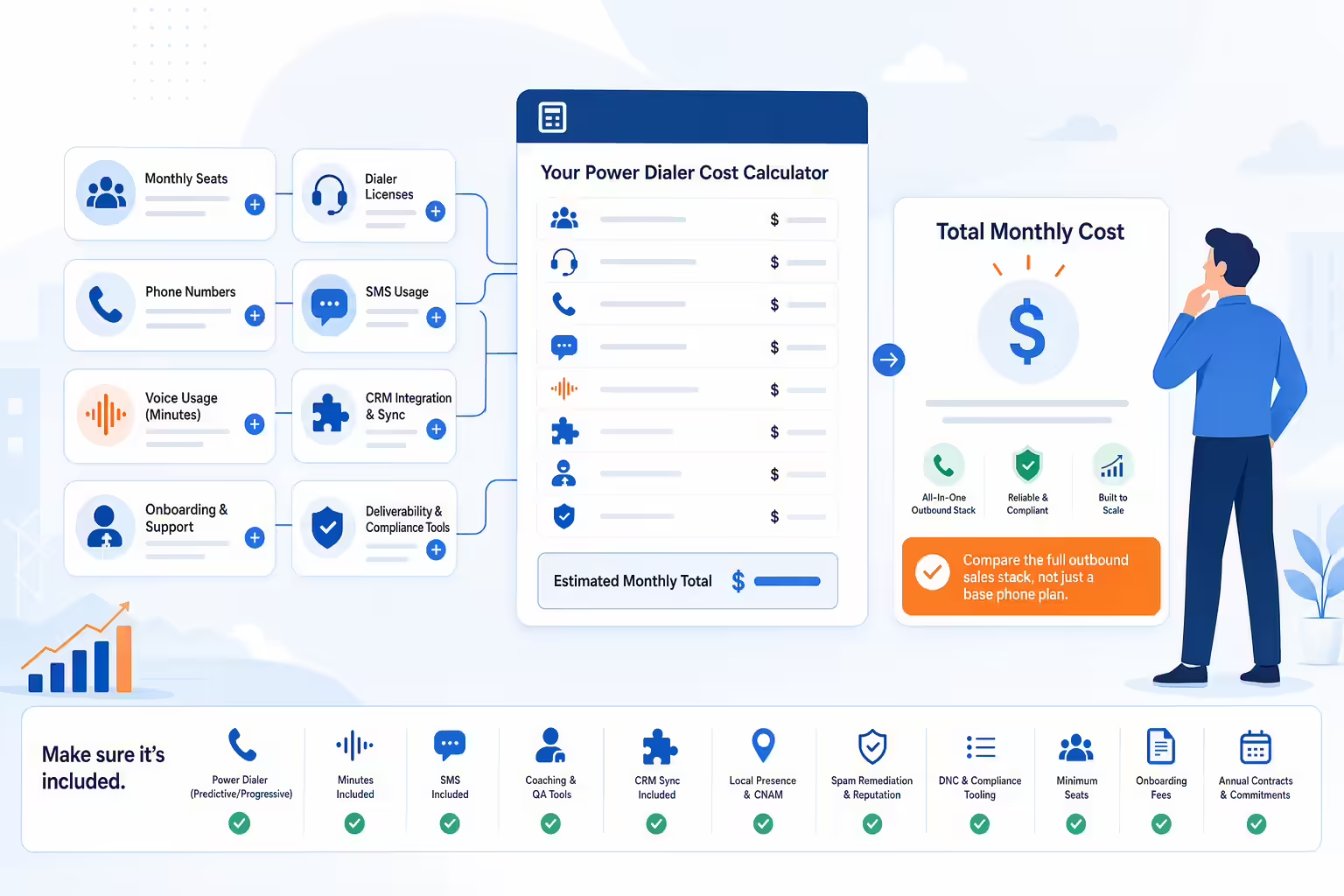
Working monthly cost = required seats + dialer licenses/add-ons + phone numbers + voice usage + SMS + recording/AI + CRM integration + onboarding/support + deliverability/compliance tools.
Then divide that total by qualified conversations, opportunities, or revenue attributable to the workflow. A $45 plan can be more expensive than a $140 plan if it creates usage charges, integration work, and low answer rates. A quote-based platform can be affordable if it replaces several paid tools and eliminates manual CRM administration. Use your own trial data.
Buyer checklist before choosing a cheap power dialer
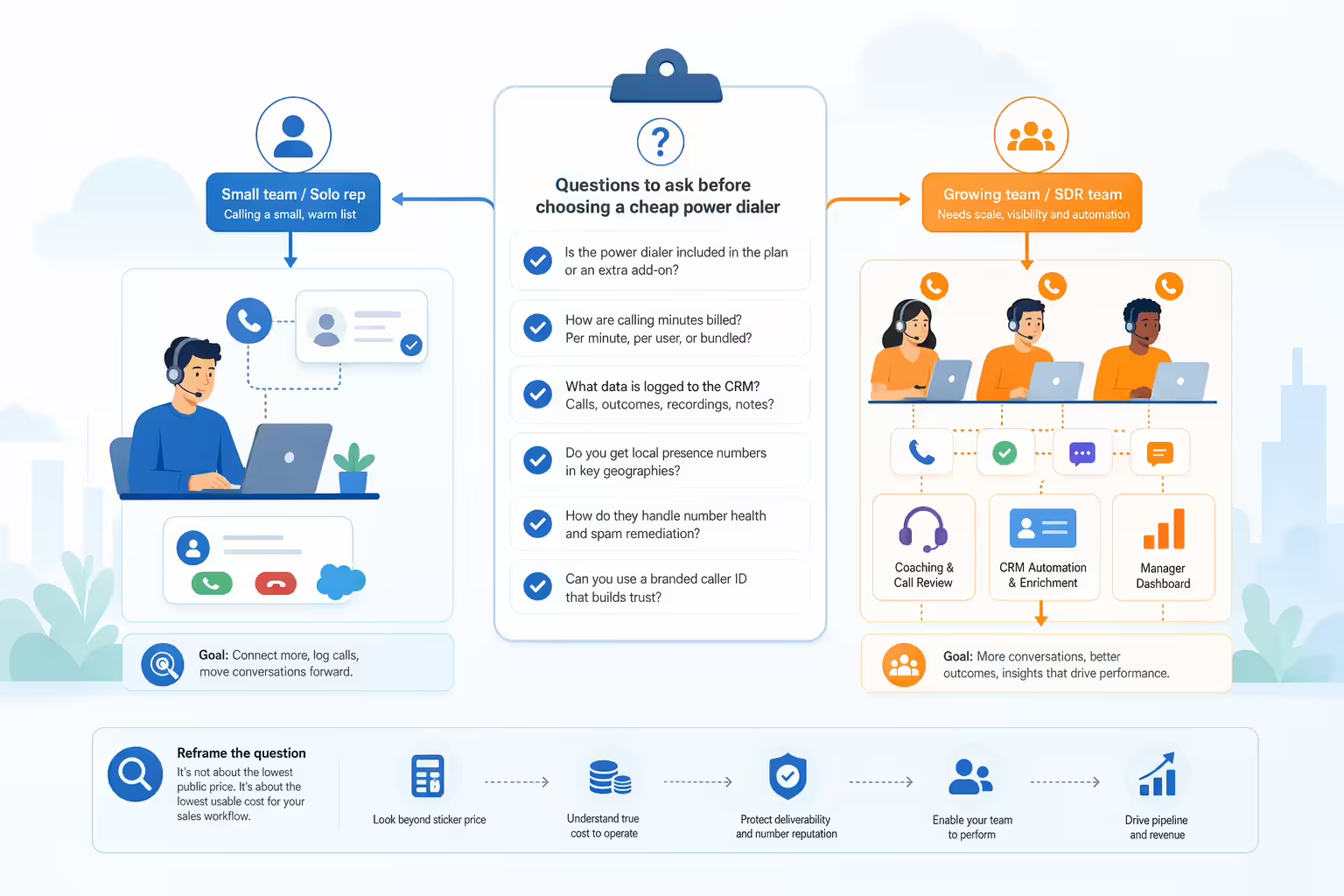
- Which exact plan includes the required dialing mode?
- What is the minimum number of seats and contract term?
- Are dialer calls included, metered, or excluded from “unlimited” calling?
- How many lines can one agent use, and what happens when several people answer?
- Are numbers, local presence, branded calling, spam monitoring, and remediation included?
- Can the system enforce DNC lists, time zones, attempt limits, consent status, and opt-outs?
- Does the CRM integration sync call direction, outcome, recording, notes, consent, and next task?
- Are voicemail drop, recording, transcription, AI summaries, coaching, and analytics included?
- What support, onboarding, uptime commitment, data retention, security, and export options apply?
- Can you test answer rate and CRM completeness with your actual reps, network, CRM, and lead sources?
Final recommendations
Best overall: Kixie. For an outbound sales team that wants multi-line dialing, CRM automation, unlimited US and Canada minutes, SMS, voicemail drop, coaching, and number-health workflows in one platform, Kixie is the most complete choice in this comparison. Compare its quote with the full cost of assembling those capabilities across a lower-priced dialer, phone service, and separate workflow tools.
For narrower needs, a solo rep focused on the lowest published entry should compare Myphoner with PowerDialer.ai’s annual Single Line plan; a real-estate prospector should compare Mojo with PhoneBurner; and a two-seat team should test JustCall Pro while including dialer usage in the cost model. A team choosing a new CRM should look at Close, and a team of three or more that needs predictive dialing should price RingCentral RingCX. International teams should compare CloudTalk with Ringover. Aircall and Dialpad are strongest when the buyer is already committed to their broader phone or contact-center deployments.
The right answer should survive a two-week proof: clean calls, healthy numbers, more qualified conversations, complete CRM records, acceptable complaint rates, and a monthly cost your team can explain.
Frequently asked questions
What is the cheapest power dialer in 2026?
There is no universal cheapest option because vendors bill seats, voice, and dialer access differently. Myphoner shows the lowest base software price in this comparison at $27 per seat per month for US accounts, but no minutes are included, so voice is billed per minute. CloudTalk’s Starter plan plus the Power Dialer add-on is $40 per user per month billed annually, with unlimited US and Canada calling under a fair-usage policy. JustCall Pro is $98 per month for its two-seat minimum on annual billing. Compare the complete working cost.
Is there a free power dialer?
None of the vendors in this comparison offers a permanent free power dialer; they offer free trials instead. Kixie and Ringover list seven-day trials; JustCall, CloudTalk, Myphoner, Close, and Dialpad Sell Essentials list 14 days. A trial is most useful when you test your real CRM, lists, network, number reputation, and reporting, not only whether the dial button works.
How much does a power dialer cost?
Published subscriptions in this comparison range from low double digits plus usage to more than $150 per user/month. Minimum seats can create a higher starting commitment: JustCall Pro starts at two seats, while Aircall Professional, Ringover Business, and RingCentral RingCX require three. Close and CloudTalk Starter have no published minimum, and Kixie requires a quote.
Are power dialers legal for cold calling?
The tool alone does not determine legality. The answer depends on the audience, consent, DNC status, technology, message, calling hours, abandonment behavior, and jurisdiction. Consumer, B2B, prerecorded/artificial-voice, and multi-line campaigns can be treated differently. Have counsel review the exact campaign and use DNC, consent, time-zone, attempt-limit, caller-ID, and recordkeeping controls.
Does a power dialer call multiple numbers at once?
Not always. Traditional power dialers usually move through one number at a time. Multi-line or parallel dialers call several numbers simultaneously. Kixie’s Multi-Line PowerDialer supports up to four lines; Mojo offers three; PowerDialer.ai markets a five-line parallel dialer; Ringover’s Parallel Dialer add-on dials two. CloudTalk and JustCall offer parallel or predictive dialing through an add-on or a higher plan, and Close and RingCentral RingCX offer predictive dialing on specific plans.
What should I test during a power dialer trial?
Test answer rate, qualified conversations per hour, post-answer delay, voicemail detection, call quality, spam-label behavior, DNC and time-zone controls, CRM field completeness, rep ease of use, reporting, support response, and the actual billable usage. Run the test with representative lists and your production CRM.
About the author
Shane Martin is a Kixie team member who researches sales technology, outbound calling workflows, and content performance. This article was researched and reviewed on October 7, 2026. Product and pricing corrections can be sent through Kixie’s contact channels.
Ready to close more deals with Kixie?
See how Kixie's AI-powered tools can transform your sales and support operations.
Start Free Trial