
TL;DR: Speed to lead software helps inbound sales teams shorten the time from form submission, demo request, phone inquiry, or chat handoff to first rep action by combining instant alerts, lead routing, dialing, SMS, email, CRM logging, automation, and response time reporting. The guide frames the core workflow as lead capture, CRM record creation or update, ownership assignment by rules such as round robin, territory, account owner, source, company size, language, product line, or rep availability, rep alerting with context, first call via dialer or click to call, fallback steps such as voicemail, text, email, or second call, activity logging, and manager review. Evaluation criteria include support for lead sources, routing logic, calling workflow, approved messaging channels, CRM integration, automation, reporting, scalability, governance, permissions, data quality, and approved messaging practices. Recommended operating rules include defining high intent versus low intent inbound leads, setting realistic response time SLAs by lead type, automating assignment, minimizing clicks before first outreach, building a follow up sequence, and reviewing reports weekly. Key metrics are average response time, median response time, speed to call, first attempt rate, contact rate, follow up completion, lead to meeting conversion, and response time by source. Kixie is mentioned as a platform to consider for calling, messaging, and CRM workflows, with current capabilities, integrations, and package availability to be verified through Kixie documentation or a representative.
When a new inbound lead raises their hand, the clock starts immediately. The faster your team can assign the lead, reach out, and log the first touch, the more consistent your follow-up process becomes.
That is where speed to lead software comes in. These tools help sales teams reduce the delay between a lead’s first conversion event and a rep’s first meaningful follow-up. Depending on the system, that may include instant notifications, lead routing, calling, texting, CRM logging, sales automation, and reporting.
This guide explains what speed-to-lead software does, which features to look for, how to build a faster lead response workflow, and which metrics to track as you improve your inbound sales process.
What speed to lead software does
Speed-to-lead software helps sales teams respond to new leads quickly and consistently. In practice, it connects the moment a lead comes in, such as a form submission, demo request, phone inquiry, or chat handoff, to the next sales action.

A strong speed-to-lead workflow usually answers a few critical questions:
- Who should own this lead?
- How quickly should a rep respond?
- What channel should be used first: phone, text, email, or another touchpoint?
- What happens if the lead does not answer?
- How will the activity be tracked in the CRM?
- How will managers know whether reps are meeting response-time expectations?
Speed-to-lead tools may be standalone products, features inside a CRM, or part of a broader sales engagement, dialer, or revenue operations platform. For many teams, the ideal setup combines lead capture, routing, calling, texting, automation, and reporting into a single workflow.
Why speed to lead matters for sales
Inbound leads are often most engaged right after they take action. They may have just requested pricing, booked a demo, downloaded a resource, compared vendors, or searched for a local service. If follow-up is delayed, that intent can fade, and the lead may continue researching other options.
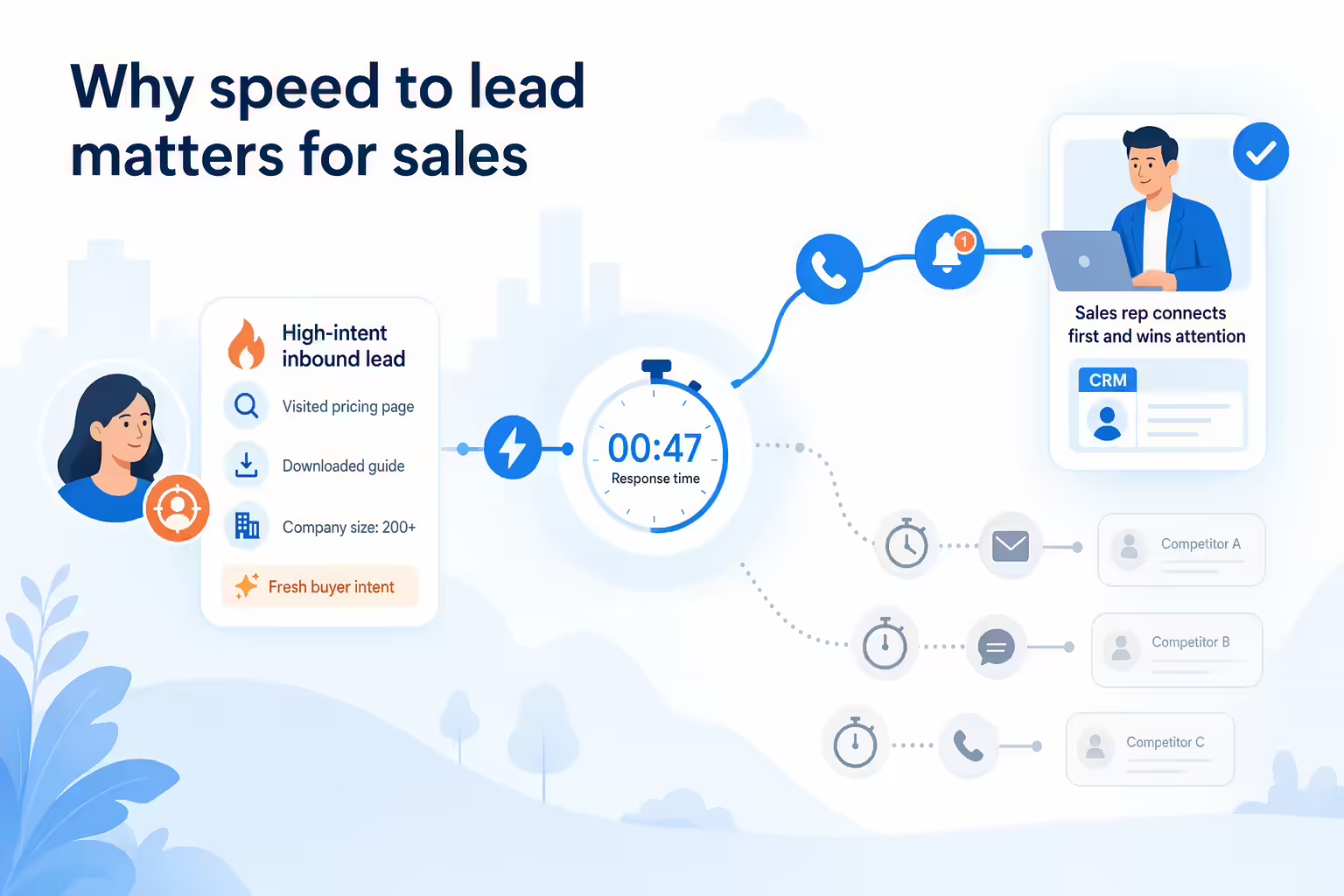
Improving speed to lead is not only about being first. It is about creating a dependable process that makes follow-up less dependent on manual reminders, spreadsheets, or reps checking the CRM at the right moment.
For sales leaders, faster lead response can support several operational goals:
- Higher rep accountability: Every lead has an owner, a next step, and a visible activity history.
- Cleaner handoffs: Leads can be routed based on territory, source, availability, product interest, or other business rules.
- More consistent follow-up: Reps can use predefined call, SMS, and email steps instead of improvising every time.
- Better reporting: Managers can see where response delays occur and coach around real workflow data.
- Improved buyer experience: Prospects get a timely response while their question, need, or request is still fresh.
Publishing note: If you plan to include conversion-rate or response-time benchmarks, add current third-party sources before publishing. Avoid using unsourced statistics in a buying guide.
Key speed to lead software features
The right feature set depends on your sales motion, lead volume, CRM setup, and follow-up channels. Use the checklist below to evaluate speed-to-lead tools without getting distracted by features your team may not actually use.
Instant lead alerts
The first requirement is visibility. Reps and managers need to know when a new high-intent lead comes in. Alerts may appear through the CRM, browser notifications, email, mobile notifications, or team communication tools.
Look for alerting that supports your actual workflow. For example, a team that handles demo requests in real time may need immediate rep notifications, while a team that qualifies lower-intent form fills may use prioritized queues.
Lead routing and ownership
Lead routing software helps assign new leads to the right rep or team. Routing rules can be simple, such as round robin assignment, or more advanced, such as routing based on territory, account owner, lead source, company size, language, product line, or rep availability.
The goal is to eliminate ambiguity. A lead should not sit untouched because multiple reps assume someone else is handling it.
Sales dialing and click to call
For many inbound sales teams, the phone is the fastest way to create a real conversation. Calling features can help reps move from lead notification to first attempt with less friction.
Depending on the platform, teams may look for sales dialer software, click-to-call from the CRM, local presence options, voicemail tools, call disposition fields, and automatic call logging. Before publishing vendor-specific claims, verify which calling features are currently available in the product being discussed.
Lead follow-up by SMS and email
Not every lead answers the first call. A fast follow-up workflow should define what happens next. That may include a short text message, a personalized email, or an automated reminder for another call attempt.
SMS for sales follow-up can be useful when it is appropriate for your business model and consent requirements. Teams should review applicable calling and texting rules with legal counsel and avoid assuming that every lead can be contacted on every channel.
CRM integration for sales software
Speed-to-lead software is most useful when it works with the system where your sales team already manages pipeline. A CRM integration can help reps avoid double entry, keep lead records current, and give managers a complete view of follow-up activity.
When evaluating CRM integrations, ask whether the tool can log calls, texts, notes, outcomes, ownership changes, and timestamps in the CRM. Also confirm whether the integration supports your lead sources and required fields.
Lead activity logging
If the first call, text, or email is not logged, it becomes difficult to measure speed to lead accurately. Activity logging creates a record of when the lead arrived, when the first attempt happened, who handled it, and what the outcome was.
This data is especially important for teams with service-level agreements, shared lead queues, or multiple inbound channels.
Lead response time reporting
Managers need visibility into more than total activity volume. A rep may make many calls while still responding slowly to new inbound leads. Response-time reporting helps identify gaps in the handoff between lead capture and rep action.
Useful reports may include average response time, median response time, first-attempt rate, leads outside SLA, response time by source, and contact rate by time-to-first-touch.
How speed to lead software works
A typical speed-to-lead workflow connects marketing capture, sales assignment, rep outreach, and CRM reporting. Here is a simplified version:
- A lead takes action. The lead submits a form, requests a demo, calls a number, starts a chat, or enters through another inbound source.
- The system creates or updates a record. The lead is added to the CRM or matched to an existing contact or account.
- Routing rules assign ownership. The lead is sent to the right rep, team, or queue based on your business logic.
- The rep receives an alert. The notification prompts immediate action and may include key context, such as source, campaign, product interest, or location.
- The rep calls the lead. A dialer or click-to-call workflow can reduce the time between alert and first attempt.
- The system triggers fallback steps. If the call is missed, the rep may send a text, email, or schedule another call attempt according to your playbook.
- Activity is logged. Calls, notes, dispositions, and follow-up steps are recorded for visibility and reporting.
- Managers review performance. Response-time metrics show whether the team is meeting expectations and where the process needs improvement.
If your team is reviewing tools for faster lead response, consider how a platform such as Kixie may fit into your broader calling, messaging, and CRM workflow. Verify specific product capabilities, integrations, and package availability with current Kixie documentation or a Kixie representative before publishing feature-specific claims.
How to improve speed to lead
Software can reduce friction, but it will not fix an unclear process by itself. The strongest results usually come from pairing the right tool with a clear operating model.
Define an inbound lead
Not every form fill requires the same urgency. Separate high-intent requests, such as demo forms or pricing inquiries, from lower-intent conversions, such as newsletter signups or early-stage content downloads.
This helps your team prioritize the leads that deserve immediate sales action.
Set a lead response time SLA
Create a clear internal standard for how quickly reps should respond to different types of leads. For example, a high-intent demo request may have a much shorter SLA than a general content inquiry.
Keep the SLA realistic. If your reps cannot consistently hit the target, review staffing, routing, business hours, lead quality, and automation gaps.
Route leads automatically
Manual assignment creates delays. Use routing rules to send leads to the right owner as soon as possible. If a rep is unavailable, define what happens next so leads do not stall.
Make the first sales action easy
Reduce the number of clicks between lead alert and first outreach. Reps should not have to search for a phone number, copy data between systems, or manually create every follow-up task before calling.
This is where calling tools, CRM workflows, and sales automation can support a faster process.
Build a lead follow-up sequence
If the first call is missed, the next step should be obvious. Create a simple sequence that may include a voicemail, text message, personalized email, and scheduled second call attempt.
The goal is to make follow-up prompt without making it careless or overly aggressive.
Review lead reporting weekly
Speed-to-lead improvements are easier to sustain when managers review the data regularly. Look for patterns by lead source, rep, time of day, campaign, and outcome.
Use call tracking and reporting to coach the process, not just the individual rep. Sometimes the issue is not effort; it is a broken routing rule, unclear ownership model, or poor lead source data.
How to choose speed to lead software
Before comparing vendors, document your current process. Where do leads come from? Who owns them? How are reps notified? How long does the first attempt take? What happens when the first attempt fails?
Then use these questions to evaluate speed-to-lead software:
- Lead sources: Can the tool support the forms, campaigns, phone numbers, chat tools, and CRM records that create new leads?
- Routing logic: Can leads be assigned using the rules your team actually needs?
- Calling workflow: Can reps call quickly from the place where they work?
- Messaging workflow: Can reps follow up through approved channels when a call is missed?
- CRM fit: Does the tool integrate with your CRM in a way that supports clean data and activity logging?
- Automation: Can the system reduce manual tasks without creating a robotic buyer experience?
- Reporting: Can managers measure response time, first attempt, activity completion, and outcomes?
- Scalability: Will the workflow still work as lead volume, rep count, or routing complexity increases?
- Governance: Can your team manage permissions, data quality, and approved messaging practices?
It is also helpful to involve both sales and operations stakeholders. Sales reps can identify day-to-day friction, while operations leaders can evaluate CRM data, routing logic, automation, and reporting requirements.
Speed to lead metrics to track
Once your workflow is live, track a focused set of metrics that show whether response time is actually improving and whether faster follow-up is translating into better conversations.
- Average response time: The average time between lead creation and first rep action.
- Median response time: A useful companion metric because averages can be skewed by outliers.
- Speed to call: The time between lead creation and the first outbound call attempt.
- First-attempt rate: The percentage of new inbound leads that receive a first attempt within your SLA.
- Contact rate: The percentage of leads that result in a live conversation or meaningful reply.
- Follow-up completion: The percentage of leads that receive the expected call, SMS, email, or task sequence.
- Lead-to-meeting conversion: The percentage of leads that convert into booked meetings or qualified opportunities.
- Response time by source: A breakdown that shows whether certain channels or campaigns create operational bottlenecks.
Review these metrics together. A faster first attempt is valuable, but it should be measured alongside contact quality, conversion, and pipeline outcomes.
Speed to lead software FAQs
What is speed to lead?
Speed to lead is the amount of time between a prospect becoming a lead and a sales rep’s first follow-up attempt. For inbound teams, it is often measured from form submission, demo request, call, or chat handoff to the first call, text, email, or logged activity.
What does speed to lead software do?
Speed-to-lead software helps teams respond faster by supporting workflows such as lead alerts, routing, calling, SMS or email follow-up, CRM logging, automation, and response-time reporting.
How fast should sales teams respond to leads?
The right response time depends on lead intent, staffing, business hours, and sales model. Many teams create different internal SLAs for high-intent leads, such as demo or pricing requests, and lower-intent leads, such as content downloads. If you publish a specific benchmark, support it with a credible current source.
Can speed to lead software work with a CRM?
Yes, many speed-to-lead workflows are designed to work with a CRM. The key is confirming that the tool can support your specific CRM, fields, routing needs, activity logging, and reporting requirements.
Which features matter most for sales teams?
The most important features are usually instant alerts, lead routing, fast calling, fallback follow-up through approved channels, CRM integration, activity logging, and response-time reporting. The best mix depends on your team’s lead volume, sales process, and compliance requirements.
If your team is evaluating ways to reduce lead response time, start by mapping your current workflow, identifying where leads get stuck, and reviewing tools that can support faster calling, messaging, automation, and CRM visibility. To discuss how Kixie may fit your sales process, request a demo or verify current capabilities with the Kixie team.
Ready to close more deals with Kixie?
See how Kixie's AI-powered tools can transform your sales and support operations.
Start Free Trial