
TL;DR: Salesforce admins can track lead response time accurately by pairing Kixie’s real-time call and SMS logging with two custom lead fields: First_Outreach_Date__c and Response_Time_Business_Minutes__c. Native Salesforce reporting falls short because the first response lives on related Task records, standard activity fields lack minute-level precision, and manual task entry skews timestamps. A record-triggered Task flow can stamp the first completed call or SMS onto the lead, and a business-minutes formula can measure the gap from CreatedDate while excluding weekends. That gives teams a reliable way to monitor the 5-minute response window, compare rep performance, and spot coverage gaps before lead quality drops.
The Strategic Importance of Lead Response Time for Admins
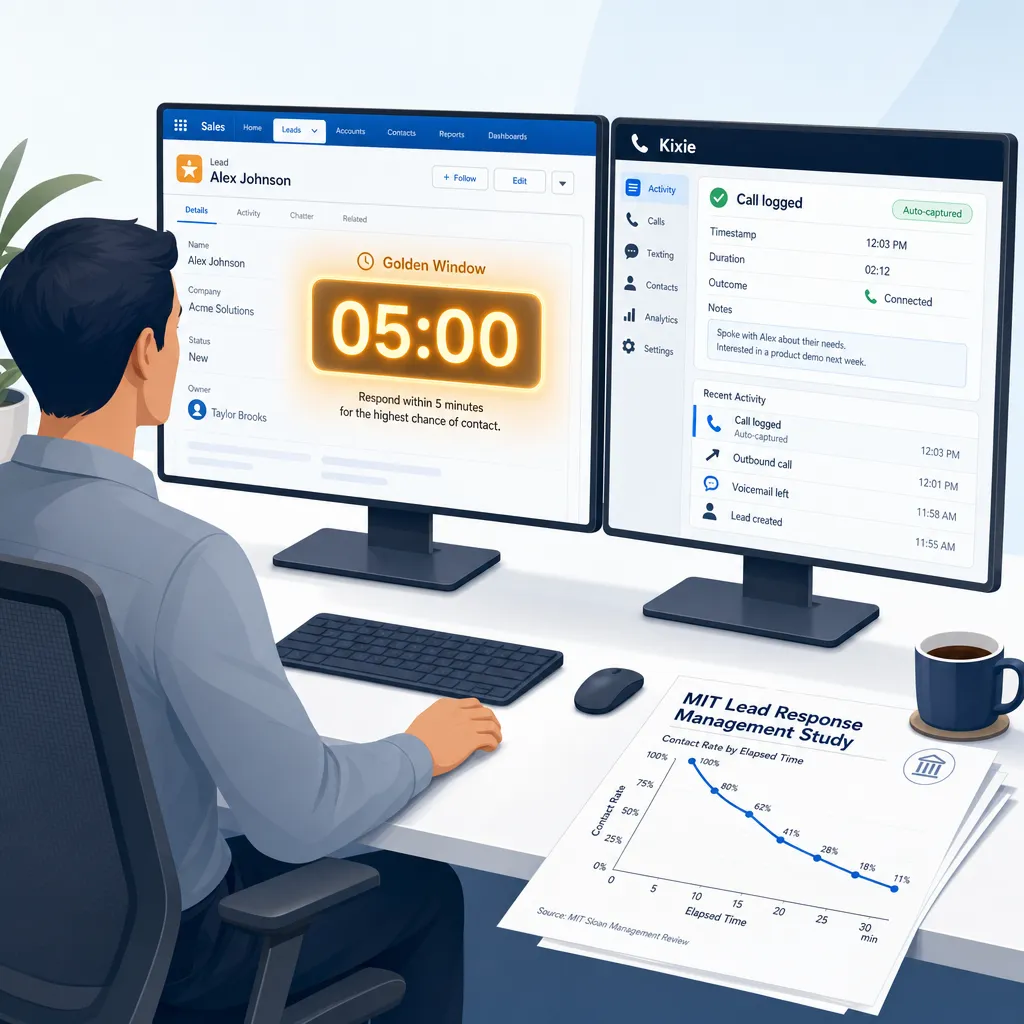
In the current high-velocity sales cycle, the metric known as Lead Response Time (often called Speed to Lead) is a vital sign of organizational health. By the time a lead record appears in your Salesforce org, a silent countdown has begun against the prospect’s waning attention span.
The stakes of tracking Lead Response Time are backed by hard evidence. The MIT Lead Response Management Study provides a sobering reality: the probability of successfully contacting a lead drops by 100 times if the outreach occurs within 30 minutes instead of 5 minutes. Furthermore, the odds of qualifying that lead decrease by 21 times over that same 25-minute interval. These are not marginal gains; they determine the efficacy of marketing spend.
However, accurately tracking this 5-minute golden window is difficult because native Salesforce architecture does not provide a time-to-first-response field out of the box. To solve this, admins often need an automation setup that integrates call logging technology such as Kixie to bridge the gap between business goals and technical reality.
Why Salesforce Can’t Report Lead Response Time Natively
To report on Lead Response Time effectively, admins must first understand why the native Salesforce platform struggles to calculate it. The issue lies in the fundamental data model of the platform.
Salesforce is a relational database where the Lead is a primary object with a definitive creation timestamp (CreatedDate). The response, however, is stored as a separate record on the Task or Event object. These records are linked to the lead via the WhoId relationship field.

To calculate response time, the system must perform a specific operation across these two objects:
Response Time = Min(Task.CreatedDate) – Lead.CreatedDate
Native reports struggle to isolate the single earliest activity timestamp for a specific lead and perform a date-difference calculation against the lead’s creation date across thousands of records simultaneously. Furthermore, standard fields like LastActivityDate are insufficient because they are Date fields, not DateTime fields. They record that an activity happened on a specific day, but not the specific minute, rendering them statistically useless for measuring a 5-minute response window. This architecture necessitates a more robust solution involving automation and precise timestamps.
Why Manual Entry Fails to Track Lead Response Time in Salesforce
Even if a Salesforce admin designs the perfect automation flow to capture the first activity date, the system remains dependent on the input of that activity. In a native Salesforce setup without automated telephony integration, that input is manual, which destroys the integrity of Lead Response Time metrics.

An SDR’s primary directive is volume, and the process of manually logging a call takes between 30 to 60 seconds per dial. To save time, reps often engage in batch logging, where they make calls in the morning but enter the data into Salesforce hours later.
- The Reality: The lead was called at 9:05 AM (5-minute response).
- The Data: The Task record was created at 4:30 PM (7.5-hour response).
Because Lead Response Time is calculated based on the CreatedDate of the Task, this batching behavior renders the report operationally false. Additionally, mobile calls made from personal phones often go unlogged entirely (the parking lot gap), creating holes in the dataset. To solve the reporting problem, admins must remove the human element from data entry.
Using Kixie to Fix Salesforce Data for Admins
To overcome the dual problems of Salesforce architectural limitations and human error, admins can use Kixie, a specialized telephony platform that acts as a data integrity engine. Kixie’s integration with Salesforce is bi-directional and real-time, fundamentally changing the mechanism of data entry to ensure accurate Lead Response Time reporting.
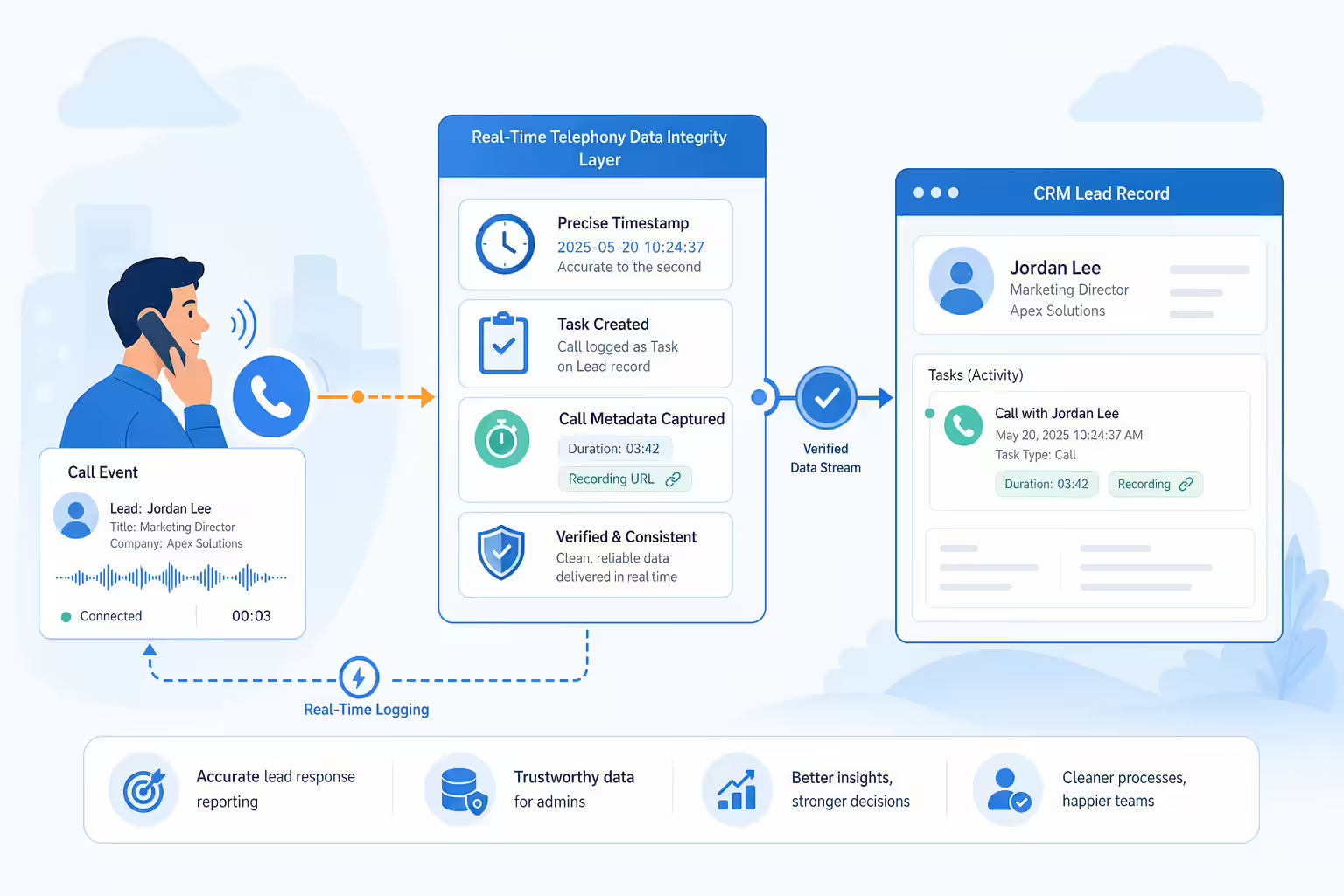
When a rep makes a call using Kixie, the system handles the logging autonomously:
- Automatic Creation: Kixie immediately creates a Task record on the matching Lead object.
- Precise Timestamp: The
CreatedDateof this Task is the exact system time the call occurred, accurate to the second.
This automated process eliminates the distortion caused by batch logging and ensures that the data in Salesforce is a mirror reflection of reality. Kixie also adds useful metadata to the Task record, such as precise call duration in seconds and a direct URL to the call recording. By standardizing the input through Kixie, the Salesforce admin gets a consistent dataset, which is the prerequisite for calculating accurate response times.
How Salesforce Admins Can Implement Lead Response Tracking
Once Kixie is integrated to ensure the integrity of Task data, the Salesforce admin must build specific infrastructure to calculate Lead Response Time. This section covers the fields, flows, and formulas required to stamp the first outreach date onto the lead record.
Lead Fields for First Outreach Tracking
Admins must create fields on the Lead object to store the data permanently:
- First Outreach Date: Create a Date/Time field (
First_Outreach_Date__c) to store the timestamp of the very first outbound call or SMS logged by Kixie. - Response Time Business Minutes: Create a Number field (
Response_Time_Business_Minutes__c) to store the calculated duration between lead creation and the first outreach.
Task Flow Logic for First Outreach

Use a record-triggered flow on the Task object to detect the first activity:
- Trigger: When a Task is created where the Type equals Call or SMS and the Status is Completed.
- Check Lead: Get the parent Lead record.
- Decision: Check if the lead’s
First_Outreach_Date__cis currently null. - Update: If null, stamp the Task’s
CreatedDateinto the lead’sFirst_Outreach_Date__cfield. This locks in the first response time permanently.
Formula Setup for Business Minutes
To calculate business minutes while excluding weekends, use a robust formula in the Response_Time_Business_Minutes__c field. This formula should subtract the CreatedDate from the First_Outreach_Date__c value while using modular arithmetic (MOD()) to remove Saturdays and Sundays, ensuring the reporting reflects operational reality rather than calendar hours.
Advanced Salesforce Reporting on Lead Response Time
With the data architecture effectively deployed and Kixie providing accurate inputs, the final phase is visualization. By moving from unstructured data to structured, timestamped metrics, admins can now answer critical questions about the 5-minute window.

Recommended Lead Response Reports
- Rep Performance: Group leads by owner and average the
Response_Time_Business_Minutes__cfield. This identifies which reps are aggressive with new leads and which are letting them sit. - Golden Window Compliance: Create buckets for response time, such as 0 to 5 minutes and 5 to 30 minutes. Use a donut chart to visualize what percentage of leads are contacted within the critical 5-minute window.
Build a Lead Response Dashboard
Assemble these reports into a lead response command center. Include components like a gauge chart comparing average response time against a 10-minute goal, and a red alert metric showing total uncontacted leads aged over 2 hours. This visibility allows Salesforce leadership to optimize the entire revenue engine based on forensic data.
Future Reporting Insights for Salesforce Admins
Implementing Kixie for accurate Lead Response Time is not the end of the process; it is the start of intelligent revenue operations. Once accurate timestamps for inbound leads and outbound responses are available, Salesforce admins can derive second-order insights.

Staffing Heatmaps for Lead Response Time
Admins can construct heatmaps comparing lead creation hour against the day of week. If data shows response times spike to 45 minutes on Tuesdays at 1:00 PM, you can diagnose the cause, such as an all-hands meeting, and adjust SDR schedules to cover these high-volume windows.
How to Audit Manual Logging Gaps
With Kixie, the CreatedBy ID for the Task is usually the integration user or the API. Admins can run audit reports to filter for tasks created manually by reps versus those created by Kixie. If a rep has 100% manual logs, they are likely bypassing the dialer and potentially fabricating data, allowing for targeted intervention.
AI and Sentiment Analysis for Call Reviews
Kixie’s ecosystem integrates with tools like Gong to analyze call recordings. In the future, dashboards can link the speed of the call to the content of the call, revealing if fast responses correlate with specific keywords like Pricing or positive sentiment.
A Final Guide to Accurate Lead Response Time
Accurately tracking Lead Response Time in Salesforce means replacing unreliable manual habits with precise system data. The native Salesforce platform assumes a level of manual data discipline that simply does not exist in high-velocity sales teams, leading to garbage-in, garbage-out reporting.

By introducing Kixie as the automated data entry layer, the admin solves the data quality problem. Kixie transforms the chaotic activity of a phone call into a precise, digital Salesforce record. With this clean data stream, the admin can deploy the flow and formula architecture to turn the Salesforce org into an active intelligence engine. You are no longer guessing if the team is fast; you know exactly how fast they are, down to the minute. That gives leaders a concrete way to validate lead quality and coach effectively.
Ready to close more deals with Kixie?
See how Kixie's AI-powered tools can transform your sales and support operations.
Start Free Trial