
TL;DR: Start the evaluation with what Salesforce itself gives you, because that is the baseline every third-party tool has to beat. Salesforce Help currently marks Sales Dialer as scheduled for retirement, says no new features or enhancements are being added to it, and recommends moving to Salesforce Voice instead. Sales Dialer is an add-on license at extra cost, it runs in Lightning Experience on the desktop only, its outgoing calls reach the U.S. and Canada only, Puerto Rico is excluded, and Local Presence works in the U.S. but not Canada. Its call lists accept leads, accounts, person accounts and contacts, and they read the standard Phone field. Now the part that quietly wrecks reporting: reps need the Edit Task permission to log calls, that permission is not automatically included with some profiles, and reps on those profiles can place calls all day that never get logged. A cadence will not advance to its next step until the call is logged. Task record types need the Log a Call quick action assigned or logging fails, and a call left running in an inactive tab past your session timeout is not logged properly and can lose its notes. So the Salesforce progressive dialer features worth testing are not the pacing controls on the pricing page. They are the write-back path, the disposition-to-field mapping, the objects and phone fields the queue can actually read, retry and suppression rules, and what an administrator sees when a sync fails. Test every call outcome, not just the connect. And know before you plan a pilot that Salesforce says you cannot make or receive live calls with Dialer in a sandbox, so a native sandbox test proves your automation fires, not that the calling works. Compliance settings support governance; they do not establish it. Get qualified counsel on consent, calling windows, recording and retention before you dial.
Most dialer evaluations start in the wrong place. Someone asks which tool places the most calls per hour, a vendor answers, and nine months later the pipeline report still cannot tell a manager how many real attempts happened before a deal got marked closed lost.
That gap is not a pacing problem. It is a data problem. The call happened. The rep remembers it. Salesforce has no idea.
So this guide works through the Salesforce progressive dialer features that actually change what your team does and what your CRM knows. It also separates progressive dialing from preview, power, parallel and predictive modes, because vendors genuinely do not agree on those words. Ask every provider to demonstrate the trigger rather than accept the label.
What a Salesforce Progressive Dialer Actually Does
A progressive dialer starts one outbound call when a rep becomes available. The system takes the next eligible record, puts the context on screen, and dials. The rep does not pick the number. The call ends, wrap-up finishes, and the queue advances. That is the loop.
One call per available rep is the whole distinction. That is what separates progressive dialing from tools that fire several lines at once, and from tools that guess when a rep will be free.
Here is the honest caveat. These category names are not standardized, and some vendors use progressive and power interchangeably while others draw a hard line between them. That is not your problem to solve on a demo call. Make them show you what triggers the dial. Watch the screen, not the slide.
What Salesforce Gives You Before You Buy a Dialer
Check the native baseline first. It is short. It is also changing.
Salesforce Help describes Sales Dialer as click-to-dial from phone number fields in Lightning Experience, on contacts, leads and list views, with call notes and call logging. The same documentation carries an important notice: Sales Dialer is scheduled for retirement, no new features or enhancements are being added to it, and Salesforce recommends moving to Salesforce Voice to get telephony features directly in Salesforce. Sales Dialer is available for an additional cost as an add-on license.
Read that again before you build a roadmap on it. A feature receiving no enhancements is not a platform. It is a countdown.
The documented constraints matter too, and they are specific:
- Dialer features run in Lightning Experience on the desktop only, with no support in Experience Cloud sites.
- Outgoing calls are supported to the U.S. and Canada only. Puerto Rico is not supported.
- Local Presence is available in the U.S. and is not available in Canada.
- Call lists can include leads, accounts, person accounts and contacts, and they use the standard Phone field for those records.
- Permission set groups are not supported for Dialer permissions, so those permission sets get assigned directly.
- Call Monitoring is not supported in Salesforce Essentials, listens to one rep at a time, covers outbound calls only, and uses double the minutes because it counts both the rep and the manager.
Notice the fourth item. Your queue reads the standard Phone field on four object types. Nothing else. If your team keeps mobile numbers in a custom field, or works opportunities and campaign members, the native call list does not reach them. That one detail decides a lot of shortlists.
The Native Salesforce Dialer Behavior That Breaks Reporting
This is the section most evaluations skip. It is also the one that costs the most later. Everything below is documented behavior of Salesforce’s own Sales Dialer, not a description of every third-party tool. Treat it as the baseline to test any vendor against, and ask each one how their integration behaves in the same three situations.

Salesforce documents three separate ways a call can happen without being logged the way you expect. None of them announces itself to the rep. Each one is a configuration state, not an outage, so the call itself goes through normally.
- Missing Edit Task permission. Users need the Edit Task permission to log calls. Salesforce states plainly that this permission is not automatically included with some profiles, so users with those profiles can make calls, but those calls are not logged.
- Task record types without the quick action. If your org has record types enabled for tasks, the Log a Call quick action has to be assigned to a specific record type in order to log calls.
- Session timeout on an inactive tab. If calls continue in inactive tabs for longer than your org’s session timeout, Salesforce says they are not logged properly, and notes made on the call may also be lost. Note the wording: not logged properly, which is not the same as not logged at all, so check what partial record you actually get.
Now connect it to the workflow. Salesforce also documents that a cadence will not advance to its next step after a call until the call is logged.
So the failure chain runs like this. A rep whose profile lacks Edit Task dials fifty records. Salesforce says those calls are not logged. Unlogged calls do not advance a cadence, so the records sit at the same step, and the manager’s activity report shows a rep who did no work. The rep is not told. Whether anyone else finds out depends entirely on who is watching the activity data.
Ask every vendor the same question about their own integration. What happens to the activity record when the write-back fails? And who finds out?
Salesforce Progressive Dialer Features to Prioritize
Sequential calling through the dialer queue
Can a rep work the whole queue without copying a number or clicking between records? Confirm it on screen. Then check the controls that matter on a bad day: how a rep pauses, skips, removes or reschedules a record, and whether a manager can restrict any of that.
Dialer pacing and wrap-up controls
Ask what makes a rep count as available. A useful demo covers wrap-up time, manual pauses, scheduled breaks, failed connections and the exact moment the next call fires. Pacing should differ by campaign and by team. If it cannot, find that out now, not after rollout.
Salesforce dialer data sync and object coverage
Which objects can the integration actually read and update? Write down every one, standard and custom. Leads and contacts are the easy part. The rest is where deals get lost. Your process may also run on campaigns, opportunities, accounts, tasks or custom objects, and the native call list does not cover those. Confirm whether sync is one-way or bidirectional, and how fast an update appears on the other side.
Dialer field mapping and call dispositions
Reps need outcome options that match how your team actually follows up. Check whether an administrator can map dispositions to Salesforce fields, statuses, tasks or flows without a developer. One more thing worth catching early: Salesforce notes that deactivated call result values are not removed from the call panel, so cleaning up your outcome list means deleting the values you no longer want.
Salesforce dialer call logging quality
Automatic logging only helps if the record it creates is worth reading. Place a connected call, a no answer, an invalid number and a forced system error, then open all four activity records. Look at timestamps, duration, ownership, direction, disposition and the link to any recording. Duration definitions that disagree between the vendor and Salesforce will surface here. Better now than in a board deck.
Dialer list segmentation and record routing
The dialer has to respect your assignment model. Test what happens when ownership changes mid-queue, when a record belongs to two campaigns, and when two reps could reach the same person. Routing has to be explainable to a sales manager and a Salesforce administrator in one sentence. If it is not, it gets overridden.
Dialer retry limits and suppression rules
What stops a record from being dialed again tomorrow? Review retry timing, maximum attempts, local-time restrictions, internal suppression lists, and records that must never re-enter a queue. Salesforce does enforce one of these natively: Dialer respects the Do Not Call field, and records with that field selected have one-click calling disabled. That is a useful floor. It is not a compliance program. Do not confuse the two.
Dialer voicemail workflows
Prerecorded voicemail saves real time on a call block, and the limits are worth knowing up front. In Salesforce, users can store up to 20 voicemail messages, each capped at two minutes, saved as files that count toward your file storage quota, and Dialer users with the voicemail drop feature can store up to 10 prerecorded messages. Whatever tool you pick, test detection accuracy against the carriers and regions your team really calls, then check how the attempt gets categorized and whether a rep can correct a wrong result.
Dialer recordings and transcripts
If a provider offers recording, transcription or summaries, verify storage location, access permissions, retention controls and write-back. Salesforce saves call recordings as files, estimates roughly 15 MB of storage for an hour of recording, applies the same sharing rules as other files, and lets admins delete recordings from the Recording Management page in Setup. Salesforce also states that where the law requires it, users must notify the recipient of monitoring or recording and stop on request. Involve qualified counsel before you turn any of this on.
Salesforce dialer reporting definitions
Managers want attempts, connections, outcomes, talk time and queue progress. Ask one question first. Does this number come from Salesforce data, vendor data, or both? Reconcile the definitions before anyone uses them for coaching or compensation. A connect rate that counts differently in two systems gets argued about for a year. Settle it in week one.
Salesforce dialer workflow automation
If you run Salesforce Flow, test whether dialer-created records trigger what you expect. Watch for recursion, duplicate tasks, conflicting field updates and automations that fire before all the call data has arrived. That last one is common and hard to catch. By the time a human opens the record, it looks fine.
Dialer permissions and audit trails
Who can build lists, change pacing, export data, reach recordings or edit dispositions? Work that out on paper first. Two Salesforce constraints shape this: permission set groups are not supported for Dialer permissions, and Dialer users cannot hold Salesforce Voice permission sets or belong to a Salesforce call center. Salesforce also advises against assigning Dialer to users already on Open CTI. Sort that out before you hand out licenses. Mixed teams are where this bites.
Salesforce Progressive Dialer Compared With Other Dialers
Treat these as working definitions for your evaluation, not universal product labels:
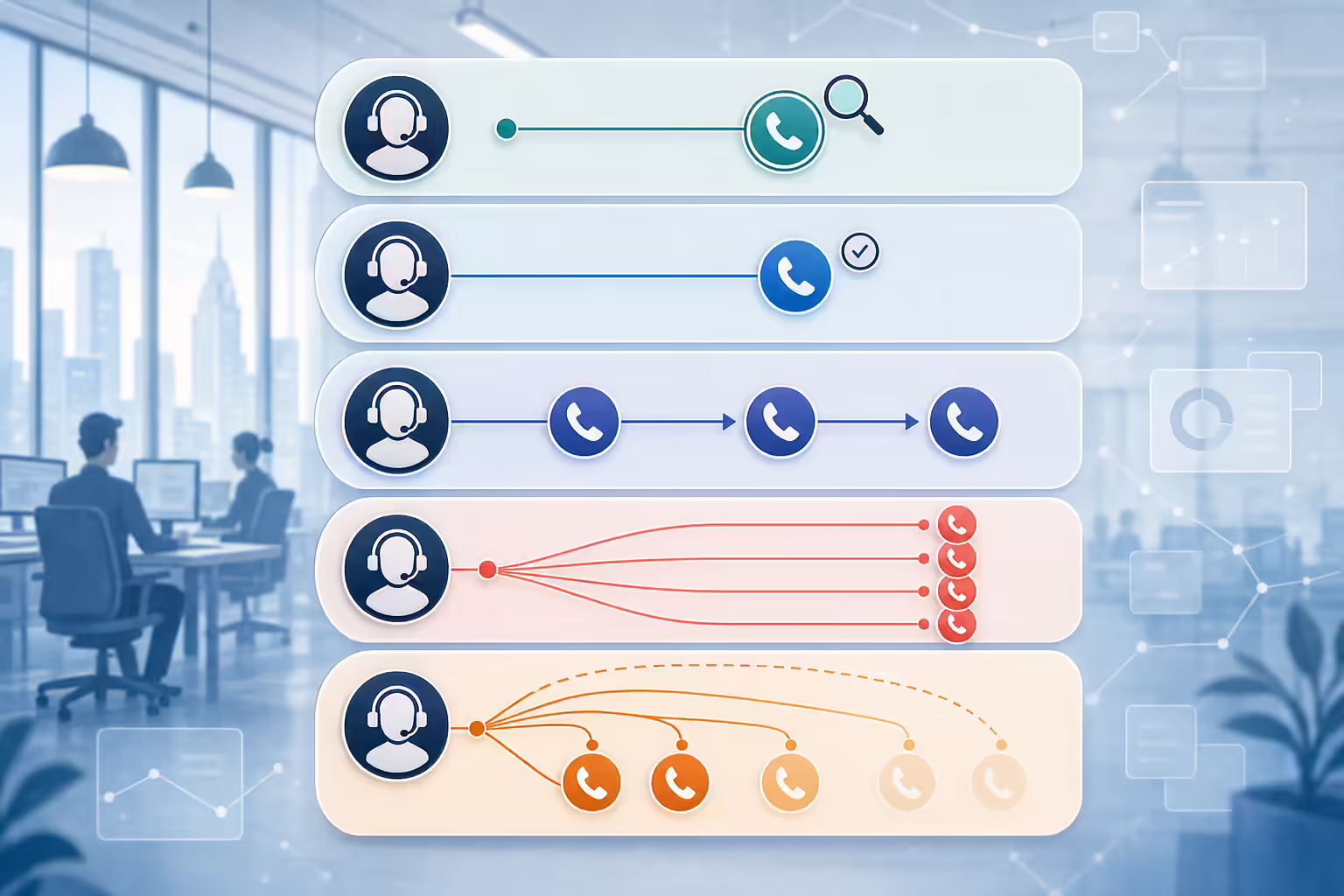
- Preview dialing: the rep reads the record, then decides whether and when to call. More preparation, and a manual decision point on every record.
- Progressive dialing: one call starts when a rep is available, using the next eligible record in the queue.
- Power dialing: usually automated sequential dialing. Where it differs from progressive depends entirely on the vendor.
- Parallel dialing: several calls run at once for one rep or workflow. Connection handling and the rep experience need close review.
- Predictive dialing: pacing logic starts calls based partly on expected rep availability and connection patterns. Usually considered by high-volume teams.
More calls started is not automatically better. Sometimes it is worse. It depends on the list.
Weigh list quality, lead temperature, staffing, connection handling, customer experience and the rules that apply to your contacts. Progressive dialing earns its place when a team wants controlled one-at-a-time pacing with the record already on screen. For a wider look at what is available against Salesforce records, this comparison of Salesforce dialer tools covers the category.
Salesforce Dialer Integration Checklist
Take this list into the demo and make the vendor answer it live.
- What is the installation model: managed package, embedded interface, browser extension, API connection, or something else?
- Which Salesforce editions, objects, phone fields and authentication methods are supported right now?
- Can custom fields and custom objects be mapped without custom development?
- When Salesforce and the dialer hold different values, which one wins?
- How are duplicate people, multiple phone numbers, merged records and deleted records handled?
- What happens when an API limit, permission issue, network interruption or validation rule blocks a write-back? Salesforce allocates inbound API calls per 24-hour period by edition, with Enterprise, Unlimited and Performance orgs starting at 100,000 plus a per-license allowance and any purchased add-ons, and production orgs capped at 25 concurrent long-running requests. A chatty integration shares that pool with everything else you run.
- Can an administrator find failed sync events and retry them, or do they disappear?
- Do the activity records feed your existing dashboards and attribution model?
- What are the network requirements per active session? Salesforce recommends at least 10 kbps per Dialer session and considers 500 kbps or more optimal, with WebRTC enabled in the browser.
Kixie sells sales engagement software for business calling and texting, and PowerDialer is the product that handles list-based outbound calling. If you are evaluating it alongside others, ask for the same live demonstration against a Salesforce configuration that looks like yours, and check the Salesforce integration documentation for current behavior rather than trusting a feature grid.
How to Test a Salesforce Progressive Dialer
Before you plan the pilot, one constraint changes the shape of it. Salesforce states that you cannot make or receive live calls with its own Sales Dialer in a sandbox. You can make test calls and test the automation that runs after a call, such as the log a call task. Salesforce also notes that when you create a sandbox from an org that already has voice calls, the voice call records and recordings are not copied, and Dialer has to be enabled again from Setup.
So with native Sales Dialer, a sandbox proves your automation fires. It does not prove the calling works. Third-party dialers are separate products with their own sandbox behavior, so ask each vendor what their integration supports in a sandbox and get it in writing. Either way, plan a small production pilot for the calls themselves.
- Map the process first: define queue entry, ownership, dialing, disposition, follow-up, suppression and exit criteria. If you cannot draw it, no tool will fix it.
- Configure a test org: use representative fields, validation rules, permissions and automations, not a clean org that resembles nothing.
- Build a deliberately messy pilot list: multiple owners, several time zones, mixed phone-field formats, prior outcomes and some records that should be ineligible.
- Check the permissions before the first dial: confirm Edit Task on every pilot profile, and confirm the Log a Call quick action is assigned if task record types are on. Skip this and your pilot data is worthless.
- Test every outcome, not just the connect: no answers, voicemail, invalid numbers, skipped records, retries and a forced sync failure.
- Reconcile the reports: compare CRM activities against vendor-side reports and resolve the metric definitions that disagree.
- Train by role: reps, managers, RevOps and administrators each need different instructions and a different escalation path.
- Review before you expand: look at data quality, actual rep behavior, failure rates, customer experience and governance, then decide. A pilot that nobody reviews is just an early rollout.
A working queue depends on the process underneath it, which is worth designing before the tooling. The same logic applies to the wider sales process the dialer plugs into.
Salesforce Dialer Compliance Settings to Review
Calling, consent, do-not-call, recording, retention and permitted-time requirements vary by jurisdiction, number type, technology and context. This guide is not legal advice. Have qualified counsel review the workflow you intend to run.
One scoping point is worth knowing before you plan the pilot. The FTC lists business-to-business solicitation calls among the exemptions to the Telemarketing Sales Rule, unless the call involves the sale of nondurable office or cleaning supplies. That is a federal rule with a narrow carve-out. It is not a blanket exemption, it does not speak to state law, and it does not cover consumer or mixed lists, so confirm which rules apply to your contacts rather than assuming a B2B list is unregulated.
Internally, name the owner for each one: consent records, suppression sources, calling-window rules, recording settings, retention periods and incident response. Then answer the question that gets skipped. Is each restriction enforced in Salesforce, in the dialer, or in both, and what happens when the two disagree?
Software controls support governance. They do not establish compliance. Someone still owns the decision.
Salesforce Progressive Dialer FAQs
Does Salesforce have a built-in progressive dialer
Salesforce documents Sales Dialer as click-to-dial from phone number fields plus call lists, available as an extra-cost add-on license in Lightning Experience. Salesforce Help also states that Sales Dialer is scheduled for retirement, that no new features or enhancements are being added, and that it recommends moving to Salesforce Voice for telephony inside Salesforce. Check current packaging and licensing in Salesforce documentation rather than assuming anything labeled dialer includes progressive pacing.
What are the main limitations of the native Salesforce dialer
These apply to Salesforce’s own Sales Dialer, not to third-party tools, and the documented ones are concrete. Desktop Lightning Experience only, no Experience Cloud sites, outgoing calls to the U.S. and Canada only with Puerto Rico excluded, Local Presence in the U.S. but not Canada, call lists limited to leads, accounts, person accounts and contacts using the standard Phone field, no permission set groups for Dialer permissions, call monitoring restricted to one outbound rep at a time at double the minutes, and no live calling in sandbox.
Is a progressive dialer the same as a power dialer
Sometimes yes. Sometimes no. The vendor decides. In this guide progressive means one call starts when a rep is available. Make each provider explain their trigger, their pacing and whether more than one line is ever open at once.
Which Salesforce objects should a progressive dialer support
Whichever ones your process actually runs on. Salesforce call lists natively cover leads, accounts, person accounts and contacts through the standard Phone field. If you work opportunities, campaign members, custom objects or a custom mobile-number field, confirm support explicitly before shortlisting.
Why are calls not logging in Salesforce
Start with three documented causes. The rep may lack the Edit Task permission, which is not included in some profiles and lets calls happen without being logged. Task record types may be enabled without the Log a Call quick action assigned. Or the call ran in an inactive tab past the org’s session timeout, which prevents proper logging and can lose the notes. Check all three before you blame the integration.
When should a team look at predictive dialing instead
Predictive dialing is worth evaluating when a high-volume team needs pacing across a pool of reps rather than one call per rep. Assess connection handling, abandoned-call behavior, data quality, rep experience and the legal requirements that apply to that model before choosing it.
Sources
How this article was built: every statement about what Salesforce natively supports, restricts, or is retiring comes from the current Salesforce Help documentation linked below and is reported with Salesforce’s own scope and wording intact. The dialing-mode definitions are stated as a working evaluation framework rather than industry standards, because vendors define progressive, power and parallel dialing differently and no neutral standard governs those labels. The evaluation and pilot steps are reasoned from the documented constraints and are written so you can substitute your own objects, fields, profiles and volumes. Third-party dialer behavior varies by product and changes without notice, so confirm any vendor capability against that vendor’s current documentation and a live demonstration. Where the article states a regulatory scope, it comes from current federal agency material linked below and is reported with the agency’s own carve-outs intact. Calling, consent, recording and retention obligations depend on your contact types, markets and campaign design, and state law adds requirements federal rules do not, so nothing here is legal advice. Kixie publishes this article and sells sales engagement software for business calling and texting.
- Salesforce Help: Sales Dialer. Source for the Sales Dialer retirement notice, the statement that no new features or enhancements are being added, the recommendation to move to Salesforce Voice, the description of single-click calling from phone number fields on contacts, leads and list views, the supported editions, and the additional-cost add-on license requirement, accessed August 26, 2026.
- Salesforce Help: Sales Dialer Considerations for Sales Engagement. Source for desktop-only Lightning Experience availability and the lack of Experience Cloud support, U.S. and Canada outgoing calling with Puerto Rico excluded, U.S.-only Local Presence, the call list object coverage of leads, accounts, person accounts and contacts through the standard Phone field, the Edit Task permission requirement for logging calls, the requirement that a call be logged before a cadence advances, the 20-message two-minute voicemail limits and 10 prerecorded voicemail drop messages, the roughly 15 MB per hour recording storage estimate and Recording Management deletion path, Do Not Call field enforcement, call monitoring restrictions and double minute usage, the lack of permission set group support, the sandbox live-calling restriction, and the deactivated call result values behavior, accessed August 26, 2026.
- Salesforce Help: Dialer Prerequisites. Source for the Log a Call quick action requirement when task record types are enabled, the inactive-tab session timeout logging failure and possible loss of call notes, the WebRTC browser requirement, the recommendation of at least 10 kbps per Dialer session with 500 kbps or more optimal, and the guidance against assigning Dialer to users already using Open CTI, accessed August 26, 2026.
- Salesforce Developer Limits and Allocations Quick Reference: API Request Limits and Allocations. Source for the total inbound API requests allowed per 24-hour period by org edition, including the 100,000 plus per-license allowance and purchased add-ons for Enterprise, Unlimited and Performance editions, and the concurrent request limit of 25 for production orgs, accessed August 26, 2026.
- Federal Trade Commission: Complying with the Telemarketing Sales Rule. Current FTC business guidance for the Telemarketing Sales Rule, source for the listing of business-to-business solicitation calls among the exemptions to the Rule and for the carve-out where the call involves the sale of nondurable office or cleaning supplies, accessed August 26, 2026.
Sources verified by the Kixie Research Team on August 26, 2026. All source links checked on August 26, 2026.
Ready to close more deals with Kixie?
See how Kixie's AI-powered tools can transform your sales and support operations.
Start Free Trial