TL;DR: Connecting Kixie to Claude (API: $3/1M input tokens, $15/1M output tokens) via Zapier ($19.99+/mo) creates an automated follow-up system that drastically cuts manual labor costs. This matters because 80% of sales require 5+ follow-ups but only 8% of reps follow up that many times, and reps currently spend 13 hours/week writing emails.
Introduction
Sales organizations face a continuous operational challenge balancing the need for high-volume outreach with the necessity for personalized follow-up communication. The phrase “stop writing follow-ups connect kixie to claude in 5 minutes” reflects a growing shift in revenue operations toward intelligent automation. Manual data entry and repetitive email drafting drain significant resources from sales development representatives and account executives. When a salesperson completes a phone call, they must traditionally switch contexts, open their email client, review their notes, and type a relevant message. This context switching reduces active selling time.
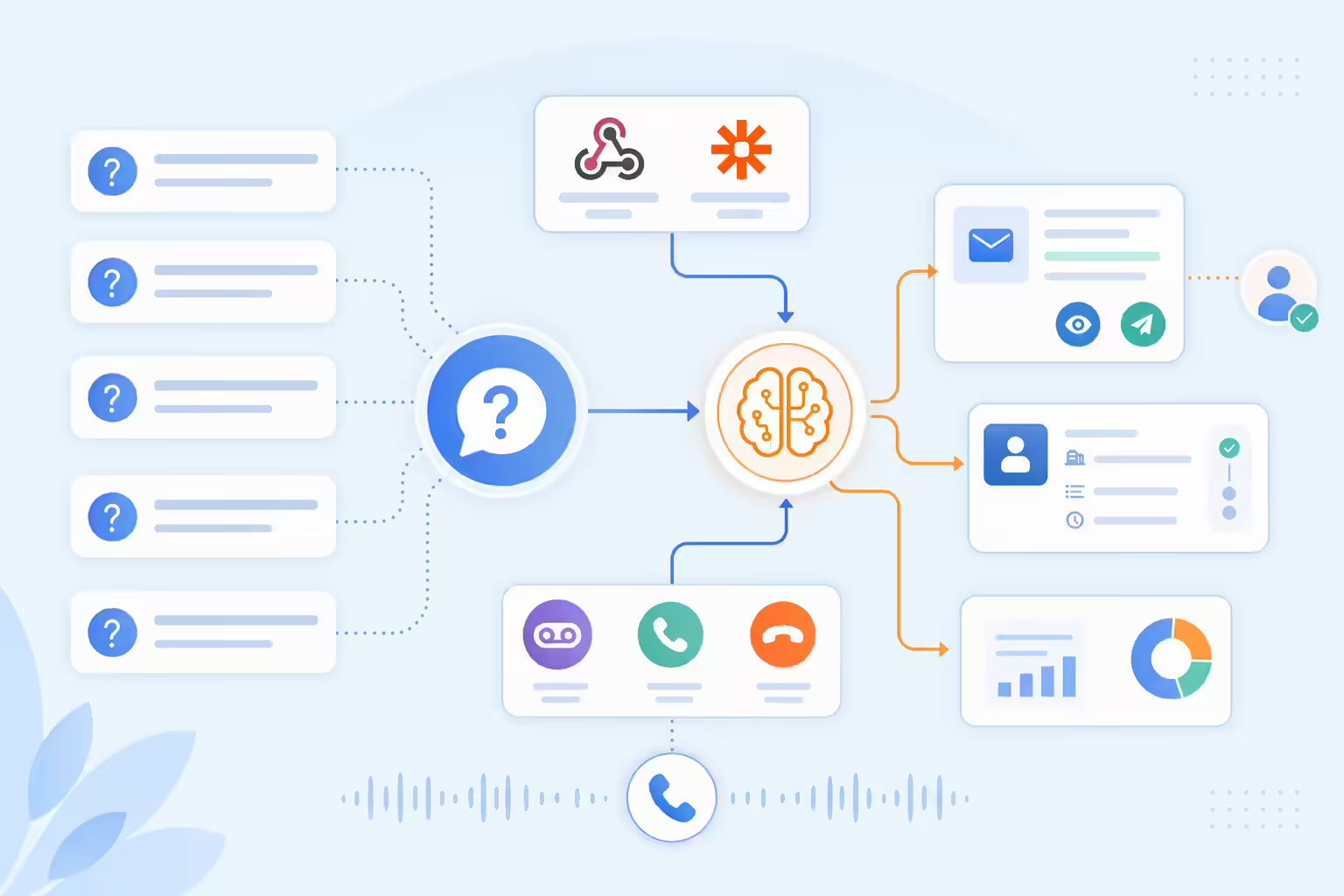
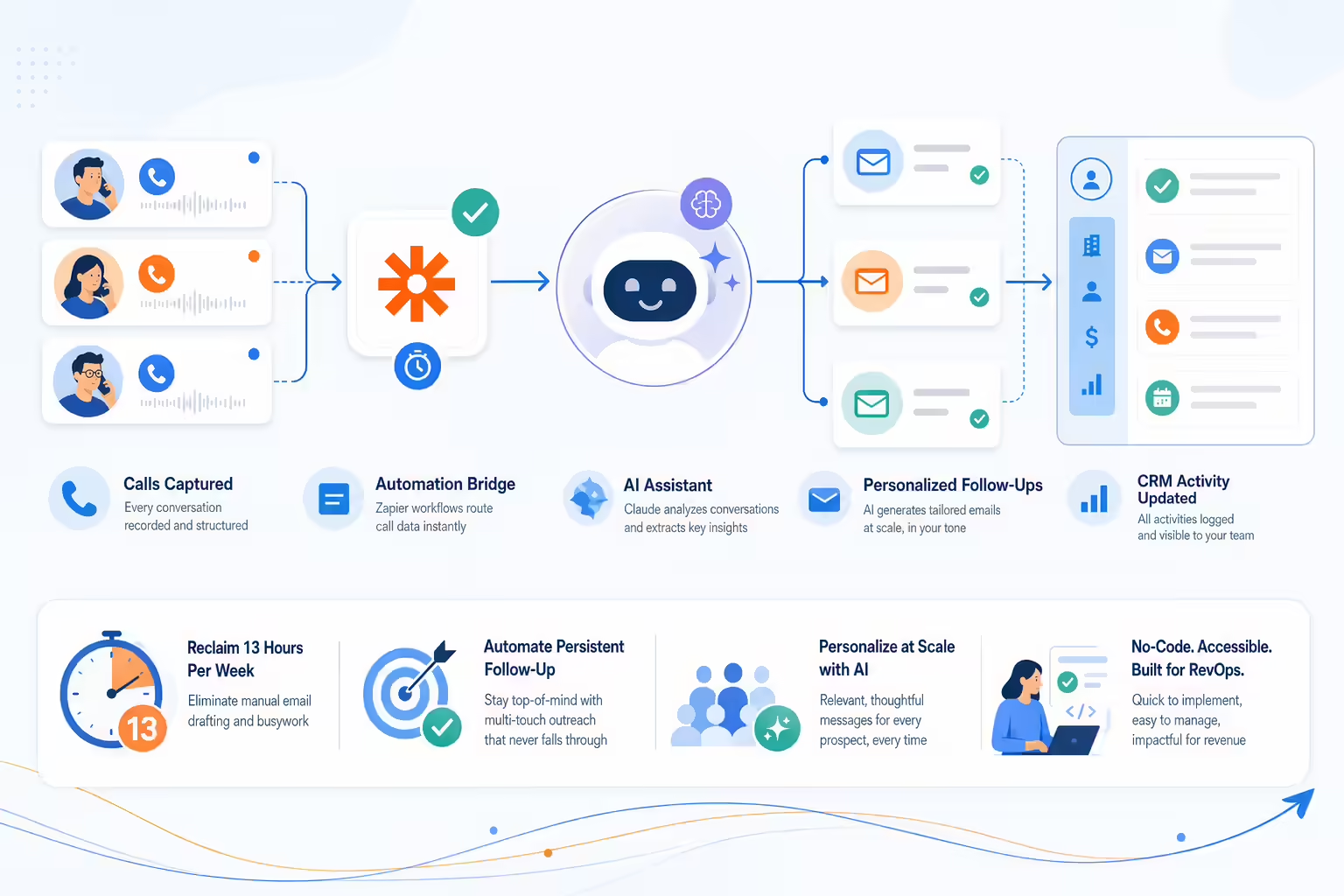
By integrating Kixie, a cloud-based business telephony system, with Claude, a large language model developed by Anthropic, businesses can eliminate this manual step. Through an intermediary automation platform like Zapier, a completed call in Kixie can instantly trigger Claude to write and send a contextually accurate email based on the specific call outcome. This educational report details the underlying data on why follow-ups are necessary, explores the features and costs of the required tools, and provides a comprehensive, step-by-step guide on how to build this specific automation infrastructure.
The Operational Cost of Manual Sales Follow-Ups
To understand the value of connecting Kixie to Claude, it is important to analyze the current state of sales productivity. Sales professionals are evaluated based on their ability to generate revenue, but structural inefficiencies frequently prevent them from maximizing their time spent talking to buyers.
Time Allocation in Sales Departments
According to research by HubSpot, salespeople spend only about 34 percent of their day actively selling to prospects. The remainder of their workday is consumed by administrative tasks and preparation. Specifically, sales representatives spend 21 percent of their time writing emails and another 17 percent entering data into Customer Relationship Management systems. In a standard 40-hour workweek, writing emails accounts for approximately 13 hours of lost productivity per representative.
The volume of daily tasks required to maintain a healthy sales pipeline is substantial. On average, a sales development representative completes 94.4 activities per day. These daily activities are typically broken down into the following categories:
35.9 phone calls
32.6 emails
15.3 voicemails
7.0 social media interactions
When writing individual emails takes an average of two minutes per message, the time commitment quickly compounds. For a team of ten sales representatives, the company is effectively paying for 130 hours of email drafting every single week.
The Statistical Necessity of Persistence
Despite the time constraints, follow-up emails are a mandatory component of a successful sales cycle. Data shows that 60 percent of customers will refuse an offer up to four times before they finally agree to a purchase. Furthermore, 80 percent of all completed sales require at least five follow-up attempts after the initial contact has been made.
However, human behavior in sales often contradicts these mathematical realities. Because of the fear of rejection or the sheer difficulty of managing a high-volume pipeline, 44 percent of salespeople give up after making just one follow-up attempt. Only 8 percent of salespeople consistently follow up more than five times. The drop-off in effort directly correlates to a loss in potential revenue.
When a salesperson relies on manual processes to track who needs a follow-up and then manually drafts the message, the system is prone to failure. The rep either forgets to send the email, sends a generic template that fails to engage the prospect, or sacrifices dial time to write a thoughtful response. Automating this process ensures that the persistent follow-up sequence happens reliably without sacrificing the personalization required to secure a meeting.
Overview of the Technology Stack
Building an automated system that listens for a phone call to end and immediately drafts a response requires three specific pieces of software. This section outlines the roles and features of Kixie, Zapier, and Claude.
Kixie Business Telephony and Call Automation
Kixie is a cloud-based telephony tool designed primarily for outbound sales teams, call centers, and revenue operations departments. It operates as a Google Chrome extension that overlays a click-to-call dialer on top of existing software, allowing representatives to dial numbers directly from their web browser or Customer Relationship Management system.
Kixie offers multiple pricing tiers designed for teams of different sizes, from a base plan with CRM integration, click-to-call, and ring groups, up to an advanced PowerDialer tier with multi-line dialing capable of reaching up to 4 numbers concurrently. Visit kixie.com/pricing for current plan details.
One of Kixie’s most notable features is ConnectionBoost. This is an artificial intelligence-powered local presence dialing tool that automatically rotates through a pool of more than 50,000 local phone numbers. When a representative calls a prospect in Texas, ConnectionBoost ensures the caller ID displays a local Texas area code. This feature helps prevent numbers from being marked as “Spam Risk” and can significantly increase the rate at which prospects answer the phone.
For automation purposes, Kixie utilizes “Webhooks.” A webhook is a method for one software application to send real-time data to another application whenever a specific event occurs. Kixie can trigger webhooks based on events such as a call starting, a call ending, a text message being sent, or a specific call disposition being logged by the sales agent.
Zapier Workflow Automation
Zapier acts as the digital bridge between Kixie and Claude. It is a no-code automation platform that connects over 7,000 different web applications. In Zapier, automated workflows are called “Zaps.” Every Zap consists of a “Trigger” (the event that starts the workflow) and one or more “Actions” (the tasks performed as a result of the trigger).
Zapier operates on a tiered pricing model based on the number of “tasks” consumed per month. A task is counted every time an Action step successfully completes.
Free Plan Costs $0 per month but is limited to 100 tasks and two-step Zaps (one trigger and one action).
Professional Plan Starts at $19.99 per month when billed annually (or $29.99 billed monthly) and includes 750 tasks. This plan unlocks multi-step workflows, premium application integrations, and access to webhooks.
Team Plan Starts at $69.00 per month (annually) for 2,000 tasks and includes multi-user collaboration features and shared workspaces.
Because the Kixie integration requires catching a webhook and sending data to an artificial intelligence tool, users will need at least the Zapier Professional plan to execute this workflow reliably.
Claude 3.5 Sonnet by Anthropic
Claude is a large language model developed by the artificial intelligence research company Anthropic. Within the Claude 3.5 family, the “Sonnet” model provides an optimal balance of processing speed, high intelligence, and cost-effectiveness. Released in June 2024, Claude 3.5 Sonnet operates at twice the speed of previous flagship models and excels at understanding nuance, complex instructions, and writing content with a natural, relatable tone. This makes it highly effective for drafting sales emails that do not sound robotic.
Anthropic offers Claude access through two primary methods. The first is a consumer subscription called Claude Pro, which costs $20 per month for usage within their web interface. However, to automate processes with Zapier, businesses must use the Anthropic Application Programming Interface.
API pricing is strictly usage-based, calculated by the number of “tokens” processed. A token is a fragment of a word; generally, 1,000 tokens equal about 750 English words. Claude 3.5 Sonnet charges separate rates for input tokens (the text you send to the AI in your prompt) and output tokens (the text the AI generates in response).
Input Token Cost $3.00 per 1 million tokens.
Output Token Cost $15.00 per 1 million tokens.
Because a typical sales email requires very few tokens, the cost to generate a single email is exceptionally low, usually measured in fractions of a cent.
Platform Comparison Zapier vs Make
When building automations, revenue operations leaders frequently evaluate Zapier against competitors like Make (formerly Integromat). While both platforms can successfully connect Kixie to Claude, they possess different pricing structures and technical learning curves. Choosing the right platform impacts the long-term cost of your sales automation infrastructure.
Feature and Pricing Comparison Table
The following table outlines the key differences between Zapier and Make for small to mid-sized sales teams automating communication workflows.
Feature / Metric
Zapier (Professional Plan)
Make (Core / Pro Plan)
Starting Monthly Price
$19.99 (Billed Annually)
$9.00 (Core) or $16.00 (Pro)
Monthly Task Limit
750 Tasks
10,000 Operations
Total Integrations
8,000+ Applications
~1,500+ Applications
User Interface
Linear, step-by-step logic
Visual canvas, complex branching
Learning Curve
Very low (Beginner-friendly)
Moderate to High
Webhook Support
Yes (Premium feature)
Yes
AI Integration
Native Claude and GPT modules
Native AI modules available
Zapier is generally preferred for organizations that want to deploy automations quickly without dedicating engineering resources to the project. Its interface is highly intuitive, allowing sales managers to build workflows in minutes. However, Zapier’s task-based pricing can become expensive if a sales team generates thousands of calls per month.
Make offers a significantly higher limit of 10,000 operations for a lower starting price point. It uses a visual canvas that allows for complex, multi-path scenarios. The drawback is that Make requires a deeper understanding of data structures and JSON formatting. For the purpose of this guide, which emphasizes speed and accessibility (“in 5 minutes”), Zapier serves as the primary integration bridge.
Preparing the Automation Infrastructure
Before building the automation sequence, administrators must gather the necessary credentials and ensure their accounts are properly configured. Skipping these prerequisites will result in connection errors during the Zapier configuration phase.
Step by Step Account Preparation
Verify Kixie Administrator Access To configure webhooks in Kixie, the user must have an Admin or Manager level account. A standard agent login will not have access to the necessary settings menus.
Locate Kixie API Credentials Log into the Kixie dashboard and move through to the menu path Manage > Account Settings > Integrations. On this page, copy the “Business ID” and the “API Key.” Save these values in a secure text document, as they will be required to authenticate the connection in Zapier.
Upgrade the Zapier Account Ensure the Zapier account is upgraded to at least the Professional tier. The Free tier does not support the “Webhooks by Zapier” module, which is necessary to receive the instant push data from Kixie.
Generate an Anthropic API Key Create an account on the Anthropic Developer Console. move through to the API Keys section and generate a new key. You will need to attach a billing method and add a small prepaid balance (e.g., $10.00) to activate the API functionality.
Step 1 Create the Kixie Webhook Trigger
The automation process begins inside the Kixie platform. A webhook must be configured to tell Kixie exactly when to package call data and where to send it. While Kixie does have a native Zapier application with some basic functions, using Kixie’s native webhooks provides a much faster and more comprehensive data transfer.
Generating the Zapier Catch URL
First, open a new browser tab and log into Zapier. Click “Create a Zap.”
For the Trigger step, search for the application named “Webhooks by Zapier.”
Under the Event dropdown, select “Catch Hook.”
Click Continue. Zapier will generate a unique Endpoint URL. This URL acts as the digital mailing address where Kixie will deliver the call data. Copy this URL to your clipboard.
Configuring the Webhook in Kixie
Return to the Kixie dashboard as an administrator.
move through the left-hand menu to Manage > Automations > Webhooks.
Click the “+ ADD” button to create a new webhook configuration.
In the “Name” field, enter a descriptive title, such as “Zapier Follow-Up Trigger.”
In the “Webhook URL” field, paste the Endpoint URL that was generated by Zapier.
In the “Event Name” dropdown menu, you must select the specific action that will trigger the data transfer.
For a sales follow-up automation, the two best options are End Call or Call Outcome (also known as Disposition).
The End Call event sends the data payload immediately the second the representative hangs up the phone.
The Call Outcome event waits until the representative selects a specific disposition from the Kixie dialer interface (e.g., “Left Voicemail,” “Meeting Booked,” or “Not Interested”).
Selecting “Call Outcome” is highly recommended for follow-up automations. It ensures the webhook is only triggered after the sales representative has categorized the call. In the setup menu, you can checkmark specific outcomes, allowing you to trigger this webhook exclusively for “Left Voicemail” or “Follow Up Requested” dispositions.
Leave the optional Header Name and Header Value fields blank. Click “Save Changes” to activate the webhook.
Generating Sample Data
Zapier needs sample data to understand the structure of the incoming webhook. To generate this, open the Kixie dialer extension and place a brief test call to your own personal cell phone. Answer the call, let it run for a few seconds, and then hang up. If you selected the “Call Outcome” event, make sure to log a disposition for the test call.
Return to the Zapier tab and click “Test Trigger.” Zapier will listen for the data and display a successful payload. The JSON payload from Kixie will contain highly detailed variables, including the callid, calldate, duration, fromnumber, tonumber, callstatus, and disposition. Having this structured data allows you to pass specific details into your Claude prompt.
Step 2 Set Up the Claude Artificial Intelligence Action
Once Zapier successfully catches the webhook data from Kixie, the next step is to forward that data to Claude 3.5 Sonnet to draft the personalized email.
Authenticating the Anthropic Connection
In your Zapier workflow, click the “+” button to add an Action step.
Search for the application “Anthropic (Claude)”.
Under the Event dropdown menu, select “Send Message.”
Click Continue. Zapier will prompt you to connect your Anthropic account. A dialog box will appear asking for your API Key. Paste the API key you generated from the Anthropic Developer Console and click “Yes, Continue to Anthropic (Claude)”.
Selecting the Model and Parameters
In the Action configuration menu, you must define how Claude will process the request.
Model Select “Claude 3.5 Sonnet” from the dropdown list.
Max Tokens to Sample This dictates the maximum length of the generated email. Setting this to 300 or 400 tokens is generally sufficient for a concise sales follow-up.
Temperature This setting controls the creativity of the AI. A temperature of 0.0 produces highly deterministic, repetitive text. A temperature of 1.0 produces highly creative text. For business emails, a setting between 0.4 and 0.7 is recommended to balance professional consistency with a natural, conversational tone.
Crafting the Prompt Engineering Instructions
The “Prompt” field is where the true value of the automation is created. You must provide Claude with clear instructions on your company’s value proposition, the tone of voice, and the specific variables pulled from the Kixie webhook.
When writing the prompt, use Zapier’s “Insert Data” tool to dynamically map the webhook variables into the text. For example, you can insert the calldate and the disposition directly into the prompt instructions.
Example Prompt Framework
You are an expert Sales Development Representative for [Your Company Name], a company that provides [Your Value Proposition].

Your task is to write a short, highly engaging follow-up email to a prospect.

Here is the data from the phone call we just completed:
- Call Duration: [Insert Kixie 'duration' variable] seconds
- Call Outcome: [Insert Kixie 'disposition' variable]

Instructions:
1. If the Call Outcome is "Left Voicemail," write a 3-sentence email mentioning that I just tried calling them and left a message. Do not ask for a meeting yet; just offer a helpful resource related to [Pain Point].
2. If the Call Outcome is "Follow Up Requested," write a 4-sentence email thanking them for their time on the phone today. Include a polite call to action asking if they are available for a 15-minute discovery call next Tuesday.
3. The tone must be natural, peer-to-peer, and professional.
4. Do not use corporate clichés like "Hope this finds you well" or "I wanted to reach out."
5. Output ONLY the email body. Do not include subject lines or placeholder text.
By providing strict negative constraints (e.g., “Do not use corporate clichés”), Claude 3.5 Sonnet is highly effective at mimicking a natural human tone that avoids the typical robotic feel of AI-generated spam. Using dynamic data from the Kixie webhook allows the AI to understand exactly how the call went and adjust its response accordingly.
Step 3 Automate the Email Delivery
The final step in the automation sequence takes the output text generated by Claude and physically sends the email to the prospect.
Add a third step to your Zapier workflow. The application you choose for this step depends entirely on your existing technology stack. You can choose Gmail, Microsoft Outlook, or a CRM platform like HubSpot or Salesforce.
Example Configuration Using Gmail
Select “Gmail” as the application and “Send Email” as the Event.
Connect your corporate Gmail account.
In the “To” field, you need the prospect’s email address. Note: Kixie’s webhook provides the prospect’s phone number (tonumber). If Kixie is properly synced with your CRM, the webhook may include the email variable directly. If the email variable is empty, you may need to add an intermediary “Search” step in Zapier (e.g., “Find Contact in HubSpot” using the phone number) to retrieve the email address before this step.
In the “Subject” field, type a static subject line or use Claude to generate a dynamic subject line in a previous step.
In the “Body” field, select the “Reply” text generated by the Anthropic Action step.
Click “Test Action” to send a sample email.
If you prefer human oversight, you can configure the Zap to “Create Draft” instead of “Send Email.” This allows the sales representative to open their email client, review the AI-generated follow-up, make minor edits, and hit send manually. This still saves approximately 90 percent of the drafting time while maintaining quality control.
Advanced Strategies Enhancing the Data Flow
Once the basic integration is functioning, revenue operations teams can add complexity to the workflow to improve performance and analytics tracking.
Incorporating Call Summaries
If the company utilizes Kixie’s premium Conversation Intelligence add-on, the telephony platform can analyze live calls using artificial intelligence. When a call ends, Kixie’s AI can generate a text summary of what was discussed, track sentiment analysis, and identify key phrases.
By passing this CI Summary webhook data into Zapier, the prompt sent to Claude can become exponentially more personalized. Instead of writing a generic “Thanks for the chat” email, Claude can reference specific topics discussed on the call.
Revised Prompt Addition:Here is the summary of our conversation: [Insert Kixie CI Summary]. Please mention one specific pain point from this summary in the opening line of the email to prove I was actively listening.
Delaying the Follow-Up Delivery
Sending an email exactly three seconds after hanging up the phone can sometimes feel overly automated to the recipient. To simulate a more human workflow, administrators can utilize Zapier’s native “Delay” module.
Insert a “Delay by Zapier” step between the Kixie trigger and the Claude action. Configure it to delay the workflow for 15 minutes. This ensures the prospect receives the follow-up email at a natural interval, suggesting the representative took time to sit down and type out the message.
Worked Example Calculating the Return on Investment
Implementing new technology requires financial justification. By comparing the hard costs of the Kixie, Zapier, and Claude subscriptions against the hourly cost of manual labor, the return on investment becomes clear.
Analyzing the Automation Costs
The cost of this system relies heavily on usage volume. Consider a mid-sized sales team of 5 representatives who collectively make 5,000 outbound phone calls per month. Assuming 2,000 of those calls require a follow-up email, the costs break down as follows:
1. Zapier Task Costs
Processing 2,000 emails requires a multi-step Zap. A 3-step Zap (Catch Webhook, Prompt Claude, Send Email) uses 2 tasks per run (the trigger does not count as a task, but the two actions do).
2,000 emails × 2 tasks = 4,000 tasks per month.
This volume requires Zapier’s Team plan, which starts at $69.00 per month (when billed annually) for up to 2,000 tasks, plus overage fees, or moving to a higher volume tier. For 5,000 tasks, the monthly cost on Zapier is approximately $89.00.
2. Claude 3.5 Sonnet API Costs
To calculate token costs, we must estimate the length of the prompt and the output.
The prompt instructions and webhook data equal approximately 300 words (400 tokens).
The generated email equals approximately 100 words (130 tokens).
Total input tokens per month: 400 tokens × 2,000 emails = 800,000 input tokens.
Total output tokens per month: 130 tokens × 2,000 emails = 260,000 output tokens.
Using Anthropic’s pricing model:
Input Cost: 0.8 million tokens × $3.00 = $2.40.
Output Cost: 0.26 million tokens × $15.00 = $3.90.
Total Claude API Cost: $6.30 per month.
Total Automation Cost
Zapier ($89.00) + Claude ($6.30) = $95.30 per month.
Analyzing the Labor Savings
If the average sales representative earns a base salary of $60,000 per year, their hourly wage is approximately $28.84.
As established earlier, drafting emails manually consumes roughly 13 hours per week per representative.
13 hours × 4 weeks = 52 hours per month.
52 hours × $28.84 = $1,500.00 in labor costs per month, per representative.
For a team of 5 representatives, manual email drafting costs the company $7,500.00 per month in lost time.
By spending $95.30 on automation infrastructure, the company reclaims $7,500.00 worth of active selling time. This yields an astronomical return on investment and allows the sales team to focus entirely on live phone interactions and closing deals.
Frequently Asked Questions
1. Does Kixie integrate directly with Claude without needing Zapier?
No. Kixie does not currently possess a native, direct integration with Anthropic’s Claude. Kixie relies on its robust API and webhook capabilities to send data to third-party integration platforms. Zapier (or a similar tool like Make) is required to receive the data from Kixie and translate it into a prompt for the Claude API.
2. What is the difference between a Claude Pro subscription and the Claude API?
Claude Pro is a $20-per-month consumer subscription that grants individuals priority access to the Claude.ai web interface for manual chatting and document analysis. The Claude API is a developer tool that charges per token based strictly on usage. To build automated workflows in Zapier, you must use the API, which generally results in much lower costs for specific, repetitive tasks like drafting emails.
3. Will the Kixie webhook trigger if a prospect misses the call and the agent leaves a voicemail?
Yes. Kixie webhooks can be triggered by multiple events. You can configure a “Voicemail” webhook or an “End Call” webhook. If you use a “Call Outcome” webhook, the agent simply needs to log the disposition as “Left Voicemail” in the Kixie dialer interface, and the data will instantly push to Zapier.
4. What happens if I exceed my monthly task limit in Zapier?
If you exceed your task limit on a Zapier paid plan, your automations may be temporarily paused, or you will incur pay-per-task overage billing, depending on your account settings. Zapier provides usage alerts so administrators can upgrade to the next pricing tier before workflows are disrupted.
5. Can I log the AI-generated email back into my CRM?
Yes. In Zapier, you can add an additional Action step after the email is sent. If you use Salesforce or HubSpot, you can use the respective Zapier modules to “Log Activity” or “Update Record.” You can map the exact text generated by Claude into the CRM’s contact notes, ensuring a complete historical record of the communication.
Conclusion and Key Takeaways
The modernization of sales operations relies on eliminating friction from the daily workflows of frontline representatives. Connecting Kixie to Claude via Zapier provides a highly scalable solution to one of the most time-consuming administrative tasks in business: writing follow-up emails.
By analyzing the data and mechanics of this integration, several key takeaways emerge:
Time is the Highest Cost The 13 hours per week that salespeople spend drafting emails is an expensive inefficiency. Reclaiming this time allows representatives to increase their daily call volume and focus on revenue-generating activities.
Persistence is Automated Because 80 percent of sales require five or more follow-ups, relying on human memory to execute multi-touch sequences is risky. Automations ensure that no lead is abandoned after a single call attempt.
AI Provides Quality at Scale Traditional email templates often sound generic and fail to convert. Utilizing Claude 3.5 Sonnet ensures that follow-up emails are dynamically customized based on the exact duration and disposition of the Kixie phone call.
Implementation is Accessible This architecture does not require a team of software engineers. Utilizing Kixie’s native webhooks and Zapier’s no-code interface, a revenue operations manager can deploy this entire system in a matter of minutes.
By strategically layering telephony, integration, and artificial intelligence tools, organizations can effectively stop writing manual follow-ups without sacrificing the personalization required to win modern buyers.
Ready to close more deals with Kixie?
See how Kixie's AI-powered tools can transform your sales and support operations.