

 HubSpot
 Salesforce
 Zoho
Zoho
 HighLevel
 Pipedrive
 ActiveCampaign
 Slack
Slack
 Zapier
This operational blueprint details the integration of Kixie’s Live Leaderboards into GoHighLevel (GHL) to resolve the CRM's native lack of real-time sales activity reporting. The solution functions by establishing Kixie as a "Team Layer" atop the GHL database, where GHL Workflows push new leads to Kixie PowerLists for immediate dialing and Kixie syncs call outcomes back to the GHL timeline. Technical implementation involves configuring a Kixie Leaderboard URL with role-specific metrics, such as "Talk Time" and "Connections" for SDRs versus "Revenue" for AEs, and embedding this URL into GHL via a Custom Menu Link (iFrame) or a Dashboard Widget. To ensure data accuracy and visibility, the guide recommends using "Kiosk Mode" URLs for office displays to prevent browser timeouts and prioritizing direct iFrame feeds over API syncs to eliminate data latency.
Table of Contents
- Executive Summary: The Visibility Gap
- The "GoHighLevel Paradox"
- Solution Architecture: The Team Layer
- Strategic Configuration of Sales Metrics
- Step-by-Step Technical Implementation
- Advanced Automation & Workflows
- Optimizing for TV Mode & Remote Floors
- Psychology of Gamification
- Troubleshooting & Best Practices
- Conclusion
Executive Summary: The Visibility Gap in High-Velocity Sales on GoHighLevel
In the current environment of revenue operations, data visibility has moved beyond a logistical convenience to become a primary driver of organizational performance. For agencies, enterprises, and high-growth businesses using GoHighLevel (GHL) as their central Customer Relationship Management (CRM) and marketing automation platform, a critical operational paradox frequently emerges as they attempt to scale from marketing-centric teams to high-velocity sales organizations.

While GoHighLevel offers robust capabilities for funnel management, lead capture, and marketing attribution, it historically encounters friction when tasked with providing the granular, real-time "sales floor" visibility required to manage aggressive outbound and inbound sales teams effectively. This report serves as a comprehensive operational blueprint for closing this visibility gap for real-time sales leaderboards.
It addresses the specific management deficiency defined by the inability to view, track, and gamify sales agent activity, such as live call volume, connection rates, and talk time, in real-time within the native GHL interface. Native reporting within the platform often relies on retrospective data aggregation or manual export procedures, creating a "blind spot" for sales managers who require the ability to act in the moment rather than correcting behaviors days after the fact.
The analysis detailed herein proposes a comprehensive solution: the integration of Kixie’s "Live Leaderboards" directly into the GoHighLevel environment. By using Kixie as a specialized "Team Layer" atop GHL’s database, organizations can inject enterprise-grade telephony metrics and gamification directly into their CRM. This document will guide the reader through the architectural theory, technical implementation, strategic configuration, and psychological deployment of real-time sales leaderboards, effectively shifting GoHighLevel from a marketing tool into a centralized command center for high-performance sales teams.
The "GoHighLevel Paradox" and the Scaling Ceiling for Sales Leaderboards
The Architectural Divergence: Marketing vs. Sales Reporting
To fully grasp why a third-party solution like Kixie is necessary for real-time sales leaderboards, one must analyze the architectural intent of GoHighLevel (GHL). The platform was engineered primarily as an all-in-one marketing automation suite designed to enable agencies to manage client acquisition and retention. Consequently, its native reporting engines are optimized for metrics that track the longitudinal path of a lead through a digital funnel, such as attribution and conversion reporting.
However, the requirements of sales management are fundamentally distinct from those of marketing. Sales management requires "Activity Reporting," a discipline concerned with the immediate, high-frequency actions of human agents rather than the automated progression of digital entities. The questions a sales manager asks are immediate and behaviorally focused, whereas the questions a marketing manager asks are often retrospective and outcome-focused.
- The Marketing Manager's Query: "How many leads did the Facebook ad campaign generate over the last 72 hours?" (Seeks lagging, aggregate data).
- The Sales Manager's Query: "Who is on the phone right now? Which agent has been idle for 45 minutes?" (Seeks real-time data for immediate coaching).
GoHighLevel’s native reporting infrastructure often exhibits data mismatches when repurposed for this real-time monitoring due to delayed processing of conversion events. Furthermore, the platform currently lacks a native "Teams" hierarchy robust enough for complex sales routing, forcing managers to view individual user statistics in isolation.
The "Scaling Paradox" and the Five-Rep Ceiling
A phenomenon often observed in the GoHighLevel ecosystem is the "Scaling Paradox," which typically manifests when a sales team grows beyond five representatives. Up to five reps, a manager can often manage activity through proximity or manual spot-checking. Beyond five reps, the sheer volume of activity creates a management blind spot.
At this scale, the limitations of GHL's native telephony and reporting become operational liabilities. The "flat architecture" of GHL, where users exist essentially as peers within a sub-account, means there is no inherent concept of a "Sales Team" versus a "Support Team" in the reporting modules. This results in uneven lead distribution, where leads effectively "rot" because they cannot be routed intelligently to a group of available agents. Furthermore, the lack of a specialized "Team Layer" means that reporting cannot easily be filtered by role, polluting sales data with customer support activities.
The Consequence of "Spreadsheet Hell"
In the absence of a real-time sales leaderboard visualization layer within GoHighLevel, sales managers often find themselves in "Spreadsheet Hell". This operational state is characterized by the necessity to manually export call logs to CSV files, pivot the data in Excel to group by agent, and then sum the duration columns simply to ascertain who made the most calls during a given period.
The latency inherent in this manual process destroys the behavioral feedback loop. If a sales representative is underperforming on a Tuesday morning, but the manager only reviews the compiled Excel report on Friday afternoon, four days of potential revenue generation have been lost. In high-velocity sales, the shelf life of actionable data is measured in minutes, not days. Real-time sales leaderboards solve this latency problem by closing the feedback loop from days to seconds, allowing for micro-corrections that save weeks of lost productivity.
The Psychological Necessity of the Leaderboard
Beyond the logistical imperative for accurate data, there is a profound behavioral necessity for public visibility in sales environments. Sales is an inherently competitive and psychologically taxing profession, and to maintain morale, the environment must provide immediate validation of effort. The "Hawthorne Effect," where individuals modify their behavior in response to being observed, is a powerful tool in sales management.
A real-time sales leaderboard serves three critical psychological functions: Validation, Calibration, and Gamification. It transforms the repetitive nature of cold calling into a competitive sport.
By embedding Kixie’s Live Leaderboard into GoHighLevel, organizations bridge the gap between the CRM where the work happens and the visualization of how that work is progressing.
The Solution Architecture – Kixie as the "Team Layer" for GoHighLevel
Defining the "Team Layer" Integration
Since GoHighLevel (GHL) treats users largely as flat entities within a sub-account, integrating Kixie allows it to function as the "Team Layer" that sits atop the GHL database. In this architectural model, Kixie handles the telephony infrastructure, including the dialer, routing, and real-time presence monitoring, while GoHighLevel remains the immutable database of record for contact information and deal stages.
The integration is bi-directional:
- GHL to Kixie (The Trigger): GHL Workflows detect new leads (e.g., a form submission) and push this contact data immediately to Kixie PowerLists for auto-dialing. This ensures that the moment a lead enters the CRM, they are queued for a conversation.
- Kixie to GHL (The Record): Kixie pushes call activities, recordings, and dispositions back into the GHL contact timeline. This ensures that while the activity happens in the telephony layer, the history is preserved in the CRM.
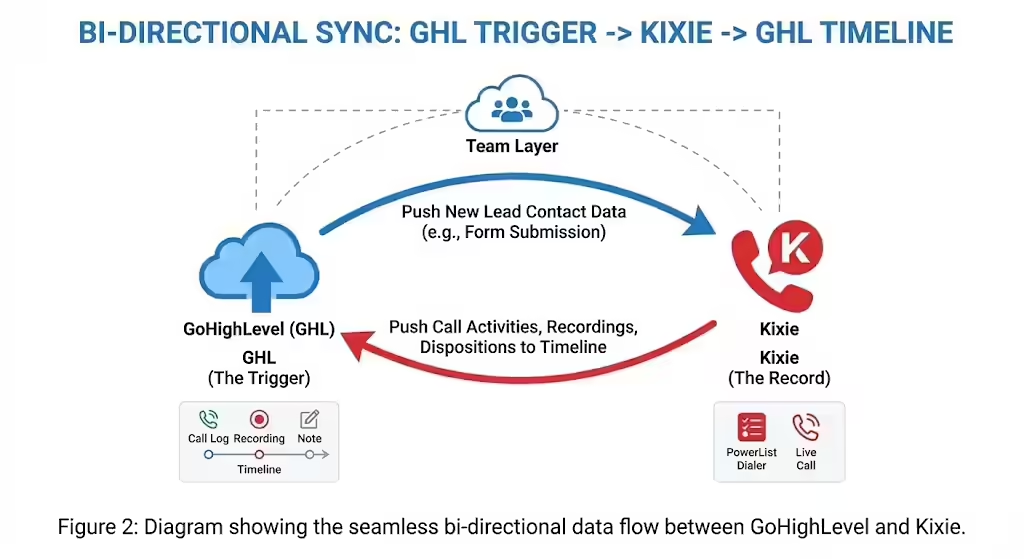
This strategy allows the business to use GoHighLevel for what it does best (marketing automation) while using Kixie for what it does best (high-velocity voice connection and real-time analytics).
The Live Leaderboard Engine
Kixie’s Live Leaderboard engine is distinct from standard GoHighLevel reporting because it accesses the telephony switch directly. It does not rely on the CRM to "report" that a call was made; rather, it reads the activity from the phone system's core switch itself.
This ensures that the data displayed is accurate to within seconds, refreshing automatically every 15 seconds. This direct-to-switch engine allows for the visualization of specific metrics that GHL native reports may obscure, delay, or simply not capture, such as:
- ConnectionBoost Rating: The effectiveness of local presence dialing in securing pickups.
- Average Talk Time: A proxy for lead quality and pitch effectiveness.
- SMS Volume: Real-time tracking of text outreach alongside voice metrics.
- Presence Status: Seeing who is "In Session," "Available," or "Do Not Disturb" in real-time.
Integration Mechanics
The technical foundation of integrating Kixie real-time sales leaderboards into GoHighLevel requires a one-time OAuth handshake between a Kixie Manager account and a GoHighLevel Admin Sub-account. It is crucial to note that this integration occurs at the Sub-account level, not the Agency level.
This aligns with the leaderboard logic: a business requires a leaderboard for a specific business unit (the sub-account), not an aggregate of every client in an agency’s portfolio. For agencies managing multiple clients, this means that each client sub-account can have its own discrete, private Kixie instance and leaderboard, ensuring data privacy and relevance.
Strategic Configuration of Sales Metrics for Real-Time Leaderboards
Designing for Role: SDR vs. AE
When configuring a real-time sales leaderboard within the Kixie and GoHighLevel ecosystem, the metrics displayed must align strictly with the role of the team members. A common error in sales management is creating a generic leaderboard that mixes "Setters" (Sales Development Reps, or SDRs) and "Closers" (Account Executives, or AEs). These roles have different success metrics.
- The SDR Leaderboard (Hunter Metrics): For Sales Development Reps (SDRs), the goal is opportunity generation. To drive performance in real-time, the leaderboard must focus on leading indicators like Dials (volume), Connections (efficiency), and Talk Time (quality). A rep with 100 dials and 2 hours of talk time is having meaningful conversations, whereas high dials with low talk time indicates failure.
- The AE Leaderboard (Closer Metrics): For Account Executives (AEs), dial volume is often less relevant than deal progression. An AE leaderboard should track Total Talk Time (indicating deep discovery), Completed Activities (meetings held), and Revenue/Deal Value (highlighting revenue closure in real-time).
The "Metric" Dropdown Configuration
In the Kixie dashboard, the configuration involves selecting specific data columns to display on the sales leaderboard. The interface allows for a "Carousel" approach, where multiple slides rotate, keeping the display dynamic and preventing "banner blindness".
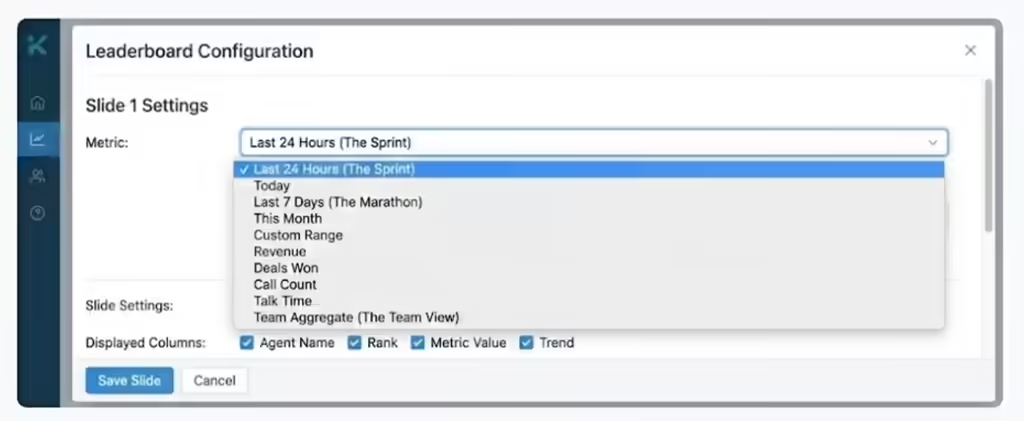
Strategic Recommendation for Slide Rotation:
- Slide 1 (The Sprint): "Last 24 Hours" or "Today": Shows who is winning today to drive immediate urgency.
- Slide 2 (The Marathon): "Last 7 Days": Shows consistency. This prevents a rep who had one lucky morning from falsely dominating the narrative.
- Slide 3 (The Team View): Aggregate stats for "Sales Team A" vs. "Sales Team B". This fosters tribal competition rather than just individual rivalry, encouraging team members to coach each other.
Setting Time Intervals
When setting up a Kixie real-time sales leaderboard, administrators can select time intervals of 14 hours, 24 hours, 7 days, or 30 days.
Operational Tip: Set the "Today" view to 14 hours rather than 24 hours if you want to capture the current workday specifically, resetting at midnight. This ensures the board is blank and ready for fresh competition each morning, preventing yesterday's success from diluting today's urgency.
Step-by-Step Technical Implementation Guide for the GoHighLevel Sales Leaderboard
Configuring the Kixie Leaderboard
This phase details how to configure the visual settings within Kixie before embedding them into the GoHighLevel sales leaderboard.
- Access the Kixie Dashboard: Log in to app.kixie.com as an Admin.
- Go to Live Views: Select Live from the main menu, then click Leaderboards.
- Create New Display: Click the New Display button.
- Team Segmentation: Under the Teams dropdown, do not leave it on "All Agents" if you have support staff. Select the specific "Sales" team to ensure the leaderboard is relevant.
- Metric Selection: Select Connections (pickup capability), Talk Time (conversation quality), and Total Calls (grit/effort).
- Visualization Settings: Set Slide Duration to 30 seconds and toggle Show All Users to OFF to focus on the top 10 performers.
- Generate URL: Save to generate a unique URL. This is the "Source of Truth" link used for embedding.
Preparing the GoHighLevel Environment
There are two primary methods to embed the Kixie real-time sales leaderboard URL into GoHighLevel (GHL): the Custom Menu Link and the Dashboard Widget.
Method A: The Custom Menu Link (The "Command Center" Approach)
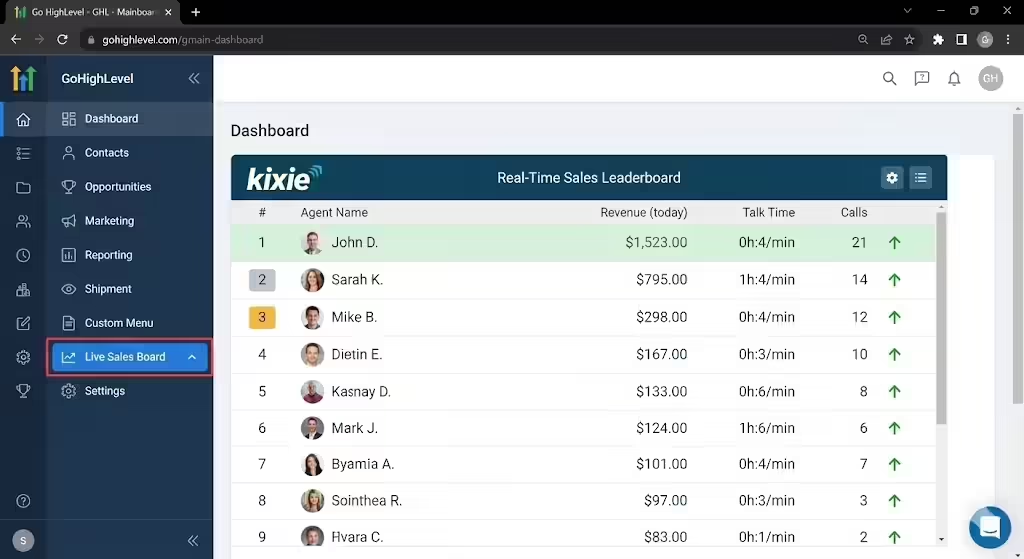
This method creates a dedicated tab in the GHL sidebar, making the Kixie sales leaderboard look like a native GoHighLevel feature.
- Open GHL Settings: Go to your Sub-account Settings and find Custom Menu Links.
- Configure Link: Click Create New. Set the title to "Live Sales Board" and paste the Kixie URL.
- Open in iFrame: Select iFrame (or "Inside HighLevel"). Crucial: Do not select "New Tab". The iFrame option keeps the menu bar intact, maintaining a seamless experience.
- Result: When a rep clicks "Live Sales Board," the leaderboard loads immediately within the main GoHighLevel window.
Method B: The Dashboard Embed Widget (The "Overview" Approach)
This method places a smaller version of the sales leaderboard directly on the main GHL dashboard.
- Edit Dashboard: Go to the GHL Dashboard and click Edit, then + Add Widget.
- Select Embed: Choose the Embed element and select iFrame URL as the type.
- Configure: Paste the Kixie URL and drag the widget to 100% width to ensure columns are legible.
- Result: Every time a user logs in, the first thing they see is their ranking relative to their peers.
Advanced Automation & Workflows for "Speed to Lead" in GoHighLevel
The "Instant Dial" Workflow
To maximize the "Connections" metric on a GoHighLevel sales leaderboard, organizations must reduce the latency between a lead arriving in the CRM and the phone ringing.
Workflow Logic:
- Trigger: A Contact is Created in GoHighLevel (e.g., via Facebook Lead Form).
- Action: The workflow adds the contact to a Kixie PowerList using the Kixie Native Integration action within GHL.
- Result: The lead is instantly pushed to the Kixie PowerCall dialer of available agents. The dialer detects availability and initiates the call.
- Leaderboard Impact: As agents accept these calls, their "Connections" and "Talk Time" metrics on the leaderboard spike immediately, providing instant positive reinforcement for handling inbound traffic.
Gamifying Call Outcomes (Dispositions)
Kixie allows for "Disposition Reporting," enabling advanced contests based on call outcomes rather than just volume on the sales leaderboard.
- Concept: If a user logs a "Demo Booked" outcome in the Kixie dialer, that data syncs to GoHighLevel.
- Advanced Visualization: While the live board shows talk time, a secondary report (embedded via iframe from Google Looker Studio connected to GHL data) can sit side-by-side showing "Demos Booked Today".
- Triggered Celebrations: Use GoHighLevel workflows to detect the "Demo Booked" tag (synced from Kixie) and trigger an internal notification (Slack/Teams) to celebrate the win.
Using AI for Leaderboard Dominance
Kixie's AI capabilities, specifically "ConnectionBoost" and "Local Presence," directly impact the metrics displayed on the real-time sales leaderboard.
- ConnectionBoost: This feature automatically rotates local area codes to match the prospect's region.
- Leaderboard Correlation: Agents who use ConnectionBoost will statistically see higher "Connection Rates" and "Talk Time" on the leaderboard.
- Coaching: Managers should use this correlation to coach underperforming reps by pointing out that top performers on the leaderboard are utilizing Local Presence tools to achieve their stats.
Optimizing the Real-Time Sales Leaderboard Display for "TV Mode" and Remote Floors
The Kiosk URL and "TV Mode"
While embedded dashboards are excellent for individual laptops, high-velocity sales teams often mount a large TV in the office to create a pervasive sense of accountability using the real-time sales leaderboard. Kixie provides a specialized "Kiosk" or "TV Mode" capability for this purpose.

Setup for Office TVs:
- Hardware: Use a reliable stick PC or media player (e.g., Amazon Fire Stick 4K) connected to the TV's HDMI port. Avoid Smart TV built-in browsers as they often lack the memory for long-running WebSocket connections.
- Software: Use a browser in "Kiosk Mode" or a digital signage app like AbleSign. This strips away address bars and window frames, maximizing data visibility.
- URL Configuration: Use the specific Kixie Sales Leaderboard URL with the "Kiosk" toggle enabled to optimize font sizes for distance viewing.
- Auto-Refresh: Do not install third-party auto-refresh extensions. Kixie’s architecture self-refreshes every 15 seconds; external refreshers cause a jarring screen "blink".
The "Virtual Sales Floor" for Remote Teams
For distributed teams where a physical TV is impossible, the solution is the "Virtual Sales Floor" for the sales leaderboard.
- Strategy: Create a pinned tab in the company Slack or Microsoft Teams channel that links to the public Kixie URL.
- The "Bullpen" Zoom: Some high-performance remote teams keep a "bullpen" Zoom room open all day where a dedicated admin screen-shares the Kixie Sales Leaderboard 24/7. Reps work in this room with the "TV" always visible in the shared screen window, simulating the ambient pressure of an office environment.
Psychology of Gamification and "Healthy" Competition on the Sales Leaderboard
The "Green/Red" Motivation
Implementing a Kixie sales leaderboard is a cultural intervention that acts as a magnifying glass on performance. The dashboards often use visual cues (heat maps) to show performance relative to peers.
- The High Performer: Seeing their face at the #1 spot releases dopamine, reinforcing the positive behavior.
- The Middle of the Pack: Seeing that they are only 5 calls behind the person above them creates a "reachable goal" (nudge theory), encouraging extra effort to pass the person in front.
- The Laggard: Visibility eliminates the ability to hide. In a spreadsheet, a rep with 0 talk time goes unnoticed, but on a TV, 0 talk time is a clear warning signal. This forces a decision: improve performance or opt-out of the role.
Avoiding "Vanity Metrics" Pitfalls
A significant risk of real-time sales leaderboards is that agents may "game" the system to look good on the TV without driving revenue.
- The "Dial Pad Hero": An agent who dials numbers and hangs up instantly to boost their "Total Calls" metric looks like a hard worker but generates no value.
- Counter-Measure: Configure the leaderboard to prioritize Talk Time over Call Count. You cannot fake talk time; you need a human on the other end to engage.
- The "Chatty Cathy": An agent with high talk time but low conversions suggests long conversations with unqualified leads.
- Counter-Measure: Pair "Talk Time" with "Dispositions" (e.g., Sales Made). If talk time is high but sales are low, the manager knows to intervene with coaching on closing techniques rather than effort.
Troubleshooting and Best Practices for GoHighLevel Real-Time Leaderboards
Handling Data Latency and Sync Issues
When running Kixie real-time sales leaderboards inside GoHighLevel (GHL), it is important to understand data flow. The iframe approach (embedding the Kixie URL directly) bypasses GHL's internal database latency because it acts as a window looking directly at Kixie’s server. This is the primary technical advantage of the iFrame method over trying to build a custom GHL dashboard using "Custom Values" that update via API. The iFrame is a direct feed, while the API update is a sync; always choose the direct feed for leaderboards.
Mobile Responsiveness and App Usage
GoHighLevel has a mobile app (LeadConnector), but Kixie sales leaderboards embedded as iFrames are often difficult to read on small screens due to column squashing.
- Recommendation: Advise sales reps that the Leaderboard embedded in GoHighLevel is a "Desktop/Tablet" experience. For mobile check-ins, they should be encouraged to use the Kixie Mobile App directly, rather than the GHL embed, as the app is optimized for vertical scrolling and quick stats checking.
The "Double Header" Issue
When embedding Kixie via iFrame into GoHighLevel (GHL), Kixie’s website has its own header (menu, logo), and GHL has its own sidebar and top bar. This can look cluttered, creating a "frame within a frame" effect.
- Fix: Use the specific "Presentation Mode" or "Kiosk Mode" URL from Kixie if available. This strips away the menu bars, leaving only the data, creating a cleaner, more integrated aesthetic inside the GoHighLevel window.
Conclusion: From Data to Action with Real-Time Sales Leaderboards in GoHighLevel
Creating a real-time sales leaderboard for GoHighLevel (GHL) is not merely a technical integration task; it is a strategic shift in how an agency or business manages its revenue generation.
By acknowledging the limitations of GoHighLevel’s native reporting—which favors marketing attribution over sales activity—and overlaying Kixie’s specialized "Team Layer," businesses can gain enterprise-grade visibility. The integration of Kixie’s Live Leaderboards via GoHighLevel’s Custom Menu Links creates a "Single Pane of Glass" ecosystem. Sales representatives no longer need to toggle between a CRM and a phone system report; the score is always visible, the expectations are clear, and the feedback loop is instantaneous.
In an environment where speed-to-lead and persistence are the primary determinants of conversion, the Real-Time Sales Leaderboard acts as the pulse of the sales floor. It transforms the abstract concept of "work" into visible, measurable, and competitive action, driving the behavioral changes necessary to scale from a small team to a high-performance sales organization.