
List-View Dialing in Pipedrive
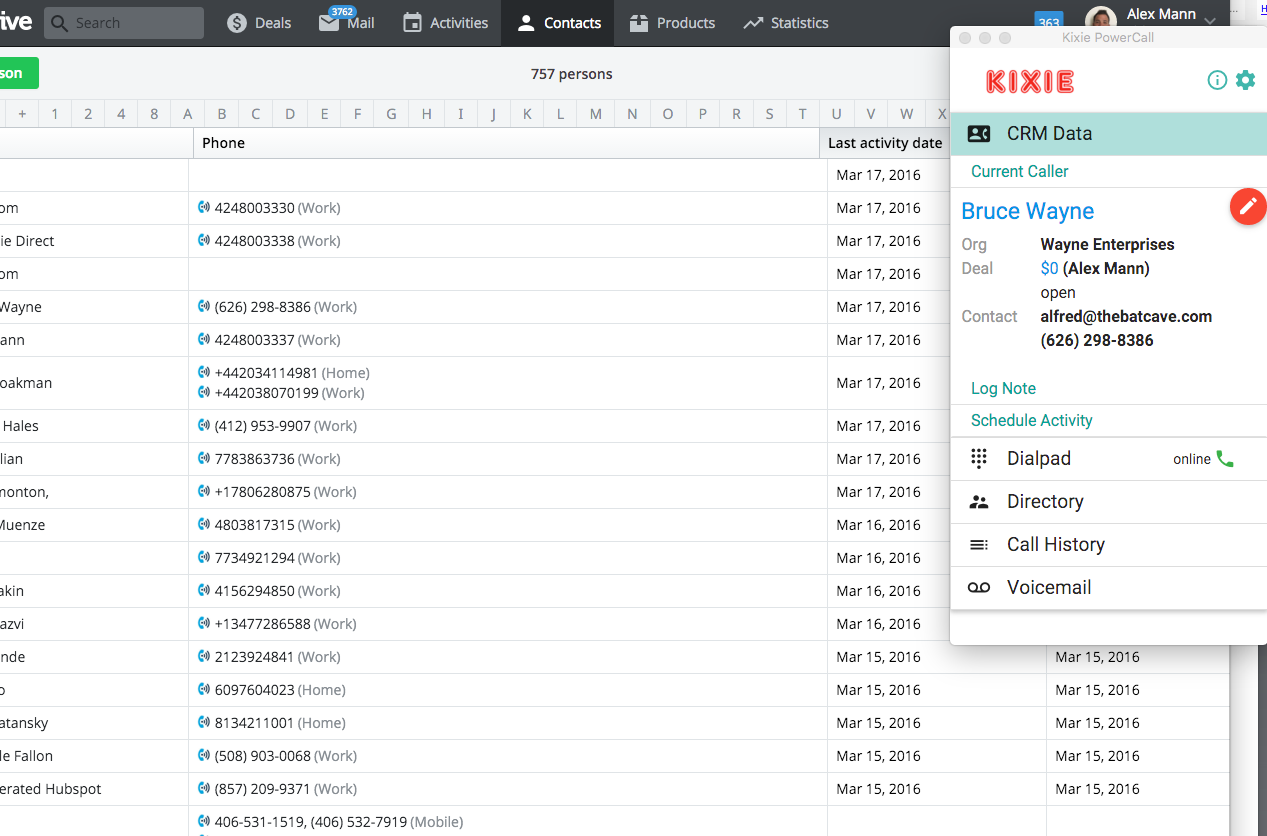
Dialing from a list view in Pipedrive really brings out the usefulness of Kixie’s Pipedrive integration in general, and the Kixie PowerCall® in particular. On the Pipedrive contacts page, you can see in the example below, that I have created a list of contacts, in this case using a filter. You can also create such a list view with phone numbers in the deals page, if you prefer.

By utilizing the red Kixie click-to-call icon beside each number, I can dial down the list very efficiently with this inside sales power dialer, click by click! Additionally, whenever I make a call, my Kixie PowerCall® will populate with the caller’s CRM information and give me the opportunity to:
- View and edit the contact’s basic Pipedrive information
- Click into the contact and/or its most recent deal if desired
- Compose a note that will sync into the Pipedrive contact
- Schedule a future activity with the Pipedrive contact
- Log a Call Disposition regarding the outcome of the call with the contact
PowerCall in List View This way, I can dial down a list with with click-to-call, and when I do need to click into the actual contact or deal, make edits, log notes or schedule activities, I can do that efficiently without slowing down or breaking my Pipedrive workflow.
To start a free trial in under 3 minutes with no credit card required, please click here. Thanks!
Ready to close more deals with Kixie?
See how Kixie's AI-powered tools can transform your sales and support operations.
Start Free Trial