
List-View Dialing in HubSpot CRM
Dialing down a contact list in HubSpot CRM really brings out the efficiency of Kixie’s HubSpot CRM integration. On the HubSpot CRM contacts page, as you can see in the example below, I have my list of contacts. By utilizing the red Kixie click-to-call icon beside each number, I can dial down the list, one click at a time. 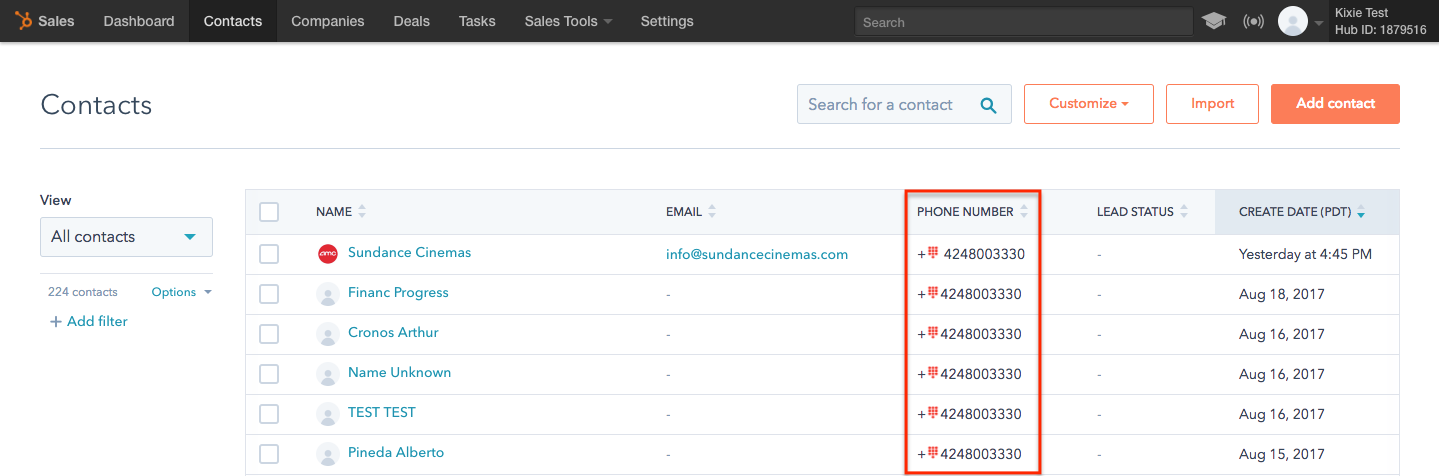 Additionally, whenever I make a call, my Kixie PowerCall® will give me the opportunity to:
- View the person’s basic HubSpot CRM information, and click directly into the contact.
- Edit the contact’s basic information in HubSpot CRM
- Compose a note or call disposition that logs inside the contact
- Schedule a future activity (like a follow-up call) that logs inside the contact
This way, I can dial down a list with with click-to-call, and when I do need to click into the actual contact, make edits, log dispositions or schedule activities, I can do that efficiently without slowing down or breaking my workflow. For even faster outbound work on HubSpot lists, the Kixie PowerDialer can auto-dial through a list of contacts for you.
To start a free trial of Kixie in under 3 minutes, no credit card required, please click here. Or schedule a demo to see how Kixie integrates with HubSpot CRM. Thanks!
Ready to close more deals with Kixie?
See how Kixie's AI-powered tools can transform your sales and support operations.
Start Free Trial