

 HubSpot
 Salesforce
 Zoho
Zoho
 HighLevel
 Pipedrive
 ActiveCampaign
 Slack
Slack
 Zapier
TL;DR: This report identifies a critical inefficiency in Salesforce Digital Engagement where Omni-Channel routing processes low-value "junk" SMS replies as distinct Work Items (MessagingSession objects), generating PendingServiceRouting (PSR) records that saturate agent capacity and block high-value Voice interactions via race conditions. Standard Tab-Based and Status-Based capacity models, along with native keyword filtering, fail to distinguish or effectively filter implicit refusals and carrier-flagged spam. The solution decouples SMS from the routing engine using Kixie Team SMS as a "Sidecar" workflow, employing a collaborative inbox that permits manual triage without consuming Salesforce routing capacity. Data integrity is preserved by logging SMS as "Completed Tasks" rather than stateful MessagingSession objects.
Table of Contents
- Executive Summary: Why Junk SMS Replies Conflict with Salesforce Workflows
- How Salesforce Routing Mechanics Create the SMS Clog
- Why Salesforce Capacity Models Can’t Handle SMS Replies
- Why Native Filters Fail to Stop Junk SMS Replies
- Kixie Team SMS – A Sidecar for Salesforce Workflows
- Logging SMS to Salesforce Without Clogging Workflows
- Reducing Junk SMS Replies with Advanced Features
- Implementation Guide to Stop Clogging Salesforce Workflows
- Conclusion: Stop Clogging and Restore Flow to Salesforce SMS
Executive Summary: Why Junk SMS Replies Conflict with Salesforce Workflows
In the current environment of high-velocity sales, the integration of Short Message Service (SMS) into Customer Relationship Management (CRM) ecosystems presents a critical opportunity, yet it remains a significant source of inefficiency. Salesforce provides robust tools for digital engagement through its Service Cloud and Omni-Channel architectures. However, a pervasive friction exists when these tools, which were originally designed for ticket-based customer support, are applied to the fluid, high-volume nature of outbound sales prospecting.
This report analyzes a specific, debilitating phenomenon: the saturation of Salesforce workflows by "junk" SMS replies. When sales teams execute bulk outreach, they inevitably generate low-value inbound traffic, specifically replies such as "STOP," "Who is this?", or "Wrong number". In a standard Salesforce configuration, the Omni-Channel routing engine interprets these signals not as noise, but as distinct, actionable "Work Items".
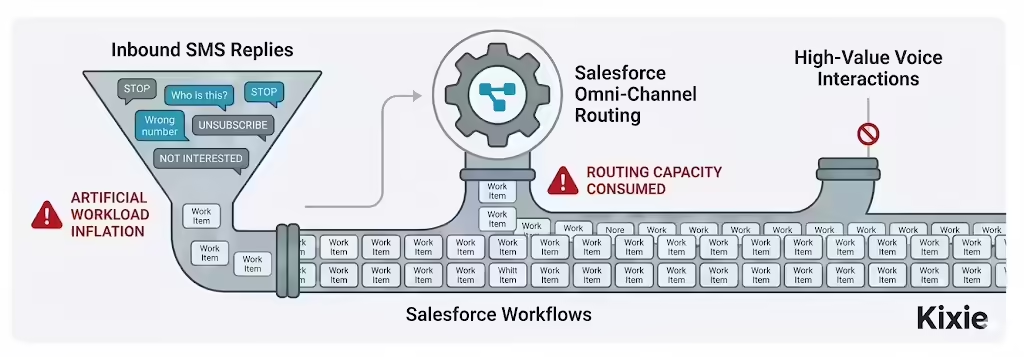
This architectural interpretation triggers a cascade of inefficiencies: artificially inflated agent workloads, the consumption of finite routing capacity, and the interruption of high-value voice interactions. This document guides Salesforce administrators and Revenue Operations (RevOps) leaders through the mechanics of this problem and proposes a structural decoupling using Kixie's "Team SMS" to filter noise while preserving the CRM as the single source of truth.
How Salesforce Routing Mechanics Create the SMS Clog
To understand why junk SMS replies disrupt sales operations, one must look at the specific mechanics of the Salesforce routing engine. Omni-Channel is a logic layer designed to route work items to the most qualified, available agent. While this logic works well for handling complex support cases, it introduces fatal rigidities when applied to the asynchronous nature of SMS sales conversations.
The "New Task" Fallacy and Object Generation
The fundamental unit of work in the Salesforce routing architecture is the Work Item. In the context of SMS, this is typically represented by the MessagingSession object. When Salesforce receives an inbound SMS, it evaluates whether to append it to an existing conversation or start a new one.
Because sales conversations are often sporadic, a previous MessagingSession may have timed out or been marked "Ended". Consequently, Salesforce interprets a new incoming message, even a junk reply like "STOP," as a discrete, novel event. This triggers a specific sequence:
- Object Instantiation: The system creates a new MessagingSession record.
- Routing Trigger: It generates a PendingServiceRouting (PSR) record.
- Distribution: It pushes the PSR to a queue or agent.
The system assigns equal weight to a high-intent buying signal and a low-intent refusal, generating a PSR for both. This egalitarian treatment of unequal signals is the root cause of the workflow clog.
The PendingServiceRouting Bottleneck
The PendingServiceRouting (PSR) object serves as a holding pen for work waiting to be assigned. In high-volume sales environments, the accumulation of junk SMS replies creates a PSR backlog that impacts system latency and agent availability.
When a mass text campaign is sent to 1,000 leads, the response curve is typically front-loaded, potentially generating hundreds of replies within minutes. If the routing configuration uses a "Most Available" model, the engine attempts to distribute these items across the active sales floor.
- The Saturation Point: Agents' capacity limits are reached within seconds as they are bombarded with junk SMS PSRs, marking them "Busy" or "At Capacity".
- The Denial of Service: While agents manually clear these junk items, they are technically unavailable to receive high-priority work items, such as inbound Voice Calls.
The "Race Condition" and Voice Interruptions
A critical flaw in standard Salesforce workflows is the conflict between SMS and Voice channels. Salesforce documentation explicitly acknowledges "race conditions" that occur when external routing (telephony) and internal Omni-Channel routing interact.
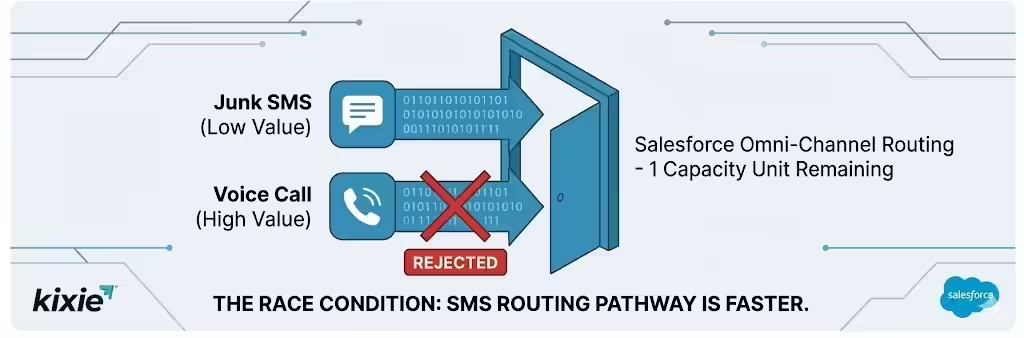
If a sales representative has one remaining unit of capacity, and an inbound Voice Call (high value) and a junk SMS (low value) arrive simultaneously, the SMS often "wins". The SMS routing pathway is entirely internal to Salesforce and requires less overhead than the telephony handshake.
- The Consequence: The SMS occupies the final capacity slot.
- The Rejection: The Voice Call is rejected because the agent is now at 100% utilization.
- The Revenue Impact: A qualified conversation is sacrificed for a junk text.
Lifecycle Management and the "Zombie" Session
The lifecycle of a MessagingSession (New, Active, Waiting, Inactive, Ended) further complicates workflows. A specific issue arises with "Zombie" sessions, which are interactions that are technically over but remain systemically active.
If a prospect replies "No thanks," and the agent closes the tab, the session might enter an "Inactive" state rather than "Ended". If the customer sends a second message (e.g., "Please remove me"), the "Inactive" session may reactivate and re-enter the agent’s queue. This forces the agent to handle the same refusal multiple times.
Why Salesforce Capacity Models Can’t Handle SMS Replies
Salesforce uses capacity models to determine when an agent can receive new work. The two primary methods, Tab-Based and Status-Based, both fail to adequately filter the noise of junk SMS replies in a Sales context.
Tab-Based Capacity: The Visual Clog
In the Tab-Based model, an agent’s capacity is determined strictly by the number of open console tabs.
- The Mechanism: Capacity equals the number of open tabs.
- The Failure: Sales representatives often keep many records open for context. When junk SMS replies arrive, each one forces a new tab to open.
- Visual Paralysis: An agent facing a barrage of "STOP" replies will see their console workspace fragment, pushing legitimate deals off-screen. To reclaim capacity, the agent must manually click the "X" on every junk tab, performing non-value-added work to clear the queue.
Status-Based Capacity: The Hidden Clog
Status-Based Capacity decouples capacity from the UI, calculating bandwidth based on the status of assigned work items.
- The Mechanism: Capacity is the sum of the weights of items in "consuming" statuses (e.g., "New" or "In Progress").
- The Failure: While this solves visual clutter, it does not solve availability issues. A new junk SMS typically enters in a "New" status, consuming capacity immediately upon arrival.
- Persistence of Noise: The agent must still interact with the item to change its status to "Completed" to release the capacity. The system demands that every noise signal be processed as a task.
The Limitations of "Interruptible" Work
Salesforce allows administrators to define work items as "Interruptible" (can be paused for urgent work) or "Primary" (blocks other work).
- The Classification Error: Junk SMS presents a classification dilemma. If classified as Primary, it blocks urgent calls. If classified as Interruptible, it allows calls but still clogs the agent’s "Accepted Work" list.
- The Psychological Cost: Even if a call interrupts a junk SMS, the agent suffers from the cognitive load of the interruption. The notification chime and screen pop trigger an "Orienting Reflex," creating attention residue that lowers the quality of subsequent interactions.
Why Native Filters Fail to Stop Junk SMS Replies
Many organizations attempt to use Salesforce’s native filtering to manage SMS volume. While Omni-Channel routing can handle standard compliance keywords, it is often insufficient for the nuance of human sales communication.
The Hard "STOP" vs. The Soft "No"
Salesforce Digital Engagement includes built-in logic for standard compliance keywords like "STOP," "QUIT," or "UNSUBSCRIBE".
- The Mechanism: When these keywords are detected, the system updates the MessagingEndUser record to "Opt-Out".
- The Gap: This logic only captures explicit refusers. It fails to address implicit refusers using colloquialisms like "Please don't text me," "Wrong person," or "Stop texting me bro".
- The "Chatty" Junk: Inquiries like "Who is this?" are not opt-outs, but for a cold list, they act as non-convertible noise. Because the Salesforce filter is rigid, these messages pass through and enter the routing engine as valid work items, consuming the same resources as a genuine prospect.
Carrier Filtering and Deliverability
Carrier Filtering adds another layer of complexity to SMS workflows. Carriers like AT&T and Verizon aggressively filter A2P (Application-to-Person) traffic that resembles spam.
- The Visibility Gap: If a carrier blocks an inbound reply (e.g., a customer cursing at a bot), the sales rep never sees it. However, if the carrier allows the reply but flags it as "Spam" in the header, standard Salesforce integrations often lack the sophistication to parse that header. The message lands in the queue regardless.
- Kixie’s Approach: Specialized providers use technologies like "ConnectionBoost" to maintain high reputation scores, reducing the likelihood of triggering carrier filters that result in confused "Who is this?" replies.
The "One-to-Many" Texting Problem
A significant pain point in standard Salesforce SMS is the mismatch between mass outreach and individual record ownership.
- The Scenario: A blast text is sent to 500 leads. 50 replies arrive and are distributed via Omni-Channel to 5 active agents.
- The Mismatch: Agent A receives a reply from a Lead technically owned by Agent B, who may be away. Agent A lacks context and must transfer the MessagingSession.
- The Efficiency Loss: This "Transfer Tax" creates friction, as the rigid assignment model prevents the team from collectively clearing noise without formal transfer procedures.
Kixie Team SMS – A Sidecar for Salesforce Workflows
To resolve the junk SMS clog, organizations must bypass the standard Salesforce routing rules for the initial layer of engagement. Kixie Team SMS acts as a "Sidecar" architecture: a parallel processing lane for high-volume messaging that sits alongside the CRM without blocking its core functions.
The Collaborative, "Slack-Like" Inbox
Kixie reimagines the SMS interface by replacing "Tickets" (Work Items) with a continuous, collaborative stream, similar to Slack.
Shared Visibility vs. Rigid Assignment
Standard Salesforce routing sends a message to one agent, hiding it from others. Kixie’s Shared SMS Inbox makes the conversation visible to the entire team or Ring Group.
- Group Triage: Any available agent can view the inbox and archive junk messages (e.g., "STOP," "Wrong Number") in seconds.
- Zero Capacity Cost: This triage happens in the Kixie interface and does not trigger a PendingServiceRouting record in Salesforce. Consequently, it consumes zero Omni-Channel capacity, leaving agents available for high-value Voice calls.
Automatic Thread Locking
To prevent two agents from replying to the same lead simultaneously ("Double Texting"), Kixie uses Automatic Thread Locking.
- The Mechanism: When Agent A starts typing, the input field locks for all other agents, who see an indicator that "Agent A is typing...".
- The Advantage: Unlike Salesforce ownership, which is a transaction, this lock is fluid. If Agent A navigates away, the lock releases instantly, allowing for rapid-fire handling of junk without administrative overhead.
The Chrome Extension Overlay
Kixie utilizes a browser extension to deliver messages without disrupting the agent's primary workflow.
- The "Glance" Factor: The extension docks to the browser, triggering a badge notification rather than a modal interruption like a Salesforce "Screen Pop".
- Workflow Integration: The agent can glance at the sidebar to determine if the message is junk (click "Archive"), a buying signal (click "Call"), or ambiguous.
- Parallel Processing: The inbox overlays the CRM, allowing agents to clear junk while maintaining focus on their active Salesforce record, eliminating the "toggle tax".
Internal Collaboration for Ambiguous Junk
Determining if a reply is junk often requires context. A message like "Can we discuss pricing?" could be a lead or a vendor solicitation.
- Private Messaging: Kixie allows agents to tag team members within the SMS thread using a private note feature.
- In-Situ Resolution: A rep can tag a manager (@Manager: Is this junk?) and receive a reply (@Rep: Yes, archive it) without leaving the thread or using external tools like Slack.
Comparative Analysis: Workflow Efficiency
This comparison highlights how the two architectures handle a "Junk Reply" event.
| Feature | Standard Salesforce (Omni-Channel) | Kixie Team SMS (Sidecar) |
|---|---|---|
| Inbound Trigger | Creates MessagingSession + PSR | Push Notification in Extension |
| Routing Logic | Rigid (Round Robin / Most Available) | Flexible (Shared Inbox / Ring Group) |
| Agent Capacity | Consumes 1 Unit of Capacity | Zero Capacity Consumption |
| Voice Interaction | Can block incoming calls | Parallel processing (Non-blocking) |
| Noise Impact | "STOP" blocks a slot | "STOP" is visible but blocks nothing |
| Collaboration | Single Owner (Transfer required) | Multi-User Access (Thread Locking) |
| Data Logging | Logs as Conversation Object | Logs as Completed Task Activity |
| Work Item Type | Interruptible (often blocks) | Non-Blocking Overlay |
Logging SMS to Salesforce Without Clogging Workflows
Adopting a "Sidecar" application like Kixie often raises concerns about data fragmentation. RevOps leaders need assurance that SMS handling outside Salesforce still populates the CRM as the Source of Truth. Kixie addresses this by changing how data is logged to prevent clogging.
The "Completed Task" Strategy
Standard Salesforce Digital Engagement logs interactions as MessagingSession objects, which are "stateful" (open/closed) and imply active work to be done. Kixie logs SMS interactions as Completed Tasks within the Activity History.
- The Distinction: A "Completed Task" is a historical record stating "This event occurred," rather than a request for action.
- The Benefit: Logging a "STOP" reply as a Completed Task ensures the data exists for audit and compliance. However, because the status is "Completed," the Omni-Channel engine ignores it, bypassing the routing queue while satisfying Salesforce’s data requirements.
Automating Workflow Triggers
While a "Completed Task" does not trigger Omni-Channel routing, it can still serve as a trigger for backend automation workflows.
- Salesforce Flows: Administrators can configure a Record-Triggered Flow to listen for Task creation. If a Task Subject contains "SMS" and the Description contains "STOP," the Flow can automatically update the Lead Status to "Unqualified".
- HubSpot Workflows: For teams using a hybrid stack (HubSpot for marketing, Salesforce for sales), Kixie’s integration allows specific SMS content to trigger HubSpot Workflows. For example, a "Wrong Number" log can automatically remove a contact from a nurture campaign.
Reporting and Analytics Integrity
Because Kixie logs are standardized Salesforce Tasks, organizations can maintain native reporting capabilities.
- Dashboarding: RevOps can build standard dashboards showing SMS volume, inbound/outbound ratios, and sentiment.
- Accurate Handle Time: By removing junk triage from MessagingSession metrics, Average Handle Time (AHT) reports for legitimate Support Cases become more accurate, as they are no longer polluted by short, low-value interactions.
Reducing Junk SMS Replies with Advanced Features
Once the workflow clog is cleared, organizations can focus on improving the quality of interactions using Kixie's advanced telephony and AI features.
ConnectionBoost and Local Presence
ConnectionBoost is a telephony feature that dynamically selects an outbound Caller ID to match the prospect’s local area code (Local Presence) and rotates numbers to prevent spam flagging.
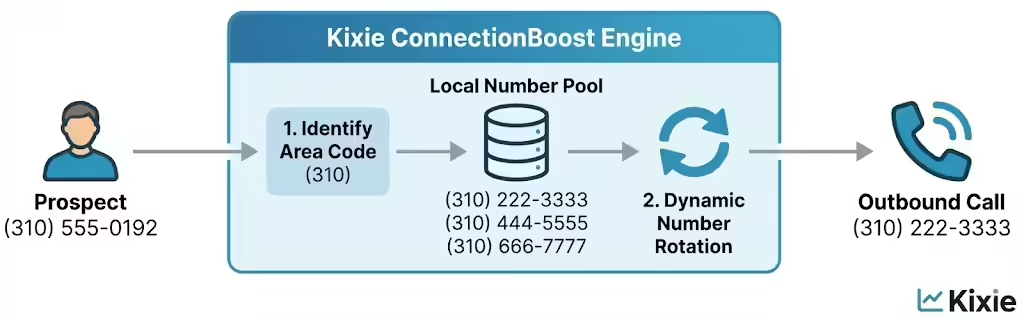
- The SMS Correlation: High answer rates on voice calls directly reduce the volume of confused "Who is this?" replies.
- Context Establishment: When a prospect answers the phone, context is established vocally. Conversely, ignoring a call from an unknown number often leads to skepticism when a follow-up text arrives. By increasing voice connection rates (up to 500%), Kixie reduces the volume of suspicious inbound SMS traffic.
AI-Powered "Revenue Signals"
Kixie is moving toward using AI to transform unstructured conversations into structured "Revenue Signals," further reducing manual filtering of junk.
- Sentiment Analysis: AI parses text sentiment to distinguish between a polite refusal and a buying signal.
- Automated Dispositioning: The system can automatically archive negative sentiment (e.g., "Stop calling me") and update Salesforce to "Do Not Call". Conversely, positive sentiment (e.g., "Call me at 5") triggers a "Hot Lead" notification.
- Self-Cleaning Inbox: This shifts the system from "Noise Management" to "Opportunity Management," notifying agents only when there is a probability of revenue.
Implementation Guide to Stop Clogging Salesforce Workflows
Transitioning from standard Salesforce Digital Engagement to Kixie requires a strategic change management process to ensure the junk SMS noise is effectively removed from the routing engine.
Step 1: Audit and Definition
Before installation, the RevOps team must quantify the problem.
- Analyze Volume: Run a Salesforce report on MessagingSession objects. A high percentage of sessions with fewer than three message turns confirms a "Noise" problem.
- Define "Junk": Establish clear definitions for messages that require no reply versus those that require administrative action (e.g., updating a record) to guide the new workflow.
Step 2: Configuration and Installation
Technical setup involves integrating the Kixie managed package with the Salesforce environment.
- Install Kixie PowerCall: Deploy the package from the Salesforce AppExchange and map Salesforce Users to Kixie Agents.
- Logging Configuration: Enable "Log SMS as Task" in the integration preferences to ensure data bypasses the Omni-Channel queue.
- Team SMS Setup: In the Kixie Dashboard, create a new Rule, assign the shared SMS number, and add members. Crucially, configure "Rule Hours" to set auto-replies for off-hours, preventing weekend backlog accumulation.
Step 3: Decommissioning the Clog
To stop the noise, the old routing pathway must be disabled.
- Modify Omni-Channel: In Salesforce Setup, remove the "SMS" Service Channel from the sales team’s Presence Configuration. This stops MessagingSession routing to their console while keeping the Voice channel active.
- Clean the Queue: Query existing PendingServiceRouting records associated with SMS and delete or reassign them to clear "Ghost" work items.
Step 4: Training and Adoption
Operational success depends on agent behavior changes.
- The "Sidecar" Habit: Train reps to keep the Kixie Chrome Extension open as their primary communication interface.
- Zero Inbox Policy: Mandate that the Team SMS inbox be cleared at the end of every shift, using the speed of the bulk archive feature.
- Notification Discipline: Instruct reps to disable browser notifications for Salesforce SMS and enable Kixie notifications for "Incoming SMS".
Step 5: Hybrid Automation (Optional)
Advanced users can configure Kixie Webhooks to send payload data to endpoints like Zapier. This allows for complex routing logic that exceeds the capabilities of Salesforce’s native engine.
Conclusion: Stop Clogging and Restore Flow to Salesforce SMS
The problem of junk SMS replies clogging Salesforce workflows stems from a fundamental misalignment between technology and use case. Salesforce Omni-Channel is a masterpiece of Service architecture, which is equitable and high-fidelity, designed to ensure no customer issue is lost. However, sales relies on velocity, not equity.
Forcing SMS traffic through Omni-Channel trades agent capacity for administrative overhead. Every "STOP" message that occupies a capacity slot acts as a silent tax on revenue: a blocked call, a missed connection, or a distracted closer.
Kixie’s "Team SMS" resolves this by treating SMS as a fluid stream rather than a series of tickets. By logging data as Completed Tasks, Kixie allows sales teams to eliminate the clog, filter noise without capacity penalties, and preserve data integrity. For the Salesforce user, efficiency is found not in managing the queue, but in stepping outside of it.