

 HubSpot
 Salesforce
 Zoho
Zoho
 HighLevel
 Pipedrive
 ActiveCampaign
 Slack
Slack
 Zapier

How to Trigger SMS from Call Dispositions in Salesforce with Kixie
A technical guide to mastering the "Double Tap" strategy.
This technical guide details the architecture for automating SMS follow-ups in Salesforce based on Kixie call dispositions (e.g., "Left Voicemail") to execute the "Double Tap" strategy and improve Speed-to-Lead. Prerequisites include a Kixie Professional Tier account for API access, Salesforce Enterprise or Unlimited Edition for HTTP Callouts, and a custom Call_Disposition__c field on the Task object to map specific call outcomes. Implementation requires a Record-Triggered Flow (After-Save) that filters for completed call tasks, solves the polymorphic WhoId issue (distinguishing Leads vs. Contacts) to retrieve mobile numbers, and enforces A2P 10DLC compliance by checking opt-out status before execution. The final step involves a POST request to the Kixie API endpoint (https://apig.kixie.com/app/event) using Named Credentials, ensuring the SMS is attributed to the correct record owner.
Table of Contents
- Executive Summary: The Evolution of Automated Sales in Salesforce
- The Strategic Imperative: Why Automate SMS Based on Call Outcomes?
- Prerequisites for Salesforce SMS Automation
- Step-by-Step: Setting up the Automation in Salesforce
- Top Use Cases for Disposition-Based SMS
- Competitor & Gap Analysis: The Kixie Advantage
- Best Practices for Automated SMS Compliance (A2P 10DLC)
Executive Summary: The Evolution of Automated Sales in Salesforce
The convergence of telephony and Customer Relationship Management (CRM) systems has fundamentally altered the operational environment for sales organizations. Historically, sales teams relied on siloed applications: a physical phone system for voice communication and a separate database for record-keeping. This fragmentation resulted in high latency and a slow "speed-to-lead," the critical metric defining the time between an inquiry and a response.

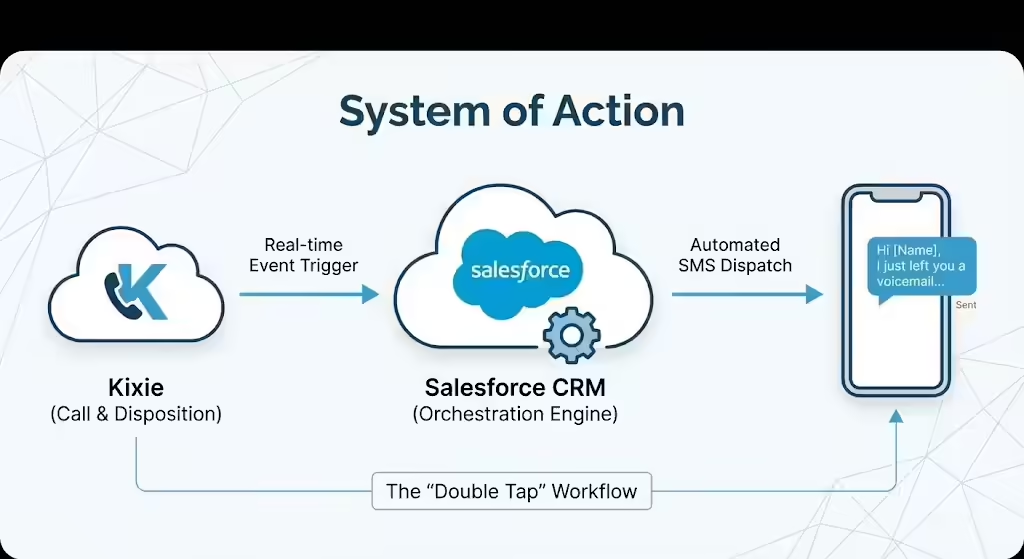
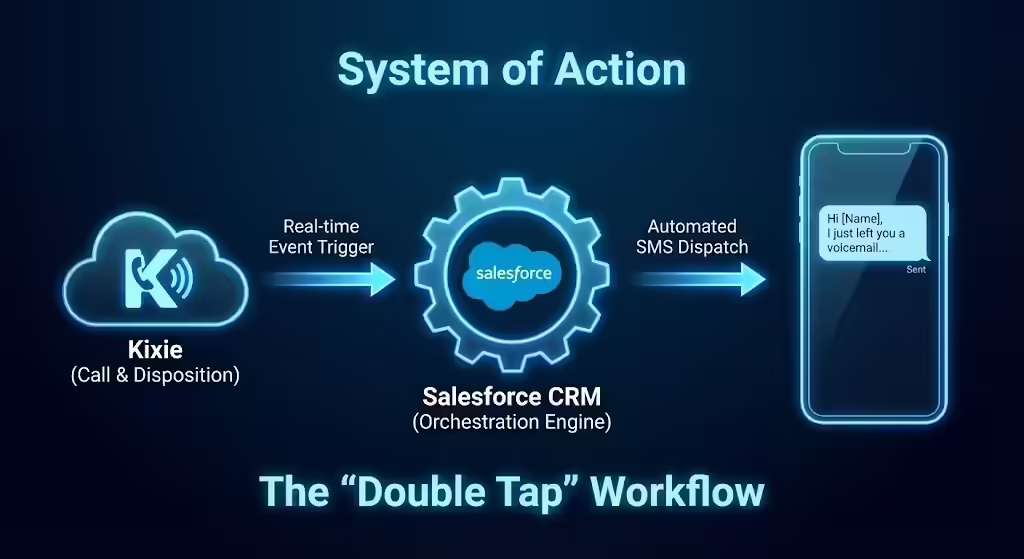
Today, integrating Voice over Internet Protocol (VoIP) platforms like Kixie with CRMs like Salesforce creates a "System of Action". In this model, the CRM acts as an orchestration engine that listens for real-time events and triggers immediate responses. This report analyzes a high-impact workflow within this model: automating SMS follow-ups triggered specifically by call outcomes, known as dispositions. By coupling the manual act of "dispositioning" a call, such as marking it as "Left Voicemail," with an automated SMS dispatch, organizations can achieve the "Double Tap" (a call followed instantly by a text) with zero administrative overhead. This guide serves as a comprehensive resource for implementing this specific automation architecture within Salesforce and Kixie.
The Strategic Imperative: Why Automate SMS Based on Call Outcomes?
In the high-velocity world of modern sales development, the efficiency of the frontline representative is the primary driver for revenue growth. However, true "Revenue Efficiency" is not just about volume; it is about maximizing the impact of interaction while minimizing the "work about work," which is the administrative burden of logging and context-switching. Automating SMS follow-ups based on call dispositions, or the outcome selected by a rep after a call, amplifies the impact of the call while eliminating manual labor.
The Psychology of the SMS Double Tap and Speed-to-Lead
The "Double Tap" strategy, which involves placing a phone call and immediately sending a text message if there is no answer, addresses the shifting preferences of modern buyers. While voice is ideal for rapport, it suffers from declining answer rates due to spam calls. Conversely, SMS boasts open rates exceeding 90%. When a prospect ignores a call from an unknown number, a text message arriving seconds later serves to "de-anonymize" the interaction.
However, the efficacy of the Double Tap is time-sensitive. Manual execution requires the rep to hang up, switch to a texting interface, and type a message. This process can take up to 90 seconds. Automation reduces this latency to near-zero, ensuring the text arrives while the prospect is still looking at their phone screen.
Enforcing SMS Messaging Consistency
In large sales teams, manual texting often leads to inconsistent messaging, with some reps using overly casual language or unapproved scripts. By tying SMS automation to the Kixie call disposition, sales leadership gains centralized control over the narrative. For example, the "Left Voicemail" disposition can trigger exactly the message the marketing team has refined, ensuring every prospect receives a consistent brand experience.
Eliminating Administrative Friction in Salesforce
The modern sales stack is often criticized for requiring too many clicks, which distracts from selling. Automation transforms the mandatory act of dispositioning a call into a productive act of communication. By using this existing behavior to trigger the SMS, the organization effectively gets the text message "for free" in terms of rep effort. The rep clicks "Left Voicemail" once to log the data, and the system handles the rest.
Overcoming the Voicemail Black Hole with SMS
Voicemail response rates have plummeted, and messages are often ignored. An automated companion SMS acts as a signpost, alerting the prospect that a message exists. This multi-channel approach increases the probability that the prospect will engage, as the voicemail proves a human is reaching out while the SMS provides a convenient channel for a reply.
Prerequisites for Salesforce SMS Automation
Implementing an automated SMS workflow where Salesforce triggers a text message based on a Kixie call outcome requires a specific structural foundation. It involves configuring the Salesforce data model, ensuring the correct Kixie billing tier, and understanding the API interplay between the two systems.

Kixie Account Configuration and API Access
To enable Salesforce to command Kixie to send a text, specific configurations are required:
- Required Tier: You must use the Professional Tier (or higher). "Integrated" or "Basic" tiers typically restrict access to the programmable API endpoints required for custom triggers.
- API Key Retrieval: The administrator must retrieve the unique Business ID (BID) and API Key from the Kixie Dashboard under Manage > Account Settings > Integrations.
- Bi-directional Sync: This setting must be enabled so that when Kixie interacts with a phone number, it can query Salesforce to identify the associated Lead or Contact and log the SMS correctly.
Salesforce Edition and Environment
Automation via "HTTP Callouts" in Salesforce Flows requires a Salesforce edition that supports API integration.
- Supported Editions: Enterprise, Unlimited, and Performance Editions support these features natively.
- Professional Edition: This edition requires the purchase of the "Web Services API" add-on to make outbound API calls.
The Salesforce Data Model: Preparing the Task Object
Kixie logs call activities as Task records within the standard Salesforce Activity timeline. To trigger automation, the Task object must be customized:
- Configuring the "Call Disposition" Field: Create a custom field on the Salesforce Activity object (Label: Call Disposition, Name:
Call_Disposition__c). - Kixie Mapping: In the Kixie Dashboard, configure the integration to write the specific disposition outcome to this API name (
Call_Disposition__c). This ensures structured data is available for the trigger. - Updating the "Type" Field: Update the standard "Type" picklist to include Kixie-specific values like "Incoming SMS," "Outgoing SMS," "Disposition," and "Call" to assist with filtering.
The Polymorphic "WhoId" Challenge in Salesforce
On a Task record, the "Name" field (API Name: WhoId) is polymorphic, meaning it can refer to either a Lead or a Contact. Salesforce Flows do not inherently know which object sits behind the ID until runtime. The automation logic must include a decision step to identify the object type (Lead vs. Contact) and retrieve the mobile phone number from the correct table to avoid failure.
Step-by-Step: Setting up the Automation in Salesforce
This section provides a detailed walkthrough of creating the automation using Salesforce Flow Builder to trigger Kixie SMS messages based on call outcomes. This guide assumes you are using Salesforce Flow rather than legacy Workflow Rules.
Establish the Kixie Connection (Named Credentials)
Using Salesforce Named Credentials is the security best practice as it abstracts the endpoint and authentication from the flow logic.
- Create Named Credential: Navigate to Setup > Security > Named Credentials.
- Configuration: Label it "KixieAPI" and set the URL to
https://apig.kixie.com.
Create the Record-Triggered Flow for Calls
The engine of this automation is a Record-Triggered Flow that listens for new call tasks.
- Initiate Flow: Select Record-Triggered Flow on the Task object.
- Trigger: Set to run when a record is created.
- Conditions: Status Equals "Completed,"
Call_Disposition__cIs Null False, and Type Equals "Call". - Optimization: Select "Actions and Related Records" (After-Save Flow) to enable external callouts.
Solving the WhoId Identity Crisis for Calls
Because the Task WhoId can be a Lead or Contact, you must identify the object to get the phone number.
- Create Formula (f_IsLead): Use the formula
BEGINS({!$Record.WhoId}, "00Q")to check if the ID belongs to a Lead. - Add Decision Element: Check if
f_IsLeadis True. If so, follow the "Is Lead" path; otherwise, follow the "Is Contact" path. - Get Records: Fetch the
MobilePhoneandFirstNamefrom the respective Lead or Contact object. - Assignment: Populate a unified
var_MobileNumbervariable from the results.
SMS Compliance Check (The "Kill Switch")
Before sending, the flow must check for opt-outs to ensure compliance.
- Check Opt-Out: Add a decision element to check if
{!var_HasOptedOutOfSMS}is True. - Action: If True, End Flow immediately.
Determining the SMS Message (Disposition Logic)
- Decision Element: Create paths for different dispositions (e.g., "Left Voicemail," "Busy," "Demo No Show").
- Text Templates: Create specific templates for each path (e.g., "Hi {!var_FirstName}, I just left you a voicemail... - {!$Record.Owner.FirstName}").
The Kixie API Callout
- Action Element: Select Create HTTP Callout.
- Endpoint:
https://apig.kixie.com/app/event(Method: POST). - Map Variables: Map
targetto{!var_MobileNumber},messageto the relevant template, andemailto{!$Record.Owner.Email}. Mapping the owner email is crucial for attributing the text to the correct agent.
Top Use Cases for Disposition-Based SMS
Implementing the technical architecture for Salesforce SMS automation is only the first step; the strategic application defines its success. The following use cases represent high-value opportunities where triggering an SMS from a Kixie call disposition adds genuine value.
The "Left Voicemail" Double Tap SMS
- Scenario: A rep calls a prospect, leaves a voicemail, and marks the disposition as "Left Voicemail".
- Automation: The system instantly sends: "Hi [Name], I just left you a voicemail regarding [Value Prop]. I know voicemails can be a pain. Feel free to text me back here if that's easier.".
- Why it Works: It acknowledges the friction of voicemail and offers a low-friction alternative (texting), effectively converting a one-way broadcast into a potential two-way dialogue.
The "Busy / Call Later" Handler
- Scenario: The prospect answers but asks for a call back later. The rep marks the call "Busy" or "Reschedule".
- Automation: The system sends: "Thanks for picking up, [Name]. I'll make a note to try you again on Tuesday. If there's a specific time that works best, just let me know!".
- Why it Works: It confirms verbal agreements to call back and opens a channel for the prospect to specify a better time without a formal calendar invite.
The "Post-Demo" SMS Resource Drop
- Scenario: An Account Executive finishes a demo and promises to send pricing. They mark the call "Demo Completed".
- Automation: The system sends: "Great speaking with you, [Name]. I've just sent over the proposal we discussed via email. Let me know if you have any trouble opening it.".
- Why it Works: This "Signposting" directs the prospect's attention to their email, increasing open rates and providing a "white glove" service touchpoint.
Competitor & Gap Analysis: The Kixie Advantage
The market for Sales Engagement Platforms is crowded, but for the specific workflow of triggering SMS from Salesforce dispositions, Kixie possesses distinct system advantages over competitors like RingCentral or Dialpad.
Kixie Chrome Extension vs. Desktop Application
Many competitors operate as standalone desktop applications or separate tabs. To send a text after a call, the rep must switch applications, creating workflow friction. Kixie’s "PowerCall" dialer lives as a Chrome Extension directly overlaying the Salesforce window. When the rep selects a disposition in the extension, Kixie instantly pushes that data to Salesforce via API, ensuring the trigger event happens in real-time.
Granularity of Disposition Triggers
Generic VoIP integrations often sync call data simply as "Connected" or "Not Connected". Kixie allows for unlimited, customizable dispositions that map 1:1 to Salesforce text fields. This granularity allows for nuanced automation (e.g., distinguishing between "Gatekeeper Rejection" and "Decision Maker Conversation") that generic "Call Ended" triggers cannot match.
Local Presence Continuity in Calls
Kixie can maintain number consistency (or at least area code consistency) between the voice and text channels. If a system uses a pool of numbers for calling but a different static number for SMS, it breeds distrust. Kixie's "single identity" experience is crucial for trust-building in the Double Tap workflow.
Best Practices for Automated SMS Compliance (A2P 10DLC)
Warning: Regulatory Compliance
The regulatory environment for business texting has shifted with the enforcement of A2P 10DLC (Application-to-Person 10-Digit Long Code). Carriers now classify all business texting over local numbers as "Application-to-Person," regardless of whether a human clicked "send" or a Salesforce Flow triggered it.
Understanding 10DLC Registration for SMS
Before launching any automated SMS workflow, the organization must register its "Brand" (Company Identity) and "Campaign" (Use Case) with The Campaign Registry (TCR). Unregistered traffic is subject to severe filtering and blocking. Crucially, the templates used in your Salesforce Flow must match the sample messages provided during registration to avoid flagging.
Managing SMS Opt-Outs (STOP Keywords)
Compliance requires a rigorous mechanism for honoring opt-outs. When a user replies "STOP," Kixie blocks future outbound messages at the gateway level. However, a Kixie Webhook should also be set up to update the HasOptedOutOfSMS__c checkbox in Salesforce. This visual indicator warns reps before they attempt to text a prospect who has previously opted out.
SMS Timing and Frequency Limits
Robotic behavior harms engagement. Salesforce Flows should include a decision element to check the time, ensuring texts are only sent during compliant calling hours (typically 8 AM - 9 PM recipient time). Additionally, implement frequency capping to prevent "Double Tapping" the same person twice in 24 hours, which can feel like harassment.
Conclusion: Maximizing Salesforce and Kixie Results
Triggering SMS from call dispositions in Salesforce using Kixie represents the maturation of Sales Engagement. It moves the sales team away from disjointed, manual tasks and toward a unified, automated "System of Action". By using the Kixie Chrome extension to capture accurate disposition data and Salesforce Flows to orchestrate the immediate response, organizations can dramatically improve their Speed-to-Lead, enforce consistent messaging, and free up their representatives to focus on what they do best: selling. While the technical setup requires careful attention to the Salesforce Data Model—particularly the polymorphic WhoId and 10DLC compliance—the result is a robust, scalable engine that works silently in the background, turning every missed call into a new opportunity for connection.
Disclaimer: This report is for informational purposes. Implementation of SMS automation must strictly adhere to local laws (TCPA, GDPR) and carrier regulations (10DLC). Consult legal counsel before activating automated outbound messaging campaigns.