TL;DR: Data Extraction Summary
Revenue Operations teams face a 91% incompleteness rate in CRM data, with 70% of that data decaying annually. Inaccurate HubSpot call reporting primarily stems from three technical failures: manual logging variability, browser-based WebRTC disconnects (specifically error CALL31402ERR), and API rate limits which cap bursts at 100-150 requests per 10 seconds. Manual entry frequently causes “Ghost Calls” where rep connect rates appear artificially high (e.g., 33% vs. an actual 5%) due to the omission of non-connects.
Kixie’s bi-directional integration resolves these issues by bypassing the browser and synchronizing data server-side directly to the HubSpot API. This architecture supports local presence dialing (ConnectionBoost), which increases answer rates by up to 500%, and automates STIR/SHAKEN compliance to prevent carrier blocking. By treating call dispositions as immutable workflow triggers, organizations can enforce data fidelity and eliminate human error in pipeline progression.
Epistemology of CRM Data Integrity in HubSpot Call Reporting
The effectiveness of modern Revenue Operations depends entirely on data fidelity. In the contemporary sales stack, the Customer Relationship Management system, specifically HubSpot, functions as the central mechanism for forecasting, attribution modeling, and strategic decision-making. However, the operational reality for many organizations involves an environment characterized by “dirty data,” a condition defined by incompleteness, inaccuracy, inconsistency, and duplication.
When HubSpot call reporting data is compromised, the negative results extend beyond an inability to track daily activity metrics. Inaccurate call data distorts “Speed-to-Lead” calculations, invalidates “Connect Rate” benchmarks, and renders “Customer Acquisition Cost” analyses statistically insignificant. Research indicates that data errors are unavoidable as HubSpot instances grow. These errors stem from customer input variances, human error during manual data entry, and systemic failures in data import/export processes. Researchers and data engineers must address these inaccuracies through a rigorous examination of data capture mechanisms and the architectural limitations of native CRM tools.
The Financial Cost of Inaccurate Data in HubSpot Call Reporting
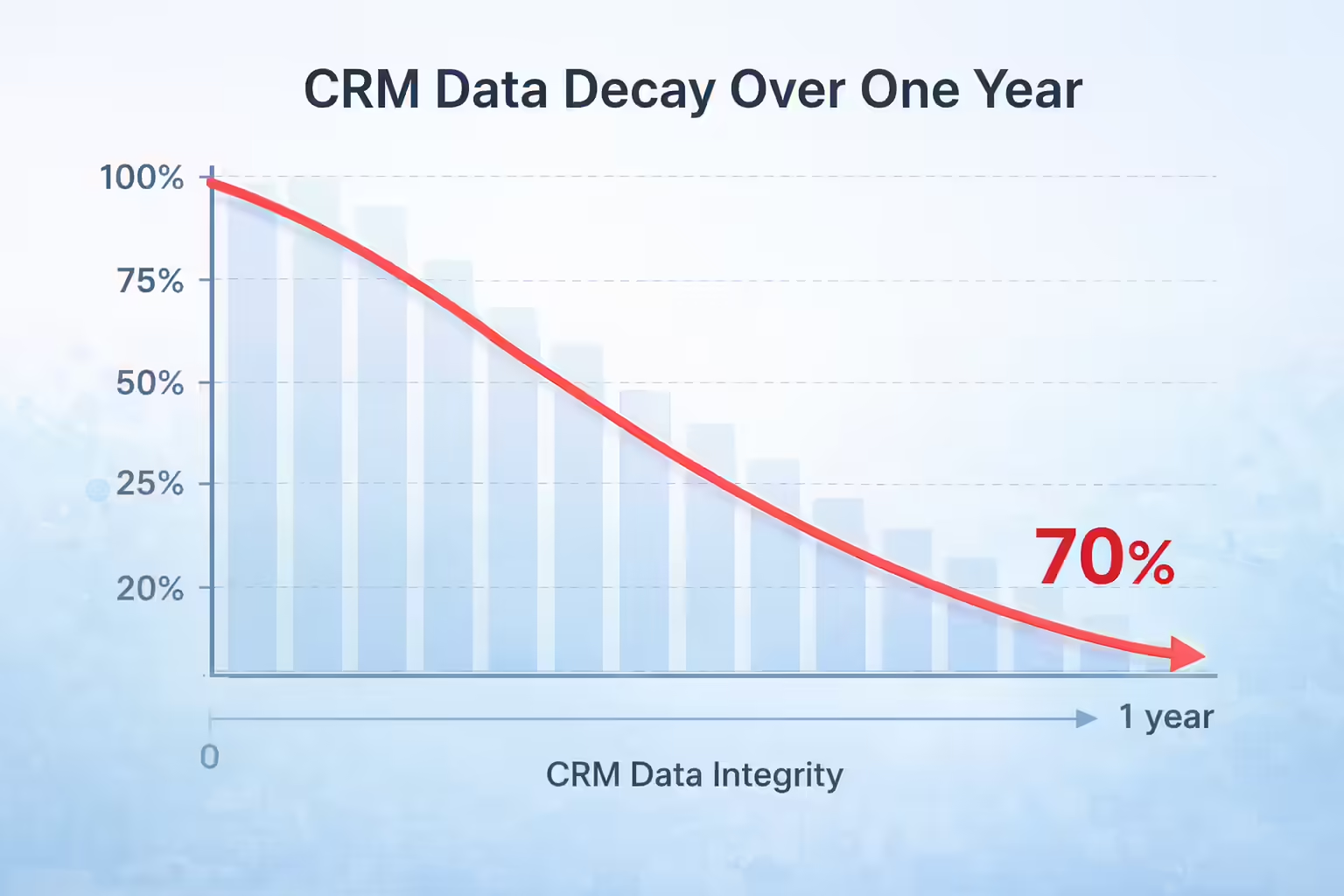
Data decay is not a passive process. It is an active degradation of the CRM’s utility. Industry analysis suggests that approximately 91% of CRM data is incomplete. Furthermore, 70% of that data decays annually due to natural obsolescence (such as job changes or company restructuring) and process failures. In the specific context of HubSpot call reporting, this decay manifests as gaps in the historical timeline of prospect interactions.
When a sales representative fails to log a call or logs it with incorrect metadata, they introduce “null values” into the dataset. Incomplete data profiles lead to poor personalization, ineffective lead scoring, and significant gaps in customer insights. For example, if a discovery call is not accurately logged with its duration and outcome, the marketing automation engine may fail to trigger the appropriate nurture sequence. Alternatively, it might trigger a sequence that is contextually inappropriate, which degrades the customer experience.
The presence of duplicate records (often resulting from slight variations in name entry or email addresses) fragments the call history across multiple contact IDs. This fragmentation makes it mathematically impossible to calculate accurate “Touchpoints-to-Close” ratios. The activity is dispersed across disparate records that the HubSpot call reporting engine views as separate entities.
HubSpot Call Reporting and Object Association Schemas
A fundamental understanding of the HubSpot data schema is required to diagnose reporting errors. HubSpot organizes data into primary objects: Contacts, Companies, Deals, and Tickets. Activities (such as calls) are associated with these objects. A primary driver of HubSpot call reporting confusion is the misalignment of these associations during data capture.
When generating a report, the user must define the primary data source. If a call is logged to a Contact record but that Contact is not correctly associated with a Company record, a report based on “Company Activity” will exclude that call. This is not a failure of the reporting engine itself. It is a failure of Association Propagation, the mechanism by which an activity logged on a child object (Contact) is reflected on the parent object (Company) or related object (Deal). Native manual logging often relies on the user to manually select these associations. This process is highly prone to human error and omission.
Distinct reports (such as “Team Activity Summary,” “Activity Timeline,” and “Custom Report Builder”) often yield different numbers for the same metric because they query different datasets and apply different attribution rules. The “Team Activity Summary” may count calls based on the hubspot_owner_id of the activity, while a custom report might filter based on the associated_deal_id. Without a unified mechanism to ensure every call is associated with all relevant objects at the moment of creation, HubSpot call reporting discrepancies are inevitable.
Manual Entry Errors in HubSpot Call Reporting
The most persistent source of data inaccuracy in HubSpot call reporting is the reliance on manual human intervention. Despite the availability of automation, many organizations still depend on sales representatives to manually log call outcomes, notes, and follow-up tasks. This reliance introduces stochastic variance that undermines the reliability of the entire dataset.
Taxonomy Fragmentation and Inconsistency
Standard Operating Procedures typically dictate that sales representatives log call outcomes to track pipeline progression. However, in the absence of rigid validation rules or automated enforcement, the taxonomy of these outcomes becomes fragmented. Research confirms that inconsistent data entry is a primary breaker of reporting aggregation. Consider a scenario where multiple representatives attempt to log a voicemail. Representative A might enter “Left Voicemail,” Representative B enters “LVM,” and Representative C selects “No Answer” because they define a voicemail as a non-connect. To a human supervisor, these might appear synonymous. To the HubSpot call reporting engine, however, these are three distinct string values. This fragmentation prevents the aggregation of data into meaningful categories. Reports designed to track “Voicemail Ratios” or “Connect Rates” will fail to capture the full scope of activity because the query filters cannot account for every variation of manual entry.
The “Ghost Call” Phenomenon and Survivor Bias
Manual logging introduces a significant temporal latency between the event (the call) and the record (the log). This latency frequently leads to omission, particularly of unsuccessful activities. In high-velocity sales environments, representatives may make 50 to 100 dials per day. The administrative burden of manually logging each distinct dial attempt (especially those that result in “Busy,” “No Answer,” or “Disconnected” outcomes) is prohibitive. Consequently, representatives often succumb to “survivor bias” by logging only the calls that result in a meaningful conversation or a positive outcome.
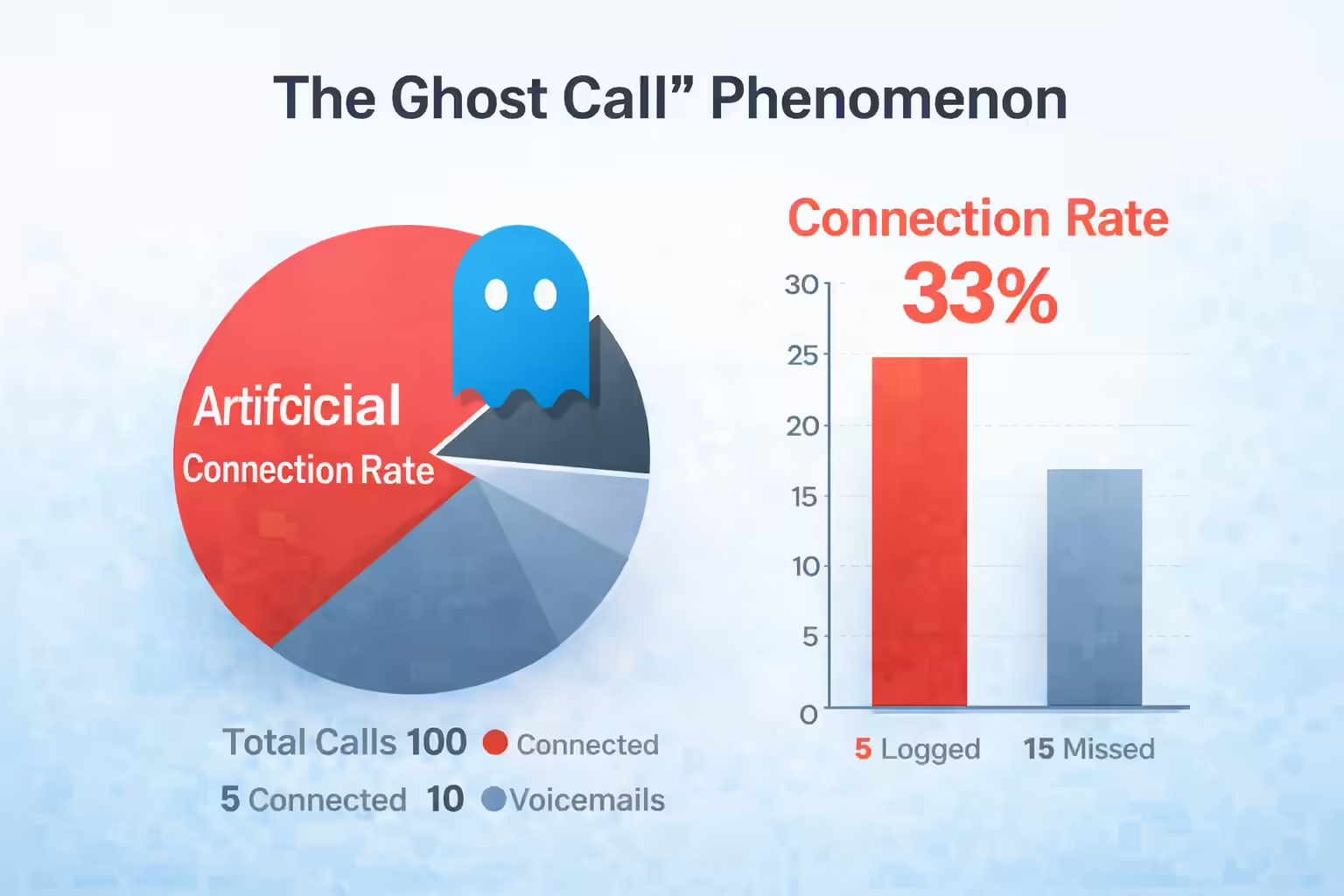
This selective logging creates the “Ghost Call” phenomenon. This is a statistical distortion where the reported “Connection Rate” appears artificially high because the denominator (total dial attempts) is severely underreported. If a rep makes 100 calls and connects with 5, but only logs the 5 connections and perhaps 10 voicemails, the reported data suggests a 33% connection rate (5/15). The actual connection rate is 5%. This distortion renders HubSpot call reporting data useless for capacity planning or realistic quota setting.
Field Omission and Incomplete Profiles
Beyond the omission of the call event itself, manual entry often results in incomplete metadata. Essential fields such as call duration, precise timestamps, and specific call types are often estimated or left blank. Incomplete customer data makes it impossible to run marketing automation sequences confidently. For instance, if the “Call Duration” field is not populated with millisecond accuracy, Revenue Operations teams cannot perform regression analyses to determine the correlation between talk time and deal closure probability. Furthermore, if a sales rep updates an opportunity but leaves critical fields like “Expected Close Date” or “Lead Source” blank, the CRM fails to guide the user effectively. This leads to deficient pipeline reports that misrepresent future revenue.
Browser Instability Affecting HubSpot Call Reporting Data
While human error accounts for a significant portion of data inaccuracy, technical limitations within the native HubSpot calling infrastructure and browser-based telephony extensions introduce a layer of systemic instability. These technical failures result in data loss that is often invisible to the user until reporting discrepancies arise.
WebRTC and the Disconnect Error Vector
The native HubSpot calling tool and many third-party extensions rely on WebRTC (Web Real-Time Communication) protocols executed directly within the browser. While convenient, this architecture is susceptible to local environmental variables that can disrupt the data capture process. Technical reports from the HubSpot community highlight persistent issues with browser-based calling disconnects, specifically errors such as CALL31402ERR. These errors typically occur when the browser loses access to the audio input device or when the UserMedia acquisition fails due to conflicting permissions or hardware changes (such as disconnecting a Bluetooth headset).
The data implication of these disconnects is severe. When a call terminates abnormally due to a technical error, the logic responsible for triggering the “Call End” event may fail to execute. This event typically packages the call duration, timestamp, and recording for transmission to the database. Consequently, the call log is either never created, or it is created with zero duration and a null disposition. This creates a class of “Phantom Calls” where the activity occurred and time was spent, but no record exists to prove it within the HubSpot call reporting system.
Iframe Reloads and State Loss
The architecture of browser-based widgets often involves embedding the softphone within an iframe. Strict resource management policies in HubSpot mean that switching between tabs or refreshing a page can force the calling widget to reload or re-initialize. If a representative switches away from the active tab during a call or immediately upon its conclusion, the widget’s state may be reset before the final data payload is sent to the server. Users have reported that SDK events are ignored by HubSpot when multiple tabs are open, as the system purposefully restricts communication between tabs to avoid duplicate behavior. This leads to a scenario where the rep believes the call is logged, but the data was discarded by the browser’s garbage collection or ignored by the HubSpot instance due to session conflict. Furthermore, browser resource conservation features (such as putting inactive tabs to “sleep”) can sever the WebSocket connection required to maintain the call state. If a rep is on a long call and switches to another application, the backgrounded HubSpot tab may lose connectivity. This results in a dropped call and a lost data log.
API Limits Creating Gaps in HubSpot Call Reporting
For enterprise teams or those utilizing custom integrations, API rate limits in HubSpot present a formidable and often invisible barrier to data completeness. HubSpot imposes a strict rate limit of roughly 100 to 150 requests per 10 seconds for many integration types. This exists alongside a daily cap that varies by subscription tier (such as 500,000 requests/day for Professional/Enterprise). While these limits appear generous, they function as a “token bucket” system that can be easily overwhelmed by burst activity.
Consider a “Power Hour” scenario where 50 sales representatives are dialing simultaneously using an automated dialer. Each call generates multiple API requests, including searching for contacts, creating call engagements, associating calls with deals, and updating contact properties. The collective volume of these requests can exceed the 100-request-per-10-seconds burst limit. When this limit is hit, HubSpot returns a 429 Too Many Requests error. Unless the integration possesses sophisticated “back-off and retry” logic, these requests are simply dropped. The call occurs and the rep does the work, but the CRM rejects the record. This results in permanent, unrecoverable gaps in the HubSpot call reporting data, particularly during the periods of highest team activity.
Kixie Server-Side Sync for HubSpot Call Reporting Integrity
To remediate the inaccuracies caused by human variance, browser instability, and API throttling, organizations require a solution that acts as an external enforcement layer for data integrity. Kixie utilizes a specialized integration architecture that bypasses native limitations to ensure high-fidelity data capture for HubSpot call reporting.
Deep Bi-Directional Synchronization
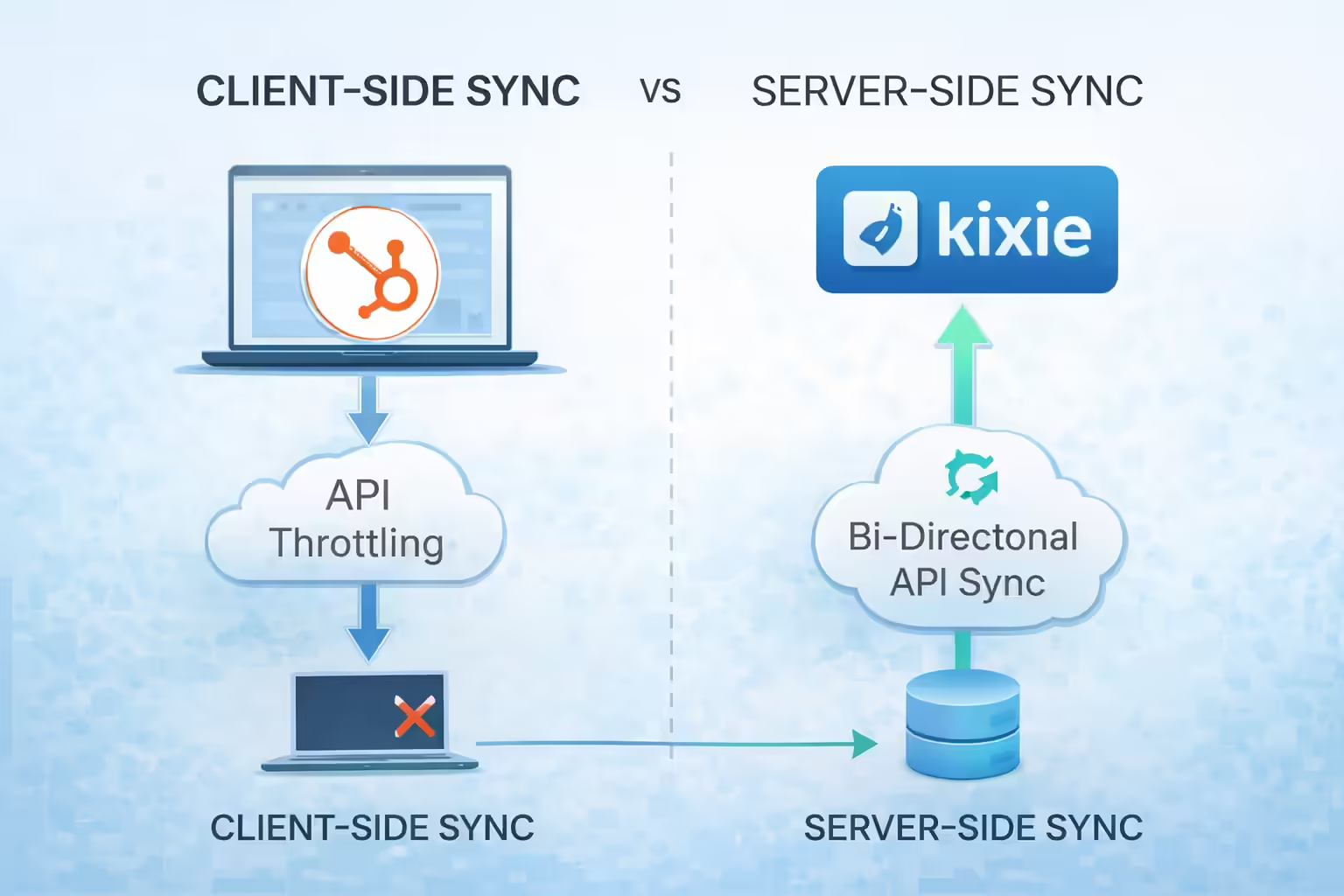
Unlike superficial integrations that merely “push” notes to HubSpot, Kixie utilizes a deep bi-directional sync that interacts directly with the Engagement API and Timeline API. Kixie operates at the API level. This means the data sync is fundamentally decoupled from the user’s browser state. When a call is initiated, the logic is handled by Kixie’s telephony servers rather than the client-side browser alone.
Even if the user’s browser crashes, the tab is closed, or the computer loses power immediately after a call, the call data is processed by Kixie’s infrastructure. The duration, recording URL, and timestamp are pushed to HubSpot via the API. This server-side execution eliminates the data loss risks associated with iframe reloads and tab sleeping.
Object Native Logging
Kixie logs interactions as native HubSpot Call and SMS objects rather than generic tasks or notes. This ensures that all data populates the standard HubSpot properties required for native reporting. hs_call_disposition is mapped directly from Kixie dispositions to internal HubSpot GUIDs. hs_call_duration is captured from the telephony switch and is accurate to the millisecond. hs_call_recording_url is automatically populated with a persistent link to the recording file.
Context-Aware Logic for HubSpot Call Reporting Accuracy
Accurate attribution requires determining who was called. In B2B sales, a single phone number might be associated with a Contact, a Company, and multiple open Deals. Kixie employs a dual-method sync logic to resolve this ambiguity and ensure precise HubSpot call reporting attribution.
DirectSync: The Context-Aware Method
When a user initiates a call via the “Click-to-Call” icon within HubSpot (from a specific Contact record, Deal view, or Task Queue), Kixie utilizes DirectSync. The system captures the object_id of the page the user is viewing at the moment of the click. Consequently, the call is logged explicitly to that specific Contact. This applies even if the phone number is shared by multiple contacts (such as a shared main office line). This ensures 100% attribution accuracy for outbound workflow activity and prevents the “ambiguous association” errors common in manual dialing.
Manual-Search Sync: The Heuristic Fallback
For calls initiated manually (dialing a number on the keypad) or inbound calls where context is not pre-established, Kixie employs Manual-Search Sync. The system queries the HubSpot API for the phone number. It syncs the activity to the most recently created contact associated with that number. Crucially, once the Contact is identified, Kixie automatically propagates the log to the associated Company and all active Deals. This automatic propagation solves “Primary Source” reporting discrepancies. It ensures that HubSpot call reporting run on “Company” or “Deal” levels is populated with the correct data without requiring manual association by the rep.
Custom Property Mapping for Granular HubSpot Call Reporting
Standard reporting often fails because generic fields do not capture business-specific context. Kixie allows for the mapping of Custom Properties from HubSpot directly into the Kixie PowerCall interface. This bridges the gap between the CRM schema and the telephony interface.
Revenue Operations teams can create custom properties in HubSpot (such as “Churn Risk Score,” “Contract Renewal Date,” or “Technical Qualification Status”) and map these to the Kixie dialer. When a rep is on a call, they can view and edit these specific fields within the Kixie window. The data is then written back to HubSpot in real-time. This capability adds significant value to the dataset. Instead of relying on unstructured “Notes” (which are difficult to report on), the data enters structured fields that can be used for filtering and segmentation immediately. By exposing specific, required fields during the call, Kixie guides the rep to collect the necessary data. This effectively reduces the incidence of “Incomplete Profiles” and ensures that the HubSpot call reporting data remains robust and actionable.
Automating HubSpot Call Reporting via Disposition Triggers
The most effective method for eliminating data inaccuracy is to remove the human element from the data entry process entirely. Kixie transforms the CRM from a passive repository into an active, automated engine through its “Signal to Action” framework. This approach uses call dispositions as trusted triggers for HubSpot Workflows. This ensures that the state of the CRM always reflects the reality of the sales interaction.
In a manual environment, a sales representative must perform two distinct actions: 1) log the call outcome, and 2) update the Deal Stage or Lead Status. Often, the second step is forgotten, which leads to pipeline inaccuracy. Kixie unifies these actions. The specific disposition selected in Kixie (such as “Demo Scheduled,” “Not Interested,” or “Left Voicemail”) acts as a hard trigger for HubSpot automation. For example, if the Activity Property Call Outcome is equal to “Demo Scheduled,” HubSpot can automatically update the Deal Stage to “Presentation Scheduled,” create a task to “Send Calendar Invite,” and enroll the contact in a “Pre-Demo Nurture Sequence.” This automation ensures that the Pipeline Stage in HubSpot always matches the actual outcome of the interaction. There is no possibility for a rep to mark a call as “Successful” but forget to move the Deal Stage. This eliminates a major source of error in HubSpot call reporting.
Extending HubSpot Call Reporting with External Integrations
For complex data needs that extend beyond native HubSpot workflow capabilities, Kixie exposes rich webhooks and REST APIs. These can be consumed by integration platforms like Make.com to orchestrate complex data flows.
For instance, a “Completed Call” event in Kixie can trigger a Make.com scenario that updates the HubSpot Deal Stage, logs the call data to an external data warehouse (like Snowflake or BigQuery) for longitudinal analysis, and pushes a notification to a Slack channel. This creates a “bi-directional loop” where every call, text, and disposition logs itself across the entire tech stack. This ensures that the CRM remains synchronized with all other enterprise systems.
Additionally, Kixie’s integration with Gong allows for the capture of Conversation Intelligence data. By automating the recording and transcription process, Kixie ensures that Gong has access to 100% of the audio data. Gong’s analysis (sentiment scores, talk-to-listen ratios, objection handling) is then fed back into the ecosystem. This transforms the call log from a static record of time and duration into a rich dataset of qualitative performance metrics. RevOps can then analyze not just the quantity of calls made, but their effectiveness.
Validating Data Sources for HubSpot Call Reporting
Correcting the mechanism of logging is the baseline. To truly optimize a Revenue Operations strategy, one must ensure the validity of the data being generated. This involves tackling the problem of false negatives in call outcomes and ensuring regulatory compliance.
ConnectionBoost: Validating the “No Answer”
One of the largest sources of inaccurate data in sales reporting is the “No Answer” outcome. A “No Answer” is typically interpreted by reporting models as a lack of interest or availability from the prospect. However, in the modern telephony environment, it is frequently a result of spam flagging or call screening due to out-of-area numbers. If a rep calls a prospect in New York using a California area code, the likelihood of the call being ignored or flagged as “Spam Likely” is high. In this scenario, the data point “No Answer” is a false negative. It reflects the carrier’s filtering algorithm rather than the prospect’s intent.
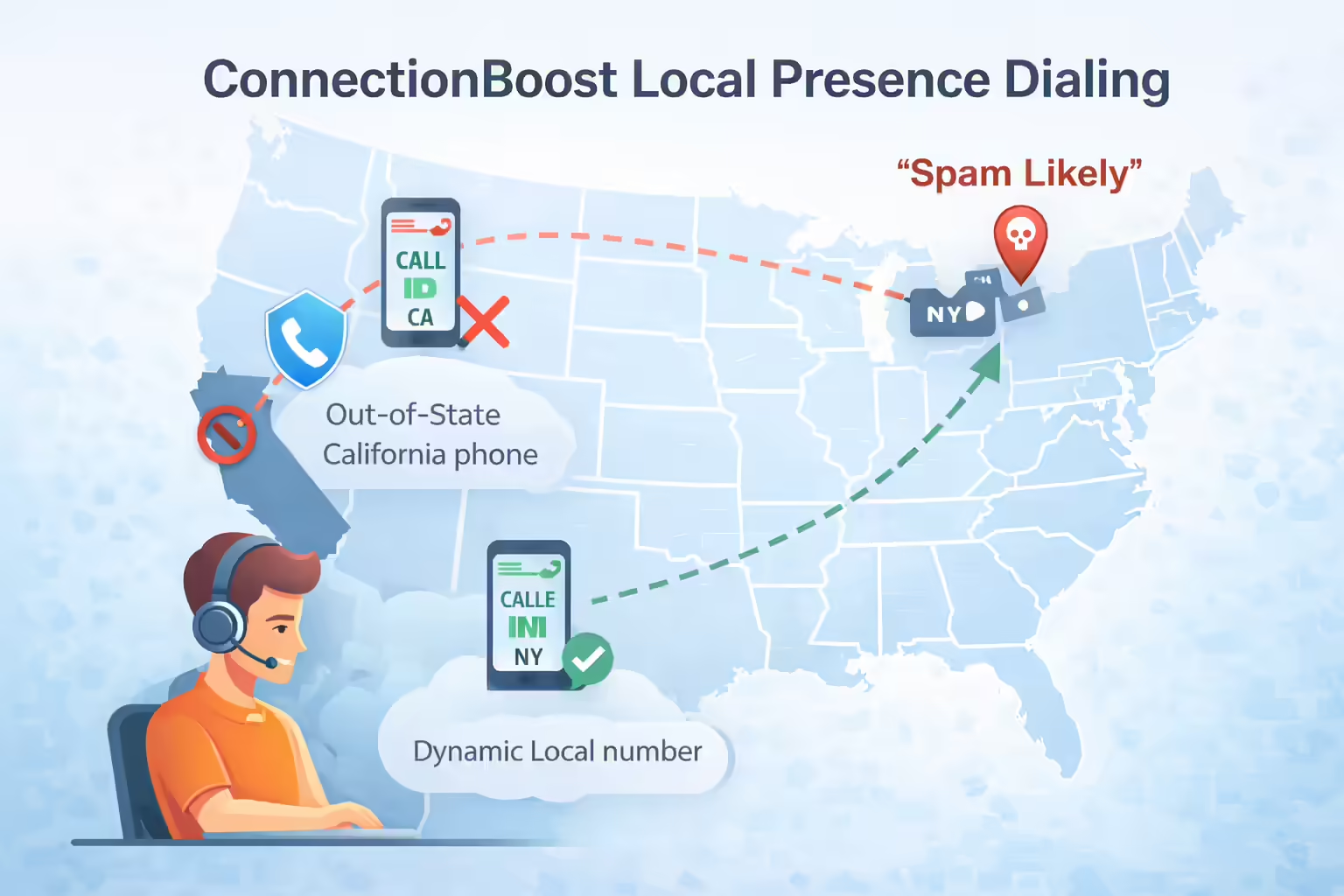
Kixie’s ConnectionBoost remediates this data distortion through dynamic local presence dialing. The system automatically selects a number from a pool of over 50,000 local numbers that matches the prospect’s area code. It also employs progressive Caller ID, which rotates numbers to prevent any single number from accumulating high call velocity that triggers spam algorithms. By removing the artificial barrier of spam flagging, the “Answer Rate” metric becomes a true reflection of prospect availability. Kixie users report answer rates increasing by up to 500%. This shift radically alters the “Dials to Opportunity” ratio within HubSpot call reporting.
STIR/SHAKEN Compliance: Identity Assurance
Data accuracy is also legal accuracy. With the implementation of STIR/SHAKEN protocols by the FCC, calls that are not properly authenticated are liable to be blocked or mislabeled by carriers. Kixie manages STIR/SHAKEN registration for HubSpot numbers. This ensures that calls receive “A-Level Attestation.” This involves registering the business identity with the carriers so that the “Caller ID” is verified as legitimate. High attestation levels reduce the variable of “Carrier Blocking” in call reports. Without this, sudden drops in connection rates could be misdiagnosed as rep performance issues rather than technical compliance failures. By stabilizing the delivery mechanism, the data derived from that delivery becomes consistent and reliable.
Unified SMS and HubSpot Call Reporting
Modern sales are multi-channel. However, native HubSpot call reporting often segregates SMS data or fails to log it entirely if sent from personal devices. Kixie integrates full 2-way SMS directly into the sales workflow and logs these messages as distinct activities on the HubSpot timeline.
Kixie handles the 10DLC (10-digit long code) registration, which is required for A2P (Application-to-Person) messaging. This prevents messages from being filtered by carriers. This unification allows for “Touchpoint Analysis” reports that combine Calls and SMS to determine the optimal cadence. For example, a report can reveal that calls preceded by an SMS have a 20% higher connection rate. This insight is impossible if SMS data is missing or sequestered in a separate system.
Optimizing Analytics for HubSpot Call Reporting
With the data capture mechanisms fixed and the data itself validated, the final step is to optimize the reporting layer within HubSpot to visualize this high-fidelity information.
Fixing the “Offline Sources” Bucket
“Offline Sources” is often a black hole for attribution in HubSpot. Kixie mitigates this by ensuring all activities are logged with the correct hs_communication_channel_type and hs_communication_logged_from parameters. By explicitly defining these parameters as CRM or INTEGRATION generated (rather than leaving them null or generic), the data is correctly bucketed into Sales Activity. This allows for clear segmentation in the “Traffic Analytics” and “Sales Analytics” dashboards. This ensures that outbound call activity is attributed to the correct source.
Custom Reporting and Forecasting
With Kixie’s data flowing into native objects, RevOps teams can build sophisticated custom reports. By filtering for specific Kixie dispositions (such as “Demo Scheduled”), managers can identify top performers based on outcomes rather than just volume. Furthermore, accurate call data is the fuel for predictive modeling. Before Kixie, forecasting engines relied on “Weighted Pipeline” models that were often skewed by underreported activity. With 100% of interactions logged (including “Ghost Calls” and SMS), the forecasting model has a high-fidelity view of engagement. It can accurately identify deals that require high effort but yield low results versus those that require low effort and yield high results. This allows leadership to allocate resources effectively.
Proven Results in Fixing HubSpot Call Reporting
The transition from native logging to Kixie’s automated infrastructure delivers measurable improvements in data quality and downstream business metrics.
Canopy: Solving Data Latency
Canopy, a Kixie user, utilized the integration to address data latency and connection issues. The metric improvement was significant: Time to First Call was reduced from roughly 35 minutes to 9 minutes. This improvement was only visible and manageable because the timestamp data for “Lead Creation” and “First Call” was being logged accurately and automatically. Manual logging would have likely obscured the true latency and hidden the inefficiency. The improved speed-to-lead (verified by accurate reporting) correlated with a 3% increase in overall conversion rates.
Fischer Homes: Scaling Volume with Integrity
Fischer Homes needed to increase outbound call volume without losing data visibility. By implementing Kixie’s multi-line AI PowerDialer, they were able to triple their outbound call volume. Crucially, because the dialer automatically logged every attempt (even across multiple lines simultaneously), the “Connect Rate” data remained accurate despite the massive increase in volume. This allowed them to scale their operations with full confidence in their performance metrics.
Final Thoughts on HubSpot Call Reporting Integrity
Inaccurate data in HubSpot call reporting is a systemic risk that undermines the credibility of the entire Revenue Operations function. This analysis demonstrates that this inaccuracy is largely structural. It is born of reliance on manual entry, browser-based instability, and API bottlenecks.
To permanently resolve these issues, organizations must move beyond “training reps to log better” and adopt an infrastructure-first approach. Kixie provides this infrastructure by enforcing data integrity through deep bi-directional synchronization, automated workflow triggers, and rigorous compliance standards.
Key Recommendations:
-
Adopt API-First Synchronization:
Replace browser-dependent logging with a server-side solution to eliminate technical data loss. -
Automate the “Signal to Action”:
Use call dispositions to automatically drive Deal Stage progression, removing human variance from pipeline reporting. -
Validate the Data Source:
Implement Local Presence (ConnectionBoost) and STIR/SHAKEN compliance to clean “Answer Rate” data of false negatives caused by external filtering. -
Augment the Schema:
Map custom properties to the dialer interface to capture structured, actionable business data at the point of interaction.
By implementing this framework, HubSpot users can transform their CRM from a passive system of record into a dynamic, accurate, and trustworthy source of revenue intelligence.
Ready to close more deals with Kixie?
See how Kixie's AI-powered tools can transform your sales and support operations.
Start Free Trial