TL;DR: Salesforce Call Logging Data & Automation Specs
Core Metric: Sales representatives spend only 28% of their time selling (Salesforce “State of Sales”), with 72% of capacity consumed by administrative tasks.
Efficiency Loss: Manual call logging requires ~90 seconds per attempt; automated logging reduces this to <1 second.
Financial Impact: For a 50-person team, manual entry costs approximately 12,500 selling hours annually.
Technical Integration: Kixie utilizes a bi-directional API sync with Salesforce, writing directly to the Task object as “Completed” activities.
Outcome: Increases daily call volume capacity by 50% to 300% and ensures 100% data capture for attribution modeling.
Additional Specs: Configuration: Admins must map dispositions to a custom Call_Disposition__c field and ensure the Task “Type” field is set to “Visible” for the integration profile. Automation Triggers: Uses Salesforce Flow to detect specific Task Subject lines (e.g., “Left Voicemail”) to trigger downstream actions like SMS or email follow-ups.
The Conflict Between Sales Velocity and Salesforce Call Logging
A fundamental paradox exists in modern revenue operations. The systems built to optimize sales performance often become the primary obstacles to execution. For the sales representative, the Customer Relationship Management (CRM) platform, specifically Salesforce, functions as a “system of record” that demands constant updates. The requirement is strict: every interaction, phone call, voicemail, and disposition must be logged to ensure pipeline visibility. However, the operational reality differs significantly from this requirement.
Sales representatives dislike logging calls. This sentiment spreads across the industry because manual entry interferes with the primary objective of selling. The manual process of moving through a record, opening a task, inputting data, and saving creates a friction point that breaks the flow of high-velocity outreach. It forces a cognitive shift from persuasion to clerical administration. The burden of excessive data entry is a productivity killer that organizations have struggled to mitigate for decades.
This report argues that the answer is technological intervention rather than behavioral modification. Kixie manages this process automatically. The method involves shifting the logging workload entirely from the human agent to the software layer. By integrating Kixie’s Automatic Call Logging with Salesforce, the workflow shrinks to a minimum. The representative makes the call, clicks one button to disposition it, and the system handles the rest. This analysis examines how this automation is achieved, the architecture required to support it, and the benefits for data integrity.

The Operational Costs of Manual Salesforce Call Logging
To understand the necessity of automation, organizations must quantify the costs of the current manual methods. Manual data entry acts as an operational failure that degrades data quality, reduces revenue capacity, and obscures strategic visibility.
The premise of Sales Operations is the optimization of the sales process to maximize revenue per unit of effort. However, empirical data suggests that non-revenue-generating activities erode a significant portion of a sales representative’s capacity. Data entry is the primary culprit.
According to the “State of Sales” research conducted by Salesforce, sales representatives spend just 28% of their week actually selling. Administrative tasks, deal management, and manual data entry consume the remaining 72% of their capacity. This statistic has remained high over successive reporting periods. It indicates a failure in standard operational models to address the administrative load placed on revenue generators.
HubSpot research illuminates the granularity of this time loss. Their data indicates that 32% of sales reps spend an hour or more on data entry every single day. When applied across a standard sales organization, the economic implications are severe. For a team of 50 representatives, an hour of lost productivity per person per day equates to 12,500 hours of lost selling time annually. This is a direct subtraction from the organization’s revenue-generating capacity.
Cognitive Friction in Salesforce Call Logging Workflows
The cost of manual entry extends beyond time lost. It introduces a psychological burden known as context switching. To log a call manually in Salesforce Lightning, a representative must typically perform a multi-step sequence. They must access the specific Contact or Lead record, locate the Activity timeline, click the “Log a Call” button, manually enter the Subject and Notes, select a Disposition value, and save the record.
Repeating this process 50 to 100 times a day induces cognitive fatigue. The human brain struggles to switch rapidly between the high-focus task of conversing with a prospect and the low-value task of database entry. The result is data decay. As the day progresses, the quality of notes diminishes. Representatives may begin to batch-log calls at the end of the day or skip logging unsuccessful attempts entirely.
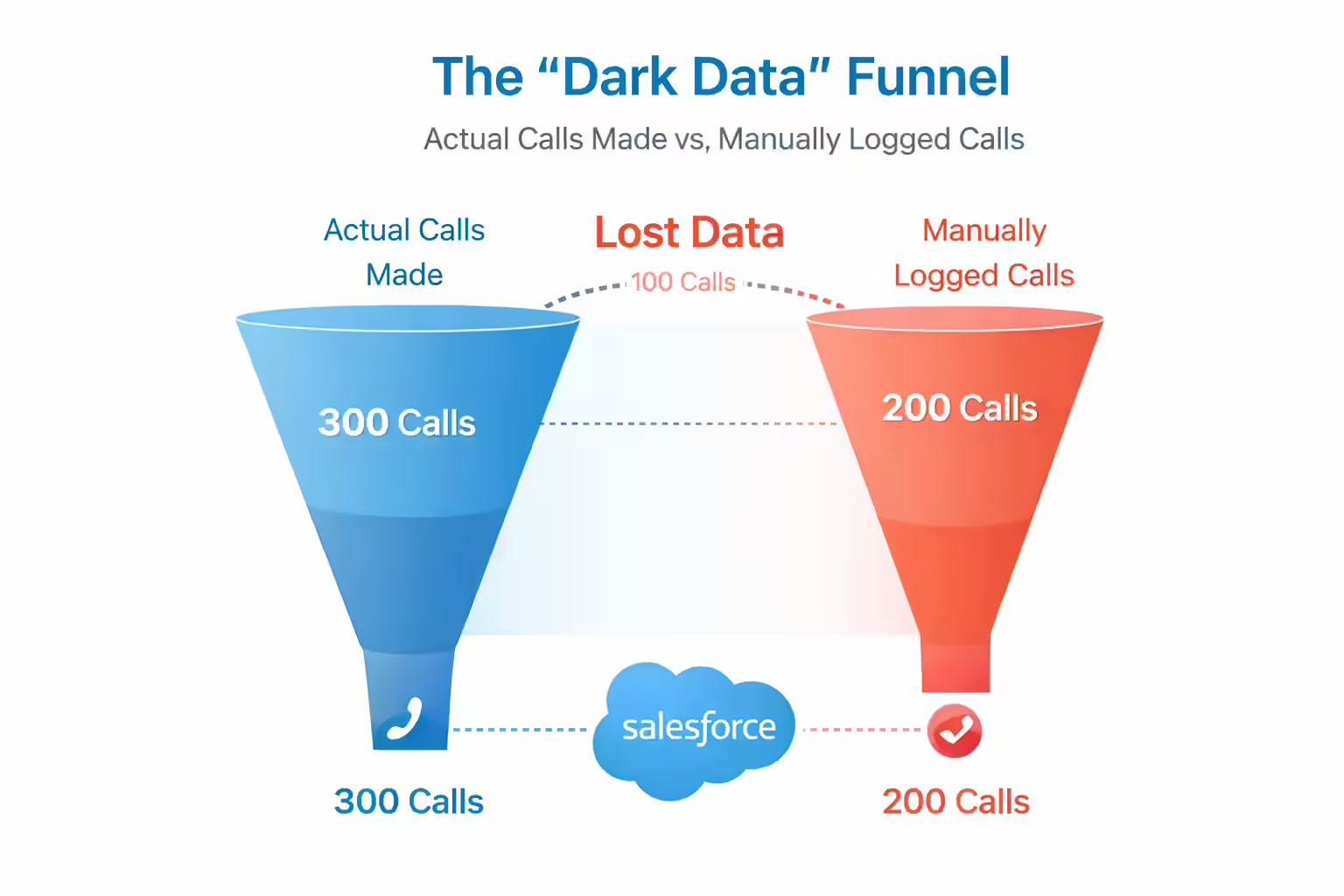
This behavior creates a “dark data” problem. Executives often rely on self-reported data from CRM inputs. Even with good intentions, this data is often flawed. It leaves leadership without accurate information about what occurs on the front lines. Without accurate, automated data on call volume, connect rates, and dispositions, forecasting becomes guesswork rather than science.
Downstream Impacts of Poor Salesforce Call Logging
Failure to automate call logging affects the entire Revenue Operations ecosystem. The CRM is designed to be the “Single Source of Truth,” but manual entry compromises this integrity.
Inaccurate forecasting is a primary consequence. If 20% of calls are not logged, the conversion metrics used to predict future revenue are mathematically unsound. Leaders cannot calculate the “calls-to-opportunity” ratio if the total calls metric is artificially low. Furthermore, marketing automation relies on accurate status updates. If a representative fails to log a “Connected” outcome promptly, the lead may continue to receive automated emails stating “We haven’t heard from you,” which creates a disjointed customer experience.
Managerial effectiveness also suffers. Managers cannot coach what they cannot see. Without recordings and outcome data attached to specific Salesforce records, targeted performance improvement becomes impossible. The remedy for these challenges is the removal of the human element from the data entry process through robust Computer Telephony Integration (CTI).
Technical Architecture of Kixie’s Salesforce Call Logging Integration
Kixie operates as a bi-directional synchronization engine that hooks directly into Salesforce’s core objects via the API. This ensures data flows seamlessly between the telephony platform and the CRM.
The dialer reads context from Salesforce (Lead Name, Company, Past Activities) to inform the representative before the call connects. Conversely, the system writes activity data back into Salesforce immediately upon call completion. This includes call duration, recording URLs, dispositions, and SMS content. This architecture ensures that the Salesforce environment remains the authoritative record without requiring manual intervention. The integration connects at the API level and interacts primarily with the Task object.
When a call occurs, Kixie executes a logic tree to determine where to log the activity. If the phone number matches a single Lead or Contact, the activity is logged directly to that record. In databases with duplicate records, Kixie prioritizes the Contact level integration. If the phone number does not exist in Salesforce, Kixie can automatically create a new Lead. This ensures inbound calls from unknown prospects are captured as new potential opportunities.
Salesforce Call Logging Object Mapping and Task Logic
Salesforce’s data model allows activities to roll up to related objects. Kixie utilizes this native relationship structure. When a call is logged to a Contact, it automatically associates with the parent Account. This gives Account Executives a complete view of all communications with a specific company. Crucially, Kixie syncs activity to the most recent Opportunity associated with the Contact. This helps RevOps teams analyze how many touchpoints are required to close specific deals.
Every Kixie engagement is logged as a Salesforce Task with the status “Completed.” Utilizing the native Task object ensures compatibility with all standard Salesforce reporting tools. The Task record created by Kixie is rich with metadata. The Subject Line is dynamically generated based on the interaction type. The Activity Type is classified as “Call,” “SMS,” or “Disposition.” The Description contains the rep’s notes and a permanent link to the call recording.
By standardizing this data input, Kixie transforms unstructured voice communication into queryable rows in the Salesforce database. This allows for precise productivity reporting on metrics like Talk Time versus Dialing Time.

User Experience: Removing Friction from Salesforce Call Logging
The core value for the end-user is the reduction of process friction. The Kixie PowerCall dialer interface acts as a bridge between the browser and the CRM. In a manual workflow, logging a call outcome requires moving away from the current screen. Kixie condenses this workflow into a single click within the dialer interface overlay.
When a call ends, the PowerCall dialer presents a “Call Outcome” window. The representative selects the appropriate outcome from a pre-configured list. Kixie instantly pushes this selection to Salesforce via API and creates a Task with a Subject line matching the disposition. In a queued list of numbers, the dialer automatically moves to the next lead.
This “Auto-Advance” feature creates an efficiency dividend. Manual logging requires 45 to 90 seconds per call. Kixie’s automated sync occurs in near-zero time. This differential allows representatives to increase their daily call volume significantly without working additional hours. The removal of the “Save” button from the routine eliminates the friction that causes data decay.
Granular Salesforce Call Logging Dispositions
Generic VoIP tools often limit call data to binary states like “Connected” or “Not Connected.” Kixie allows for customizable dispositions that map to Salesforce business logic. A “Connected” call can be refined into specific outcomes such as “Discovery Booked,” “Competitor Info,” or “Gatekeeper Rejection.”
Each of these custom dispositions is logged as a distinct value in the Salesforce Task subject line. This granularity is essential for reporting. A Sales Ops manager can run a report on “Objection Type Frequency” to identify why deals stall. This level of detail transforms the CRM from a simple contact list into a strategic asset.
The transition to automated logging alters sales productivity math. Manual methods incur approximately 1.5 minutes of overhead per attempt. Automated methods incur roughly one second of overhead. This efficiency gain is paired with features like ConnectionBoost, which utilizes local presence dialing to increase connection rates. The system manages the caller ID rotation automatically and logs the outcome correctly to Salesforce.
Configuring Salesforce Call Logging for Administrators
Implementing Kixie requires specific configuration steps to ensure data flows correctly. The Salesforce organization must be an Enterprise, Unlimited, or Professional Edition with API enabled. Kixie operates as an external application writing to the database, making API access fundamental.
Administrators should create a dedicated custom field for structured disposition data. While Kixie populates the standard “Subject” field, a custom field allows for cleaner reporting. Access “Object Manager” and then “Task” to create a new field labeled “Call Disposition” with the API Name Call_Disposition__c. In the Kixie Dashboard, map the disposition outcome to this specific API name.
A common setup error involves Field-Level Security. Kixie interacts with the Task object and specifically the “Type” field. This field must be set to “Visible” for the integration profile. If this field is hidden or read-only, Kixie cannot query or write to the Task object effectively. Administrators must explicitly enable logging for different channels within Kixie settings to ensure voice calls and SMS messages map to the correct objects and types.
Automating Salesforce Actions via Call Logging Triggers
The power of integrating Kixie with Salesforce lies in using logged call data to trigger downstream automations. This moves the system from a record-keeping tool to an action engine. Because Kixie logs dispositions as Completed Tasks with specific Subject lines, these data points serve as triggers for Salesforce automation.
The logic relies on the “Contains” operator in Salesforce Flow. When a Task record is created and the Subject contains a string like “Discovery Booked,” the Flow can update the Lead Status to “Qualified” or create an Opportunity. This method allows for flexibility. A specific disposition can trigger any action that Salesforce Flow supports.
Salesforce Admins should note that Salesforce is retiring Workflow Rules. All new automations should be built using Salesforce Flow Builder. Flow offers superior capability (such as updating related records) and executes complex logic that legacy tools could not handle.

Advanced Use Cases for Salesforce Call Logging Automation
One effective strategy enabled by this integration is the “Double Tap.” This involves calling a prospect and immediately sending a text message if they do not answer. In a manual workflow, this process takes 60 to 90 seconds. With Kixie and Salesforce Flow, the rep clicks “Left Voicemail,” and the Flow detects the Task. It then triggers an outbound API call to send a pre-templated SMS instantly.
Intelligent lead routing is another use case. Speed-to-lead determines conversion. Kixie’s automation can route inbound calls or new leads instantly. When a new lead enters Salesforce, a Flow can trigger a Kixie automatic call to the assigned sales rep. When the rep answers, the system dials the lead. This reduces response time from hours to minutes.
The integration also extends to document handling. If a call disposition is logged as “Proposal Requested,” Salesforce Flow can trigger an integration with document tools to generate a proposal template using Salesforce Opportunity data. This removes administrative work and allows the rep to focus on the next call.
Strategic Value of Accurate Salesforce Call Logging
The strategic value of Kixie’s automated logging lies in data hygiene. Clean data fuels revenue intelligence. When every call is logged with a precise disposition, Marketing and RevOps can calculate the true cost of acquisition.
With manual logging, leaders guess at activity levels. With automated logging, metrics like “Calls to Opportunity” become mathematical certainties. Organizations can identify which campaigns generate high call volumes but low connection rates.
Data entry automation also enables conversation intelligence. Because every call is recorded and the URL is logged to the Salesforce Task, managers can review calls related to specific Closed-Lost opportunities. Kixie can analyze audio for sentiment and log a score to the CRM. A Flow could alert a manager if a negative sentiment call is logged on a key account. This allows for proactive churn prevention and targeted coaching on objection handling.
Best Practices for Salesforce Call Logging Implementation
Successful implementation requires a strategic approach to configuration. Sales Operations must define a standardized list of Dispositions before configuring the technical layer. These outcomes should be mutually exclusive and collectively exhaustive. A strict picklist is superior to free-text notes.
Training should focus on the behavioral shift. Representatives need to understand that the Kixie dialer becomes their command center. The “Save” button in Salesforce is no longer their primary tool. Emphasizing the “Auto-Advance” feature helps reps see the benefit of finishing their lists faster.
Troubleshooting common issues often involves checking permissions and API limits. If automated SMS triggers fail, check Salesforce Flow Debug logs to ensure the Subject condition matches the exact string. Ensure the “Task” object and its fields are visible to the integration user profile. Kixie relies on API calls, so administrators should monitor the organization’s daily limits.
Conclusion: The Future of Salesforce Call Logging
The frustration sales representatives feel toward Salesforce data entry acts as a symptom of a broken process. Asking humans to perform robotic tasks is an inefficient use of talent. Kixie’s Automatic Call Logging resolves this by respecting the strengths of both the human and the machine. The human focuses on persuasion (conversation). The machine handles the documentation (logging) and synchronization.
For a Salesforce-driven organization, the shift to automated logging is a requirement. As businesses move toward an AI-driven future where tools rely on data quality, the input must be accurate. Kixie ensures that the data entering Salesforce is a pristine, real-time record of engagement. By automating the mundane, Kixie allows the sales team to focus on closing deals.
Ready to close more deals with Kixie?
See how Kixie's AI-powered tools can transform your sales and support operations.
Start Free Trial