

 HubSpot
 Salesforce
 Zoho
Zoho
 HighLevel
 Pipedrive
 ActiveCampaign
 Slack
Slack
 Zapier

TL;DR
The GoHighLevel (GHL) native dialer contains a persistent technical failure where outbound Caller IDs revert to the sub-account default line during page transitions, browser refreshes, or session timeouts. This issue originates from the dialer's reliance on transient browser DOM states rather than persistent database configurations.
This volatility causes sales representatives to inadvertently call prospects from incorrect numbers, leading to trust erosion and low connection rates. The operational cost includes approximately 3-5 seconds of lost productivity per call due to manual verification workarounds.
The definitive structural solution requires decoupling the voice layer from the CRM interface using Kixie PowerCall, a Chrome extension-based telephony client. Kixie maintains user-specific configuration settings independent of the GHL browser tab, ensuring strict Caller ID governance.
Transitioning to this decoupled architecture eliminates the "Wrong Number" bug, resolves the associated "One-Ring" inbound call issue, and enables advanced features like AI-driven Local Presence which can increase answer rates by up to 400%. Implementation of this fix takes under 15 minutes per user.
The GoHighLevel Dialer Bug and Wrong Number Fix
In the current environment of high-velocity sales, telephony infrastructure reliability is essential. Organizations using GoHighLevel (GHL) as their primary Customer Relationship Management (CRM) platform face a critical technical anomaly regarding outbound caller identification.
The Issue
Users report a systemic failure within the native dialing interface where the system reverts user-assigned outbound numbers to the sub-account's default line. This behavior is often triggered by browser movement, page refreshes, or session timeouts. It compromises the sales process, reduces prospect trust, and forces teams to use inefficient manual workarounds.
The root cause of the GoHighLevel dialer bug lies in the structural dependency of the native dialer on transient browser session states. It also involves the limitations of its integration with backend telephony providers like Twilio. While GoHighLevel updates its platform (such as the "Dialer Refresh" in Labs), the instability of user-specific configuration retention remains a significant friction point.
This report provides a technical analysis of this failure mode and presents a structural solution. High-performance sales operations find that the most effective remediation is to decouple the voice infrastructure from the CRM interface. By implementing Kixie PowerCall (a dedicated browser-extension telephony client), organizations enforce strict caller ID governance.
Kixie operates independently of the GoHighLevel Document Object Model (DOM). This ensures the selected outbound identity remains static regardless of CRM usage or browser resource management.
Technical Root Cause Analysis: Why the GoHighLevel Dialer Bug Occurs
To understand why the system calls from the wrong number, one must examine the layers of the application's telephony stack. The failure results from how modern single-page applications (SPAs) handle state persistence versus how telephony sessions require stability.
Browser Session Volatility and the GoHighLevel Dialer Bug
The GoHighLevel platform consists of micro-services rendered within a unified web interface. The native dialer is an embedded component within this interface. Recent updates, specifically the "Dialer Refresh" feature, act as a primary vector for this instability.
In a robust telephony design, a user's configuration (such as their preferred outbound Caller ID) resides in a persistent database layer. However, technical analysis suggests that the GHL native dialer relies on the current browser session state. When a user moves between contacts, the CRM's central pane reloads data. If the dialer component re-initializes during this process, it queries the configuration hierarchy to determine which number to display.
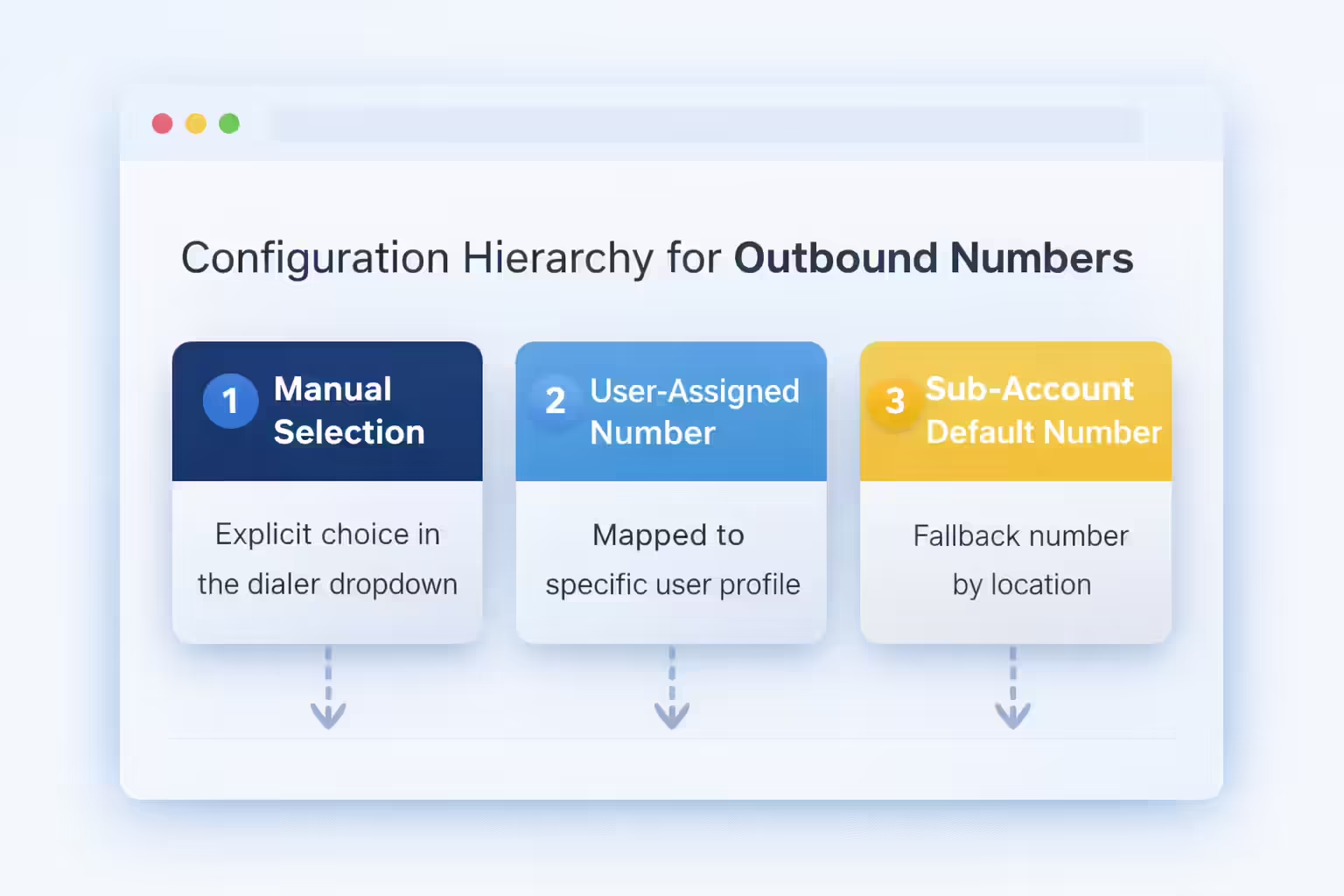
The hierarchy for outbound numbers in GHL typically follows this order:
- Manual Selection: The number explicitly chosen by the user in the dialer dropdown.
- User-Assigned Number: The number mapped to the specific user profile in "My Staff" settings.
- Sub-Account Default Number: The fallback number assigned to the location.
The GoHighLevel dialer bug manifests as a failure in step 1 and step 2 retrieval during re-initialization. If the system fails to fetch the User-Assigned Number due to API latency or a session cache miss, it defaults to the Sub-Account Default Number. This ensures the dialer remains functional, but it causes the wrong number error. A sales representative may set their direct line, refresh the page to load a new lead, and unknowingly revert to the main company line.
Browser Environment Limitations Affecting the GoHighLevel Dialer
The native dialer operates via WebRTC (Web Real-Time Communication) directly within the browser tab's Document Object Model (DOM). This creates a tight coupling between the CRM's visual rendering and the voice engine's stability.
Modern browsers, particularly Google Chrome, employ aggressive resource management techniques. The "Memory Saver" feature actively discards the memory state of inactive tabs to preserve RAM. If a sales representative has multiple tabs open, the browser may suspend the GHL tab. When the rep clicks back to GHL, the tab reloads. This reload event is functionally identical to a manual refresh and triggers the configuration reset responsible for the GoHighLevel dialer bug.
Furthermore, the native dialer is JavaScript running on the page. It is susceptible to interference from other browser extensions. Ad blockers, privacy tools, or other CRM extensions can delay the execution of scripts responsible for retrieving the "last used number" preference. This interference introduces unpredictability into the GoHighLevel dialer environment.
The Twilio Wrapper and GoHighLevel Dialer Errors
GoHighLevel acts as a software wrapper around Twilio or similar backend providers. When a user initiates a call, GHL sends an API request to Twilio to bridge the call. This abstraction layer creates a "Black Box" effect regarding errors.
When the GHL interface fails to send the specific "From" parameter associated with the user's direct line, the backend logic must default to a value to complete the request. It uses the number associated with the sub-account's credential SID. While this fallback mechanism prevents total call failure, it results in the "Wrong Number" bug. The sales rep remains unaware that the wrong number is being used until the prospect answers or ignores the call.
Correlation Between the One-Ring Issue and the GoHighLevel Dialer Bug
The instability of the native dialer is further evidenced by the "One-Ring" bug. In this scenario, inbound calls ring once and then disconnect or divert to voicemail prematurely. This is caused by a race condition between the GHL browser tab's timeout settings and the carrier's voicemail pickup time.
If the browser tab lags or is suspended, it fails to acknowledge the inbound call event in time. The default timeout triggers a diversion. This confirms that the browser tab is a fragile environment for hosting critical voice infrastructure and contributes to the overall unreliability of the GoHighLevel dialer.

Operational Impact: Costs Associated with the GoHighLevel Dialer Bug
The technical glitch described above translates into significant operational deficits. The immediate symptom is a frustrated sales rep, but the downstream effects impact conversion rates, data integrity, and team efficiency.
Trust Erosion Caused by the GoHighLevel Dialer Bug
In an environment of relentless robocalls, the caller ID is the first line of defense for any prospect. Trust is established or lost before the phone is answered. The GoHighLevel dialer bug destroys consistency. Sales relationships require continuity.
If a prospect receives an initial call from a representative's direct line and a follow-up call from the company's main line because the dialer reset, the prospect perceives a disconnect. The interaction feels transactional rather than relationship-based.
Additionally, prospects ignore numbers they do not recognize. If the default sub-account number is used by other team members or marketing automations, carrier analytics are more likely to flag it as "Spam Likely." This reduces the answer rate compared to a carefully managed direct user line. The most damaging scenario involves callbacks. If the call came from the default sub-account number, the callback routes to a generic IVR or voicemail. The lead is often lost. Conversely, a callback to a direct user line routes directly to the rep's mobile device, preserving the deal context.
Efficiency Loss From Manual Verification of the GoHighLevel Dialer
To mitigate the GoHighLevel dialer bug, users develop a manual workaround (checking the caller ID dropdown before every dial). The process involves:
- Opening the Contact.
- Clicking the Call Icon.
- Pausing to inspect the dropdown.
- Identifying the wrong number.
- Scrolling to select the Correct Number.
- Dialing.
This sequence adds approximately 3-5 seconds per call. For a high-volume representative making 100 calls a day, this totals nearly 10 minutes of wasted time daily. This friction breaks the "flow state" and diverts cognitive energy from the pitch to quality-checking the software interface.
Data Fragmentation Resulting From the GoHighLevel Dialer Bug
CRM integrity relies on accurate data logging. The GoHighLevel dialer bug compromises this by creating inconsistent metadata. Many reporting workflows rely on the "From" number to attribute activity to specific agents.
If calls originate from the shared default number, automated attribution scripts may fail to credit the specific agent. Additionally, this causes SMS thread splitting. If a rep calls from the Default Number but texts from their User Number, the conversation thread on the prospect’s mobile device splits into two separate contacts. This fragmentation reduces the likelihood of a response.
Solution Architecture: Decoupling Voice to Solve the GoHighLevel Dialer Bug
The solution to the "Wrong Number" problem is not to wait for a patch. The solution is to change the architecture of how calls are initiated. Organizations must move from an Embedded model (Native Dialer) to a Decoupled model (Kixie PowerCall).
The Overlay Philosophy for Fixing the GoHighLevel Dialer Bug
GoHighLevel functions as the foundation (holding data, contacts, and automations). Using the native dialer is akin to living in the foundation. Kixie acts as a specialized layer built on top of that foundation. It utilizes the data from the foundation but provides a high-performance environment for calling.
By installing Kixie, you introduce a dedicated telephony client that:
- Reads contact data from GHL (via the Chrome Extension reading the screen).
- Executes the call through Kixie’s proprietary network (not GHL’s Twilio sub-account).
- Writes the outcome (recording, disposition, notes) back into GHL notes and timeline.
How Kixie Permanently Resolves the GoHighLevel Dialer Bug
Kixie solves the caller ID reversion issue because it does not rely on the GHL browser tab’s session state to determine dialing parameters. Your caller ID settings are stored in the Kixie User Profile and fetched by the Chrome Extension upon login. This profile is persistent. Moving from one contact to another in GHL changes the screen data, but it does not reset the Kixie Extension’s internal settings.
When you click-to-call in GHL using Kixie, the extension intercepts the phone number and initiates the call using the settings defined in the Kixie application. GHL’s internal "Default Number" setting becomes irrelevant because GHL is not placing the call. Additionally, because Kixie runs as a Chrome Extension, it operates in a separate process from the web page. Even if the GHL page freezes or is suspended by Chrome's Memory Saver, the Kixie extension remains active and authenticated.
Feature Comparison: GoHighLevel Native Dialer vs. Kixie
| Feature | GoHighLevel Native Dialer | Kixie |
|---|---|---|
| Caller ID Stability | The GHL Native Dialer is volatile and resets on refresh. | Kixie is persistent and user-defined, eliminating "Wrong Number" calls. |
| Architecture | The GHL Native Dialer is browser-based WebRTC. | Kixie uses a dedicated Extension/Softphone architecture. |
| Inbound Routing | GHL relies on complex sub-account flows. | Kixie uses direct "Find Me/Follow Me" to route calls to the rep's device, preventing the "One-Ring" bug. |
| Reliability | GHL offers "Best Effort" reliability. | Kixie offers Carrier-Grade reliability with redundant carriers. |
Implementation Guide: Deploying the Fix for the GoHighLevel Dialer Bug
This section provides a technical guide to resolving the "Wrong Number" issue by transitioning to Kixie. This process takes under 15 minutes per user.
Step 1: Installation and Integration to Fix the GoHighLevel Dialer Bug
First, establish the bridge between the GHL database and the Kixie voice engine.
- Install the Chrome Extension: Search for "Kixie PowerCall & SMS" in the Chrome Web Store and add it to Chrome.
- Create/Login to Account: Log in with Kixie credentials.
- Connect the CRM:
- Open the Kixie PowerCall dialer.
- Go to the Menu icon (☰) in the top right corner.
- Select Settings > CRM.
- Click the "+" (Add CRM) button.
- Select LeadConnector (the generic wrapper for GoHighLevel).
- CRITICAL: Select the correct Sub-Account (Location) within GoHighLevel to ensure data maps to the correct contacts.
Step 2: Configuring Static Caller ID to Override the GoHighLevel Dialer Bug
This configuration eliminates the bug by creating a "Hard Set" rule. For Individual Users:
- Open the Kixie PowerCall dialer.
- Go to Menu (☰) > Settings > User Settings.
- Locate the "Outbound Caller ID" dropdown.
- Select the desired Direct Inward Dial (DID) number.
- Toggle "Local Presence" / "ConnectionBoost" to OFF (initially) to enforce a static fix.
Once set, every call uses this number. The Kixie extension respects this setting regardless of GHL page refreshes or cache clearing.
For Managers (Bulk Configuration):
- Log in to the Kixie Dashboard.
- Go to My Profile > Manage Agents.
- Select an agent and click Edit.
- Under "Outbound Caller ID Number", select the assigned DID for that agent.
- Save changes to push the configuration to the agent’s dialer.
Step 3: Verifying Sync After Fixing the GoHighLevel Dialer Bug
Kixie provides full bi-directional synchronization, ensuring GHL remains the source of truth. To verify data flow:
- Call Initiation: Click the "Red Kixie Icon" next to a phone number in GHL.
- Execution: Kixie places the call.
- Completion: Select a "Disposition" (e.g., "Connected") in the Kixie dialer upon hang-up.
- Sync: Kixie pushes a "Note" into the GHL Contact Record containing call duration, direction, recording URL, and disposition status.
Advanced Telephony: Optimization Beyond the GoHighLevel Dialer Bug Fix
Transitioning to Kixie enables telephony capabilities unavailable in the GHL native environment. The "Static Caller ID" approach is stable, but advanced strategies can further improve performance.
Limitations of Single Numbers in the GoHighLevel Dialer
Using a single static number for high-volume calling leads to diminishing returns. Carriers monitor calling velocity. If a single DID makes 100+ outbound calls per day with short durations, carrier analytics engines will flag the number. Once labeled "Spam Likely," pickup rates drop. Additionally, calling a prospect in one region from a number in a different region signals "outsider" status and reduces answer rates.
Dynamic Identity Management vs. The GoHighLevel Dialer Bug
Kixie’s ConnectionBoost technology optimizes answer rates.
- Dynamic Local Presence: When an agent calls a specific area code, Kixie displays a matching local number from a pool of clean numbers.
- Progressive Caller ID: Kixie rotates the displayed number periodically. This prevents the prospect from blocking a single number.
- Spam Minimization: Kixie monitors number pools and rotates out flagged numbers.
To implement, locate the "ConnectionBoost" toggle in the Kixie dialer and turn it ON. This capability is absent in the GHL native dialer.
Compliance Risks Associated with the GoHighLevel Dialer Bug
The "Wrong Number" bug introduces compliance risks under STIR/SHAKEN protocols. If GHL defaults to a misconfigured number, calls may receive low attestation levels ("B" or "C"). This signals to the receiving carrier that the call origin is untrusted.
Kixie acts as the voice carrier and manages "Trust Center" registrations, ensuring higher attestation levels. Kixie also simplifies A2P 10DLC registration for compliant SMS messaging.
Resolving Inbound Issues Related to the GoHighLevel Dialer Bug
Kixie solves the inbound "One-Ring" bug through device redundancy. Configuration steps:
- Open the Kixie Dashboard.
- Go to Manage Numbers > Edit Number > Inbound Call Flow.
- Set the call to ring the Kixie Desktop App and Mobile App simultaneously.
This routing happens at the carrier level, bypassing the GHL browser tab entirely. Even if the GHL tab is closed, the call routes successfully.
Comparative Analysis: Native GoHighLevel Dialer vs. The Kixie Fix
For decision-makers, the following comparison highlights the structural differences.
Stability Differences Between Kixie and the GoHighLevel Dialer
The GHL Native Dialer relies on the browser's DOM. It is fragile and prone to "session drift," where settings are lost during movement. It is vulnerable to browser resource throttling. Kixie uses a Chrome Extension architecture running in a separate process, ensuring persistence of settings and immunity to DOM repaints.
Audio Quality: Kixie vs. the GoHighLevel Dialer
The GHL Native Dialer depends on the browser's WebRTC implementation and instant internet quality. Kixie uses a dedicated softphone engine within the extension, supporting advanced audio device selection and higher resilience to packet loss.
Workflow Efficiency: Kixie vs. the GoHighLevel Dialer
The GHL Native Dialer requires a "Stop-Check-Select-Dial" workflow to prevent errors, slowing down prospecting. Kixie enables "Click-to-Call" with a single action. The dialer configuration is "Set and Forget".
Analytics and Coaching Missing from the GoHighLevel Dialer
The GHL Native Dialer provides basic reporting. Kixie offers a "Live Dashboard" for sales managers, including real-time listen-in, whisper coaching, and barge-in functionality.
Conclusion: Final Thoughts on the GoHighLevel Dialer Bug Fix
The "Wrong Number" bug in GoHighLevel is a symptom of an architecture that couples voice infrastructure too tightly with a browser-based application. While GoHighLevel is a strong tool for marketing automation, its native dialer struggles with the requirements of session persistence.
Sales representatives should not waste time manually verifying dropdown menus or lose deals due to incorrect caller IDs. The structural solution is to stop using the GHL native dialer.
Integrating Kixie PowerCall eliminates the bug by maintaining a persistent, user-defined Caller ID. It shifts the workflow from error-prone checks to seamless click-to-call. Finally, it provides access to ConnectionBoost and Local Presence, turning Caller ID into an asset rather than a liability. For businesses scaling outbound sales on GoHighLevel, decoupling the voice layer is the necessary next step.