

 HubSpot
 Salesforce
 Zoho
Zoho
 HighLevel
 Pipedrive
 ActiveCampaign
 Slack
Slack
 Zapier
TL;DR: Automated Guide Summary
This 2026 technical guide analyzes ten Salesforce CTI integrations, categorizing them by architecture (Open CTI vs. Native) and High-Velocity Sales (HVS) capabilities. Kixie is identified as the optimal solution for volume, offering multi-line parallel dialing and AI local presence to minimize latency. Fastcall serves as the primary native option for strict data residency and compliance. Revenue.io focuses on real-time guidance, Dialpad utilizes Voice Intelligence (Vi) for transcription, and RingCentral provides enterprise scalability. Niche solutions include PhoneBurner for report-based workflows, Aircall for ecosystem integration, CloudTalk for international routing, and JustCall for multi-channel SMS. Essential configuration steps include modifying Softphone Layouts and Salesforce Task object types to ensure accurate data logging. The market is currently navigating a transition from Open CTI to Service Cloud Voice, though Open CTI remains the functional standard for outbound sales teams.
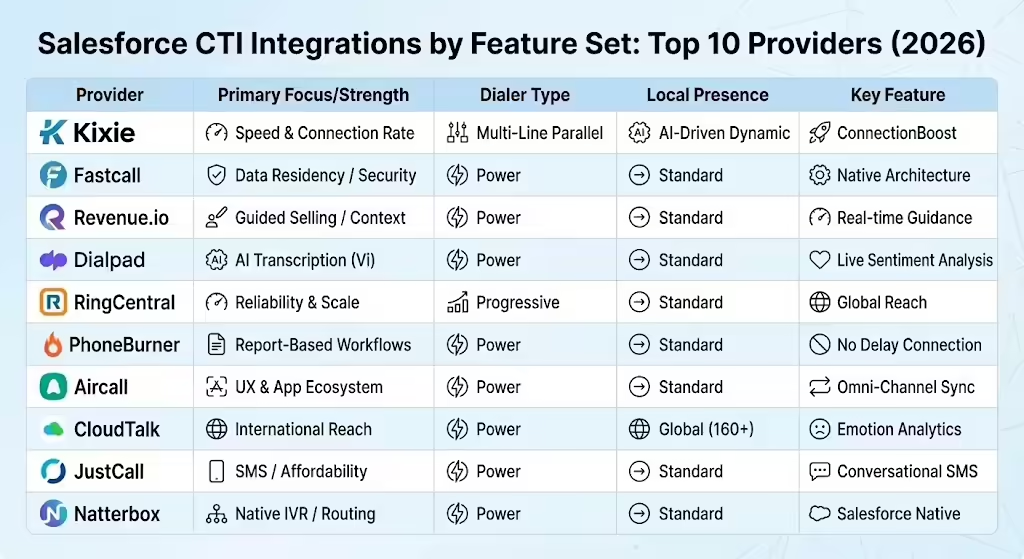
Table of Contents
- CTI in Modern Revenue Operations
- Kixie: The High-Velocity Sales Powerhouse
- Fastcall: The Native Salesforce Architect
- Revenue.io: The Sales Science Integration
- Dialpad: The AI Sales Innovator
- RingCentral: The Enterprise CTI Standard
- PhoneBurner: The Report-Based Sales Specialist
- Aircall: The Sales UX Champion
- CloudTalk: The Global Sales Quality Player
- JustCall: The Agile Sales Challenger
- Comparative Analysis: CTI Architecture
- Implementation Guide: Ensuring Success
- Future Trends: The Death of Open CTI?
- Conclusion: The Final Guide to CTI
CTI in Modern Revenue Operations
In the competitive market of 2025, the difference between a closed deal and a lost opportunity is often measured in seconds. For sales organizations using Salesforce, the Computer Telephony Integration (CTI), which serves as the link between the phone system and the customer database, has evolved from a simple utility into a strategic command center.
High-Velocity Sales (HVS) is no longer just about making more calls; it is about the intelligent organization of outreach, where data quality, connection rates, and rep efficiency meet. The modern Revenue Operations (RevOps) strategist faces a difficult contradiction. On one hand, buyers are harder to reach than ever, with answer rates for cold calls dropping to single digits without advanced tools. On the other hand, the expectation for data accuracy within Salesforce is higher than ever.
Every interaction must be logged, sentiment analyzed, and next steps automated. Manual entry of call notes is outdated; the technology stack must invisibly handle administrative tasks so sales professionals can focus entirely on the conversation.
This report provides an analysis of the top 10 Salesforce CTI integrations. It functions as a critique of how these platforms operate within the Salesforce Lightning Experience, how they handle data residency and Open CTI (Salesforce's browser-based telephony API), and which solutions drive speed for outbound sales teams.
Defining High-Velocity Sales in the Salesforce Era
To evaluate integration options effectively, one must first define "High-Velocity Sales" within the Salesforce context. It is a methodology defined by rapid lead qualification, structured outreach cadences, and the reduction of friction between the sales representative and the prospect.
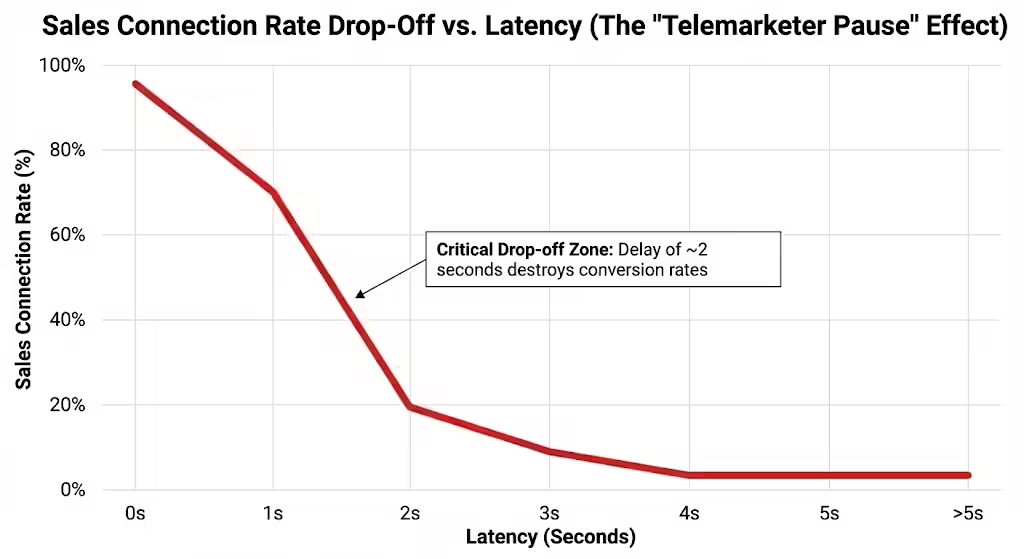
- The Latency Challenge: In high-volume environments, a delay of even two seconds, known as the "telemarketer pause," between a prospect answering and the rep connecting can destroy conversion rates. CTI solutions must reduce this latency through advanced bridging technologies.
- The Context War: A rep dialing 100 prospects a day cannot rely on memory. The CTI must provide an immediate "screen pop," which is a visual display of the Lead or Contact record, open Opportunities, and past activity history, the moment the phone rings. This context must appear without refreshing the browser page, as reloading disrupts workflow in the Salesforce Console.
- Data Hygiene as Automation: The system must automatically log call duration, outcome (disposition), and recording URL directly to the Salesforce Task or Activity object. Furthermore, these logs must trigger downstream automation, such as moving a lead status to "Working" or enrolling a contact in a nurture sequence.
The Architecture of Integration: Open CTI vs. Native
A fundamental technical divide exists in the CTI market between "Open CTI" and "Native" applications, influencing everything from speed to security. Understanding this difference is required to select the right tool.
Salesforce Open CTI (The Modern Standard)
Historically, CTI required installing physical adapters on every desktop. Salesforce changed this with Open CTI, a JavaScript API that allows third-party telephony systems to embed their softphone directly into the Salesforce browser interface, typically the Utility Bar.
- Mechanism: Open CTI uses the browser as the client. When a rep clicks a phone number in Salesforce, the browser sends a command to the CTI provider's cloud to initiate the call. The provider then pushes the call state back to the browser.
- Advantages: This architecture works on any platform (Mac, Windows, Linux) and requires no local software installation. It allows for rich, cloud-based features like global carrier routing and AI processing that occur outside of Salesforce's strict governor limits.
- The Service Cloud Voice Nuance: While Salesforce has signaled a shift toward "Service Cloud Voice" for contact centers, which integrates telephony into the Omni-Channel widget, Open CTI remains the dominant framework for Sales teams in 2025. Service Cloud Voice is often complex to deploy for outbound sales, whereas Open CTI partners offer specialized dialers optimized for speed.
Native Applications (The "On-Platform" Approach)
A subset of providers, such as Fastcall, build their applications 100% "Native" to Salesforce.
- Mechanism: The application logic resides entirely within Salesforce Apex and Visualforce code. The actual voice transport is usually handled by a backend provider, like Twilio, but the application "lives" in your Salesforce org.
- Data Residency: Because the app is native, customer data (phone numbers, recordings, logs) technically never leaves the Salesforce environment's compliance boundary. This is a critical differentiator for regulated industries like healthcare or defense.
The CTI Evaluation Strategy
This analysis tests each provider against specific high-intent capabilities that define market leadership in the Salesforce CTI space:
- Power Dialer / Parallel Dialer: Does the tool dial one number at a time, or can it dial multiple lines simultaneously to increase rep talk time?
- Local Presence: Does the tool dynamically adjust the caller ID to match the prospect's geography, and how does it manage spam reputation?
- Voice Intelligence (Vi): Does the tool offer real-time transcription and sentiment analysis?
- Bi-Directional Sync: How fast does data move between the telephony cloud and the Salesforce database?
Kixie: The High-Velocity Sales Powerhouse
Best For: Aggressive outbound sales teams, multi-line power dialing, and maximum "Speed-to-Lead".
Kixie Sales Integration Overview
Kixie has established itself as a primary choice for organizations that prioritize outbound volume and connection rates. Unlike generalist VoIP providers that view Salesforce integration as a minor feature, Kixie’s architecture is engineered to turn Salesforce into an automated engagement engine. It is an "Integrated" solution using Open CTI (Salesforce's browser API) that uses its external cloud to provide heavy-duty dialing capabilities that would be impossible within Salesforce's native limits.
Deep Look: The Sales Power Dialer
The core of Kixie's value is its parallel dialing capability. While standard power dialers call one number after another sequentially, Kixie allows a single rep to dial up to 10 leads simultaneously.
- The Efficiency Math: If a manual dialer achieves 40 dials/hour and a standard power dialer achieves 80, Kixie's multi-line dialer can push this to 300+ dials/hour. The system listens to the line status; if it detects voicemail or a busy signal, it disconnects and logs the outcome automatically. The rep is only connected when a live human voice is detected.
- Latency Management: A common failure point in multi-line dialers is the "telemarketer delay". Kixie utilizes proprietary "ConnectionBoost" technology to minimize this lag, ensuring the rep is connected the millisecond a prospect answers to preserve the conversation flow.
Salesforce Local Presence and Spam Defense
In 2025, a major barrier to sales is the "Scam Likely" label on caller IDs. Kixie addresses this with an AI-driven Local Presence engine.
- Dynamic Rotation: Kixie does not just assign a static local number. It utilizes a pool of over 50,000 numbers, rotating them dynamically to match the prospect's area code (e.g., a prospect in the 415 area code sees a 415 caller ID).
- Progressive Caller ID: The system is intelligent enough to rotate numbers if a prospect is called multiple times, preventing the "stalker" effect of the same number calling repeatedly. This technology is cited to increase connection rates by up to 500% compared to using a single corporate number.
Salesforce Automation & Speed-to-Lead
Kixie integrates deeply with Salesforce workflow rules to enable "Speed-to-Lead".
- The Trigger: When a new lead is created in Salesforce, such as via a web form, Kixie can immediately trigger a call to an available sales rep.
- The Action: The rep picks up, and Kixie automatically dials the new lead. This reduces the response time from hours to seconds, which is correlated with higher conversion rates.
- SMS Automation: Kixie also supports automated SMS triggers. If a rep logs a call disposition of "Left Voicemail," Kixie can automatically send a pre-templated text message to the prospect ("Hey, just missed you, giving you a call about X..."), increasing engagement without manual effort.
Salesforce Integration Specifics
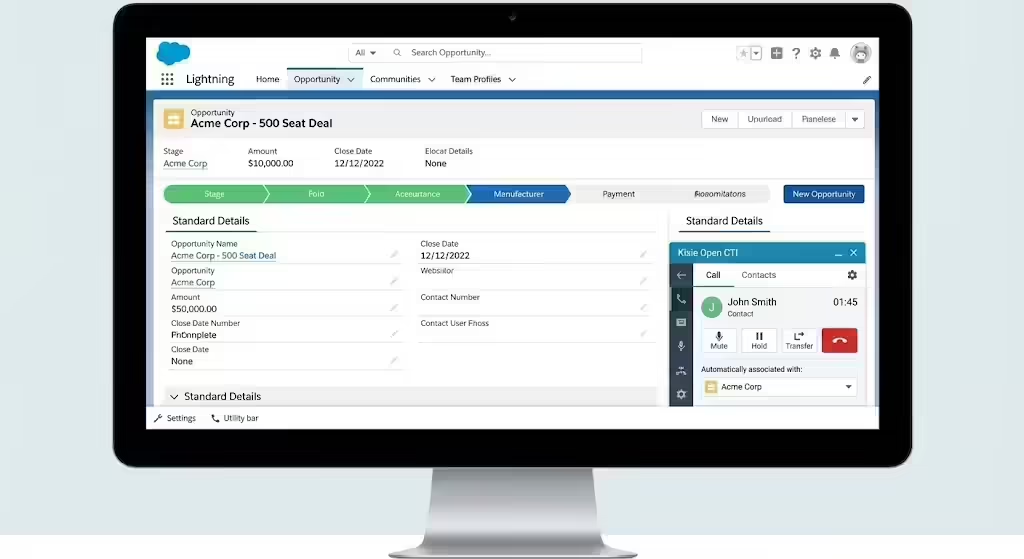
Kixie’s setup is designed for rapid deployment via the Salesforce AppExchange.
- Utility Bar: It resides as a persistent footer in the Salesforce Lightning Console.
- Object Logic: It intelligently associates calls with the record in focus. If a rep is viewing an Opportunity, the call log attaches to the Opportunity, the Account, and the Contact simultaneously.
- Configuration: A critical setup step involves configuring the Salesforce Task object to accept a custom "Type" of "Call". This ensures that Kixie activities are not lost in the general "Task" noise and can be reported on granularly, such as "Calls > 5 minutes".
Fastcall: The Native Salesforce Architect
Best For: Organizations with strict data residency requirements, compliance-heavy industries (Healthcare, Finance), and "Salesforce Purists".
Fastcall Integration Overview
Fastcall differentiates itself through a strict architectural philosophy: 100% Native. Unlike integrated competitors that sync data between external clouds, Fastcall’s application logic sits entirely within the Salesforce Lightning Platform. It is effectively a highly sophisticated interface for Twilio, allowing organizations to manage their telephony directly from within the CRM.
Deep Look: Salesforce Data Residency
For global enterprises navigating GDPR, HIPAA, or strict financial regulations, the concept of "Data Residency," meaning where data is physically stored, is paramount.
- No Third-Party Storage: With Fastcall, call recordings, logs, and metadata are stored directly in Salesforce or an S3 bucket controlled by the client. There is no "Fastcall Cloud" where data sits vulnerable. This simplifies the vendor security review process significantly.
- Twilio Control: Fastcall creates a sub-account on Twilio for the client. This means the client retains legal ownership of the phone numbers and the carrier relationship, providing portability and transparency in billing.
The Native Salesforce User Experience
Because Fastcall is built with Apex and Lightning Web Components (Salesforce's native coding languages), its performance within the CRM is seamless.
- Speed: There is zero API latency between the call ending and the log appearing, because the log is generated by the Salesforce internal server, not an external webhook.
- Omni-Channel Support: Fastcall integrates natively with Salesforce Omni-Channel, the tool that routes work items to agents. This allows voice calls to be routed using the same logic as Leads, Cases, and Chats. If an agent is busy with a Chat, Salesforce Omni-Channel can prevent a voice call from routing to them. This represents a level of orchestration that external apps often struggle to match.
Native Integration Limitations
The native architecture does impose limits. Fastcall is bound by Salesforce's governor limits, such as API calls per day, though native apps use fewer APIs. It generally lacks the massive parallel dialing capabilities of external dialers like Kixie (10-line dialing) or the proprietary AI transcription engines of Dialpad, as it relies on Twilio's underlying capabilities for these features.
Revenue.io: The Sales Science Integration
Best For: Complex B2B sales cycles, Account-Based Marketing (ABM), and teams needing "Guided Selling".
Revenue.io Sales Integration Overview
Revenue.io (RingDNA) positions itself above the standard "Dialer" category, defining its space as "Revenue Science". It is a platform for orchestration, guidance, and intelligence. While it offers excellent telephony, its primary value is in what happens during the call.
Examining: Guided Sales and CTI Context
Revenue.io transforms the softphone into a "Co-Pilot" for the sales representative.
- Contextual CTI: When a call comes in, the Revenue.io sidebar doesn't just show the name. It aggregates marketing data, such as "Visited Pricing Page yesterday," prior interaction history, and open support tickets. This gives the rep a "cheat sheet" before they even say hello.
- Moments™: This feature provides real-time notifications during a call. If the speech recognition engine detects the prospect saying "Competitor X," a battle card automatically pops up on the rep's screen with talking points to counter that competitor. This enables "live coaching" at scale.
Sales Prioritization and Workflow
Revenue.io focuses on "Next Best Action" rather than simple dialing lists.
- Intelligent Sequencing: Instead of a static list, Revenue.io can prioritize leads based on "Signal Strength," utilizing behavioral data. This ensures that high-velocity teams are spending their energy on the leads most likely to convert, rather than just burning through a list alphabetically.
- Salesforce Native Feel: While technically an integrated app, Revenue.io's UI is so deeply embedded in the Salesforce aesthetic that it feels native. It writes data to standard Salesforce objects, ensuring that reports and dashboards are easily accessible to RevOps leaders.
Dialpad: The AI Sales Innovator
Best For: Tech-forward companies wanting "Voice Intelligence" (Vi), real-time transcription, and a modern, unified UI.
Dialpad CTI Overview
Dialpad is a leader in the "Kill the Desk Phone" movement, offering a Unified Communications (UCaaS) platform that handles voice, video, and messaging. Its Salesforce integration is distinguished by its heavy reliance on proprietary AI, which they term "Voice Intelligence" (Vi).
CTI Analysis: Real-Time Transcription
Most CTI tools record calls; Dialpad reads them.
- Live Transcription: As the rep speaks, Dialpad transcribes the conversation in real-time on the screen. This changes the nature of data entry. The rep can click on a specific part of the transcript to mark it as an "Action Item," which then syncs to Salesforce notes.
- Searchable Voice Data: Because every call is transcribed, the voice data becomes searchable text. A manager can search Salesforce for every call where the phrase "too expensive" was used, aggregating market feedback in a way that listening to MP3s never could.
Sales Sentiment Analysis and Coaching
Dialpad's AI monitors the sentiment of the call (Positive, Neutral, Negative) in real-time.
- Manager Alerts: If a call's sentiment turns sharply negative, a manager can be alerted to "Barge" or "Whisper" into the call to assist the rep. This creates a safety net for junior SDRs.
- Post-Call Analytics: The integration provides a "Coaching Score" for every interaction, automating the Quality Assurance (QA) process that sales managers rarely have time for.
RingCentral: The Enterprise CTI Standard
Best For: Large enterprises, IT-led purchasing, and organizations requiring a single vendor for all telephony, covering both Office and Sales needs.
RingCentral Sales Integration Overview
RingCentral is the giant of the cloud telephony world. Its Salesforce integration is mature, stable, and designed for scale. While it may lack the aggressive specialized features of Kixie (like 10-line dialing), it compensates with 99.999% reliability and a feature set that satisfies the entire C-Suite, not just the VP of Sales.
Deep Look: Global Sales Reliability
For a company with 5,000 employees, "High Velocity" often takes a backseat to the requirement that "It just needs to work".
- Global Reach: RingCentral offers local numbers and carrier services in over 40 countries natively. This simplifies the billing and procurement process for multinational sales teams.
- High Velocity Sales Support: RingCentral has updated its integration to support Salesforce's HVS "Work Queues". Reps can work through a cadence in Salesforce, and clicking "Call" triggers the RingCentral softphone instantly.
RingCX and Salesforce Routing
RingCentral’s "RingCX" is a contact center overlay that integrates with Salesforce.
- Intelligent Routing: It enables skills-based routing, such as routing a French-speaking prospect to a French-speaking agent, using Salesforce data to inform the routing decision before the phone even rings.
- Unified Reporting: RingCentral offers "Cloud Phone Reports" that allow users to view granular telephony metrics (QoS, packet loss, jitter) alongside sales metrics within Salesforce, giving IT and Sales a shared view of performance.
PhoneBurner: The Report-Based Sales Specialist
Best For: Teams that live and breathe Salesforce Reports for their prospecting lists and demand "delay-free" connections.
PhoneBurner CTI Overview
PhoneBurner occupies a unique niche. It is not just a softphone; it is a workflow tool designed specifically for "burning" through lists. Its philosophy is built around "Report-Based Dialing".
Understanding: Report-Based Sales Dialing
While other dialers require you to create static lists or campaigns, PhoneBurner integrates directly with the Salesforce Report engine.
- The Workflow: A sales manager creates a Salesforce report (e.g., "Leads in NY > $50M Revenue"). The rep opens PhoneBurner, selects that report, and hits "Begin Dial Session". The system locks the rep into a focused mode, serving up records one by one.
- Up to 500 Records: A single session can handle up to 500 records, which is significantly higher than standard list views allow. This keeps reps in the "flow state" for longer periods.
The Sales Connection "No Delay" Promise
PhoneBurner heavily markets its lack of "telemarketer delay".
- Technical Distinction: Unlike predictive dialers that dial multiple lines and then transfer the call to an agent, causing a pause, PhoneBurner is a power dialer that keeps the line open or manages the connection handoff so seamlessly that the rep hears the prospect say "Hello" instantly. This is critical for avoiding the immediate "hang-up" reaction prospects have to silence.
Aircall: The Sales UX Champion
Best For: Fast-growing SMBs and Mid-Market teams that value simplicity, design, and rapid onboarding.
Aircall Integration Overview
Aircall disrupted the telecom market by focusing on User Experience (UX). Its interface is clean, modern, and intuitive, resembling a consumer app more than enterprise software. This focus on simplicity makes it a favorite for modern tech startups where ease of use drives adoption.
Reviewing: The Sales Ecosystem Approach
Aircall shines in its ability to connect not just to Salesforce, but to the entire tech stack simultaneously.
- Stack Integration: An Aircall user can have the phone integrate with Salesforce (for logging), Slack (for notifying the team of a closed deal), and Gong (for recording analysis) all at once. This ecosystem approach prevents data silos.
- Power Dialer: Aircall includes a competent power dialer that can scrape numbers from a webpage using a Chrome extension or dial from Salesforce lists. While not as aggressive as Kixie's multi-line, it is incredibly easy to set up.
Salesforce Omni-Channel Sync
Aircall has implemented smart syncing with Salesforce Omni-Channel, the tool that manages agent availability.
- Status Sync: If a rep is on a call in Aircall, their status in Salesforce Omni-Channel automatically updates to "Busy". This prevents a support agent from being assigned a live chat while they are on the phone. This helps avoid a common frustration in hybrid sales/support roles.
CloudTalk: The Global Sales Quality Player
Best For: International sales teams requiring local numbers in 160+ countries and high call quality assurance.
CloudTalk CTI Overview
CloudTalk focuses on the infrastructure layer. For sales teams distributed across multiple continents, call quality (jitter, latency) is often the primary pain point. CloudTalk optimizes its network for global coverage, ensuring that a rep in Manila sounds crystal clear to a prospect in London.
Inspecting: Global Sales Reach
- Number Acquisition: CloudTalk provides one of the largest inventories of international numbers, covering 160+ countries. This allows a global sales team to have "Local Presence" in almost any market they target, which is notoriously difficult to procure with US-centric providers.
- Smart Routing: The Salesforce integration allows for country-based routing. If a lead in Salesforce has a German country code, CloudTalk can automatically route the outbound call through a German carrier node to ensure quality and caller ID recognition.
Sales Emotion Analytics
CloudTalk includes a unique "Emotion Analytics" feature.
- Sentiment Tracking: Similar to tools like Dialpad, it attempts to measure the caller's mood. This data is logged back to Salesforce, allowing managers to view a dashboard of "Unhappy Customers" vs. "Happy Customers" based on voice energy and tone.
JustCall: The Agile Sales Challenger
Best For: SMBs requiring a balance of Voice, SMS, and affordability.
JustCall Integration Overview
JustCall has gained rapid market share by offering a feature-dense platform at a highly competitive price point. It acknowledges that modern sales is not just about voice; it is about text messaging (SMS) and WhatsApp.
Feature Focus: SMS and WhatsApp Integration
JustCall offers one of the most robust SMS integrations for Salesforce.
- Conversational Messaging: Unlike tools that treat SMS as a notification, JustCall provides a conversational interface within Salesforce. Reps can text back and forth with prospects just like they would on a mobile phone, with the entire thread logged to the Lead record.
- Bulk SMS: JustCall facilitates bulk SMS campaigns (e.g., "Webinar starting in 1 hour") directly from Salesforce list views. This is a powerful feature for high-velocity teams nurturing large pipelines.
Sales Dialer Pricing and Accessibility
JustCall is often the entry point for smaller teams. Its pricing model is transparent, and it offers a "Sales Dialer" (predictive/power) that includes essential features like voicemail drop and script display without the enterprise price tag of RingCentral or Genesys.
Comparative Analysis: CTI Architecture
To aid in selection, the following matrices compare the top providers across critical high-velocity dimensions.
Table 1: Architectural & Dialing Capabilities
| Provider | Architecture | Dialer Type | Local Presence | Primary Strength |
|---|---|---|---|---|
| Kixie | Integrated (Open CTI) | Multi-Line (Parallel) | AI-Driven (Dynamic) | Speed & Connection Rate |
| Fastcall | Native | Power | Standard | Data Residency / Security |
| Revenue.io | Integrated | Power | Standard | Guided Selling / Context |
| Dialpad | Integrated | Power | Standard | AI Transcription (Vi) |
| RingCentral | Integrated | Progressive | Standard | Reliability & Scale |
| PhoneBurner | Integrated | Power | Standard | Report-Based Workflows |
| Aircall | Integrated | Power | Standard | UX & App Ecosystem |
| CloudTalk | Integrated | Power | Global (160+ Countries) | International Reach |
| Natterbox | Native | Power | Standard | Native IVR / Routing |
| JustCall | Integrated | Power | Standard | SMS / Affordability |
Table 2: Pricing Models and Value
(Note: Pricing is subject to change and often involves volume negotiation.)
| Provider | Pricing Model | Estimated Starting Cost | Value Proposition |
|---|---|---|---|
| Kixie | Per User / Month | ~$29 - $55+ | High ROI via increased connect rates (Parallel Dialing). |
| Fastcall | Per User + Usage | ~$30 - $60 + Twilio Fees | "Pay for what you use" transparency; cost control via Twilio. |
| Dialpad | Per User | ~$25 - $50 | Includes AI transcription which often costs extra elsewhere. |
| RingCentral | Tiered License | ~$25 - $40 | Bundled with Office Phone features; good for mixed-use. |
| JustCall | Per User | ~$29 | Includes SMS features that are often add-ons. |
The ROI of High-Velocity Sales Features
When evaluating cost, RevOps leaders must calculate the "Cost of Inaction," or the price paid for inefficient workflows.
- Connection Rate ROI: If a rep makes 100 calls a day with a 5% answer rate, they get 5 conversations. If a tool like Kixie (via Local Presence and Multi-Line dialing) increases that to 10 conversations, the rep's productivity has doubled. A $50/month license difference is negligible compared to a 100% increase in pipeline generation.
- Logging ROI: Manual logging takes ~2 minutes per call. For 50 calls, that is 100 minutes of lost time per day. All tools listed here solve this, but PhoneBurner and Kixie minimize the transition time between calls most aggressively, reclaiming "dead air" time.
Implementation Guide: Ensuring Success
Selecting the software is only the first step; the failure of CTI projects often stems from poor implementation within Salesforce.
The "Don't Skip" Salesforce Configuration Steps
To ensure data flows correctly between the CTI and the CRM, the following Salesforce configurations are mandatory:
- Softphone Layouts: In Salesforce Setup, you must configure "Softphone Layouts". This determines what data pops up when a call rings. Best Practice: Configure the layout to show "Name," "Account," "Opportunity Stage," and "Last Interaction Date". Do not clutter the screen with irrelevant fields.
- Task Type Configuration (Critical for Reporting): Most CTI tools log calls as Salesforce "Tasks". You must modify the Task object's "Type" picklist to include values like "Call," "Kixie Call," or "Outbound Call". Why: If you skip this, calls will be logged as generic "Tasks," making it impossible to separate a "Call" from a "To-Do" item in your reports.
- Utility Bar Placement: In the Lightning App Manager, add the Open CTI Softphone to the "Utility Bar," the footer of the screen. Setting: Ensure "Load in background when app opens" is checked. This ensures the phone is active and ready to ring even if the user hasn't clicked on it yet.
CTI Installation: Managed Package vs. XML
- Managed Package (Most Common): For tools like Kixie, RingCentral, and Fastcall, you install a package from the AppExchange. This automatically creates the necessary Call Center Definition files and Apex classes.
- Call Center Definition File (Manual): For some older or custom Open CTI implementations, you may need to import an XML file into the "Call Centers" setup node. This file contains the URL of the CTI adapter and the CTI version (Open CTI vs. Desktop CTI).
Sales Change Management and Adoption
Sales reps will often resist any tool that feels like "Big Brother" or surveillance.
- Positioning: Sell the CTI as an automation tool, not a tracking tool. "This tool means you never have to type a call log again".
- Gamification: Use the newly acquired data to power Salesforce Dashboards. Show "Top Talkers" or "Most Connection Time" on a public dashboard. This validates the tool's usage and creates healthy competition.
Future Trends: The Death of Open CTI?
Sales teams using Salesforce must address a critical development regarding the Computer Telephony Integration (CTI) framework: the rumored "retirement" of Open CTI.
The Rise of Salesforce Service Cloud Voice
Salesforce has introduced Service Cloud Voice, a new architecture that integrates telephony natively into the Omni-Channel widget, bypassing the traditional Open CTI Utility Bar. Salesforce has stated that Open CTI is "scheduled for retirement" with no new features being added.
What this means for Sales in 2025:
- Don't Panic: The "retirement" is primarily aimed at forcing complex Contact Centers (Support) onto SCV. For Outbound Sales, Open CTI remains the functional standard because SCV is currently rigid and expensive for pure dialing use cases.
- The Hybrid Future: We expect top providers (Kixie, RingDNA) to eventually adopt the "Voice Call" object (the native object used by SCV) while maintaining their own softphone interfaces for the foreseeable future. The transition for sales teams will be gradual, likely spanning 3-5 years.
Agentic AI and The Autonomous Sales Rep
The next frontier is AI that participates. Tools like Dialpad and Salesforce's own "Agentforce" are moving toward Agentic AI.
- The Vision: An AI agent that not only transcribes the call but can autonomously send a follow-up email, schedule a meeting on the calendar, and even update the Opportunity amount based on the verbal negotiation, doing all of this without the rep touching the keyboard.
Conclusion: The Final Guide to CTI
The "Best" CTI integration is not a universal truth; it is a reflection of your specific operational constraints and goals.
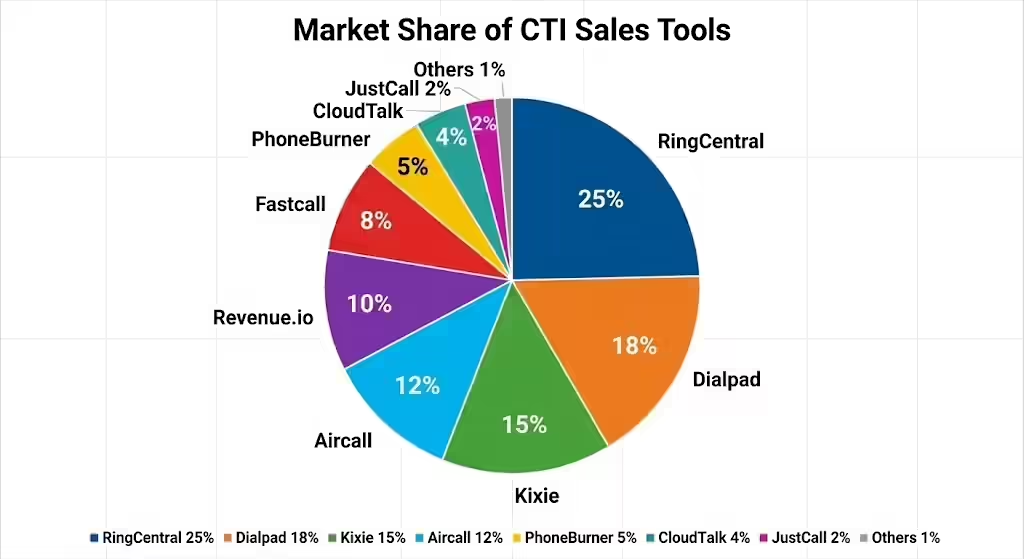
- Choose Kixie If: Your primary metric is Pipeline Generation per Rep. The combination of multi-line dialing, AI local presence, and speed-to-lead automation makes it the most lethal weapon for aggressive outbound teams.
- Choose Fastcall If: Your primary constraint is Security/Compliance. If you are in banking or healthcare and your CISO demands that data never leaves the Salesforce cloud, Fastcall is the only viable option.
- Choose RingCentral If: Your primary requirement is Unification. If you need a single vendor to handle the front desk, the support line, and the sales team, RingCentral offers the necessary scale and reliability.
- Choose Dialpad If: Your primary strategy is Coaching. If you are hiring junior reps and need to ramp them quickly, the real-time transcription and "Vi" coaching cards are invaluable.
In the high-velocity era, the phone is no longer just a phone. It is a data capture device, a coaching tool, and an automation trigger. The integration you choose will dictate whether your Salesforce org remains a passive database or becomes the engine of your revenue growth.