

 HubSpot
 Salesforce
 Zoho
Zoho
 HighLevel
 Pipedrive
 ActiveCampaign
 Slack
Slack
 Zapier

Subject: Automating SMS dispatch following "No Answer - Left VM" dispositions in Salesforce.
ROI Data: Saves 30–60 seconds per interaction; recovers ~180 hours (22 workdays) per representative annually based on standard outbound volume.
Prerequisites: Salesforce Professional Edition or higher; Kixie Professional Tier or higher; System Administrator permissions.
Configuration: Create Custom Field Call_Disposition__c (Text, 255) on Activity Object.
Update Task Type picklist to include Disposition, Incoming SMS, and Outgoing SMS. Logic: Salesforce Record-Triggered Flow on Task Creation.
Conditions: Status equals Completed AND Type equals Call AND Call_Disposition__c equals No Answer - Left VM AND WhoId starts with 00Q or 003. Action: HTTP Callout (POST) to https://apig.kixie.com/app/event with JSON payload including target (Phone), email (Rep Email), and message.
Compliance: Has_Opted_Out_SMS__c must equal False before execution.
Automating Salesforce SMS Follow-ups
In the current B2B market, the operational speed of the sales development representative (SDR) and the account executive (AE) determines revenue growth.
The modern sales floor contains vast amounts of data, yet friction often slows it down. Sales representatives must manage complex software interfaces, browser tabs, and manual data entry that deplete mental energy. This issue (often called "context switching") taxes productivity significantly.
This report outlines a practical method to resolve this bottleneck: automating Salesforce SMS follow-ups triggered directly by call outcomes.
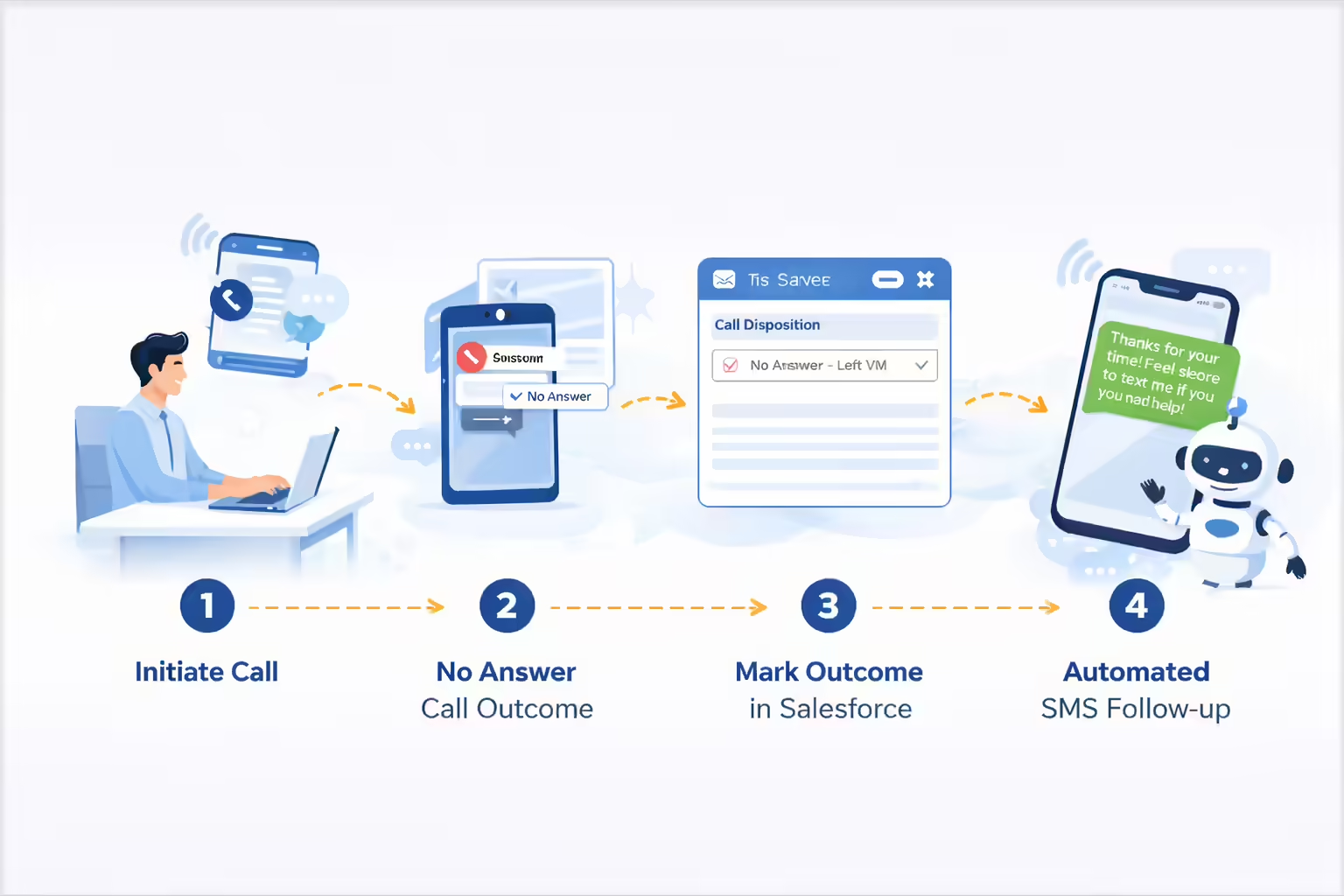
Specifically, this analysis focuses on integrating Kixie with Salesforce to execute a "Double Tap" strategy. This consists of a phone call immediately followed by a text message, executed without manual input from the representative.
The Workflow:
- The representative initiates a call via the dialer.
- The prospect does not answer.
- The representative selects the "No Answer - Left VM" option within the dialer.
- The system triggers a pre-scripted, personalized SMS follow-up to the prospect.
This Salesforce automation bridges voice and text channels, saving 30 to 60 seconds per interaction. When applied to standard outbound volume, this single optimization recovers hundreds of hours of selling time annually per representative.
This guide details the prerequisites, Salesforce Flow configuration, and ROI of automating SMS follow-ups based on call outcomes.
The Operational Cost of Manual Salesforce SMS Follow-ups
Manual Workflow vs. Automated Call Outcomes
The daily routine of a sales representative often involves a disorganized command center. To complete a single outreach sequence, a representative might have Salesforce open in one tab, LinkedIn in another, and a standalone SMS tool in a fourth.
This fragmentation requires constant adjustments. When a representative makes a call that results in a voicemail (occurring in approximately 80% of outbound attempts), they face a decision. They can end the interaction or attempt a manual "Double Tap."
Manual execution involves a slow sequence: ending the call, finding the SMS interface, writing a template, verifying the name, sending the message, returning to Salesforce, and manually logging the call outcome.
The transition changes a click-heavy path into a single step: Phone to Call Outcome to Done.
This manual sequence takes 30 to 60 seconds. For a representative executing 50 to 100 dials daily, this administrative work adds up to nearly an hour of lost productivity every day.
Cognitive Load in Salesforce SMS Follow-ups
The cost of this manual workflow extends beyond time; it reduces mental focus.
Shifting attention between different tools significantly hurts productivity. Research indicates that shifting tasks can reduce productive capacity by up to 40%. Furthermore, regaining focus after an interruption takes over 20 minutes, and the average professional faces more than 30 interruptions daily.
When a representative stops calling to draft a text message or use a different interface, they lose the focus required for persuasion. They shift from a salesperson to a data entry clerk.
By automating SMS follow-ups based on call outcomes, the organization preserves the representative's momentum. The representative clicks "Left Voicemail," and the Salesforce automation handles the rest. This allows the representative to focus on the next call outcome.
Native Salesforce Automation for Call Outcomes
The solution described here uses the deep integration between Kixie and Salesforce. Unlike basic integrations that only display a window, this method writes structured data directly to the native Salesforce Task object.
Because the call outcome is logged as specific data within Salesforce immediately upon completion, it serves as a reliable trigger for Salesforce automation engines, specifically Salesforce Flow.
This ensures the SMS follow-up is not sent by an unreliable third-party script. Instead, the CRM orchestrates the process, ensuring data integrity and logging.
Prerequisites for Automating SMS Follow-ups in Salesforce
Salesforce Edition Requirements
To automate SMS follow-ups, the technology stack must meet specific capability requirements regarding API access and automation features.
- Salesforce Edition: The organization must operate on Salesforce Professional Edition or higher. The integration relies on the Salesforce API to write task data and trigger flows. Access to Flow Builder is essential.
- Kixie Billing Tier: This automation requires the Kixie Professional tier or higher. Lower tiers typically restrict the API access and webhook functionalities.
- Permissions: The user configuring this system must have System Administrator access in Salesforce to modify the Task object and build Flows.
Preparing Salesforce Call Outcomes for Automated SMS
The standard Salesforce Task object lacks the granularity required for precise automation. To trigger an SMS follow-up only when a specific button is clicked, you must create a dedicated field for the call outcome data.
Step 1: Configuring the "Call Disposition" Field
When a representative clicks a disposition in the dialer, that text string needs a specific location within the Salesforce database. Relying on the generic "Subject" line is unreliable.
Action: Create a custom field on the Activity (Task) object.
- Label: Call Disposition
- Type: Text (Length 255)
- Recommendation: A Text field provides flexibility for dynamic call outcomes. If the dialer pushes a new value not in a Picklist, the automation might fail.
- API Name:
Call_Disposition__c. This API name is the destination variable for the integration.
Step 2: Updating the "Type" Field for Granular Filtering
Salesforce uses the standard "Type" picklist to categorize activities. To ensure automated SMS follow-ups trigger only on calls, you must define the activities.
Action: Edit the Type picklist on the Task object.
Add Values: Disposition, Incoming SMS, Outgoing SMS, Call.
Step 3: Configuring Kixie Call Outcomes
With the Salesforce database ready, the dialer must be configured to direct the call outcome data accurately.
- Access: Log in to the Kixie Dashboard and go to Manage > Dispositions.
- Define Outcomes: Create the outcomes the sales team will use. Ensure there is an exact match for the label: "No Answer - Left VM". Standardization is key for automating SMS follow-ups.
- Mapping: In the Integration settings, locate the "Dispositions" section. Map the Disposition to the Salesforce API Name:
Call_Disposition__c. - Sync Logic: Enable "Bi-directional Sync." This allows the system to identify which representative's phone number should be used as the sender ID for the automated SMS follow-up.

Building the Salesforce Automation Engine for SMS Follow-ups
Step 4: Creating the Salesforce Flow
This approach uses a Salesforce Record-Triggered Flow to monitor Task records and fire an outbound message to trigger the SMS follow-up.
- Navigate to Setup > Process Automation > Flows.
- Click New Flow and select Record-Triggered Flow.
- Object: Select Task.
- Trigger: Configure the flow to run "A record is created."
(Note: If testing shows the call outcome populates milliseconds after creation, change this to "A record is created or updated.")
Step 5: Defining Entry Conditions
To prevent the system from sending SMS follow-ups for every task, precise criteria must be defined.
Set Condition Requirements (AND):
This condition ensures the Salesforce automation only targets human prospects and does not fire for internal tasks.
Safety Valve Check: The flow must check a custom checkbox field on the Lead/Contact record (e.g., Has_Opted_Out_SMS__c). If this equals True, the flow must stop. Only if the value is False should the flow proceed.
Step 6: Configuring the Action
This step is the core of the Salesforce automation. The Flow pushes a command to the API.
- Action Type: Create HTTP Callout.
- Endpoint:
https://apig.kixie.com/app/event(Method: POST). - Headers: Include the API Key and Business ID.
Body (JSON Payload): Construct a JSON body to instruct the system on the SMS follow-up parameters.
Note: Mapping the email ensures the text comes from the specific representative.
Using Zapier to Automate SMS Follow-ups from Salesforce
For organizations without Salesforce development resources, Zapier offers an alternative.
- Trigger: Salesforce "New Outbound Message" (Instant) is preferred over "New Task" (Polling), as polling can introduce delays. Immediate delivery is vital.
- Action: Kixie "Send SMS".
- Mapping: Map the Phone Number from the Salesforce trigger data. Type the SMS follow-up template directly into the interface. Map the owner's email to ensure the text originates from the representative's direct line.
The Strategy Behind Automated SMS Follow-ups After Call Outcomes
Why Automating SMS Follow-ups Reinforces Call Outcomes
Automating SMS follow-ups is effective because it uses multi-channel reinforcement. A voicemail is a passive form of communication that requires high friction to access.
In contrast, an SMS follow-up is visual and immediate. It appears on the lock screen, where 82% of notifications are checked within five minutes.
By dispatching the SMS follow-up immediately after the call outcome is logged, the system creates a connected experience. The prospect sees the missed call and the text message simultaneously. The text legitimizes the unknown number, reducing spam suspicion and increasing the likelihood of a reply to the Salesforce call outcome.
Templates for Automated SMS Follow-ups in Salesforce
The content of the automated SMS follow-up determines the success of the campaign. It must sound conversational.
(Connects the call outcome to email).
(Provides value beyond the call outcome).
Compliance for Automated SMS Follow-ups in Salesforce
Automating SMS follow-ups requires strict adherence to regulations like TCPA and 10DLC.
- STOP Mechanism: Carriers handle standard "STOP" replies.
- Salesforce Sync Gap: Salesforce is not automatically notified when a number is blocked at the carrier level.
- Solution: Establish a Webhook that listens for keywords like "STOP" and updates the
Has_Opted_Out_SMS__ccheckbox in Salesforce. The automation flow must check this field to prevent violations during SMS follow-ups.
Measuring ROI of Automated Salesforce SMS Follow-ups
Metrics for Automated SMS Follow-ups and Call Outcomes
Implementing the automation is the first phase; analyzing the data is the second. Because the system logs SMS follow-ups back to Salesforce, reporting is precise.
- Connection Rate: Compare connection rates for leads who received the automated SMS follow-up versus a control group.
- SMS Response Rate: A high response rate indicates engagement. Research suggests SMS response rates can reach 45%, compared to 6-10% for email.
- Time Saved: Calculate the total volume of "No Answer - Left VM" call outcomes. Multiply by 45 seconds to report "Selling Capacity Reclaimed" through Salesforce automation.
Quantifying Time Saved by Automating Salesforce SMS Follow-ups
Automating SMS follow-ups based on call outcomes reclaims approximately 180 hours per representative annually. This assumes the automation saves 45 minutes per day per rep. Over a 48-week working year, this equals 22 full workdays of additional selling time per representative. This effectively adds a free month of productivity to every employee's calendar using Salesforce automation.
Troubleshooting Automated SMS Follow-ups in Salesforce
- SMS Not Sending: Check the Salesforce Flow Debug logs. A common error is a mismatch in the Owner Email mapping or an invalid Lead Phone Number format.
- Duplicate Logs: If two tasks appear for a single call outcome, verify if "Create a Task" is enabled in the dialer settings while a separate automation is also creating tasks.
- Flow Triggering Wrong: Ensure the Flow condition for call outcomes requires Status to equal Completed. If it triggers on Open tasks, the SMS follow-up might fire prematurely.
Conclusion on Automating Salesforce SMS Follow-ups
The "No Answer - Left VM" Salesforce automation represents a shift in sales technology. It moves from manual engagement to intelligent execution. By implementing this workflow for call outcomes, an organization builds an environment where technology supports the human agent.
It eliminates the administrative burden, ensures consistent messaging, and meets prospects on their mobile devices. For Salesforce users, this automated SMS follow-up strategy bridges the gap between structured CRM data and real-time conversation.